Pandas UDFs — 10-100x faster than Python UDFs
Plain Python UDFs serialize one row at a time over a slow JVM-Python boundary. Pandas UDFs use Apache Arrow and operate on whole batches — and they're the only UDF style to use in production.
Written and reviewed by Shreyash Prashu Last reviewed
What you'll learn
- Why plain Python UDFs are slow (serialization + per-row overhead)
- The three flavors of Pandas UDF and when to use each
- A before/after comparison showing the ~10-100x speedup
Before you start
The whole DataFrames chapter used Spark’s built-in F.* functions, written in the JVM and running at full speed.
We closed by naming the moment that ends: when you need your own Python logic on a column — a bespoke formula, an ML model, a parsing rule. We warned that the obvious move, wrapping a plain Python function as a UDF, is one of Spark’s most notorious performance cliffs.
We asked how to run your own Python on a billion rows without falling off it. This lesson is the answer.
If you’ve written a regular Python UDF in PySpark and watched your job take forever, you’ve met the JVM↔Python boundary tax. Each row gets serialized, sent to a Python process, deserialized, processed, re-serialized, and sent back. For a billion rows, that’s a billion context switches.
Pandas UDFs fix this by sending batches of rows in Apache Arrow format (a zero-copy, columnar in-memory layout that lets data cross the JVM-Python boundary without serializing row by row). Same Python function, 10-100x faster, no other code changes.
Why plain Python UDFs are slow
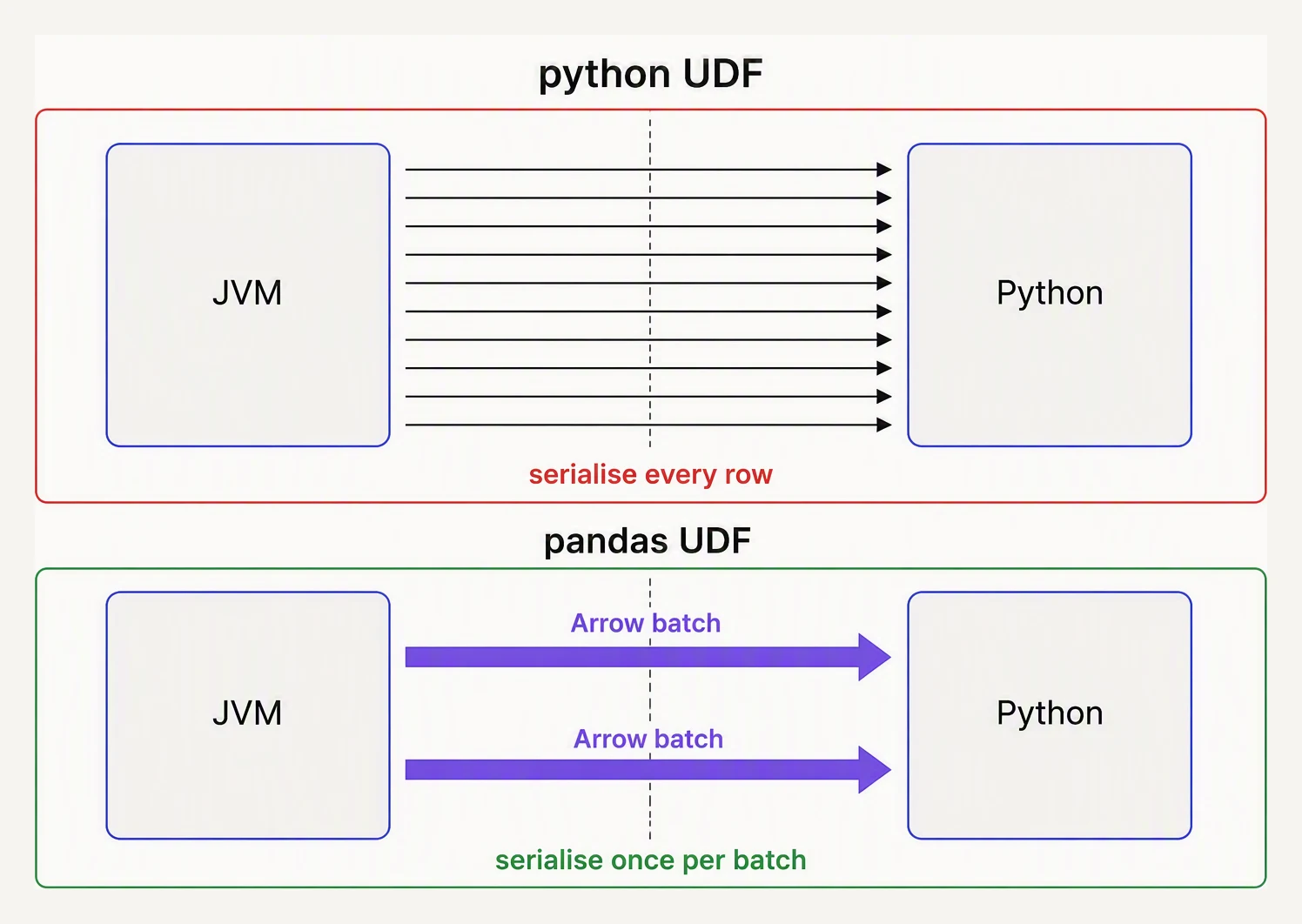
Same logic. One crosses the JVM boundary per row; the other per batch.
Spark runs on the JVM. Your DataFrame data lives in JVM memory. When you call a Python UDF:
- Spark serializes one row’s bytes (Pickle protocol)
- Sends it to a Python subprocess
- Python deserializes the row
- Calls your function
- Python serializes the result
- Sends it back
- JVM deserializes the result
For each row. Multiply by a billion. The function itself may be 100 nanoseconds, but the serialization round-trip is microseconds. You’re paying 99% overhead, 1% useful work.
# A slow UDF — serializes per row
from pyspark.sql.functions import udf
from pyspark.sql.types import StringType

@udf(StringType())
def normalize_phone(phone):
    if phone is None:
        return None
    digits = "".join(c for c in phone if c.isdigit())
    return f"+1{digits[-10:]}" if len(digits) >= 10 else None

df.withColumn("phone_norm", normalize_phone("phone"))
This works. It’s just 10-100x slower than necessary.
Pandas UDFs — Arrow-backed vectorization
Pandas UDFs send rows in Arrow batches (typically 10,000 rows at a
time). Your Python function receives a pandas.Series (or several)
and returns a pandas.Series. The serialization happens once per
batch, not once per row.
import pandas as pd

from pyspark.sql.functions import pandas_udf
from pyspark.sql.types import StringType

@pandas_udf(StringType())
def normalize_phone(phone: pd.Series) -> pd.Series:
    digits = phone.str.replace(r"\D", "", regex=True)
    last_10 = digits.str[-10:]
    return ("+1" + last_10).where(digits.str.len() >= 10, None)

df.withColumn("phone_norm", normalize_phone("phone"))
Three things changed:
- The decorator is
@pandas_udf(...)instead of@udf(...) - The function operates on a Series (vectorized pandas), not a single value
- Returns a Series of the same length
The result is a UDF that’s 10-100x faster for the same logic, because:
- Serialization happens once per ~10K-row batch instead of per row
- Inside the function, vectorized pandas/NumPy is itself much faster
than a Python
forloop
The three flavors
Pandas UDFs come in three forms, distinguished by what they take and what they return.
Flavor 1: Scalar — Series in, Series out
The one above. One column in, one column out, same length.
@pandas_udf(DoubleType())
def fahrenheit(celsius: pd.Series) -> pd.Series:
    return celsius * 9 / 5 + 32
You can also take multiple input columns:
@pandas_udf(DoubleType())
def bmi(weight_kg: pd.Series, height_m: pd.Series) -> pd.Series:
    return weight_kg / (height_m ** 2)

df.withColumn("bmi", bmi("weight", "height"))
This is the most common flavor. 90% of the UDFs you’ll write are scalar.
Flavor 2: Grouped map — apply a pandas function per group
Sometimes you need to do something Python-specific per group: fit a
small model per user, run a stats test per cohort, etc. Grouped map
gives you the entire group as a pd.DataFrame, and you return a
pd.DataFrame.
import statsmodels.api as sm

def fit_user_model(pdf: pd.DataFrame) -> pd.DataFrame:
    if len(pdf) < 5:
        return pd.DataFrame()
    model = sm.OLS(pdf["target"], pdf[["x1", "x2"]]).fit()
    return pd.DataFrame({
        "user_id": [pdf["user_id"].iloc[0]],
        "coef_x1": [model.params["x1"]],
        "coef_x2": [model.params["x2"]],
    })

result = df.groupBy("user_id").applyInPandas(
    fit_user_model,
    schema="user_id long, coef_x1 double, coef_x2 double",
)
The function gets one group’s worth of data as a pandas DataFrame and must return a pandas DataFrame matching the declared schema.
This is the pattern for parallel per-user / per-customer Python work — train a small model, run an OCR call, anything where the logic is per-key.
Flavor 3: Grouped aggregate — Series in, scalar out (per group)
When the result per group is a single value, use the grouped agg flavor:
@pandas_udf(DoubleType())
def median(values: pd.Series) -> float:
    return float(values.median())

df.groupBy("country").agg(median("amount").alias("median_amount"))
Spark calls your function once per group; you return a single number. Use this when none of the built-in aggregations does what you need — percentiles, custom statistics, etc.
Before / after
Let’s say you need to apply a regex normalization across 100M rows.
# Regular UDF — 1 hour
@udf(StringType())
def clean(s):
    return re.sub(r"[^\w]+", "_", s.lower()) if s else None

# Pandas UDF — ~5 minutes
@pandas_udf(StringType())
def clean_p(s: pd.Series) -> pd.Series:
    return s.str.lower().str.replace(r"[^\w]+", "_", regex=True)

# Spark native — ~1 minute
F.regexp_replace(F.lower("col"), r"[^\w]+", "_")
The order of preference is clear: Spark native > Pandas UDF > Python UDF.
Pandas UDFs still cross the JVM-Python boundary (once per batch), so they are not as fast as native functions — use them only when the logic genuinely needs Python. Use Python UDFs only when neither of the first two works.
A toy comparison
You can feel the per-row vs per-batch overhead in pure Python:
# Toy: per-row callback vs per-batch callback
import time

rows = list(range(1_000_000))

# Per-row: pay a function-call per element (a stand-in for crossing a boundary per row)
def per_row(x):
    return x * 2

start = time.perf_counter()
out1 = [per_row(x) for x in rows]
t1 = time.perf_counter() - start
print(f"per-row:   {t1*1000:.1f}ms")

# Per-batch: the function sees a whole batch; the work is inlined
def per_batch(batch):
    return [x * 2 for x in batch]

batch_size = 10_000
start = time.perf_counter()
out2 = []
for i in range(0, len(rows), batch_size):
    out2.extend(per_batch(rows[i:i + batch_size]))
t2 = time.perf_counter() - start
print(f"per-batch: {t2*1000:.1f}ms")

print("identical output:", out1 == out2)
print(f"speedup: {t1/t2:.1f}x")
per-row: 39.4ms
per-batch: 19.1ms
identical output: True
speedup: 2.1xThe guaranteed part is identical output: True — batching never changes the answer, only the cost. The timing is one machine’s numbers (yours will differ).
But the direction is the real signal: paying a per-element function call (per_row(x), a stand-in for crossing the boundary per row) runs about 2× slower than letting the function chew a whole batch inline.
And here’s the crucial caveat — that 2× is a pale shadow of the real Spark win. A Python function call costs nanoseconds; serializing a row across processes and the JVM↔Python boundary costs microseconds, thousands of times more.
Amortize that over a 10,000-row Arrow batch instead of paying it per row, and the 2× here becomes the 10–100× you see in production.
When NOT to use a UDF
A common anti-pattern: writing a UDF for something Spark already has built-in. Always check the built-ins first.
| You’d UDF this | Use this instead |
|---|---|
| Convert string to date | F.to_date(col, "yyyy-MM-dd") |
| Get day-of-week | F.dayofweek(col) |
| Lowercase / split / regex | F.lower, F.split, F.regexp_replace |
| Sum of array column | F.aggregate(col, F.lit(0), lambda acc, x: acc + x) |
| JSON to struct | F.from_json(col, schema) |
| Conditional logic | F.when(cond, val1).otherwise(val2) |
The pyspark.sql.functions module has hundreds of these. Skim it
once a quarter — you’ll discover useful ones you didn’t know existed.
In one breath
A plain Python @udf serializes data one row at a time across the JVM↔Python boundary — microseconds of overhead per row, paid a billion times.
A Pandas UDF sends 10,000-row Apache Arrow batches, so the serialization is paid once per batch. Pandas/NumPy vectorization speeds the work inside too, for a 10–100× win with the same logic.
It comes in three flavors:
- scalar (Series→Series, 90% of cases)
- grouped map (
applyInPandas, a whole group’s DataFrame in and out — the pattern for per-customer models) - grouped aggregate (Series→one scalar per group)
But the real order of preference is Spark native F.* > Pandas UDF > plain Python UDF, because native functions never cross the boundary at all.
Practice
Before the quiz, internalize the preference order with a concrete task: normalizing a phone-number string across 100M rows.
Which of the three approaches (native F.*, Pandas UDF, plain @udf) would you try first, and why — and what specifically does the plain @udf pay that the native function doesn’t?
Then match the flavor: you must fit one small model per customer across 50,000 customers — which Pandas UDF flavor, and why not the scalar one?
Quick check
A question to carry forward
That closes the DataFrames chapter — and look at the rule it kept landing on, the one that ranked every option: native F.* beats Pandas UDF beats Python UDF.
Every lesson here pointed the same way, and always for the same reason, stated and re-stated but never actually demonstrated: native functions are fast because Catalyst can see inside them. It pushes them down, reorders them, fuses them. A UDF is a black box Catalyst can’t optimize, which is the whole reason it’s slower.
We have now invoked “Catalyst” a dozen times as the invisible hand behind every speedup — predicate pushdown, column pruning, the reason your obvious code runs fast — and never once opened it.
The whole DataFrames chapter was, in a sense, advice about how to write code that keeps this optimizer happy, given without ever showing you the optimizer.
So the question to carry forward, the one that begins the internals chapter, is: what is this Catalyst that has been silently rewriting your every query?
What does it actually do to your code between the moment you call an action and the moment the cluster runs? How does it turn a naive pipeline into an optimized one?
That is Catalyst, the optimizer, and it opens the next chapter — where we stop using Spark and start understanding it.
Practice this in an interview
All questionspandas is slow primarily because Python loops bypass NumPy's vectorized C kernels, object-dtype columns prevent SIMD optimizations, and keeping entire datasets in memory limits scalability. The fixes are vectorization, categorical encoding, eval/query for large frames, chunking for out-of-core data, and switching to Polars or DuckDB for compute-heavy pipelines.
Polars is a Rust-native DataFrame library built on Apache Arrow that executes a lazy query plan with parallel, multi-threaded evaluation — making it 5-50x faster than pandas on large datasets. pandas has a broader ecosystem and is the right choice for exploratory work, small datasets, and libraries that expect a pandas DataFrame; Polars wins on throughput, memory efficiency, and correctness (no implicit index, no silent copies).
Vectorized pandas and NumPy operations operate on entire arrays in compiled C/Fortran code and should always be your first choice. apply runs a Python function row- or column-wise in a Python loop, map transforms a single Series element-by-element, and applymap (DataFrame.map in pandas 2.1+) applies a function to every scalar — all three are orders of magnitude slower than vectorized equivalents.
pandas operates in-memory on a single machine, making it fast and simple for datasets under a few gigabytes. Spark distributes computation across a cluster, handles terabyte-scale data, and integrates with cloud storage — but adds significant overhead for small data. The crossover point is roughly when your data no longer fits in RAM or when processing time on a single machine becomes unacceptable.