Polars — the Pandas successor you'll actually like
A Rust-powered DataFrame library with lazy execution, native parallelism, and a query language that reads like SQL. When to switch, and how the syntax maps.
Written and reviewed by Shreyash Prashu Last reviewed
What you'll learn
- Why Polars is 5-10x faster than Pandas on real workloads
- Expressions, contexts, and lazy mode — the three core ideas
- Side-by-side: the same query in Pandas and Polars
- When Polars is the right call and when Pandas is still fine
Before you start
The last lesson left us at the ceiling. Pandas is the data-science Python you grew up with.
It was written in 2008, runs single-threaded by default, and is built on a memory model (NumPy plus Python objects) that was state-of-the-art two laptop generations ago. Push past a gigabyte or two, and these operations crawl while most of your cores sit idle:
groupbysortjoin
So here is the forward-looking question we ended on: what does the same library look like if you redesign it for today’s hardware?
Polars is one answer:
- A Rust core
- columnar Arrow memory
- every core busy by default
- a query optimizer that quietly rewrites your code to do less work
On real-world ETL and group-aggregate jobs it runs 5–10x faster than pandas. Sometimes it runs 20–50x faster on lazy queries it can optimize aggressively. The syntax feels new at first, but it’s close enough that a pandas user picks it up in an afternoon.
Why Polars is fast
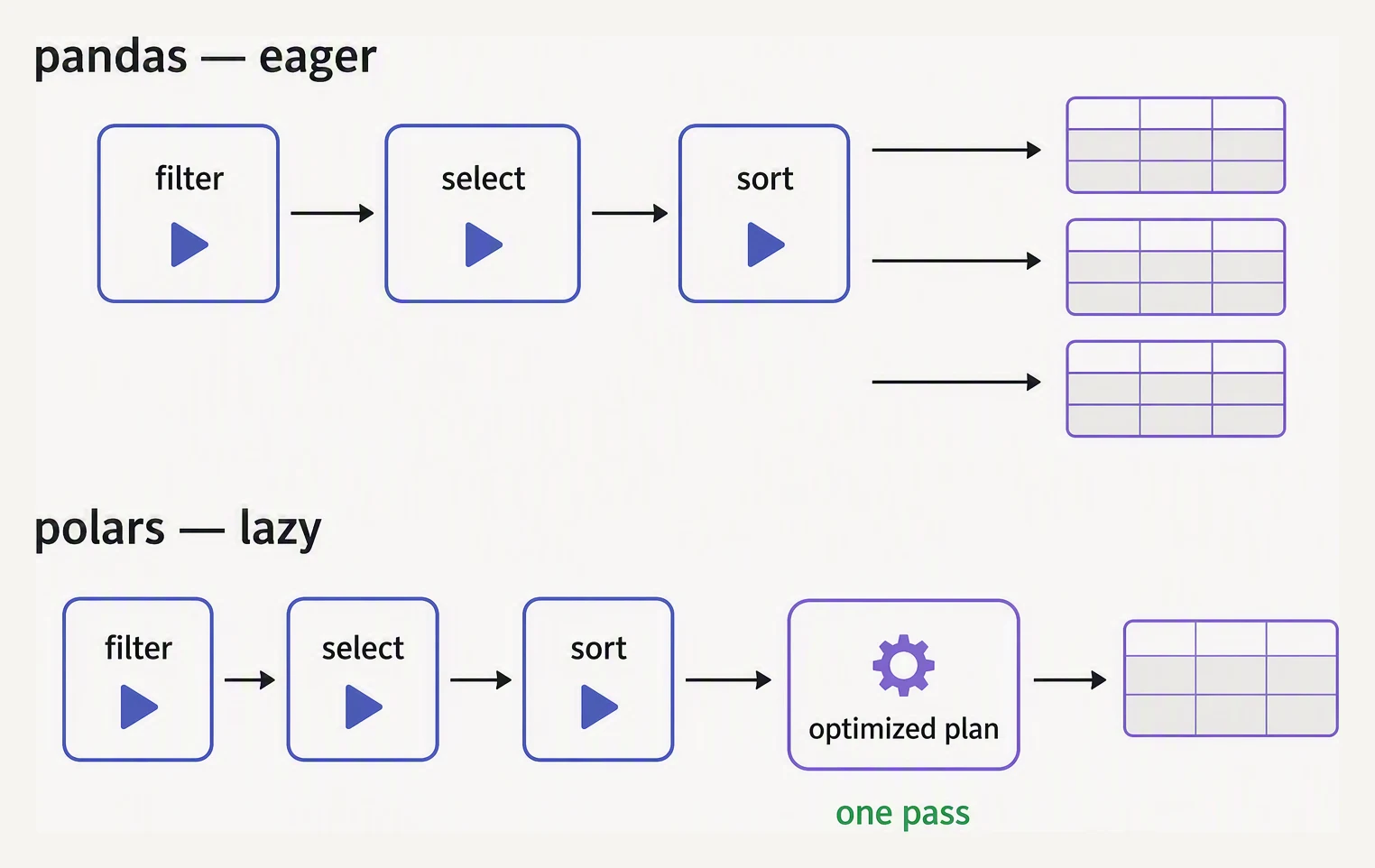
Pandas runs every step. Polars plans first, then runs the plan it optimized.
Three architectural choices, each independently a big deal:
-
Rust core, no GIL. Pandas calls into NumPy for the primitives, but the orchestration is Python — single-threaded, bound by the Global Interpreter Lock. Polars does that orchestration in Rust and uses every core you have.
-
Apache Arrow columnar memory. Cache-friendly, no Python objects for strings, and zero-copy interop with the whole Arrow-aware stack (DuckDB, PyArrow, and the rest).
-
Lazy execution with a query optimizer. You describe the transformation; Polars decides the order. It can:
- push filters down
- prune unused columns
- merge passes
Sometimes this collapses a five-step pipeline into two actual scans.
The expression model
Polars centers on expressions — small descriptions of a computation — that run inside a context. Its contexts include:
selectwith_columnsfiltergroup_by
This is the one idea that makes Polars feel different from pandas the first time you read it.
# requires: pip install polars
import polars as pl

(
    orders
    .filter(pl.col("status") == "paid")
    .with_columns(
        tax = pl.col("amount") * 0.10,
        total = pl.col("amount") * 1.10,
    )
    .group_by("customer")
    .agg(
        n_orders = pl.col("order_id").count(),
        revenue  = pl.col("total").sum(),
    )
    .sort("revenue", descending=True)
)
The shape is chained — exactly like the pandas method-chaining lesson — but columns are named with pl.col("name") instead of df["name"].
That extra indirection is the whole trick: each pl.col(...) is a lightweight description the optimizer is free to rearrange before anything runs.
Side-by-side — same query, both libraries
Per-customer revenue from paid orders, computed both ways so you can read them shoulder to shoulder.
Pandas
import pandas as pd

orders = pd.DataFrame({
    "order_id":  ["o-1","o-2","o-3","o-4","o-5","o-6","o-7","o-8"],
    "customer":  ["alice","bob","alice","carol","bob","alice","carol","dave"],
    "amount":    [120.0, 45.5, 0.0, 89.99, 210.0, 15.0, 67.5, 330.0],
    "status":    ["paid","paid","cancelled","paid","paid","refunded","paid","paid"],
})

result = (
    orders
    .query("status == 'paid'")
    .assign(total = lambda d: d["amount"] * 1.10)
    .groupby("customer", as_index=False)
    .agg(n_orders=("order_id","count"),
         revenue=("total","sum"))
    .sort_values("revenue", ascending=False)
    .round(2)
)
print(result)
customer n_orders revenue
3 dave 1 363.00
1 bob 2 281.05
2 carol 2 173.24
0 alice 1 132.00Polars (same query)
# requires: pip install polars
import polars as pl

orders = pl.DataFrame({
    "order_id":  ["o-1","o-2","o-3","o-4","o-5","o-6","o-7","o-8"],
    "customer":  ["alice","bob","alice","carol","bob","alice","carol","dave"],
    "amount":    [120.0, 45.5, 0.0, 89.99, 210.0, 15.0, 67.5, 330.0],
    "status":    ["paid","paid","cancelled","paid","paid","refunded","paid","paid"],
})

result = (
    orders
    .filter(pl.col("status") == "paid")
    .with_columns(total = pl.col("amount") * 1.10)
    .group_by("customer")
    .agg(
        n_orders = pl.col("order_id").count(),
        revenue  = pl.col("total").sum(),
    )
    .sort("revenue", descending=True)
)
print(result)
Same four customers, same revenue numbers — dave 363.00, bob 281.05, carol 173.24, alice 132.00.
The only visible difference is that the Polars frame carries no row-index column. Everything else is a mechanical rename:
| Pandas | Polars |
|---|---|
df.query("x > 5") | df.filter(pl.col("x") > 5) |
df.assign(new=...) | df.with_columns(new=...) |
df.groupby("c") | df.group_by("c") |
df["x"] | pl.col("x") |
df.sort_values("x", ascending=False) | df.sort("x", descending=True) |
(rows, cols) index | no row index — by design |
That last row matters more than it looks. Polars has no row index at all: every selection is by column or by integer position.
After enough pandas pain juggling .loc versus .iloc versus a MultiIndex, losing the index turns out to be a relief, not a loss.
Lazy mode — where the speedup really kicks in
The query above ran eagerly: each step executed the moment you called it. That is the default in both libraries.
Polars’ real superpower is lazy evaluation. Instead of running each step now, you build a description of the entire pipeline (a query plan) and hand it to the optimizer. Nothing touches data until you call .collect().
You opt in with .lazy() on a DataFrame, or with pl.scan_csv / pl.scan_parquet, which start lazy by default.
# requires: pip install polars
import polars as pl

# scan_parquet doesn't load the file — it builds a plan
result = (
    pl.scan_parquet("orders.parquet")
    .filter(pl.col("status") == "paid")
    .with_columns(total = pl.col("amount") * 1.10)
    .group_by("customer")
    .agg(revenue = pl.col("total").sum())
    .sort("revenue", descending=True)
    .collect()    # NOW it runs — and Polars optimizes the whole plan
)
With the whole plan in hand before any data moves, the optimizer can do things an eager engine structurally cannot:
- Predicate pushdown — the
statusfilter runs during the parquet scan, discarding rows before they ever enter the pipeline. - Projection pushdown — only the four columns the query touches (
status,amount,customer,order_id) are read from disk. The other 30 columns in the file are never read at all. - Common-subexpression elimination — reference the same computation twice and it runs once.
On a 10 GB Parquet where the query uses 4 columns and filters out 90% of rows, lazy Polars often does roughly 50x less work than eager pandas — not because each operation is faster, but because it performs dramatically fewer of them.
You can inspect the plan it would run, without touching any data, via .explain():
# requires: pip install polars
import polars as pl

plan = (
    pl.scan_parquet("orders.parquet")
    .filter(pl.col("status") == "paid")
    .group_by("customer")
    .agg(pl.col("amount").sum())
)
print(plan.explain())   # prints the optimized logical plan
When to switch — and when not to
Reach for Polars when
- Your data is larger than ~1 GB in memory and you’re transforming or aggregating it.
- You’re hitting GroupBy / sort / join bottlenecks in pandas that take minutes.
- You want to query Parquet/CSV files without loading them fully.
- You’re building a production ETL pipeline where performance matters and the code gets reviewed.
Stay on Pandas when
- Your data is small (under ~100 MB) — the speedup is invisible, and the pandas ecosystem (matplotlib, scikit-learn, statsmodels, every notebook on the internet) speaks pandas natively.
- You’re doing exploratory analysis where the next step is
df.plot()or a pandas-first library. - You need a feature Polars doesn’t have yet — multi-level pivoting, some exotic resampling rules, certain plotting integrations.
- The team isn’t ready. A foreign-feeling DataFrame library in shared code is a real, ongoing cost.
Things that catch Pandas users off guard
- No index. It’s not “missing” — it’s removed on purpose. Joins use the join columns, not a magic index. Less footgun, very occasionally less expressive.
group_bydoesn’t preserve order unless you ask (maintain_order=True), for parallelism reasons. Sort afterward if order matters.- String operations live on
pl.col("name").str.contains(...)rather than a Series.straccessor. Same idea, different namespace. nullis the universal missing value — noNaNsneaking into integer columns, no “object dtype withNonemixed in.” Cleaner, though it may surprise you on first load.
In one breath
Polars is pandas redesigned for modern hardware: a Rust core that uses every CPU, columnar Arrow memory, and a lazy optimizer that rewrites your pipeline to do less work.
The biggest win is lazy mode. scan_parquet(...).collect() lets predicate and projection pushdown read only the rows and columns the query needs.
You write expressions (pl.col("x") * 2) inside contexts:
filterwith_columnsgroup_byagg
They use the same chained shape as pandas method-chaining, so most of your knowledge transfers with a rename table.
Reach for it past a gigabyte or on slow group/join/sort work. Stay on pandas for small data and the model-and-plot last mile. Reach for both via a zero-copy Arrow handoff.
Practice
Quick check
pl.read_parquet(...) and pl.scan_parquet(...)?A question to carry forward
That closes the data-wrangling arc. Across NumPy and pandas — and now Polars — you’ve built the full toolkit for getting data into shape:
- load it
- clean it
- join it
- reshape it
- aggregate it
- do it fast enough to matter
But shaping data was never the point. It was always the means to an end.
So the real question now is: what is the end? A clean, aggregated table is not yet a decision.
Should the company raise the price, or cut it? Is this customer worth keeping? Which feature pays for itself?
The next section is Business Analytics — the analytics an MBA pays for, built from scratch on the exact DataFrames you now know how to produce.
It starts at the beginning: what business analytics actually is, and how a number becomes a decision that changes the room.
Practice this in an interview
All questionsPolars is a Rust-native DataFrame library built on Apache Arrow that executes a lazy query plan with parallel, multi-threaded evaluation — making it 5-50x faster than pandas on large datasets. pandas has a broader ecosystem and is the right choice for exploratory work, small datasets, and libraries that expect a pandas DataFrame; Polars wins on throughput, memory efficiency, and correctness (no implicit index, no silent copies).
pandas is slow primarily because Python loops bypass NumPy's vectorized C kernels, object-dtype columns prevent SIMD optimizations, and keeping entire datasets in memory limits scalability. The fixes are vectorization, categorical encoding, eval/query for large frames, chunking for out-of-core data, and switching to Polars or DuckDB for compute-heavy pipelines.
Every core SQL clause — SELECT, WHERE, GROUP BY, HAVING, JOIN, ORDER BY, LIMIT — has a direct pandas equivalent, but SQL executes inside a database engine with optimized query planning and disk-backed storage, while pandas requires all data to fit in RAM. Use SQL for large persistent datasets and pandas for in-memory transformation, feature engineering, and integration with the Python ML ecosystem.
eval() and query() parse expression strings and delegate evaluation to numexpr, which uses multi-threaded SIMD operations and avoids allocating intermediate arrays — giving 2-10x speedups on large DataFrames. They are most beneficial on DataFrames larger than a few hundred thousand rows where intermediate array allocation dominates; for small frames, the expression parsing overhead makes them slower than standard indexing.