Selection — [], .loc, .iloc, .at, .iat
The single most-asked pandas question, answered with rules you can apply without thinking. Plus the chained-indexing trap that ruins everyone's afternoon at least once.
Written and reviewed by Shreyash Prashu Last reviewed
What you'll learn
- When to use
[],.loc,.iloc,.at,.iat - The difference between label-based and position-based indexing
- Why chained indexing fails silently — and how to fix it
- Boolean indexing with
&,|,~(and why you need parentheses)
Before you start
The last lesson promised to settle pandas’ single most confusing question once and for all, and here
we make good. Pandas gives you five ways to grab a piece of a DataFrame — [], .loc, .iloc,
.at, .iat — and most newcomers reach for [], get bitten, and never quite learn why. By the end
of this lesson you will have one unambiguous rule for each case, plus the fix for the chained-indexing
trap that silently swallows assignments.
The five selectors at a glance
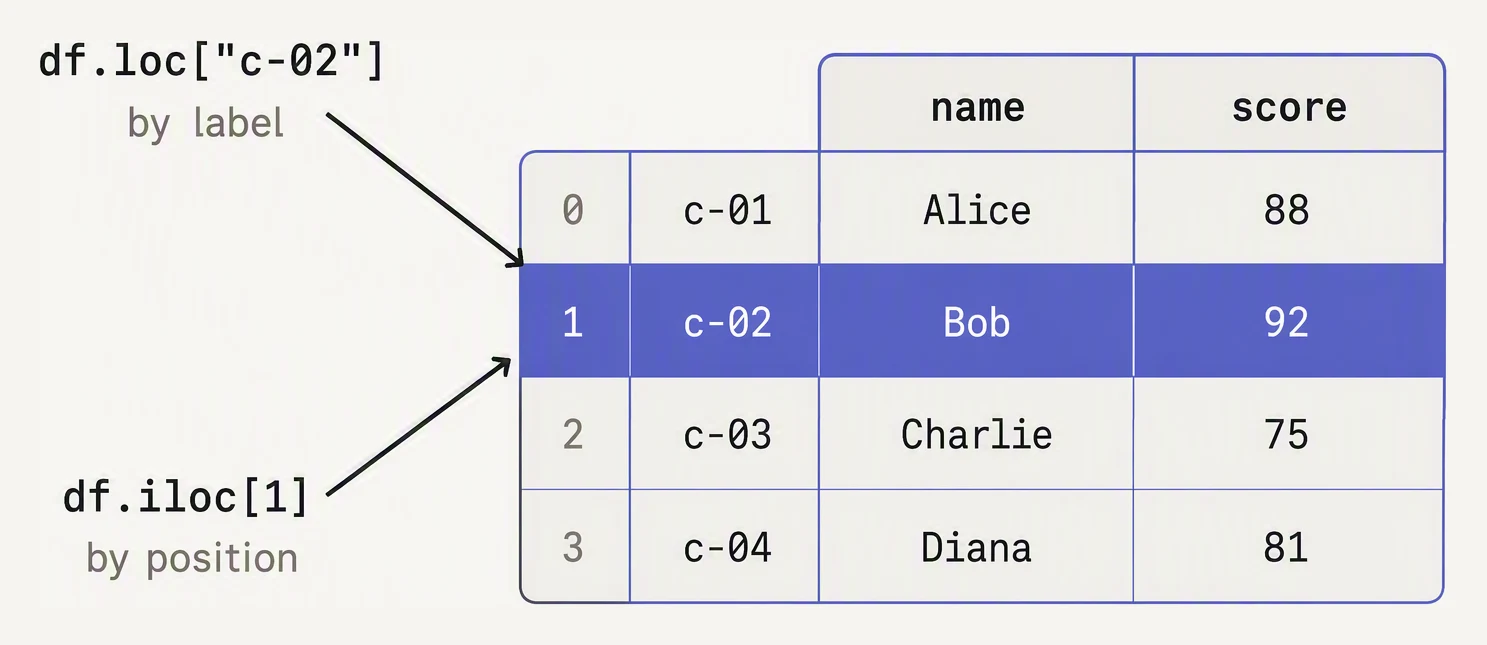
.loc reads the label. .iloc counts the position.
| selector | meaning | rows by | cols by | scalar fast-path |
|---|---|---|---|---|
df[…] | columns (mostly) | — | label | no |
.loc | label-based | label | label | no |
.iloc | position-based | int | int | no |
.at | single value, by label | label | label | yes |
.iat | single value, by position | int | int | yes |
The setup: a customer events table
import pandas as pd

events = pd.DataFrame({
    "user_id":  ["u-1", "u-2", "u-1", "u-3", "u-2", "u-1"],
    "event":    ["view", "view", "add_to_cart", "view", "purchase", "purchase"],
    "ts":       pd.to_datetime([
        "2026-05-20 10:00", "2026-05-20 10:01", "2026-05-20 10:03",
        "2026-05-20 10:05", "2026-05-20 10:07", "2026-05-20 10:09",
    ]),
    "value":    [0.0, 0.0, 24.99, 0.0, 49.99, 14.50],
}, index=["e1", "e2", "e3", "e4", "e5", "e6"])
print(events)
user_id event ts value
e1 u-1 view 2026-05-20 10:00:00 0.00
e2 u-2 view 2026-05-20 10:01:00 0.00
e3 u-1 add_to_cart 2026-05-20 10:03:00 24.99
e4 u-3 view 2026-05-20 10:05:00 0.00
e5 u-2 purchase 2026-05-20 10:07:00 49.99
e6 u-1 purchase 2026-05-20 10:09:00 14.50We will use this throughout: six events, three users, and a string index of event IDs (e1…e6)
so the difference between label and position is unambiguous.
[] — column selection (and a row trick)
import pandas as pd

events = pd.DataFrame({
    "user_id":  ["u-1", "u-2", "u-1", "u-3", "u-2", "u-1"],
    "event":    ["view", "view", "add_to_cart", "view", "purchase", "purchase"],
    "value":    [0.0, 0.0, 24.99, 0.0, 49.99, 14.50],
}, index=["e1", "e2", "e3", "e4", "e5", "e6"])

print(events["user_id"])              # one column → Series
print()
print(events[["user_id", "value"]])   # multiple columns → DataFrame
print()
print(events[1:4])                    # SLICE → rows by position (surprising!)
e1 u-1
e2 u-2
e3 u-1
e4 u-3
e5 u-2
e6 u-1
Name: user_id, dtype: object
user_id value
e1 u-1 0.00
e2 u-2 0.00
e3 u-1 24.99
e4 u-3 0.00
e5 u-2 49.99
e6 u-1 14.50
user_id event value
e2 u-2 view 0.00
e3 u-1 add_to_cart 24.99
e4 u-3 view 0.00df[col] selects a column, and df[[c1, c2]] selects several. But the slice form df[1:4]
selects rows by position (e2, e3, e4), which is confusing because single-key df[1] would instead
hunt for a column named 1. The lesson: don’t use df[...] for rows — use .iloc.
.loc and .iloc — the workhorses
The rule:
.locuses labels — both the row index labels and the column names..ilocuses integer positions (0-based, like a list).
import pandas as pd

events = pd.DataFrame({
    "user_id":  ["u-1", "u-2", "u-1", "u-3", "u-2", "u-1"],
    "event":    ["view", "view", "add_to_cart", "view", "purchase", "purchase"],
    "value":    [0.0, 0.0, 24.99, 0.0, 49.99, 14.50],
}, index=["e1", "e2", "e3", "e4", "e5", "e6"])

# .loc — by label
print(events.loc["e3"])                            # one row (Series)
print()
print(events.loc[["e1", "e3"], ["user_id", "value"]])  # rows + cols
print()
# .loc slices are INCLUSIVE on both ends
print(events.loc["e2":"e4", "user_id":"value"])

# .iloc — by position
print()
print(events.iloc[2])                              # third row
print(events.iloc[1:4])                            # rows 1, 2, 3 — STOP EXCLUSIVE
print(events.iloc[0, -1])                          # first row, last col
user_id u-1
event add_to_cart
value 24.99
Name: e3, dtype: object
user_id value
e1 u-1 0.00
e3 u-1 24.99
user_id event value
e2 u-2 view 0.00
e3 u-1 add_to_cart 24.99
e4 u-3 view 0.00
user_id u-1
event add_to_cart
value 24.99
Name: e3, dtype: object
user_id event value
e2 u-2 view 0.00
e3 u-1 add_to_cart 24.99
e4 u-3 view 0.00
0.0Two things trip people up:
.locslices are inclusive of both endpoints ("e2":"e4"gives you e2, e3, and e4), while.ilocfollows Python’s half-open convention —iloc[1:4]returns positions 1, 2, 3 only.- Numeric index labels don’t save you. If your index is
[10, 20, 30],df.loc[10]is the row labeled 10, whiledf.iloc[10]is the 11th row by position. They are different functions. With the default0, 1, 2…index they coincide, which is precisely what lulls beginners into thinking they are the same.
Same input, different rows — label vs position
This table has a string index a…f, not the default 0…5. Pick a slice or a list and watch where .loc (by label) and .iloc (by position) land. The trap: .loc['b':'d'] includes 'd'; .iloc[1:3] stops before position 3.
| index | sku0 | category1 | price2 | stock3 |
|---|---|---|---|---|
| a0 | P-100 | audio | $49 | 12 |
| b1 | P-200 | audio | $129 | 4 |
| c2 | P-300 | video | $89 | 0 |
| d3 | P-400 | video | $199 | 7 |
| e4 | P-500 | cable | $19 | 40 |
| f5 | P-600 | cable | $35 | 21 |
df.loc['b':'d', 'sku':'price']| idx | sku | category | price |
|---|---|---|---|
| b | P-200 | audio | $129 |
| c | P-300 | video | $89 |
| d | P-400 | video | $199 |
.at and .iat — the speed gun
When you need exactly one cell, .at (label) and .iat (position) are faster than .loc/.iloc:
events.at["e3", "value"]   # 24.99   — fastest single-cell read
events.iat[2, 2]            # 24.99   — same cell, by position
Use them inside tight loops when you genuinely need scalar access. For 99% of code, .loc is fine.
Boolean indexing — the workhorse
import pandas as pd

events = pd.DataFrame({
    "user_id":  ["u-1", "u-2", "u-1", "u-3", "u-2", "u-1"],
    "event":    ["view", "view", "add_to_cart", "view", "purchase", "purchase"],
    "value":    [0.0, 0.0, 24.99, 0.0, 49.99, 14.50],
})

# Purchases over $20
mask = (events["event"] == "purchase") & (events["value"] > 20)
print(events[mask])
print()

# Anything that is NOT a view
print(events[~(events["event"] == "view")])
print()

# Users in a list
print(events[events["user_id"].isin(["u-1", "u-3"])])
user_id event value
4 u-2 purchase 49.99
user_id event value
2 u-1 add_to_cart 24.99
4 u-2 purchase 49.99
5 u-1 purchase 14.50
user_id event value
0 u-1 view 0.00
2 u-1 add_to_cart 24.99
3 u-3 view 0.00
5 u-1 purchase 14.50The operators are:
&AND|OR~NOT (bitwise negation on a boolean Series — never Python’snot).isin([...])for “value is one of these.”
You must parenthesize each comparison — (a == 1) & (b > 2) — because & binds tighter than
==/>. This is the boolean-mask trap from NumPy, now on whole rows. (and/or work only on
scalars, not arrays.)
Chained indexing — the trap
The fix is to do it in one .loc call:
import pandas as pd

events = pd.DataFrame({
    "user_id":  ["u-1", "u-2", "u-1"],
    "event":    ["view", "purchase", "purchase"],
    "value":    [0.0, 49.99, 14.50],
}).copy()

# WRONG — silently does nothing useful
# events[events["event"] == "purchase"]["value"] = 0

# RIGHT — single .loc call, rows and column in one shot
events.loc[events["event"] == "purchase", "value"] = 0
print(events)
user_id event value
0 u-1 view 0.0
1 u-2 purchase 0.0
2 u-1 purchase 0.0Both purchase rows zeroed, in one shot. The general rule: when assigning, never split row and
column selection across two []s — use df.loc[row_selector, col_selector] = ….
Which selector when — a cheat sheet
- Reading one column:
df["col"] - Reading multiple columns:
df[["c1", "c2"]] - Reading rows by condition:
df[df["x"] > 0](read-only) - Reading or writing with both rows and columns:
df.loc[rows, cols] - Position-based slicing (e.g. “first 5 rows”):
df.iloc[:5] - A single cell in a loop:
df.at[label, col]ordf.iat[i, j]
In one breath
Five selectors, one rule each:
df["col"]reads a column (a slicedf[1:4]sneakily reads rows by position — avoid it)..locis label-based (row labels + column names, slices inclusive of both ends)..ilocis integer-position-based (slices exclusive stop)..at/.iatare the single-cell fast paths (label / position).
They coincide only under the default integer index. Filter rows with boolean masks — &/|/~,
.isin([...]), each comparison parenthesised.
And the cardinal sin: chained indexing for assignment (df[mask]["col"] = v) hits a throwaway copy and
silently does nothing — always write df.loc[mask, "col"] = v in a single call.
Practice
Quick check
df[df.x > 0]['y'] = 0 not modify df?user_id is in ['u-1', 'u-3'] AND value > 10. Which works?A question to carry forward
You can now grab any subset of a DataFrame — a column, a labelled slice, a boolean filter, a single
cell. But every example so far quietly assumed the data was complete. Real data is full of holes: a
sensor drops a reading, a user skips a form field, a join finds no match. And a hole is not a
zero — NaN has its own arithmetic and its own detection rules (you already met one trap: value == np.nan is always False, so it slips through a naive filter).
The next lesson is how to find, drop, fill, and interpolate missing values without lying to yourself. The very same gap can mean “truly absent,” “genuinely zero,” or “unknown,” and filling it the wrong way silently corrupts every average downstream. How do you detect missingness reliably, and how do you decide whether to drop a row, carry the last value forward, interpolate, or leave the hole alone?
Practice this in an interview
All questionsVectorized pandas and NumPy operations operate on entire arrays in compiled C/Fortran code and should always be your first choice. apply runs a Python function row- or column-wise in a Python loop, map transforms a single Series element-by-element, and applymap (DataFrame.map in pandas 2.1+) applies a function to every scalar — all three are orders of magnitude slower than vectorized equivalents.
Boolean indexing filters a DataFrame by passing a boolean Series or array of the same length as the index. Common pitfalls include using Python's and/or instead of &/| and forgetting to wrap compound conditions in parentheses, both of which raise errors or produce wrong results.
loc selects rows and columns by label (index value or column name), while iloc selects by integer position. Use loc when your index carries meaningful labels like dates or IDs; use iloc for positional slicing regardless of what the index contains.
The .str accessor vectorizes Python string methods across a Series without a Python-level loop, propagates NaN automatically, and integrates cleanly into method chains. Calling apply(lambda x: x.upper()) does the same work slower and breaks on NaN unless you add a null check.