Merge & join
SQL joins, but in pandas. The arguments that turn a "looks right" merge into one that's verified row-by-row, with no quiet data duplication.
Written and reviewed by Shreyash Prashu Last reviewed
What you'll learn
-
inner,left,right,outer— when each one fits -
on,left_on,right_on,suffixes— the argument you'll always set -
validate="1:1"— the life-saver that catches silent row explosions -
concatvsmerge— when to stack vs join
Before you start
The last lesson’s groupby was powerful but trapped inside a single table — every column it touched
already lived in events. Real questions span tables: orders here, customer names and countries
there; events referencing a device_id whose details sit in another file. merge is how you
stitch two tables together on a shared key — and if you know SQL joins, you already know it: the same
operation, same four flavours (inner / left / right / outer), plus one bonus argument — validate —
that you will wish SQL had.
Two tables — customers and orders
import pandas as pd

customers = pd.DataFrame({
    "customer_id": ["c-01", "c-02", "c-03", "c-04"],
    "name":        ["Aarav", "Bea", "Chen", "Dara"],
    "country":     ["IN", "US", "SG", "DE"],
})

orders = pd.DataFrame({
    "order_id":    [1001, 1002, 1003, 1004, 1005],
    "customer_id": ["c-01", "c-01", "c-02", "c-99", "c-03"],
    "amount":      [129.50, 85.00, 212.00, 47.25, 19.99],
})

print(customers)
print()
print(orders)
customer_id name country
0 c-01 Aarav IN
1 c-02 Bea US
2 c-03 Chen SG
3 c-04 Dara DE
order_id customer_id amount
0 1001 c-01 129.50
1 1002 c-01 85.00
2 1003 c-02 212.00
3 1004 c-99 47.25
4 1005 c-03 19.99Two deliberate edge cases: customer c-04 has no orders, and order 1004 belongs to c-99,
who is missing from customers. Watch how each join handles those.
The four join types
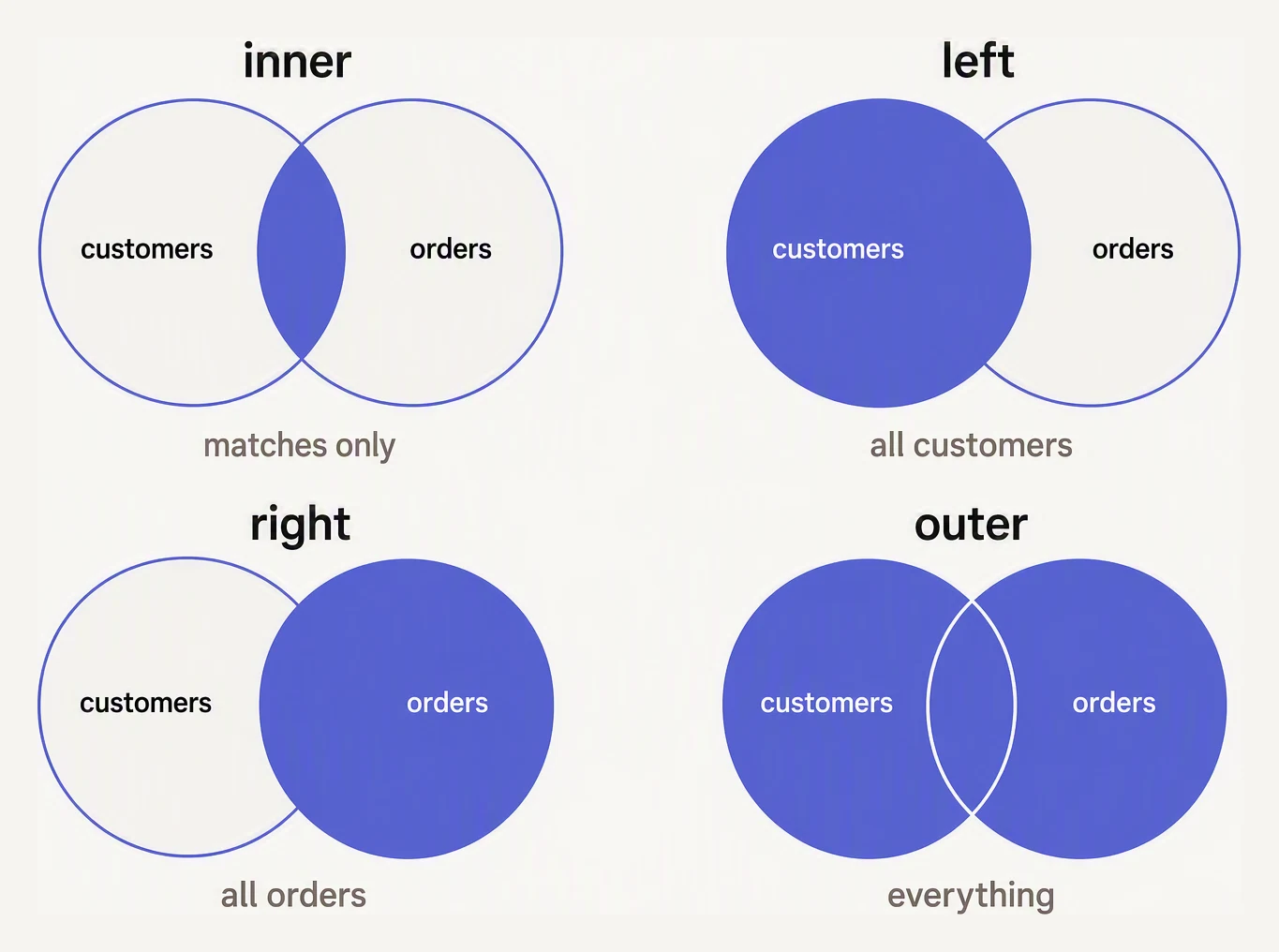
The filled region is what survives the join. Everything else is dropped.
import pandas as pd

customers = pd.DataFrame({
    "customer_id": ["c-01","c-02","c-03","c-04"],
    "name":        ["Aarav","Bea","Chen","Dara"],
})
orders = pd.DataFrame({
    "order_id":    [1001, 1002, 1003, 1004, 1005],
    "customer_id": ["c-01","c-01","c-02","c-99","c-03"],
    "amount":      [129.50, 85.00, 212.00, 47.25, 19.99],
})

# inner — only matching keys on BOTH sides
print("INNER:")
print(customers.merge(orders, on="customer_id", how="inner"))
print()

# left — keep all customers, even those with no orders
print("LEFT:")
print(customers.merge(orders, on="customer_id", how="left"))
print()

# right — keep all orders, even ones with no matching customer
print("RIGHT:")
print(customers.merge(orders, on="customer_id", how="right"))
print()

# outer — keep everything from both sides
print("OUTER:")
print(customers.merge(orders, on="customer_id", how="outer"))
INNER:
customer_id name order_id amount
0 c-01 Aarav 1001 129.50
1 c-01 Aarav 1002 85.00
2 c-02 Bea 1003 212.00
3 c-03 Chen 1005 19.99
LEFT:
customer_id name order_id amount
0 c-01 Aarav 1001.0 129.50
1 c-01 Aarav 1002.0 85.00
2 c-02 Bea 1003.0 212.00
3 c-03 Chen 1005.0 19.99
4 c-04 Dara NaN NaN
RIGHT:
customer_id name order_id amount
0 c-01 Aarav 1001 129.50
1 c-01 Aarav 1002 85.00
2 c-02 Bea 1003 212.00
3 c-99 NaN 1004 47.25
4 c-03 Chen 1005 19.99
OUTER:
customer_id name order_id amount
0 c-01 Aarav 1001.0 129.50
1 c-01 Aarav 1002.0 85.00
2 c-02 Bea 1003.0 212.00
3 c-03 Chen 1005.0 19.99
4 c-04 Dara NaN NaN
5 c-99 NaN 1004.0 47.25Read the four results as the four answers to “what do I keep?”:
inner— only rows that match on both sides. The default. c-04 (no orders) and order 1004 (no customer) both vanish — which is exactly why revenue totals can quietly drop after an inner join.left— keep all of my rows, attach what matches. c-04 survives withNaNorder fields. The workhorse of production.right— same as left with the tables swapped. Order 1004 survives with aNaNname. Rarely used; prefer left and swap the argument order.outer— keep everything from both,NaNwhere there is no match. Useful for diffs. (Noticeorder_idturnedfloatin left/outer — that’sNaNforcing the integer column to float.)
Which rows survive — and where do NaNs come from?
Pick a join type. Rows that match on customer_id are highlighted; rows without a partner either vanish (inner) or survive with NaN on the missing side. The pd.merge call updates to match.
| customer_id | name | country |
|---|---|---|
| c-01 | Mara | IN |
| c-02 | Idris | US |
| c-03 | Chen | SG |
| order_id | customer_id | amount |
|---|---|---|
| 1001 | c-01 | 129.50 |
| 1002 | c-01 | 85.00 |
| 1003 | c-02 | 212.00 |
| 1004 | c-99 | 47.25 |
pd.merge(
    customers,
    orders,
    on="customer_id",
    how="inner",
)| customer_id | name | country | order_id | amount |
|---|---|---|---|---|
| c-01 | Mara | IN | 1001 | 129.50 |
| c-01 | Mara | IN | 1002 | 85.00 |
| c-02 | Idris | US | 1003 | 212.00 |
Joining on differently-named columns
Real tables don’t always agree on column names. Use left_on / right_on:
import pandas as pd

customers = pd.DataFrame({
    "id":   ["c-01","c-02","c-03"],
    "name": ["Aarav","Bea","Chen"],
})
orders = pd.DataFrame({
    "order_id":    [1001, 1002, 1003],
    "cust_ref":    ["c-01","c-02","c-03"],
    "amount":      [129.50, 85.00, 212.00],
})

joined = customers.merge(
    orders,
    left_on="id",
    right_on="cust_ref",
    how="left",
)
print(joined)
id name order_id cust_ref amount
0 c-01 Aarav 1001 c-01 129.5
1 c-02 Bea 1002 c-02 85.0
2 c-03 Chen 1003 c-03 212.0You end up with both id and cust_ref (they’re identical), so drop one:
joined = joined.drop(columns=["cust_ref"]).
Overlapping column names — suffixes
When both tables carry a same-named column that isn’t the join key, pandas disambiguates with suffixes:
import pandas as pd

users_snapshot = pd.DataFrame({
    "user_id": ["u-1","u-2","u-3"],
    "country": ["IN","US","SG"],
    "tier":    ["gold","silver","gold"],
})
users_today = pd.DataFrame({
    "user_id": ["u-1","u-2","u-3"],
    "country": ["IN","CA","SG"],     # u-2 moved
    "tier":    ["gold","gold","gold"],
})

diff = users_snapshot.merge(
    users_today,
    on="user_id",
    suffixes=("_old", "_new"),
)

# Where did country change?
print(diff[diff["country_old"] != diff["country_new"]])
user_id country_old tier_old country_new tier_new
1 u-2 US silver CA goldOnly u-2 changed country (US → CA), and the merge-then-compare pattern surfaces it cleanly.
suffixes=("_old", "_new") is a tiny touch that makes downstream code infinitely more readable than
the default _x / _y.
validate — catch silent row explosions
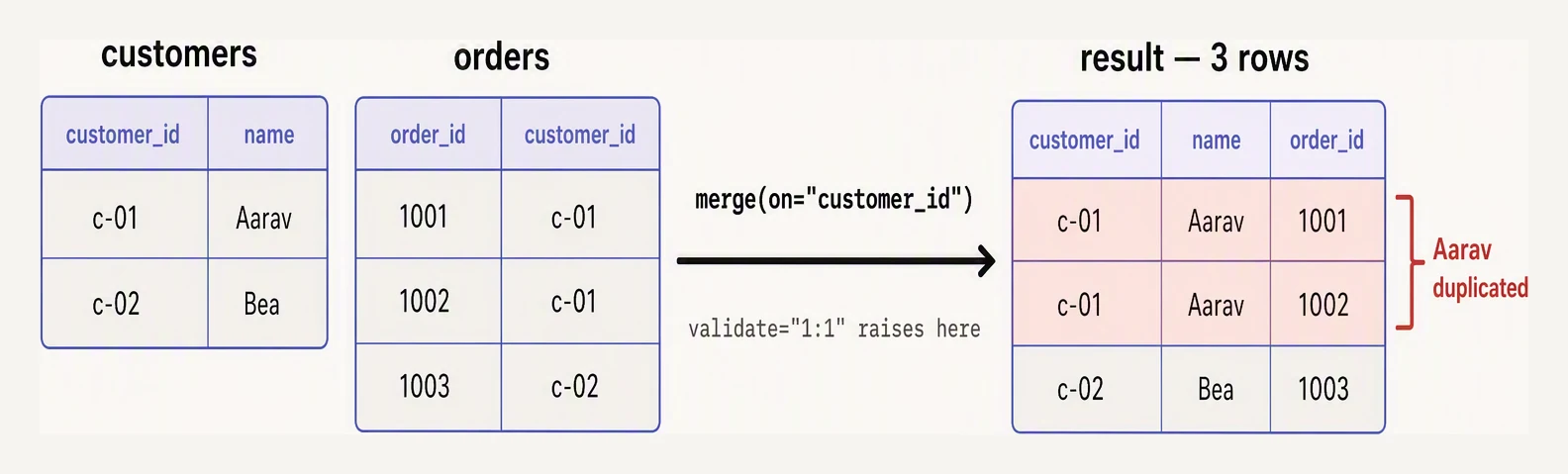
A one-to-many key quietly duplicates the left row. validate catches it.
This is the argument that should be muscle memory. It tells pandas what cardinality you expect and errors if reality differs:
"1:1"— each key appears once on each side"1:m"— once on the left, many on the right (customer → orders)"m:1"— many on the left, once on the right (orders → customer)"m:m"— many-to-many (almost always a bug — Cartesian explosion)
import pandas as pd

customers = pd.DataFrame({
    "customer_id": ["c-01","c-01","c-02"],   # BUG: c-01 appears twice
    "name":        ["Aarav","Aarav-dup","Bea"],
})
orders = pd.DataFrame({
    "customer_id": ["c-01","c-02"],
    "amount":      [129.50, 85.00],
})

try:
    customers.merge(orders, on="customer_id", how="left", validate="1:1")
except Exception as e:
    print("validate caught it:", str(e).splitlines()[0])   # first line of the error

# Without validate: silent row explosion
unsafe = customers.merge(orders, on="customer_id", how="left")
print()
print("Silent doubling:")
print(unsafe)
validate caught it: Merge keys are not unique in left dataset; not a one-to-one merge
Silent doubling:
customer_id name amount
0 c-01 Aarav 129.5
1 c-01 Aarav-dup 129.5
2 c-02 Bea 85.0Without validate, the single c-01 order got matched to both c-01 customer rows — its 129.50
now appears twice. Sum that column and your revenue is overstated, and you might not notice until a
dashboard reads 2× too high weeks later. validate="1:1" is the seatbelt that turns a silent doubling
into a loud, immediate error.
indicator=True — debugging merges
When a merge doesn’t return what you expect, indicator=True adds a _merge column showing where
each row came from (left_only, right_only, both):
import pandas as pd

customers = pd.DataFrame({"customer_id":["c-01","c-02","c-03","c-04"]})
orders    = pd.DataFrame({"customer_id":["c-01","c-01","c-02","c-99"]})

merged = customers.merge(orders, on="customer_id", how="outer", indicator=True)
print(merged)
print()
print(merged["_merge"].value_counts())
customer_id _merge
0 c-01 both
1 c-01 both
2 c-02 both
3 c-03 left_only
4 c-04 left_only
5 c-99 right_only
_merge
both 3
left_only 2
right_only 1
Name: count, dtype: int64left_only = 2 (c-03, c-04 have no orders), right_only = 1 (c-99 has no customer). When those
counts come back unexpectedly high, you know exactly which side has unmatched keys — go hunt the
typos, casing, whitespace, or genuinely-missing data.
concat — stacking, not joining
If you have two DataFrames with the same columns and want to stack them (SQL UNION), reach for
concat:
import pandas as pd

q1 = pd.DataFrame({"month": ["Jan","Feb","Mar"], "revenue": [120, 135, 142]})
q2 = pd.DataFrame({"month": ["Apr","May","Jun"], "revenue": [155, 161, 170]})

year_so_far = pd.concat([q1, q2], ignore_index=True)
print(year_so_far)
print()

# Side-by-side (axis=1) — aligns on row position; rarely what you want
side_by_side = pd.concat([q1, q2], axis=1)
print(side_by_side)
month revenue
0 Jan 120
1 Feb 135
2 Mar 142
3 Apr 155
4 May 161
5 Jun 170
month revenue month revenue
0 Jan 120 Apr 155
1 Feb 135 May 161
2 Mar 142 Jun 170ignore_index=True renumbers the stacked rows 0–5; without it you’d keep the original indices and get
duplicates (0,1,2,0,1,2). axis=1 glues them side-by-side by position — note the doubled month
column, which is why this is rarely what you want (use merge to align on a key instead).
A complete worked example — orders enriched with customer info
import pandas as pd

customers = pd.DataFrame({
    "customer_id": ["c-01","c-02","c-03","c-04"],
    "name":        ["Aarav","Bea","Chen","Dara"],
    "country":     ["IN","US","SG","DE"],
    "tier":        ["gold","silver","gold","bronze"],
})

orders = pd.DataFrame({
    "order_id":    [1001,1002,1003,1004,1005],
    "customer_id": ["c-01","c-01","c-02","c-99","c-03"],
    "amount":      [129.50, 85.00, 212.00, 47.25, 19.99],
})

# Enrich orders with customer attributes. Use left so all orders are kept.
enriched = orders.merge(
    customers,
    on="customer_id",
    how="left",
    validate="m:1",                # many orders → 1 customer
    indicator=True,
)

# Rows where the customer wasn't found
print("Orphan orders:")
print(enriched[enriched["_merge"] == "left_only"])
print()

print("Total revenue by country (excluding orphans):")
print(
    enriched[enriched["_merge"] == "both"]
    .groupby("country")["amount"].sum().round(2)
)
Orphan orders:
order_id customer_id amount name country tier _merge
3 1004 c-99 47.25 NaN NaN NaN left_only
Total revenue by country (excluding orphans):
country
IN 214.50
SG 19.99
US 212.00
Name: amount, dtype: float64validate="m:1" guaranteed no row explosion, indicator surfaced the one orphan (order 1004 → the
unknown c-99), and a groupby on the clean both rows gave revenue by country. This four-argument
join — on, how, validate, indicator — is the pattern you will write a hundred times.
In one breath
merge joins two tables on a shared key, SQL-style: inner (matches only — the default,
silently drops unmatched rows), left (keep all of mine, the production workhorse), right
(swap of left), outer (everything, NaN where unmatched). Use on (or left_on/right_on
for differently-named keys), and suffixes for overlapping non-key columns. The seatbelt is
validate= ("1:1"/"1:m"/"m:1"/"m:m"): a non-unique key Cartesian-explodes rows and inflates
totals silently — validate turns that into an immediate error. indicator=True adds a
_merge column (left_only/right_only/both) for debugging unmatched keys. For same-shape stacking
(SQL UNION) use concat (ignore_index=True), not merge.
Practice
Quick check
validate value catches a duplicate customer row?country. After merging on customer_id, what do you see?concat instead of merge?flights table (500 rows, one row per flight) with an airports table (300 rows, one row per airport) on origin_code. The result has 520 rows. What most likely explains the extra rows?A question to carry forward
You can now combine tables top-to-bottom (concat) and side-by-side on a key (merge). But there is
a third axis of transformation neither one touches: the shape of a single table — whether it is
long (one row per observation: user, metric, value) or wide (one row per user, the metrics
spread across columns). ML models want wide feature tables; event logs and databases hand you long
ones; dashboards constantly flip between the two.
The next lesson is the reshaping toolkit — pivot, melt, stack, unstack — that
turns one form into the other and back. What does it mean to pivot a long log into a wide table, when
do you melt back, and why is “tidy” long data the format that groupby and almost every plotting
library secretly prefer?
Questions about this lesson
What's the difference between merge and join in Pandas?
merge joins on columns or indexes and is the general-purpose tool, like a SQL join; join is a convenience method that merges on the index by default. Most of the time you'll use merge with an explicit on= key.
What do the how= options (inner, left, right, outer) mean?
They decide which rows are kept: inner keeps only matches, left keeps all left rows, right keeps all right rows, and outer keeps everything, filling NULLs where there's no match. inner is the default.
Why did my merge create more rows than expected?
A one-to-many or many-to-many key relationship multiplies rows. Confirm your keys are unique on at least one side (e.g. validate='one_to_many') and aggregate to the correct grain before merging.
Practice this in an interview
All questionspandas merge supports inner, left, right, and outer joins that mirror SQL semantics. The validate parameter enforces key cardinality ('one-to-one', 'one-to-many', 'many-to-one', 'many-to-many') and raises MergeError immediately when the data violates the expectation, preventing silent row multiplication.
concat stacks DataFrames along an axis without matching keys; join aligns on the index (or a single key column) using a convenient shorthand; merge is the most general, joining on any column(s) with full SQL-style control over the join type, key names, and suffix handling.
Every core SQL clause — SELECT, WHERE, GROUP BY, HAVING, JOIN, ORDER BY, LIMIT — has a direct pandas equivalent, but SQL executes inside a database engine with optimized query planning and disk-backed storage, while pandas requires all data to fit in RAM. Use SQL for large persistent datasets and pandas for in-memory transformation, feature engineering, and integration with the Python ML ecosystem.
GroupBy splits a DataFrame into subgroups by key, applies a function independently to each group, then combines the results back into a single object. Understanding which phase each method targets — agg collapses, transform preserves shape, filter removes entire groups — determines which API to reach for.