SettingWithCopyWarning — finally understood
The most misread warning in Pandas. Why it happens, when it's a real bug, and the one-shot .loc rule that makes it go away.
Written and reviewed by Shreyash Prashu Last reviewed
What you'll learn
- Why chained indexing can silently fail
- The one-shot
.locrule that always works - When the warning is a real bug vs spurious noise
-
.copy()to be explicit about intent
Before you start
The memory lesson ended on a quiet warning. All through it we kept writing logs[col] = something,
assigning a transformed column straight back into its frame — and it worked, because logs was
unambiguously its own DataFrame. But the moment your frame is a slice of another one, that same
innocent assignment turns murky. Are you editing the slice, or the original it was carved from?
Pandas often can’t tell either, and it warns you with the single most misread message in the whole
library:
SettingWithCopyWarning:
A value is trying to be set on a copy of a slice from a DataFrame.
Try using .loc[row_indexer, col_indexer] = value instead
If you’ve used pandas for more than a week, you’ve met it. Roughly half of all pandas StackOverflow questions are some version of it. The docs link in the message explains the internals but rarely fixes your actual problem — so let’s take it apart properly and make it go away for good.
The setup — a real bug
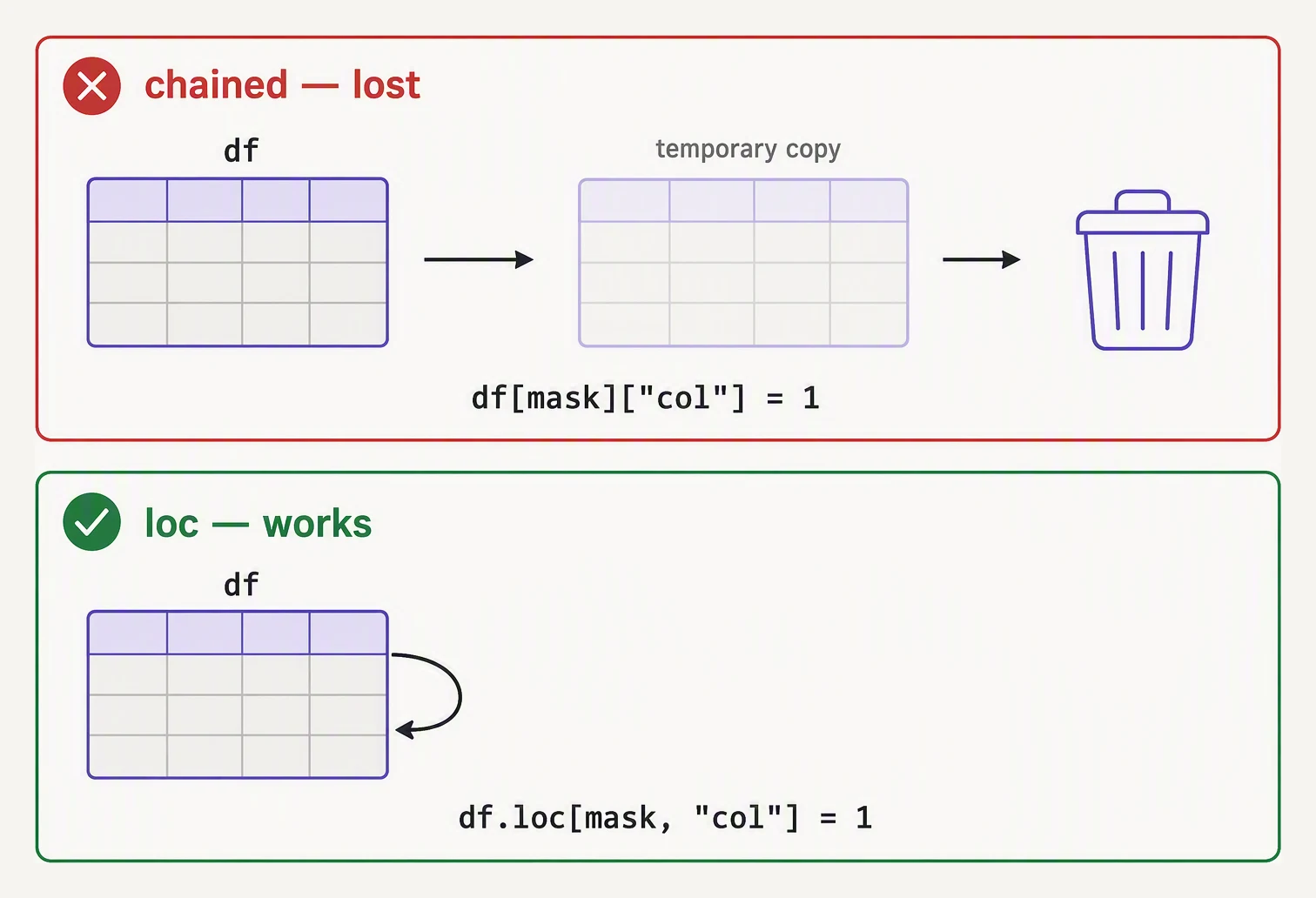
Chained indexing writes into a temporary that is thrown away. .loc writes into the original.
You filter some rows, then try to update them. It looks completely innocent.
import pandas as pd

orders = pd.DataFrame({
    "order_id": ["o-1","o-2","o-3","o-4","o-5"],
    "customer": ["alice","bob","carol","dave","eve"],
    "amount":   [120.0, 45.50, 0.0, 89.99, 210.0],
    "status":   ["paid","paid","pending","paid","paid"],
})

# Goal: mark all paid orders as "fulfilled"
paid_orders = orders[orders["status"] == "paid"]
paid_orders["status"] = "fulfilled"   # BUG and warning

print("paid_orders:")
print(paid_orders)
print()
print("original orders (was the original modified?):")
print(orders)paid_orders:
order_id customer amount status
0 o-1 alice 120.00 fulfilled
1 o-2 bob 45.50 fulfilled
3 o-4 dave 89.99 fulfilled
4 o-5 eve 210.00 fulfilled
original orders (was the original modified?):
order_id customer amount status
0 o-1 alice 120.00 paid
1 o-2 bob 45.50 paid
2 o-3 carol 0.00 pending
3 o-4 dave 89.99 paid
4 o-5 eve 210.00 paidA warning printed, paid_orders did change, and orders did not. So which one was the bug? The
trap is that this happened to work on the slice and silently skip the original — but you had no
guarantee of either outcome. The warning is pandas telling you it couldn’t promise which DataFrame
your assignment would land on. On a different dtype or memory layout, the very same line might mutate
orders instead, or do nothing at all. The danger isn’t this run’s result; it’s that the result was
never under your control.
Why this happens
Pandas indexing returns one of two things. A view is a window directly into the original’s memory — no data is duplicated, so writing through it writes through to the original. A copy is a freshly allocated DataFrame with its own memory, so writing to it leaves the original untouched. Which one you get depends on the memory layout, the dtypes involved, and the exact slice — a plain row slice on a contiguous block is often a view, a boolean-mask selection almost always copies — but none of this is a documented guarantee. Pandas decides down at the C level, and frequently it can’t tell you in advance.
Now look at what orders[orders["status"] == "paid"]["status"] = "fulfilled" really is. It’s
chained indexing — two indexing operations in a row:
orders[orders["status"] == "paid"]— the first index, returning a view or a copy.[...]["status"] = "fulfilled"— an assignment onto whatever step 1 handed back.
If step 1 returned a view, you modify orders. If it returned a copy, you modify a throwaway that’s
discarded on the next line. That ambiguity — the assignment landing on an object you can’t name and
can’t predict — is the bug. The warning fires precisely because pandas sees the pattern and knows it
can’t keep a promise.
The one-shot .loc rule
The fix is a single rule: do the filtering and the assignment in one .loc call.
import pandas as pd

orders = pd.DataFrame({
    "order_id": ["o-1","o-2","o-3","o-4","o-5"],
    "customer": ["alice","bob","carol","dave","eve"],
    "amount":   [120.0, 45.50, 0.0, 89.99, 210.0],
    "status":   ["paid","paid","pending","paid","paid"],
})

# THE FIX: single .loc, no chain
orders.loc[orders["status"] == "paid", "status"] = "fulfilled"

print(orders)
order_id customer amount status
0 o-1 alice 120.00 fulfilled
1 o-2 bob 45.50 fulfilled
2 o-3 carol 0.00 pending
3 o-4 dave 89.99 fulfilled
4 o-5 eve 210.00 fulfilledOne .loc[] call. No warning, no ambiguity, no bug — and this time orders itself is updated, with
carol’s pending row correctly left alone. The form is always:
df.loc[row_selector, column_name] = valuerow_selector can be a boolean mask, a list of index labels, or a slice; column_name is the column
(or list of columns) to write. Because both the what to select and the what to set live inside a
single .loc, there’s no intermediate object to be ambiguous about — the assignment reaches straight
into the original frame. If you remember nothing else from this lesson, remember: one .loc, one
shot.
Where does the assignment actually land?
Pick a pattern and hit Run (or Step). The diagram shows each frame in memory — watch whether the assignment reaches the original DataFrame or gets swallowed by a throwaway copy.
df[df.x > 0]['y'] = 5| idx | x | y |
|---|---|---|
| 0 | -1 | 0 |
| 1 | 3 | 0 |
| 2 | 5 | 0 |
| 3 | -2 | 0 |
| 4 | 7 | 0 |
.copy() to be explicit
Sometimes you genuinely want a separate DataFrame to modify — a transformed version you’ll annotate
without touching the original. Then say so, out loud, with .copy().
import pandas as pd

orders = pd.DataFrame({
    "order_id": ["o-1","o-2","o-3","o-4","o-5"],
    "customer": ["alice","bob","carol","dave","eve"],
    "amount":   [120.0, 45.50, 0.0, 89.99, 210.0],
    "status":   ["paid","paid","pending","paid","paid"],
})

# I want a separate DataFrame of paid orders that I'll annotate further
paid = orders[orders["status"] == "paid"].copy()
paid["status"] = "fulfilled"             # no warning — paid is independent
paid["bonus"]  = paid["amount"] * 0.05   # no warning — paid is independent

print("paid (annotated):")
print(paid)
print()
print("orders (untouched):")
print(orders)
paid (annotated):
order_id customer amount status bonus
0 o-1 alice 120.00 fulfilled 6.0000
1 o-2 bob 45.50 fulfilled 2.2750
3 o-4 dave 89.99 fulfilled 4.4995
4 o-5 eve 210.00 fulfilled 10.5000
orders (untouched):
order_id customer amount status
0 o-1 alice 120.00 paid
1 o-2 bob 45.50 paid
2 o-3 carol 0.00 pending
3 o-4 dave 89.99 paid
4 o-5 eve 210.00 paid.copy() is the explicit “this is a brand-new DataFrame; what I do here will not reach back” statement.
The warning vanishes because you removed the ambiguity yourself — and the orders printout confirms it
stayed pristine while paid grew a bonus column.
When the warning is spurious
The warning sometimes fires on code that is, in context, perfectly fine — a function returns a slice you never meant to write to, say. But you should never assume it’s spurious. The honest workflow is:
- Read the exact line the warning points at.
- Ask: is this trying to modify a DataFrame? If yes, rewrite it as a single
.locassignment. - If you’re deliberately building a new DataFrame, prepend
.copy()right after the slice. - Only once you’ve reasoned through both — and never as a reflex — consider suppressing it. And never suppress globally for a whole module.
A more realistic example
Conditionally updating a derived column — the move every analytics script makes a dozen times a day.
import pandas as pd

# Sensor readings — flag anomalies
readings = pd.DataFrame({
    "ts":           pd.to_datetime([
        "2026-05-27 08:00","2026-05-27 08:05","2026-05-27 08:10",
        "2026-05-27 08:15","2026-05-27 08:20","2026-05-27 08:25",
    ]),
    "sensor":      ["s-1","s-1","s-2","s-2","s-3","s-3"],
    "temperature": [72.1, 71.8, 215.0, 73.2, 72.9, 73.1],   # 215 is an anomaly
    "humidity":    [45.2, 45.1, 44.8, 45.0, 90.5, 45.3],    # 90.5 is an anomaly
})

# Wrong way (warning):
# anomalies = readings[(readings["temperature"] > 100) | (readings["humidity"] > 80)]
# anomalies["flag"] = "investigate"

# Right way: do it on the original frame in one .loc
readings["flag"] = "ok"
readings.loc[
    (readings["temperature"] > 100) | (readings["humidity"] > 80),
    "flag",
] = "investigate"

print(readings)
ts sensor temperature humidity flag
0 2026-05-27 08:00:00 s-1 72.1 45.2 ok
1 2026-05-27 08:05:00 s-1 71.8 45.1 ok
2 2026-05-27 08:10:00 s-2 215.0 44.8 investigate
3 2026-05-27 08:15:00 s-2 73.2 45.0 ok
4 2026-05-27 08:20:00 s-3 72.9 90.5 investigate
5 2026-05-27 08:25:00 s-3 73.1 45.3 okNotice the two-step shape: initialize readings["flag"] = "ok" first, then use .loc to overwrite
only the matching rows. Exactly two rows flip to investigate — the 215° temperature and the 90.5%
humidity. This “default value plus targeted overwrite” pattern is the cleanest way to express “set
this column conditionally” without ever touching a chained index.
When chaining is the right answer
If you’re not modifying anything — just reading, filtering, aggregating — chained indexing is fine and idiomatic. The warning only fires on assignment. So this is safe, good code:
top_users = (
    orders
    .query("status == 'paid'")
    .groupby("customer")["amount"]
    .sum()
    .nlargest(10)
)
The warning is about mutation, not access. Read freely; assign with .loc.
In one breath
The warning fires because pandas indexing can return either a view (writes reach the original) or a
copy (writes don’t), and on a chained expression like df[mask]["col"] = ... it can’t promise which
— so your assignment lands on an object you can’t name. The cure is one rule: do selection and
assignment together in a single df.loc[row_selector, column] = value. When you actually want an
independent frame, slice then .copy() and say so. Never silence the warning globally — trace it to
the assignment, rewrite that as one .loc, and the bug leaves with the message.
Practice
Quick check
orders where status is 'paid'?.copy() after a slice?A question to carry forward
Step back and take stock: you can now read data in, select and filter it, fill its gaps, group and join and reshape it, chain whole pipelines, shrink them in memory, and mutate them without tripping this warning. That’s the full pandas core. But notice what every example quietly assumed — that the whole table fits in one machine’s RAM and runs on one thread, eagerly, one operation at a time.
Push past a gigabyte or two and that assumption starts to crack: groupby, sort, and join slow to
a crawl, and a single core watches while the others sit idle. So the closing question of this section
is a forward-looking one — what does pandas look like if you rebuild it for today’s hardware? The
next lesson is Polars: a Rust-cored, multi-threaded, columnar DataFrame library with a lazy query
optimizer, how its syntax maps almost line-for-line onto what you already know, and exactly when it’s
worth reaching for instead of pandas.
Questions about this lesson
What causes the SettingWithCopyWarning?
It appears when you assign to something that might be a copy of a slice rather than the original DataFrame, so Pandas can't guarantee the change will stick. It's a warning about ambiguous chained indexing.
How do I fix the SettingWithCopyWarning?
Do the selection and assignment in one .loc call — df.loc[df.x > 0, 'y'] = 1 — instead of chaining like df[df.x > 0]['y'] = 1. If you intend a separate frame, take an explicit .copy() first.
Is the SettingWithCopyWarning safe to ignore?
Not reliably — sometimes the assignment silently fails to update the data you expect. Treat it as a real signal and rewrite the indexing rather than suppressing the warning.
Practice this in an interview
All questionsSettingWithCopyWarning fires when you try to set a value on what pandas suspects is a copy of a slice rather than the original DataFrame, so the write may silently fail. The fix is to always use .loc on the original DataFrame for assignments, or call .copy() explicitly when you intend to work on a detached copy.
loc selects rows and columns by label (index value or column name), while iloc selects by integer position. Use loc when your index carries meaningful labels like dates or IDs; use iloc for positional slicing regardless of what the index contains.
duplicated() returns a boolean mask of rows that are duplicates of an earlier row; dropduplicates() removes them. Both accept a subset parameter to restrict comparison to specific columns and a keep parameter ('first', 'last', or False) to control which instance is retained or whether all copies are dropped.