Indexing and slicing
Basic slices, multi-axis indexing, fancy indexing, and the views-vs-copies trap that mutates data behind your back.
Written and reviewed by Shreyash Prashu Last reviewed
What you'll learn
- Multi-axis slicing with the comma syntax
- When a slice returns a view (mutates the original!) vs a copy
- Boolean indexing and fancy integer indexing
- The
np.ix_trick for selecting submatrices
Before you start
The last lesson closed on a warning it left deliberately unexplained: a NumPy slice can be a view onto the same memory, not a fresh copy — write through it and you silently rewrite the original. That one fact causes half the bugs in real array code and powers half its speed, and this lesson earns it. Indexing is the moment NumPy stops behaving like a Python list: per-axis comma syntax, boolean masks, fancy index arrays, and the views-versus-copies rule that bites everyone exactly once. We build up to the trap, then defuse it.
Basic slicing — like Python, but per-axis
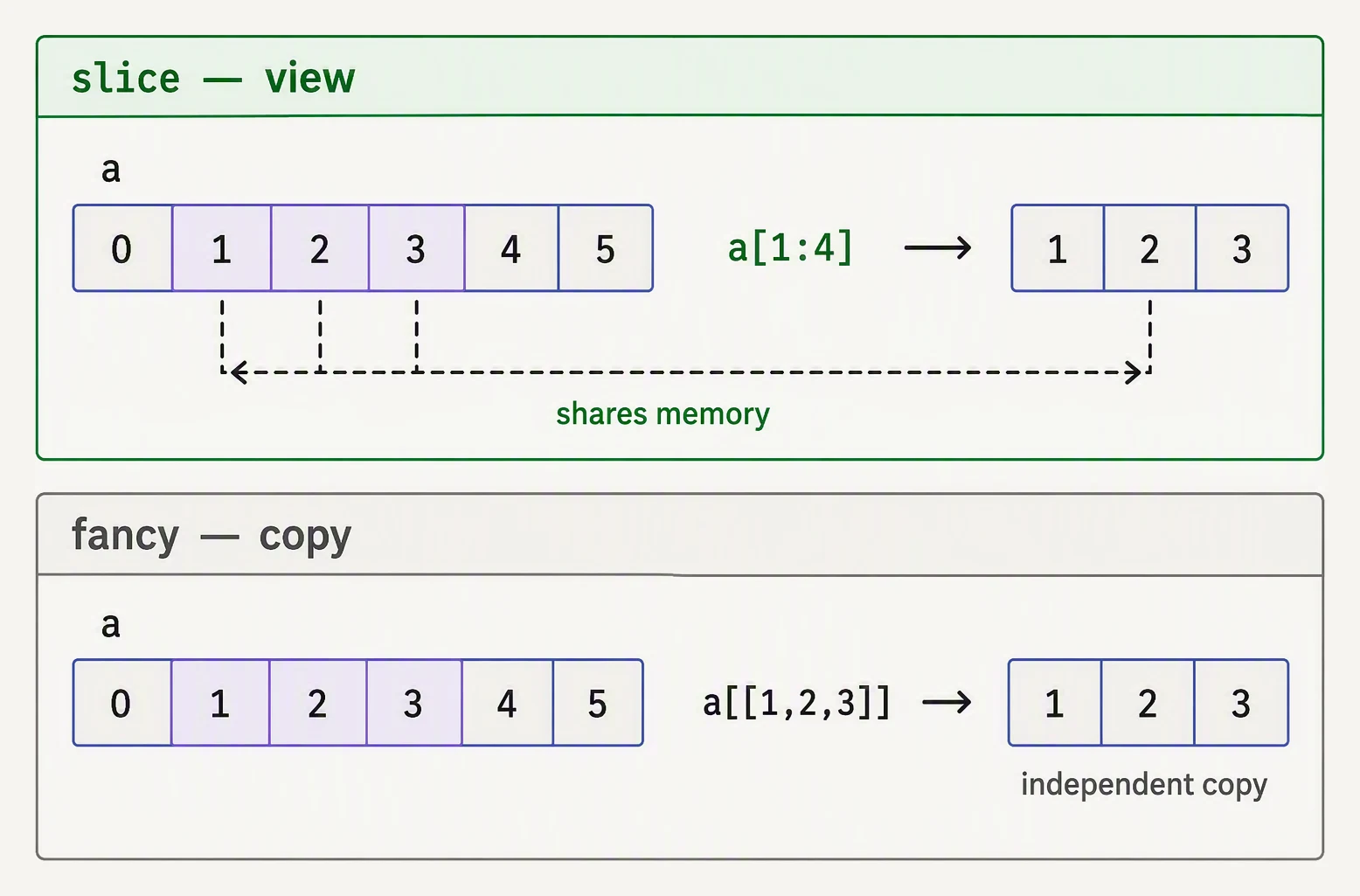
A slice is a window onto the same memory. Fancy indexing hands you a copy.
For a multi-axis array, you use one slice per axis, separated by commas.
import numpy as np

# A grayscale image, 8×8, with values 0..63.
img = np.arange(64).reshape(8, 8)
print("img:")
print(img)

# A single row (returns 1D)
print("\nrow 2     :", img[2])

# A single element
print("img[2, 3] :", img[2, 3])

# A slice — top-left 3×4 patch
print("\ntop-left 3×4 patch:")
print(img[:3, :4])

# Every other row, every other column (subsampling)
print("\nsubsampled (stride 2):")
print(img[::2, ::2])
img:
[[ 0 1 2 3 4 5 6 7]
[ 8 9 10 11 12 13 14 15]
[16 17 18 19 20 21 22 23]
[24 25 26 27 28 29 30 31]
[32 33 34 35 36 37 38 39]
[40 41 42 43 44 45 46 47]
[48 49 50 51 52 53 54 55]
[56 57 58 59 60 61 62 63]]
row 2 : [16 17 18 19 20 21 22 23]
img[2, 3] : 19
top-left 3×4 patch:
[[ 0 1 2 3]
[ 8 9 10 11]
[16 17 18 19]]
subsampled (stride 2):
[[ 0 2 4 6]
[16 18 20 22]
[32 34 36 38]
[48 50 52 54]]The pattern arr[rows, cols] extends to any number of axes: arr[a, b, c, d] for a 4-D array.
You can mix slices and integers: img[2, :] is row 2, img[:, 3] is column 3.
Slices are VIEWS, not copies
This is the most important thing in NumPy and the source of countless bugs. A basic slice returns a view — an object that shares the same memory buffer as the original, not a fresh copy of the data.
import numpy as np

prices = np.array([100.0, 101.0, 102.0, 103.0, 104.0, 105.0])
window = prices[1:4]            # a view, not a copy!
print("window:", window)

window[0] = 999                 # mutating the view…
print("prices after:", prices)  # …also mutated the original!
window: [101. 102. 103.]
prices after: [100. 999. 102. 103. 104. 105.]Writing 999 into window[0] reached straight through into prices[1]. This is intentional —
for a million-row array you do not want every slice to copy gigabytes — but it bites the moment
you hand a “subset” to a function that modifies it in place.
Pick an indexing expression — see which cells it selects
Choose 1D (length-12) or 2D (4×4) mode, then pick an expression. Highlighted cells show the slice; arrows show stride direction and step. Basic slices always return a view — the same memory as the original.
a[1:5] returns a view into the same memory — mutating any highlighted cell also changes the original array. Use .copy() when you need independence.You can check whether something is a view of another array with .base:
import numpy as np

a = np.arange(10)
b = a[2:7]                  # view
c = a[2:7].copy()           # copy

print("b is a view :", b.base is a)
print("c is a view :", c.base is a)
b is a view : True
c is a view : FalseA view’s .base points back at the array it borrows from; a copy’s does not.
Boolean indexing
This is the workhorse for filtering. A boolean array of the same shape picks out the elements
where the mask is True.
import numpy as np

# Hourly temperatures for one day (°C).
temps = np.array([12, 11, 11, 12, 14, 16, 19, 22, 25, 27, 28, 29,
                  30, 30, 29, 28, 26, 24, 22, 20, 18, 16, 14, 13])

# Which hours are "hot" (≥ 25°C)?
hot_mask = temps >= 25
print("hot hours:", np.where(hot_mask)[0])    # the indices
print("hot temps:", temps[hot_mask])          # the values
print("count    :", hot_mask.sum())           # True counts as 1
hot hours: [ 8 9 10 11 12 13 14 15 16]
hot temps: [25 27 28 29 30 30 29 28 26]
count : 9Boolean indexing always returns a copy, never a view — NumPy can’t make a view of arbitrary scattered elements. That makes it slightly slower but safer than basic slicing.
Fancy indexing — pick rows by an index array
When you have a list of the indices you want, just pass them.
import numpy as np

# 5 customers × 4 features (age, income, tenure_yrs, churn_score)
customers = np.array([
    [25, 50_000, 1.5, 0.2],
    [40, 80_000, 8.0, 0.1],
    [33, 65_000, 3.0, 0.5],
    [29, 55_000, 2.2, 0.7],
    [50, 95_000, 12.0, 0.05],
], dtype=float)

# Pick rows 0, 2, 4 — in that order.
sel = customers[[0, 2, 4]]
print("selected rows:")
print(sel)

# Reorder columns: put churn_score first.
reordered = customers[:, [3, 0, 1, 2]]
print("\nreordered columns:")
print(reordered)
selected rows:
[[2.5e+01 5.0e+04 1.5e+00 2.0e-01]
[3.3e+01 6.5e+04 3.0e+00 5.0e-01]
[5.0e+01 9.5e+04 1.2e+01 5.0e-02]]
reordered columns:
[[2.0e-01 2.5e+01 5.0e+04 1.5e+00]
[1.0e-01 4.0e+01 8.0e+04 8.0e+00]
[5.0e-01 3.3e+01 6.5e+04 3.0e+00]
[7.0e-01 2.9e+01 5.5e+04 2.2e+00]
[5.0e-02 5.0e+01 9.5e+04 1.2e+01]](The scientific notation is just how NumPy prints a float array whose values span 0.05 to
95,000.) Like boolean indexing, fancy indexing returns a copy. You can combine it with
slicing too: arr[[0, 2], :3] picks rows 0 and 2, columns 0 through 2.
Submatrix selection with np.ix_
Watch what happens when you try to use two index arrays at once:
import numpy as np

A = np.arange(20).reshape(4, 5)
print(A)

# Surprise: this picks (0,1) and (2,3) — NOT the 2×2 submatrix!
print("\nA[[0, 2], [1, 3]] =", A[[0, 2], [1, 3]])

# To get the 2×2 submatrix at rows {0, 2} × columns {1, 3}, use ix_:
sub = A[np.ix_([0, 2], [1, 3])]
print("\nA[ix_([0, 2], [1, 3])]:")
print(sub)
[[ 0 1 2 3 4]
[ 5 6 7 8 9]
[10 11 12 13 14]
[15 16 17 18 19]]
A[[0, 2], [1, 3]] = [ 1 13]
A[ix_([0, 2], [1, 3])]:
[[ 1 3]
[11 13]]The first form A[[0, 2], [1, 3]] zips the indices pairwise — you get [A[0,1], A[2,3]] = [1, 13]. The ix_ form takes the Cartesian product, the full 2×2 block at the intersection
of rows 2 and columns 3. This distinction trips up everyone exactly once.
Assignment with indexing
Anything you can read with an index, you can write with an index.
import numpy as np

# A grayscale image with one "hot pixel" we need to clamp.
img = np.full((6, 6), 128, dtype=np.uint8)
img[3, 3] = 255          # the hot pixel

# Clamp any value > 200 down to 200.
img[img > 200] = 200
print(img)

# Or assign a slice from another array.
patch = np.zeros((2, 2), dtype=np.uint8)
img[1:3, 1:3] = patch   # zero out a 2×2 patch
print("\nafter zero-patch:")
print(img)
[[128 128 128 128 128 128]
[128 128 128 128 128 128]
[128 128 128 128 128 128]
[128 128 128 200 128 128]
[128 128 128 128 128 128]
[128 128 128 128 128 128]]
after zero-patch:
[[128 128 128 128 128 128]
[128 0 0 128 128 128]
[128 0 0 128 128 128]
[128 128 128 200 128 128]
[128 128 128 128 128 128]
[128 128 128 128 128 128]]The img[img > 200] = 200 line is the idiom for conditional modification — the hot 255 pixel
clamped to 200 in one stroke, far faster than any loop.
In one breath
NumPy indexing is per-axis (arr[rows, cols], mixing slices and integers). The rule that matters
most: a basic slice returns a view sharing the original’s memory, so writing through it
mutates the original (window = prices[1:4]; window[0] = 999 changes prices) — use .copy()
when you need independence, and check with .base. By contrast boolean indexing
(temps[temps >= 25]) and fancy indexing (customers[[0, 2, 4]]) always return copies.
Two integer-array indices zip pairwise (A[[0,2],[1,3]] → [A[0,1], A[2,3]]); for the
Cartesian submatrix use np.ix_. And anything you can read you can assign:
img[img > 200] = 200 is the conditional-modification idiom, NumPy’s replacement for a loop.
Practice
Quick check
sub = big_array[100:200] and then sub[0] = -1. What happens to big_array[100]?A, what's the difference between A[[0, 2], [1, 4]] and A[np.ix_([0, 2], [1, 4])]?A question to carry forward
You can now reach into an array and lift out any piece — a row, a masked subset, a reordered block
of columns. The complementary power is changing the array’s shape while leaving its values
untouched: flatten an 8×8 image into a 64-vector, swap a batch from channels-first to
channels-last, or let NumPy infer a missing dimension with the -1 trick.
And a thread from a few lessons ago is about to pay off. Remember strides — the recipe for
reading one flat block of memory as a grid? Reshaping is almost always free precisely because it
rewrites that recipe and copies nothing. What are reshape, ravel, and transpose, when do
they hand back a view versus forcing a copy, and what exactly does -1 work out for you?
Practice this in an interview
All questionsBoolean indexing filters a DataFrame by passing a boolean Series or array of the same length as the index. Common pitfalls include using Python's and/or instead of &/| and forgetting to wrap compound conditions in parentheses, both of which raise errors or produce wrong results.
Slicing uses the syntax seq[start:stop:step] and returns a new list containing elements from index start up to but not including stop, stepping by step. Negative indices count from the end; a negative step reverses direction. Omitted parts default to the beginning, end, or step of 1.
Python lists are heterogeneous, pointer-based, and general-purpose. NumPy arrays are homogeneous, stored as contiguous typed memory, and support vectorised operations that run at C speed. For numerical work on more than a few hundred elements, NumPy is almost always faster and more memory-efficient.
pandas is slow primarily because Python loops bypass NumPy's vectorized C kernels, object-dtype columns prevent SIMD optimizations, and keeping entire datasets in memory limits scalability. The fixes are vectorization, categorical encoding, eval/query for large frames, chunking for out-of-core data, and switching to Polars or DuckDB for compute-heavy pipelines.