Why NumPy
Pure-Python loops are 100× slower than NumPy for numeric work. Here's why — and how to think in vectorized operations.
Written and reviewed by Shreyash Prashu Last reviewed
What you'll learn
- Why NumPy is faster than equivalent Python loops
- The mental shift from element-wise loops to whole-array operations
- How vectorization sets up everything in Pandas, scikit-learn, and PyTorch
Before you start
For nearly forty lessons of mathematics we typed the same three words without a second
thought — import numpy as np — and let them carry every vector, gradient, covariance matrix,
and Fourier transform we built. The math chapter closed by pointing straight at that reflex and
asking the question we kept skipping: why NumPy at all? Why not a plain Python list?
Here is the answer, and it is the foundation the entire Python data stack stands on. NumPy is the array library beneath Pandas, scikit-learn, PyTorch, JAX — essentially every numeric tool in Python. Understand it and every one of those libraries makes more sense, because underneath they are all doing exactly what this section is about.
The problem with Python lists
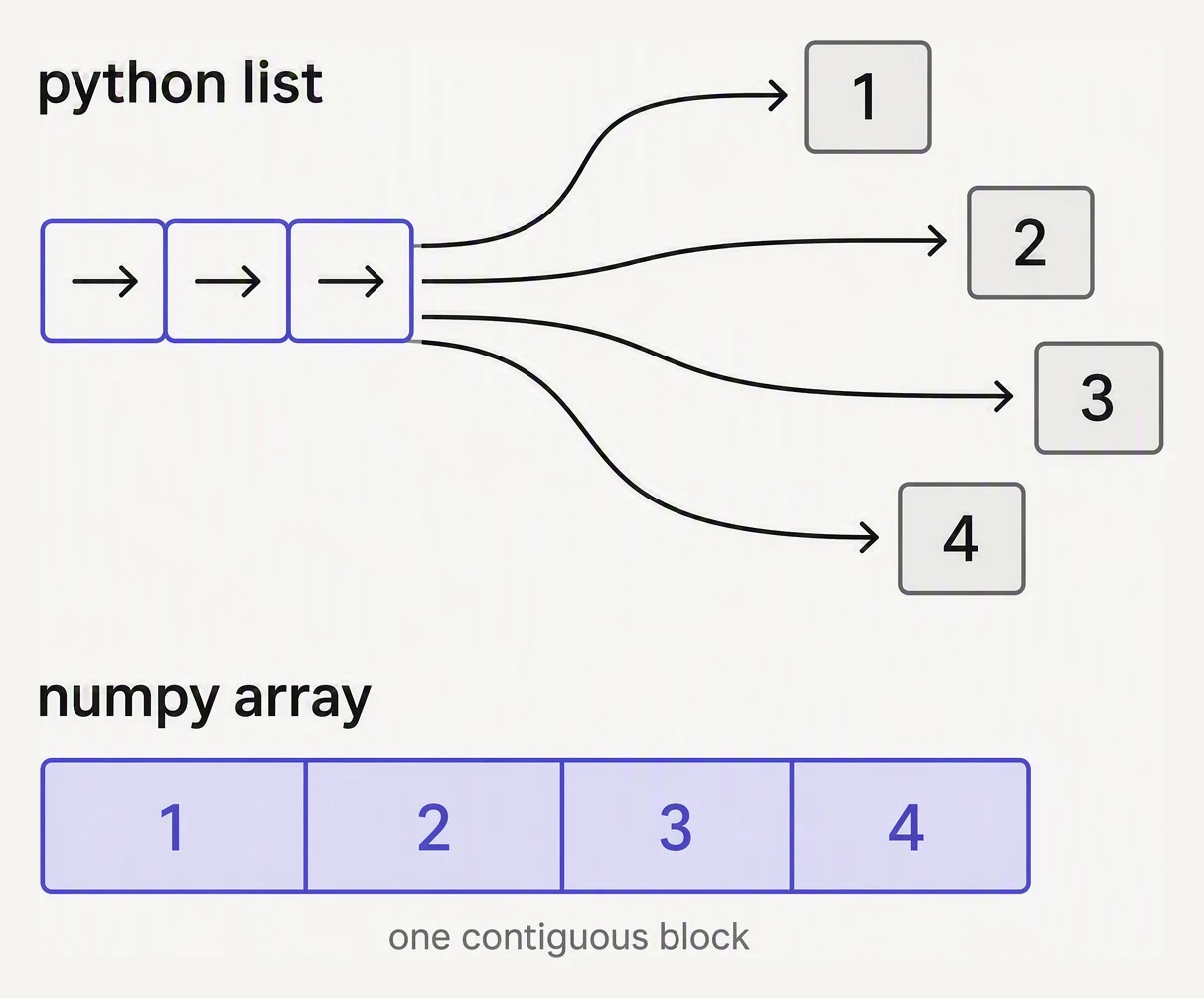
A list stores pointers to objects. An array stores the numbers themselves, side by side.
Python is dynamic, and that flexibility has a price. Every number in a list is a full object — it carries its type, a reference count, and lives at its own scattered memory address. To add two lists of a million numbers, the interpreter walks them one element at a time, doing Python-level type dispatch on every single addition. A million tiny detours.
NumPy refuses all of that. It stores numbers in a contiguous block of memory, every one the same type, and runs the operation in compiled C — a tight loop the CPU can pipeline and vectorize. No per-element dispatch, no scattered pointers. The result is typically 10–100× faster, often more.
# A small benchmark — NumPy vs a pure Python loop.
# (Absolute milliseconds vary by machine and runtime; the SPEEDUP ratio is the point.)

import numpy as np
import time

N = 1_000_000

# Pure-Python list approach
a = list(range(N))
b = list(range(N))

t0 = time.perf_counter()
c = [x + y for x, y in zip(a, b)]
t_py = time.perf_counter() - t0

# NumPy approach
arr_a = np.arange(N)
arr_b = np.arange(N)

t0 = time.perf_counter()
arr_c = arr_a + arr_b           # ← one vectorized op, no Python loop
t_np = time.perf_counter() - t0

print(f"Python list:  {t_py*1000:7.1f} ms")
print(f"NumPy:        {t_np*1000:7.1f} ms")
print(f"Speedup:      {t_py/t_np:7.1f}x")
Python list: 20.8 ms
NumPy: 0.6 ms
Speedup: 36.9xYour exact milliseconds will be different — a faster machine, a different Python, an in-browser
runtime all shift the absolute numbers. What does not change is the shape of the result: NumPy
finishing in a fraction of a millisecond what the list spends tens of milliseconds on, a
20–100× gulf that only widens as N grows. The list pays the interpreter a million times; NumPy
pays C once.
Think in arrays, not elements
The benchmark hides the deeper lesson, which is not about speed but about how you write code.
The mental shift NumPy demands: stop writing for x in arr, and start expressing what you want
on the whole array at once.
import numpy as np

prices = np.array([4.50, 1.20, 45.00, 18.00, 12.00, 6.50])
qty    = np.array([3,    5,    1,     2,     2,     4])

# Total revenue per product — no loop in sight.
revenue = prices * qty
print("Revenue per item:", revenue)
print("Total:", revenue.sum())

# Which items have revenue > $20?
print("Big sellers:", revenue > 20)
print("Big revenues:", revenue[revenue > 20])
Revenue per item: [13.5 6. 45. 36. 24. 26. ]
Total: 150.5
Big sellers: [False False True True True True]
Big revenues: [45. 36. 24. 26.]prices * qty multiplied the two arrays position-by-position with no loop written anywhere. And
that last line — revenue[revenue > 20] — is boolean indexing: the comparison returns a
boolean array [False, False, True, True, True, True], and using it as an index keeps exactly
the True positions. This is how almost every filter in Pandas works under the hood.
Vectorization isn’t just about speed
It is also dramatically more readable. Compare the two ways of writing the same filter:
# Loop version
out = []
for x, y in zip(prices, qty):
    if x * y > 20:
        out.append(x * y)
against:
# Vectorized version
rev = prices * qty
out = rev[rev > 20]
The second is shorter, carries no off-by-one risk, says what you want rather than how to walk the data, and runs in machine code. After a few weeks of writing NumPy, the loop version will start to look slow on sight — which is exactly the instinct the rest of this section builds.
In one breath
A Python list stores each number as a separate object with its own type, refcount, and memory
address, so looping over a million of them means a million interpreter detours. NumPy instead
packs numbers into a contiguous, single-type block and runs operations as compiled C —
typically 10–100× faster (the benchmark: ~37× here, though absolute times vary by machine).
The bigger shift is conceptual: think in whole arrays, not elements — write prices * qty
and revenue[revenue > 20] (boolean indexing) instead of for loops. Vectorized code is faster
and shorter, safer, and clearer — and it is the engine Pandas, scikit-learn, PyTorch, and JAX
are all built on.
Practice
Quick check
arr[arr > 0] do?A question to carry forward
We have been throwing the word array around as if it were obvious — “a contiguous block of one type.” But that phrase hides the whole machine. The same block of a million numbers can be viewed as a flat list, a 1000×1000 grid, or a stack of images, without copying a single byte — and a one-character mistake about its shape or dtype is the most common bug in all of numeric Python.
So the next lesson opens the array up. What exactly is an ndarray — its shape, its dtype, and the clever trick called strides that lets one flat block of memory be read as many different shapes? Get those three right and array bugs become readable; get them wrong and your code breaks in ways the error message never quite explains.
Practice this in an interview
All questionsNumPy operations execute compiled C code over contiguous memory blocks in a single call, while a Python loop incurs interpreter overhead and dynamic type checks on every element. Vectorization means expressing an operation over an entire array at once so the hot path never re-enters the Python interpreter.
pandas is slow primarily because Python loops bypass NumPy's vectorized C kernels, object-dtype columns prevent SIMD optimizations, and keeping entire datasets in memory limits scalability. The fixes are vectorization, categorical encoding, eval/query for large frames, chunking for out-of-core data, and switching to Polars or DuckDB for compute-heavy pipelines.
Python lists are heterogeneous, pointer-based, and general-purpose. NumPy arrays are homogeneous, stored as contiguous typed memory, and support vectorised operations that run at C speed. For numerical work on more than a few hundred elements, NumPy is almost always faster and more memory-efficient.
Vectorized pandas and NumPy operations operate on entire arrays in compiled C/Fortran code and should always be your first choice. apply runs a Python function row- or column-wise in a Python loop, map transforms a single Series element-by-element, and applymap (DataFrame.map in pandas 2.1+) applies a function to every scalar — all three are orders of magnitude slower than vectorized equivalents.