Dtypes
int8 vs int64, float32 vs float64, and the silent overflow bug that ate someone's pixel data. Pick the right dtype.
Written and reviewed by Shreyash Prashu Last reviewed
What you'll learn
- The integer and float dtype families and their memory cost
- Why float32 dominates ML and float64 dominates scientific computing
- How small int types overflow silently — and how to spot it
- Safe vs unsafe casts with
.astype
Before you start
The last lesson kept nagging you to pass dtype= and never quite said why. Here is the why, and
it has teeth. Every element in an ndarray shares one dtype, and that single choice silently
decides three things at once: how much memory the array eats, how much precision it
keeps, and whether your arithmetic quietly overflows into nonsense. Two of the most baffling
bugs in all of numeric Python — an int8 wrapping from 127 to −128, a float32 rounding a sum
into noise — both live here, and neither raises an error. This lesson teaches you to pick a
dtype on purpose.
The dtype families
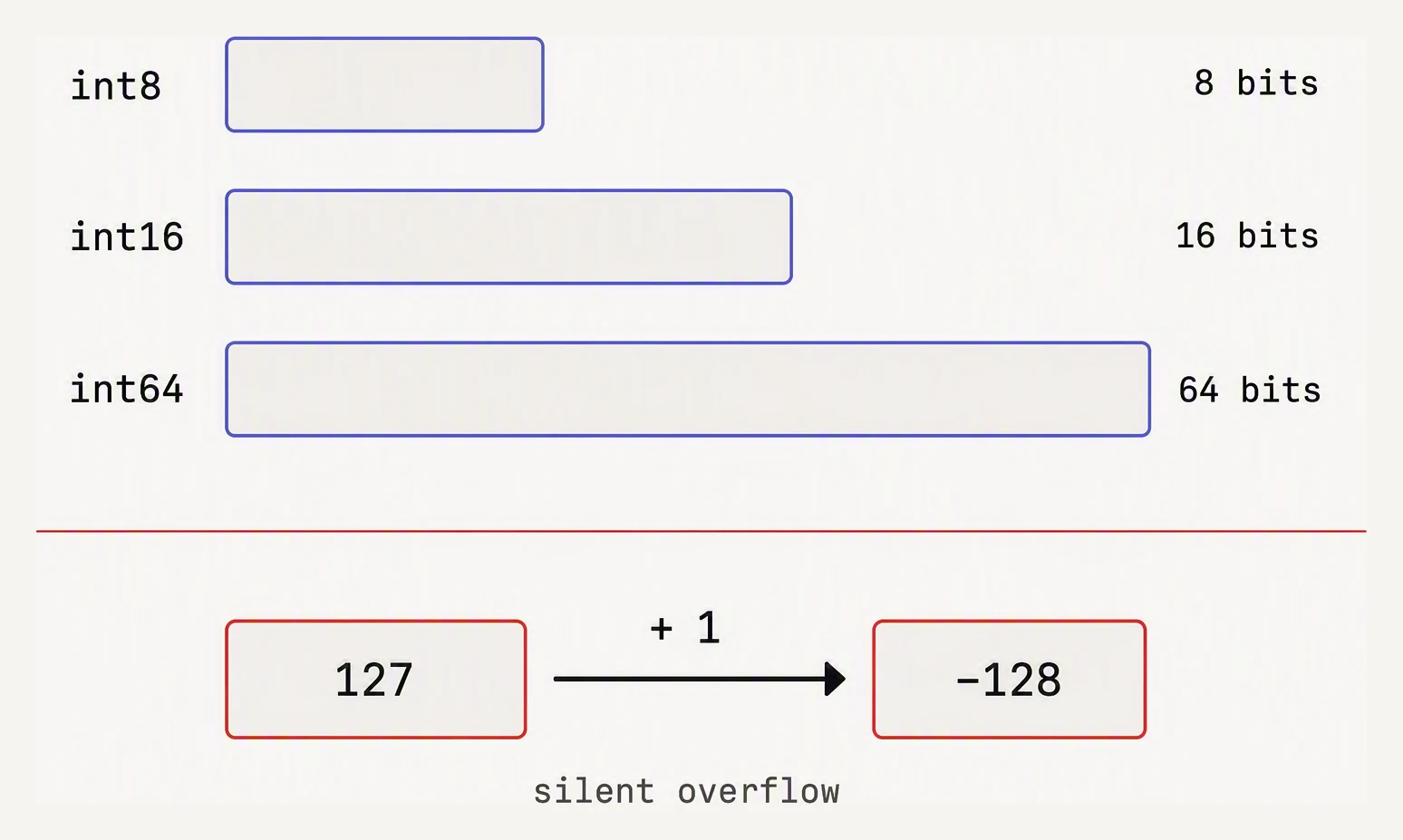
The dtype is a promise about width — break it and the value wraps silently.
NumPy gives you several integer and float widths. The number after the name is bits, not bytes.
Integer (signed):    int8   int16   int32   int64
Integer (unsigned):  uint8  uint16  uint32  uint64
Float:               float16 float32 float64
Boolean:             bool_
Complex:             complex64  complex128
Object:              object   ← avoid for numeric data
Each step up doubles the memory and widens the representable range — and “widens” is doing a lot of work, so look at the actual numbers:
import numpy as np

# Range of each integer dtype
for dt in [np.int8, np.int16, np.int32, np.int64]:
    info = np.iinfo(dt)
    print(f"{dt.__name__:7}: {info.min:>22,} .. {info.max:<22,}")

# Range of float dtypes
for dt in [np.float16, np.float32, np.float64]:
    info = np.finfo(dt)
    print(f"{dt.__name__:9}: ±{info.max:.3e}, machine eps = {info.eps:.1e}")
int8 : -128 .. 127
int16 : -32,768 .. 32,767
int32 : -2,147,483,648 .. 2,147,483,647
int64 : -9,223,372,036,854,775,808 .. 9,223,372,036,854,775,807
float16 : ±6.550e+04, machine eps = 9.8e-04
float32 : ±3.403e+38, machine eps = 1.2e-07
float64 : ±1.798e+308, machine eps = 2.2e-16int8 holds only −128 to 127. uint8 holds 0 to 255 — which happens to be exactly the range of
8-bit pixel values, which is why every image library stores pixels as uint8. And notice the
float machine eps: float32 resolves differences down to ~1.2e-07, float64 to ~2.2e-16.
That gap is the whole story of the section’s earlier numerical-stability
lesson.
Real example — pixel data fits in uint8
A 1080p RGB image as float64 is ~50 MB. As uint8, it is ~6 MB. Same data, 8× the throughput.
import numpy as np

H, W, C = 1080, 1920, 3

img_float64 = np.zeros((H, W, C), dtype=np.float64)
img_uint8   = np.zeros((H, W, C), dtype=np.uint8)

print(f"float64: {img_float64.nbytes / 1e6:6.2f} MB")
print(f"uint8  : {img_uint8.nbytes  / 1e6:6.2f} MB")
print(f"ratio  : {img_float64.nbytes / img_uint8.nbytes:.0f}x")
float64: 49.77 MB
uint8 : 6.22 MB
ratio : 8xFor a batch of 32 such images during training, that is 1.6 GB versus 200 MB. The right dtype is the difference between fitting in GPU memory and not.
The silent overflow bug
This is the classic gotcha. You compute something innocuous, and the result wraps around without a word of warning.
import numpy as np

# Pixel data, uint8. Now you want to compute the *mean brightness* of
# every pixel, summing R+G+B per pixel.
pixels = np.array([
    [200, 200, 200],   # near-white pixel — sum should be 600
    [100, 150, 200],   # sum should be 450
], dtype=np.uint8)

# Naive: just sum along the color axis.
bad = pixels.sum(axis=1)        # NumPy is smart enough to upcast here…
print("with NumPy default:", bad)

# But manual addition stays in uint8 and overflows!
manual = pixels[:, 0] + pixels[:, 1] + pixels[:, 2]
print("manual add (uint8):", manual)   # WRONG — wraps mod 256

# The fix: cast up before the math.
safe = pixels.astype(np.int32).sum(axis=1)
print("after upcast       :", safe)
with NumPy default: [600 450]
manual add (uint8): [ 88 194]
after upcast : [600 450]200 + 200 + 200 = 600, which does not fit in 8 bits. With unsigned wrap-around you get
600 mod 256 = 88, and 450 mod 256 = 194. No error, no warning — just wrong pixels. (Note that
pixels.sum(axis=1) got it right: NumPy quietly upcasts the accumulator for reductions, but
element-wise a + b + c stays in uint8 and wraps.) This bug type loves to hide for years
in image-processing code.
float32 vs float64 — the ML tradeoff
In classical scientific computing you reach for float64 (double precision) because an
eigenvalue decomposition or a stiff ODE genuinely needs the digits. In deep learning you reach
for float32 (and increasingly float16 / bfloat16) because:
- gradients only need ~3 decimal digits of accuracy,
- half the memory means twice the batch size,
- modern GPUs run float32 / float16 far faster than float64.
import numpy as np

# Same numbers, different precision.
x64 = np.array([1.0, 1e-8, 1.0 + 1e-8], dtype=np.float64)
x32 = np.array([1.0, 1e-8, 1.0 + 1e-8], dtype=np.float32)

# float32 can't distinguish 1.0 from 1.0 + 1e-8.
print("float64:", x64, "diff:", x64[2] - x64[0])
print("float32:", x32, "diff:", x32[2] - x32[0])
float64: [1.00000000e+00 1.00000000e-08 1.00000001e+00] diff: 9.99999993922529e-09
float32: [1.e+00 1.e-08 1.e+00] diff: 0.0There it is in one line: float32 simply cannot store 1.0 + 1e-8 as anything but 1.0, so
the difference collapses to 0.0 — while float64 keeps it (≈1e-8). float32 has about 7
decimal digits of precision, float64 about 16. For weights and activations, 7 is plenty; for
inverting an ill-conditioned matrix, 7 is a disaster.
What dtype does a + b produce?
Pick a dtype for each operand. NumPy promotes to the narrowest type that can represent both — but the result can be wider than you expect, and overflow can still happen before the promotion kicks in.
int32 (4B) + float16 (2B) → float64 (8B). The result array is 2× wider per element — can double memory use unexpectedly.
Highlighted cell = current selection. Pure int+int promotes to the wider int (not shown).
Casting with .astype
.astype(dtype) returns a new array with the requested dtype. It is the standard way to
convert — but it has two sharp edges.
import numpy as np

# Read genomic markers as int8 (huge dataset, save memory).
markers = np.array([0, 1, 2, 1, 0, 2], dtype=np.int8)
print(markers.dtype, markers.nbytes, "bytes")

# Compute a float weighted score — upcast first.
weights = np.array([0.5, 1.5, 2.0, 1.0, 0.8, 0.2])  # default float64
score = (markers.astype(np.float64) * weights).sum()
print("score:", score)

# Unsafe cast — float → int truncates toward zero.
floats = np.array([1.9, -1.9, 2.5, -2.5])
print("as int32:", floats.astype(np.int32))   # truncates, does NOT round
int8 6 bytes
score: 6.9
as int32: [ 1 -1 2 -2]The two edges:
- Float → int truncates, it does not round:
1.9 → 1,-1.9 → -1,2.5 → 2. Usenp.round(x).astype(int)when you actually want rounding. - Casting to a narrower int silently wraps on overflow. Casting
300touint8gives you44(300 % 256) with no warning. Always confirm the value range fits before narrowing.
The object dtype — avoid for numerics
dtype=object stores Python objects, not raw values. It is the fallback NumPy lands on when it
cannot infer a numeric type — usually because you mixed in a None or a string.
arr = np.array([1, 2, None]) # dtype = objectOperations on an object array run Python-level loops — you have thrown away the entire point
of NumPy. If you find yourself with an object array of numbers, either fill the gaps (np.nan for
floats) or move to a Pandas nullable Int64.
In one breath
A NumPy dtype is one shared element type that fixes an array’s memory, precision, and
overflow behaviour. Integers (int8…int64, uint8…uint64) double in range each step —
uint8’s 0–255 is exactly pixel range; floats trade range/precision (float16/float32/float64,
machine eps ~1e-3/1e-7/1e-16). Small ints overflow silently on element-wise math
(200+200+200 in uint8 → 88), so cast up before arithmetic; float32’s ~7 digits can’t even
represent 1.0 + 1e-8 (the diff prints 0.0), which is why scientific work uses float64 but
ML happily uses float32/bf16 (half the memory, GPU-fast, precise enough for gradients).
.astype() makes a new array but truncates float→int and wraps on narrowing, and
dtype=object silently drops you back to slow Python loops.
Practice
Quick check
pixels ** 2?np.array([1.9, 2.1, -1.9]).astype(np.int32) returns:A question to carry forward
You can now store an array as compactly as its values allow — pixels in uint8, weights in
float32, the dtype matched to the job. But storing data is only half the work; the other half is
reaching into it and pulling pieces out — a row, a column, every value above a threshold, a
scattered handful of rows.
And here NumPy springs a trap that Python lists never had. Ask for a simple slice and you may get back not a copy but a view — a window onto the same memory — so that writing through the slice silently rewrites the original array. What are the rules of indexing: when is a slice a view versus a copy, why does that distinction exist, and how do boolean masks and fancy index arrays let you carve an array into any shape of selection you need?
Practice this in an interview
All questionsCategoricalDtype stores a column as integer codes plus a small lookup table of unique values, dramatically reducing memory for low-cardinality string columns. It also enforces a fixed set of valid values, enables natural ordering, and speeds up groupby and sort operations.
The biggest wins come from converting low-cardinality string columns to category dtype (often 10x smaller), downcasting int64 and float64 to the smallest type that fits the data range, and using sparse arrays or chunked reads for data that doesn't need to live fully in memory.
Categorical dtype stores a column's unique values once in a lookup table and represents each row as a small integer code, replacing repeated Python string objects. This cuts memory by an order of magnitude for low-cardinality string columns and accelerates GroupBy, sorting, and equality comparisons because pandas operates on integer codes rather than string comparisons.
Python lists are heterogeneous, pointer-based, and general-purpose. NumPy arrays are homogeneous, stored as contiguous typed memory, and support vectorised operations that run at C speed. For numerical work on more than a few hundred elements, NumPy is almost always faster and more memory-efficient.