The ndarray
Every NumPy object is an ndarray — shape, dtype, ndim, size, strides. Understand these attributes and array bugs stop being mysterious.
Written and reviewed by Shreyash Prashu Last reviewed
What you'll learn
- The attributes that define every ndarray — shape, dtype, ndim, size, itemsize, nbytes, strides
- Why contiguous typed memory makes ndarrays fast
- How strides let one block of memory be read as many shapes
- How to construct arrays from lists, from other arrays, and with explicit dtype
Before you start
The last lesson kept calling NumPy’s array “a contiguous block of one type” and then dared you
to look inside it. Here is the inside. Every object you touch in NumPy — a vector of stock
prices, an RGB image, a 4-D batch of training tensors — is the very same thing under the hood:
an ndarray. Learn the handful of attributes that describe one and the whole library snaps
into a single consistent shape in your head, because every method and function is just operating
on these attributes.
A real example — a week of weather
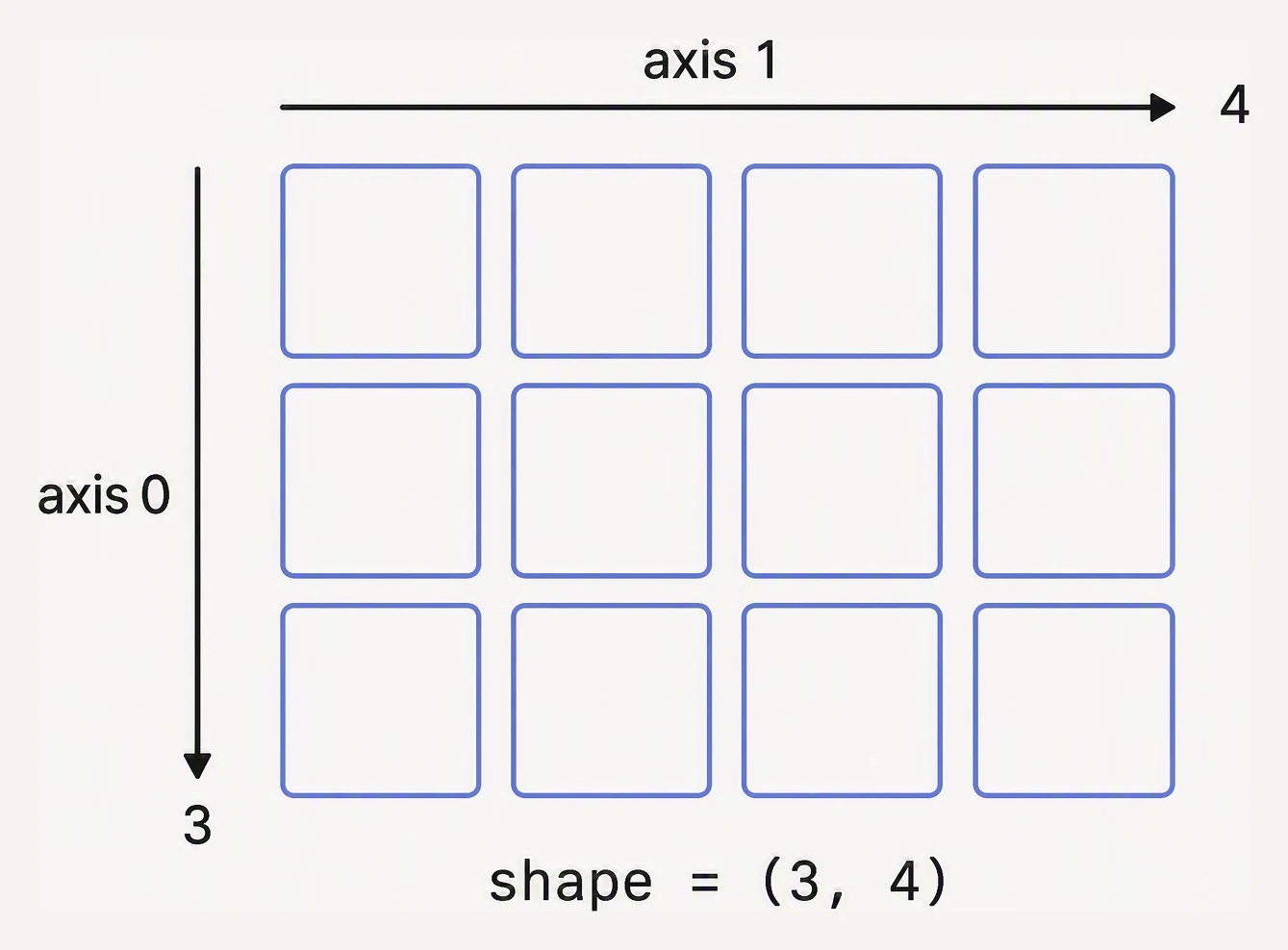
shape reads outermost first. Axis 0 goes down, axis 1 goes across.
You’re handed daily temperatures from a weather station, hour by hour. That’s a 2-D array: 7 days, 24 hours each.
import numpy as np

# 7 days × 24 hourly temperatures (°C)
np.random.seed(42)
temps = 18 + 8 * np.random.randn(7, 24)

print("shape    :", temps.shape)     # (7, 24)
print("ndim     :", temps.ndim)      # 2
print("size     :", temps.size)      # 168
print("dtype    :", temps.dtype)     # float64
print("itemsize :", temps.itemsize)  # 8 bytes per float64
print("nbytes   :", temps.nbytes)    # 168 * 8 = 1344
print("strides  :", temps.strides)   # bytes to step per axis
shape : (7, 24)
ndim : 2
size : 168
dtype : float64
itemsize : 8
nbytes : 1344
strides : (192, 8)Those seven attributes tell you almost everything you need to debug an array problem:
shape— a tuple of axis lengths.(7, 24)means “7 rows, 24 columns.”ndim— how many axes (justlen(shape)).size— total number of elements (prod(shape)).dtype— the type of each element. Every element shares one dtype.itemsize— bytes per element.float64= 8 bytes.nbytes— total memory:size × itemsize.strides— bytes to step to reach the next element along each axis.(192, 8)says “jump 192 bytes to the next row, 8 bytes to the next column” (24 columns × 8 bytes = one 192-byte row).
When something breaks, print arr.shape and arr.dtype first. Ninety percent of NumPy bugs
are one of those two being something other than what you assumed.
Strides: one block, many shapes
That last attribute, strides, is the quiet hero. The array’s data is a flat, one-dimensional
run of bytes; strides is the recipe for reading that flat run as a grid. Because the shape
lives in the strides and not in the data, NumPy can hand you the same million bytes viewed as a
flat vector, a 1000×1000 matrix, or a stack of images without copying a single byte — it just
rewrites the stride recipe. That is why reshaping and transposing are nearly free, a trick the
reshape lesson leans on hard.
Why ndarrays are fast — one block, one type
A Python list of a million floats is a million separate PyFloat objects scattered across the
heap, each carrying type info and a reference count. Adding two such lists spends more time
chasing pointers than doing arithmetic.
An ndarray of a million float64s is one contiguous 8 MB buffer. The CPU reads it
sequentially, the cache prefetcher loves it, and SIMD instructions chew through 4–8 floats per
cycle. The dtype is half of that story, and it has a memory cost worth seeing:
import numpy as np

# float64 vs int8: huge difference in memory footprint.
a = np.zeros(1_000_000, dtype=np.float64)
b = np.zeros(1_000_000, dtype=np.int8)

print(f"float64: {a.nbytes / 1024:8.1f} KB")
print(f"int8   : {b.nbytes / 1024:8.1f} KB")
float64: 7812.5 KB
int8 : 976.6 KBSame one million elements, but float64 costs ~7,813 KB (~7.6 MB) and int8 costs ~977 KB
(~1 MB) — an 8× difference decided entirely by dtype. On production-size data (billions of rows),
that choice is the difference between a job that runs and one that runs out of memory.
Three ways to make an array from data you already have
import numpy as np

# 1) From a Python list (or list of lists).
prices = np.array([4.50, 1.20, 45.00, 18.00])
print("from list :", prices, prices.dtype)

# 2) From another array — useful for changing dtype.
prices_f32 = np.array(prices, dtype=np.float32)
print("as float32:", prices_f32.dtype, prices_f32.nbytes, "bytes")

# 3) With an explicit dtype right away.
ids = np.array([1001, 1002, 1003], dtype=np.int32)
print("ids       :", ids, ids.dtype)
from list : [ 4.5 1.2 45. 18. ] float64
as float32: float32 16 bytes
ids : [1001 1002 1003] int32NumPy infers the dtype from your data unless you override it: a list of Python ints becomes
int64 on most systems, a list of floats becomes float64. Setting dtype= explicitly when you
know the range saves memory and prevents silent upcasts later.
The mental model: everything is the same object
Whether it is a scalar wrapped in an array, a 1-D price series, a 2-D spreadsheet of features, a
3-D colour image, or a 4-D batch of images, it is all one type with the same methods. The only
thing that changes is shape.
import numpy as np

scalar = np.array(42)              # 0-D
vector = np.array([1, 2, 3])       # 1-D
matrix = np.array([[1, 2], [3, 4]])# 2-D
image  = np.zeros((480, 640, 3))   # 3-D — H × W × RGB
batch  = np.zeros((32, 3, 224, 224))# 4-D — N × C × H × W (PyTorch convention)

for name, a in [("scalar", scalar), ("vector", vector),
                ("matrix", matrix), ("image", image), ("batch", batch)]:
    print(f"{name:7} ndim={a.ndim}  shape={a.shape}")
scalar ndim=0 shape=()
vector ndim=1 shape=(3,)
matrix ndim=2 shape=(2, 2)
image ndim=3 shape=(480, 640, 3)
batch ndim=4 shape=(32, 3, 224, 224)Once you start reading neural-net code you will see shapes like (32, 3, 224, 224) everywhere —
a batch of 32 images, 3 channels each, 224×224 pixels. Same ndarray, just more axes.
In one breath
Every NumPy object is one type — the ndarray — described by a few attributes: shape (axis
lengths), ndim (number of axes = len(shape)), size (total elements = product of shape),
dtype (the single type every element shares), itemsize/nbytes (bytes per element / in
total), and strides (bytes to step along each axis). It is fast because it is one
contiguous, single-type buffer the CPU can stream and SIMD through, unlike a Python list of
scattered objects — and dtype alone swings memory 8× (float64 vs int8 on a million elements).
The same buffer can be a scalar, a 1-D series, a 2-D table, a 3-D image, or a 4-D batch; only
shape changes, and strides let it be re-viewed in a new shape without copying. When an
array op breaks, print .shape and .dtype first — that is 90% of NumPy bugs.
Practice
Quick check
(64, 32, 32, 3). What's its ndim and what might it represent?np.zeros(1_000_000, dtype=np.float32) use half the memory of np.zeros(1_000_000)?A question to carry forward
You can now describe and dissect any array, and convert a Python list you already hold into one.
But look back at how every example here began: np.array([...]), a literal typed out by hand. In
real code you almost never have the literal. You have a shape you want filled — 128 embedding
vectors of zeros, a bias vector of ones, a range of x-values for a plot, a matrix of random
weights for a brand-new model.
So the next lesson is the toolbox of constructors that conjure an array from a shape alone:
zeros, ones, full, the fast-but-dangerous empty, the two range-makers arange and
linspace, eye, and the modern random generator. Which one for which job — and which one will
silently hand you garbage if you misuse it?
Practice this in an interview
All questionsPython lists are heterogeneous, pointer-based, and general-purpose. NumPy arrays are homogeneous, stored as contiguous typed memory, and support vectorised operations that run at C speed. For numerical work on more than a few hundred elements, NumPy is almost always faster and more memory-efficient.
CategoricalDtype stores a column as integer codes plus a small lookup table of unique values, dramatically reducing memory for low-cardinality string columns. It also enforces a fixed set of valid values, enables natural ordering, and speeds up groupby and sort operations.
NumPy operations execute compiled C code over contiguous memory blocks in a single call, while a Python loop incurs interpreter overhead and dynamic type checks on every element. Vectorization means expressing an operation over an entire array at once so the hot path never re-enters the Python interpreter.
Categorical dtype stores a column's unique values once in a lookup table and represents each row as a small integer code, replacing repeated Python string objects. This cuts memory by an order of magnitude for low-cardinality string columns and accelerates GroupBy, sorting, and equality comparisons because pandas operates on integer codes rather than string comparisons.