PySpark DataFrames — the only API you'll need
Spark's DataFrame is a typed Dataset[Row] with a query optimizer behind it. It replaced RDDs for almost everything — and it's the one API you should learn first.
Written and reviewed by Shreyash Prashu Last reviewed
What you'll learn
- What a Spark DataFrame is (vs pandas, vs RDDs)
- Five reliable ways to create one
- Inspecting a DataFrame: schema, count, show, explain
Before you start
The whole architecture chapter operated one object relentlessly and never once introduced it. Every example wrote
orders.filter(...), df.groupBy("country") — leaning on the DataFrame as if it were obvious.
We closed by admitting we’d studied the engine while never meeting the thing it was built to drive. We asked the plainest question of all: what is a Spark DataFrame — a distributed table, a plan, both — and how is it different from the pandas DataFrame you already know? This lesson answers it, and it opens the chapter where we finally start driving.
If you’ve used pandas, a Spark DataFrame will feel familiar — rows,
columns, a .show() instead of .head(). But under the hood, a Spark
DataFrame is fundamentally different: it’s a plan that runs across
many machines, optimized by Catalyst, lazily evaluated.
Once you internalize that, the whole API stops looking like pandas and starts looking like SQL — because that’s basically what it is.
What’s a Spark DataFrame, technically?
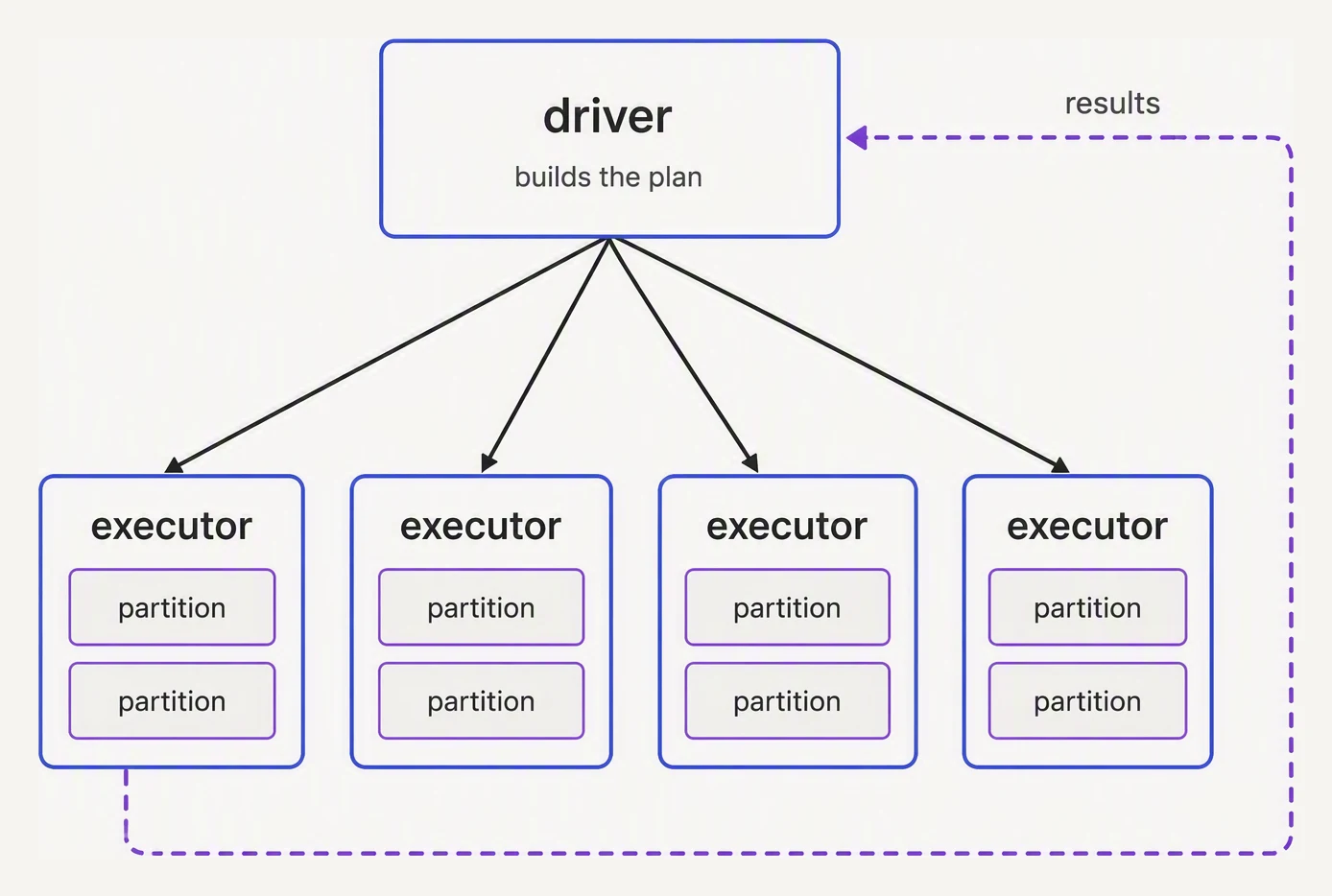
The driver decides. The executors do the work, one partition at a time.
A DataFrame is a typed Dataset of Row objects. (In Scala that
translates to Dataset[Row]. In Python the typing isn’t enforced at
runtime, but the schema is.) Each column has a fixed type. Each row
has the same set of columns.
That alone is not interesting. The interesting part is what wraps it:
- A logical plan — the tree of transformations you’ve chained
- A Catalyst optimizer — rearranges the plan for performance
- A distributed execution layer — runs across executors
When you write df.filter(...).groupBy(...).agg(...), you’re not
operating on data. You’re building a tree. Each of those calls is a
transformation (lazy — just extends the plan).
Spark runs the tree only when you call an action (something that
needs a real result, like .count(), .show(), or .write).
DataFrame vs RDD — why DataFrames won
Spark started with RDDs (Resilient Distributed Datasets) — a lower-level API where each transformation is opaque to Spark.
# RDD-style: opaque to the optimizer
rdd = spark.sparkContext.textFile("s3://bucket/data.txt")
counts = (rdd.map(lambda line: line.split(","))
             .filter(lambda parts: parts[2] == "PAID")
             .map(lambda parts: (parts[0], int(parts[3])))
             .reduceByKey(lambda a, b: a + b))
Spark can’t optimize that. The lambdas are Python functions; Catalyst has no idea what they do.
If you forgot to filter early, Spark won’t push it down for you.
# DataFrame-style: structured, optimizable
df = spark.read.csv("s3://bucket/data.txt", header=True)
counts = (df.filter(F.col("status") == "PAID")
            .groupBy("user_id")
            .agg(F.sum("amount").alias("total")))
Now Catalyst sees the filter, knows it’s a column comparison, and can push it down to Parquet read time. It sees the groupBy and picks the right shuffle strategy. Same job, less hand-tuning.
For DataFrame work, you can ignore RDDs entirely. They survive for legacy code and the rare case where you need a transformation DataFrames don’t expose.
The same job — two APIs, very different performance
Hit Run both to race them. Toggle the dataset size to see the gap widen — Catalyst's optimizations compound as data grows.
rdd = sc.textFile("s3://bucket/orders.csv")
counts = (
    rdd
    .map(lambda line: line.split(","))
    .filter(lambda p: p[2] == "PAID")
    .map(lambda p: (p[0], float(p[3])))
    .reduceByKey(lambda a, b: a + b)
)
counts.collect()df = spark.read.csv(
"s3://bucket/orders.csv",
header=True,
)
counts = (
df
.filter(F.col("status") == "PAID")
.groupBy("user_id")
.agg(F.sum("amount").alias("total"))
)
counts.collect()Five ways to create a DataFrame
In real work, you’ll use one of these:
1. From a file (Parquet, CSV, JSON)
# Parquet — the default for any non-trivial data lake
df = spark.read.parquet("s3://bucket/orders/")

# CSV with header
df = spark.read.option("header", True).csv("s3://bucket/raw/orders.csv")

# JSON lines
df = spark.read.json("s3://bucket/events/*.json")
2. From a format("...") builder
df = (spark.read
      .format("parquet")
      .option("mergeSchema", "false")
      .load("s3://bucket/orders/"))
Equivalent to the first form, but extends to non-built-in sources
(format("delta"), format("kafka"), etc).
3. From a Python collection (tests and demos)
data = [
    ("Aarav", "Mumbai",  55000),
    ("Bea",   "NYC",     92000),
    ("Chen",  "Beijing", 48000),
]
df = spark.createDataFrame(data, ["name", "city", "salary"])
This works because Spark infers the schema from the data. For production, define an explicit schema (next lesson).
4. From JDBC (a relational DB)
df = (spark.read
      .format("jdbc")
      .option("url", "jdbc:postgresql://host/db")
      .option("dbtable", "orders")
      .option("user", "u")
      .option("password", "p")
      .load())
Useful for migration or one-off pulls. Don’t use this in steady-state pipelines — JDBC reads single-threaded by default and hits the source DB hard.
5. From a streaming source
events = (spark.readStream
          .format("kafka")
          .option("kafka.bootstrap.servers", "broker:9092")
          .option("subscribe", "clicks")
          .load())
A streaming DataFrame is the same API; it just runs in micro-batches.
Inspect a DataFrame in 10 seconds
The five methods you’ll run within seconds of touching any new DataFrame:
df.printSchema()           # column names + types (free — metadata only)
df.show(5, truncate=False) # first 5 rows, full strings (triggers a job)
df.count()                 # row count (triggers a full scan)
df.columns                 # list of column names (free — metadata only)
df.dtypes                  # list of (name, type) tuples (free — metadata only)
And one more that’s underused but invaluable:
df.explain(mode="formatted") # the physical plan — see the next lessonsexplain() shows you what Spark will actually do. We’ll cover it
in detail in the explain-plans lesson.
Selecting and adding columns
The API is intentionally close to SQL:
# Select columns
df.select("name", "amount")
df.select(F.col("name"), F.col("amount") * 1.18)         # with computation

# Add a new column
df.withColumn("net", F.col("amount") - F.col("discount"))

# Rename
df.withColumnRenamed("amount", "gross_amount")

# Drop
df.drop("internal_id")

# Filter (where is an alias)
df.filter(F.col("status") == "PAID")
df.where("status = 'PAID' AND amount > 100")             # SQL string also works
F is the conventional alias for pyspark.sql.functions. It holds
hundreds of functions: F.col, F.lit, F.when, F.sum, F.lower,
F.to_date, F.split, F.array_contains, etc.
Most pandas users miss this for the first week — and then can’t stop using it.
Why F.col() and not df.col?
You’ll see three ways to reference a column:
df["name"]           # works for selection
df.name              # works as attribute, but breaks for names with spaces / keywords
F.col("name")        # the most portable, used in functions, joins, window specs
F.col("name") is the idiomatic choice — it works in every context
(filter, withColumn, window functions, aggregations) and isn’t tied
to a specific DataFrame.
A real-world flow
from pyspark.sql import SparkSession, functions as F

spark = SparkSession.builder.appName("revenue").getOrCreate()

# 1. Read
orders = spark.read.parquet("s3://bucket/orders/")

# 2. Inspect
orders.printSchema()
orders.show(3)

# 3. Transform
revenue = (orders
    .filter(F.col("status") == "PAID")
    .withColumn("net", F.col("amount") - F.col("discount"))
    .groupBy("country")
    .agg(F.sum("net").alias("revenue"))
    .orderBy(F.desc("revenue")))

# 4. Action — first one that actually runs
revenue.write.mode("overwrite").parquet("s3://bucket/revenue_by_country/")
Read → inspect → transform → write. That’s 80% of the DataFrame work you’ll do.
In one breath
A Spark DataFrame looks like pandas (rows, columns, .show()) but is fundamentally a lazily-evaluated,
Catalyst-optimized plan that runs across many machines.
Technically, it is a typed Dataset[Row] wrapped in a logical plan and a distributed execution layer. It won over
RDDs because RDD lambdas are opaque to the optimizer, while DataFrame operations are structured enough for
Catalyst to push filters into the scan and pick shuffle strategies for you.
You create one from:
- a file (Parquet preferred)
- a format-builder
- a Python collection
- JDBC
- a stream
You inspect it with metadata-only calls (printSchema, columns, dtypes) versus job-triggering ones (show,
count). You reference columns idiomatically with F.col("name").
Practice
Before the quiz, predict timing again. df = spark.read.parquet("s3://.../large/") returns in 100 ms on a 10 TB
table. What did Spark actually do in that 100 ms, and what’s the first later line that touches the columnar
data?
Then the RDD-vs-DataFrame point: you write the same job two ways — an RDD chain of map/filter lambdas, and
a DataFrame chain of .filter(F.col(...))/.groupBy(...). Explain why Catalyst can speed up the second but is
powerless on the first.
Quick check
df = spark.read.parquet('s3://bucket/large/') and the call returns in 100ms. What does that mean?A question to carry forward
We kept calling the DataFrame “typed” — a Dataset[Row] where every column has a fixed type — and then quietly
relied on that fact.
When you createDataFrame from a Python list, the types appeared; when you read.parquet, the types appeared.
But appeared from where? Twice in this lesson the answer was a parenthetical we hurried past: “Spark
infers the schema from the data… for production, define an explicit schema (next lesson).”
That hurry hides a genuinely expensive, genuinely dangerous default. Inferring types means Spark guesses them by
reading your data an extra time — and guesses wrong in ways that silently corrupt results: a zip code 01234 read
as the integer 1234, leading zero gone, every downstream join broken.
So the question to carry forward is the one that separates a demo DataFrame from a production one: where do a DataFrame’s column types actually come from, and why is letting Spark guess them both slow and unsafe?
How do you declare them explicitly so a 01234 stays a string? That is schemas, and it is the next lesson.
Practice this in an interview
All questionsRDD is the low-level, type-safe distributed collection with no schema knowledge. DataFrame adds a named-column schema on top, enabling the Catalyst optimizer and codegen — but loses compile-time type safety. Dataset merges both worlds: it carries a schema and passes through Catalyst while remaining statically typed in Scala/Java.
pandas operates in-memory on a single machine, making it fast and simple for datasets under a few gigabytes. Spark distributes computation across a cluster, handles terabyte-scale data, and integrates with cloud storage — but adds significant overhead for small data. The crossover point is roughly when your data no longer fits in RAM or when processing time on a single machine becomes unacceptable.
cache() stores a DataFrame in executor memory using the default MEMORYANDDISK storage level. persist() lets you choose the storage level — memory-only, disk-only, serialized, or replicated. Use caching when a DataFrame is reused multiple times in the same application; without it, Spark recomputes the entire lineage from scratch on each action.
Parquet is a columnar, compressed format optimized for analytical reads — only the queried columns are scanned. Avro is row-oriented, schema-embedded, and optimized for write-heavy pipelines and Kafka serialization. CSV is human-readable but schema-less, uncompressed, and slow at scale — use it only at system boundaries where a downstream tool requires it.