Data skew — the long-tail killer
One partition has 100x the data. The whole stage waits for that one executor. Skew is the most common production Spark problem — and it has known fixes.
Written and reviewed by Shreyash Prashu Last reviewed
What you'll learn
- How to spot skew in the Spark UI (the long-tail signature)
- Three common causes: hot keys, NULL clustering, low-cardinality joins
- Four fixes: AQE skew join, salting, isolate-and-process, broadcast the other side
Before you start
It has a name: data skew. The last lesson left you with the data that refuses to balance — one value holding 80% of the rows, piling onto a single task while the cluster watches.
Here is what that looks like from the outside: you launch a job, 99% of tasks finish in 30 seconds, and one task is still running 30 minutes later. That straggler is the hot-key partition. No amount of re-partitioning made it smaller, because the problem isn’t the layout — it’s the data.
Skew is when one partition holds dramatically more data than others. The unaffected tasks are idle, waiting. The skewed task can’t be split across cores. Your cluster is mostly twiddling its thumbs, and your bill runs the whole time.
Knowing the patterns that cause skew, and the fix for each, is a core senior-engineer skill — so we’ll take them one at a time.
The Spark UI signature
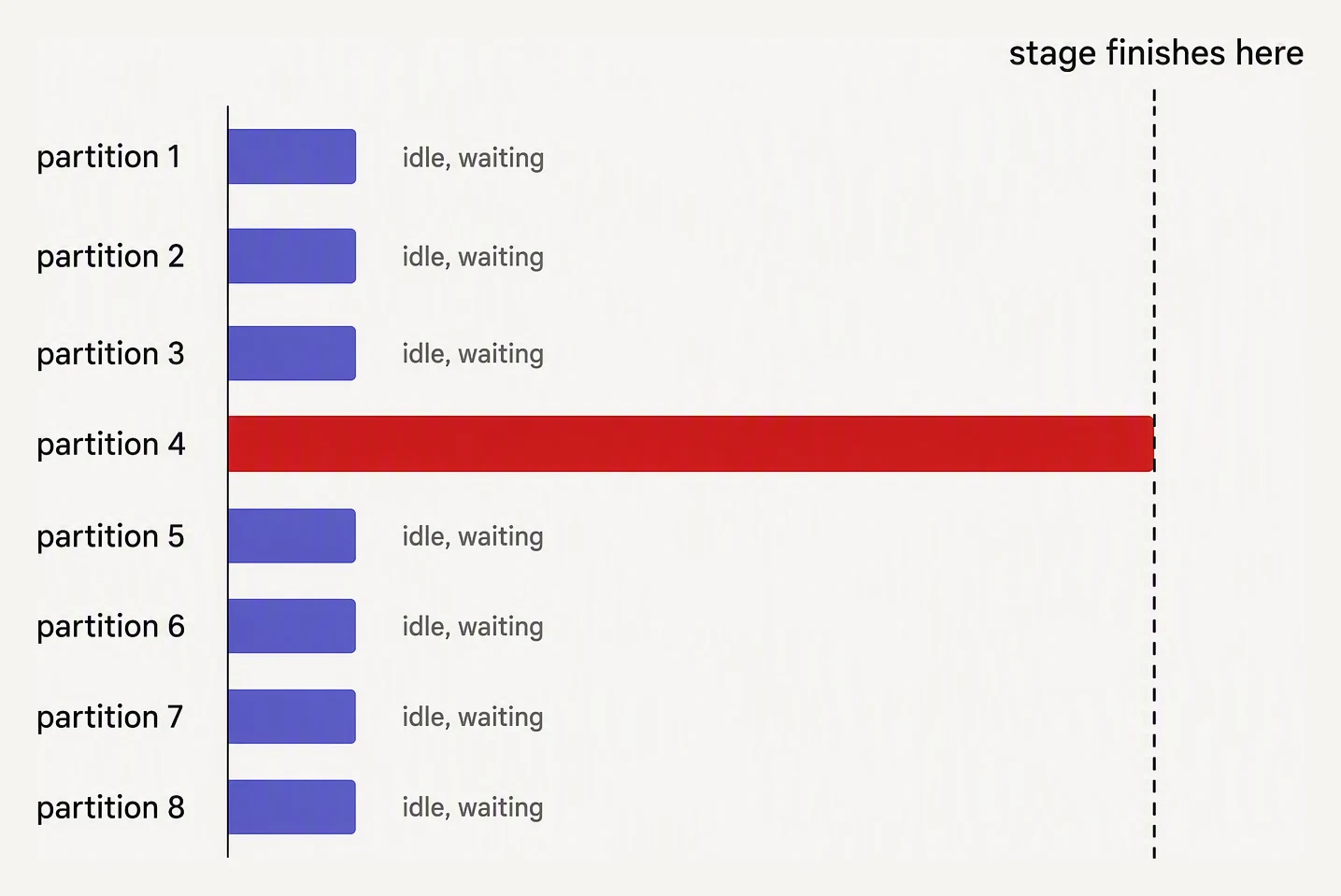
A stage is only as fast as its slowest partition.
In the Spark UI, open the slow stage and look at the Summary Metrics:
                    Min    25%    50%    75%    Max
Task Duration       2s     3s     3s     4s     45m
Shuffle Read        2MB    5MB    6MB    8MB    50GB
Records             8K     12K    13K    14K    250M
The pattern: small min/median, gigantic max. That Max column is the skewed task. Long-tail distribution = skew.
In the Tasks sub-page of the stage, sort by Duration descending. The skewed tasks are at the top.
Three common causes
Cause 1: Hot key
Your groupBy("country") includes US data. The US has 80% of your
events. All those rows hash to one partition.
events.groupBy("country").count().show()
# +-------+-----------+
# |country|      count|
# +-------+-----------+
# |     US| 1500000000|   <- the hot key
# |     IN|   80000000|
# |     UK|   40000000|
# |   ... |      ...  |
# +-------+-----------+
Cause 2: NULL clustering
NULL hashes to a fixed value. If both sides of a join have many NULLs in the key, every NULL row from each side lands in the same partition — and they multiply.
# orders has 5M rows with user_id = NULL (orphaned orders)
# users has 100K rows with user_id = NULL (data quality issue)
# Spark hashes NULL to a fixed bucket, so all 5.1M NULL rows from
# orders and all 100K from users land in the same partition — one
# huge task, even though a standard inner join produces zero matches
# (NULL != NULL in SQL equality). With eqNullSafe / <=> it explodes.
This is a nasty skew: the partition is enormous even when the join itself produces no output rows from the NULLs.
Cause 3: Low-cardinality join key
You join on tier which has only 5 values: bronze, silver, gold,
platinum, diamond. Even if the data is “balanced” across the 5,
you’ve created only 5 partitions worth of parallelism. Three nodes
sit idle.
This isn’t classic skew — it’s under-partitioning. The fix is similar (introduce more parallelism on the join key) and the symptom is similar (only a few tasks doing work).
A Spark job is only as fast as its slowest partition
Pick a distribution, run the job, then fix it with salting.
Fix 1: AQE skew join (free)
Spark 3 with AQE enabled (the default) detects skewed partitions at runtime and splits them. A 50GB partition becomes ten 5GB sub-partitions, processed in parallel.
# These are on by default in Spark 3.x — check yours
spark.conf.set("spark.sql.adaptive.enabled", "true")
spark.conf.set("spark.sql.adaptive.skewJoin.enabled", "true")
spark.conf.set("spark.sql.adaptive.skewJoin.skewedPartitionFactor", "5")
spark.conf.set("spark.sql.adaptive.skewJoin.skewedPartitionThresholdInBytes", "256MB")
A partition is considered skewed if it’s both:
- More than
skewedPartitionFactor× the median size - Larger than
skewedPartitionThresholdInBytes(256MB default)
For most workloads, this solves moderate skew with zero code changes.
When AQE isn’t enough:
- AQE only handles join skew, not groupBy skew (it can coalesce small partitions but doesn’t currently split big ones for aggregates)
- AQE thresholds may be too high for severely-skewed data
- The replicated data from splitting still has to materialize somewhere
For severe cases, you need active intervention.
Fix 2: Salting
The classic technique. Add a random suffix to the hot key so the load spreads, then aggregate the salts back together.
from pyspark.sql import functions as F

# 1. Salt the skewed key in the big table
SALT_BUCKETS = 50

salted_orders = orders.withColumn(
    "country_salt",
    F.concat(F.col("country"), F.lit("_"),
             (F.rand() * SALT_BUCKETS).cast("int"))
)

# 2. Replicate the small table so it has rows for every salt value
salt_keys = spark.range(0, SALT_BUCKETS).withColumnRenamed("id", "salt")
country_dim_replicated = (country_dim
    .crossJoin(salt_keys)
    .withColumn("country_salt",
                F.concat(F.col("country"), F.lit("_"), F.col("salt")))
)

# 3. Join on the salted key — now the US is spread across 50 partitions
joined = salted_orders.join(country_dim_replicated, "country_salt")

# 4. Aggregate (sums combine correctly across salts)
result = joined.groupBy("country").agg(F.sum("amount").alias("total"))
The trade-off:
- Pro: removes skew completely; the US is now 50 partitions of ~equal size
- Con: the small table grew 50x; each cross-join row matches multiple replicas
In a groupBy-only case (no join), salting is simpler — you just need a second aggregation:
# Salted groupBy — two-pass aggregation
salted = events.withColumn("country_salt",
    F.concat(F.col("country"), F.lit("_"),
             (F.rand() * 50).cast("int")))

# First aggregation — parallelized across 50 sub-buckets per country
partial = salted.groupBy("country_salt").agg(F.sum("amount").alias("partial_sum"))

# Second aggregation — combine salts back into countries
final = (partial.withColumn("country",
            F.regexp_extract("country_salt", r"^(.+)_\d+$", 1))
.groupBy("country").agg(F.sum("partial_sum").alias("total")))Fix 3: Isolate and process separately
Sometimes the cleanest fix is to split the hot key off and process it on its own.
# Process US and non-US separately
us_orders = orders.filter(F.col("country") == "US")
non_us_orders = orders.filter(F.col("country") != "US")

# US: broadcast the small dim and process without shuffle
us_joined = us_orders.join(F.broadcast(country_dim), "country")

# Non-US: regular join — balanced data
non_us_joined = non_us_orders.join(country_dim, "country")

result = us_joined.unionByName(non_us_joined)
This is explicit, debuggable, and often faster than salting because you can use broadcast on the hot side (where the dim filtered to one country is tiny).
Best for cases where you know the hot key in advance and it’s a small set (1-2 values).
Fix 4: Filter NULLs out
If NULL keys are causing skew, filter them out before the join — they weren’t going to match anyway:
# Bad: all NULL rows shuffle to one partition (skew), even though
#      a standard inner join produces zero output rows for NULLs
orders.join(users, "user_id")

# Good: NULLs filtered explicitly
clean_orders = orders.filter(F.col("user_id").isNotNull())
clean_users = users.filter(F.col("user_id").isNotNull())
clean_orders.join(clean_users, "user_id")
If you actually wanted NULL-on-NULL matches (rarely), use the
NULL-safe equality <=> (or .eqNullSafe()) and be ready for the
explosion.
Fix 5: Broadcast the other side
If the skewed side has a small partner, broadcast the partner. The broadcast eliminates the shuffle entirely — and with it, the opportunity to skew.
# Even with skewed orders, no shuffle = no skew problem
orders.join(F.broadcast(country_dim), "country")
This isn’t always possible (sometimes the small side isn’t actually small), but when it is, it’s the cleanest fix.
A toy skew demonstration
You can feel skew in pure Python:
# Toy: simulate skewed vs salted groupBy partitioning
from collections import defaultdict
import hashlib

# Deterministic hash -> partition (Python's hash() is randomized per run)
def part_of(key, n):
    return int(hashlib.md5(key.encode()).hexdigest(), 16) % n

# Skewed data: 80% 'US', the rest spread thin
rows = (
    [("US", 1)] * 8_000_000 +
    [("IN", 1)] * 500_000 +
    [("UK", 1)] * 500_000 +
    [("FR", 1)] * 500_000 +
    [("DE", 1)] * 500_000
)

def assign(rows, n):
    parts = defaultdict(int)
    for k, _ in rows:
        parts[part_of(k, n)] += 1
    return parts

def longest(parts):
    return max(parts.values())   # the straggler sets the stage time

# 5 partitions, hashed by country
skewed = assign(rows, n=5)
print("Partition sizes (skewed, 5 partitions):")
for p in sorted(skewed):
    print(f"  partition {p}: {skewed[p]:>10,} rows")
print(f"Longest = stage bottleneck: {longest(skewed):,} rows")

# Salt only the hot key: US -> US_0 .. US_49, round-robin
salted = []
us = 0
for k, v in rows:
    if k == "US":
        salted.append((f"US_{us % 50}", v))
        us += 1
    else:
        salted.append((k, v))

balanced = assign(salted, n=50)
print(f"\nAfter salting US into 50 buckets (50 partitions):")
print(f"Longest = new bottleneck: {longest(balanced):,} rows")
print(f"Drop: {longest(skewed) / longest(balanced):.1f}x")
Partition sizes (skewed, 5 partitions):
partition 0: 500,000 rows
partition 2: 8,500,000 rows
partition 3: 1,000,000 rows
Longest = stage bottleneck: 8,500,000 rows
After salting US into 50 buckets (50 partitions):
Longest = new bottleneck: 820,000 rows
Drop: 10.4xRead the numbers carefully, because the honest result is more useful than a tidy slogan. The skewed stage is gated on partition 2 — 8.5 million rows (the 8M US rows, plus a smaller country that happened to hash to the same bucket).
Salting US into 50 buckets dissolves that pile: each US_j is now
~160K rows, so the US is no longer anywhere near the top. The
bottleneck drops from 8.5M to 820K — about 10x.
Why 10x and not the 50x the salt count might suggest? Because we only salted the hot key. The new straggler isn’t the US anymore — it’s an unsalted country (500K rows) sitting next to a couple of US buckets that collided into the same partition.
That is the real lesson of salting: it removes the hot key as the bottleneck and hands the floor to whatever was second-largest. You salt the worst offender, re-measure, and decide whether the new floor is good enough.
A debugging flowchart
- Stage taking 100x longer than expected? Open the Spark UI.
- Sort tasks by duration. If 1-3 tasks dominate while the rest finished fast → skew.
- Check if AQE skew join is enabled. If not, turn it on.
- Is the skewed stage a join? Try broadcasting the other side.
- Still skewed? Identify the hot key (sample the data, group by the join key, look at counts).
- Hot key small (1-3 values)? Isolate and process separately.
- Hot key NULL? Filter NULLs.
- Otherwise: salt.
In one breath
Skew is one partition holding far more than its siblings, so one task runs long after the rest have finished and the cluster idles on your dime. Spot it by the long-tail signature in the Spark UI — tiny median, gigantic max.
It comes from three places:
- a hot key (US is 80% of events)
- NULL clustering (every NULL hashes to one bucket)
- low-cardinality joins (5 values, 5 tasks)
The fixes escalate:
- let AQE’s skew join split it for free
- broadcast the small side to delete the shuffle
- filter NULLs that were never going to match
- isolate a known hot key and process it alone
- when nothing else holds, salt — scatter the hot key across many sub-buckets, then sum the buckets back
Salting removes the worst offender and hands the bottleneck to whatever was second.
Practice
Before the quiz: you join a 2-billion-row clicks table to a
500-row campaign dimension on campaign_id, and one campaign owns
70% of the clicks. Walk the debugging flowchart — which fix do you
reach for first, and why might you never need salting here at all?
Quick check
A question to carry forward
That closes the internals: you can now read a plan, force a broadcast, right-size partitions, and break skew by hand. But step back and notice something — almost nobody runs raw open-source Spark in production anymore.
Spinning up clusters, patching versions, wiring storage and schedulers and notebooks together is its own full-time job, and a managed platform does all of it for you. In the data world that platform is, overwhelmingly, Databricks — the company founded by the people who wrote Spark.
So the question that opens the next chapter is: once you stop babysitting clusters and let a platform run them, what does day-to-day Spark actually look like — and what does Databricks add on top of the engine you just learned? That is where we go next.
Practice this in an interview
All questionsData skew occurs when one or more keys concentrate disproportionately more rows than others, causing a few tasks to process gigabytes while the rest finish in seconds — one slow task stalls the entire stage. Salting appends a random suffix to skewed keys before a join or aggregation, spreading the hot key across multiple partitions, then removes the salt after aggregation.
A shuffle redistributes data across all executors so that rows with the same key end up on the same partition. It involves writing intermediate data to disk, transferring it over the network, and re-reading it — making it the most costly operation in a Spark job in terms of latency and I/O.
pandas operates in-memory on a single machine, making it fast and simple for datasets under a few gigabytes. Spark distributes computation across a cluster, handles terabyte-scale data, and integrates with cloud storage — but adds significant overhead for small data. The crossover point is roughly when your data no longer fits in RAM or when processing time on a single machine becomes unacceptable.
Train/serve skew occurs when the feature values a model sees at training time differ from those it sees at inference time, even for the same raw input — caused by divergent preprocessing code paths, different data sources, or temporal leakage. It silently degrades performance without raising obvious errors.