Schemas — inferred vs explicit
Letting Spark infer a schema is convenient. It's also a slow, sometimes-wrong default. Explicit StructTypes are the production answer.
Written and reviewed by Shreyash Prashu Last reviewed
What you'll learn
- Why schema inference is slow and risky on big files
- StructType + StructField + DataType — the building blocks
- How to handle schema evolution gracefully
Before you start
The last lesson called the DataFrame “typed” and then hurried past where those types come from with a
parenthetical: Spark infers them, and for production you should declare them. We flagged the danger — a zip code
01234 silently read as the integer 1234 — and promised the full story. Here it is: the two ways a DataFrame
gets its column types, why letting Spark guess is both slow and unsafe, and how to nail the types down yourself.
When you read a CSV or JSON, Spark needs to figure out the schema: “which columns exist, what type is each?” You can let it infer the schema from the data, or you can declare it explicitly. The inferred path is cheaper to write. The explicit path is cheaper to run, harder to break, and the only acceptable choice in production.
How inference works (and why it’s slow)
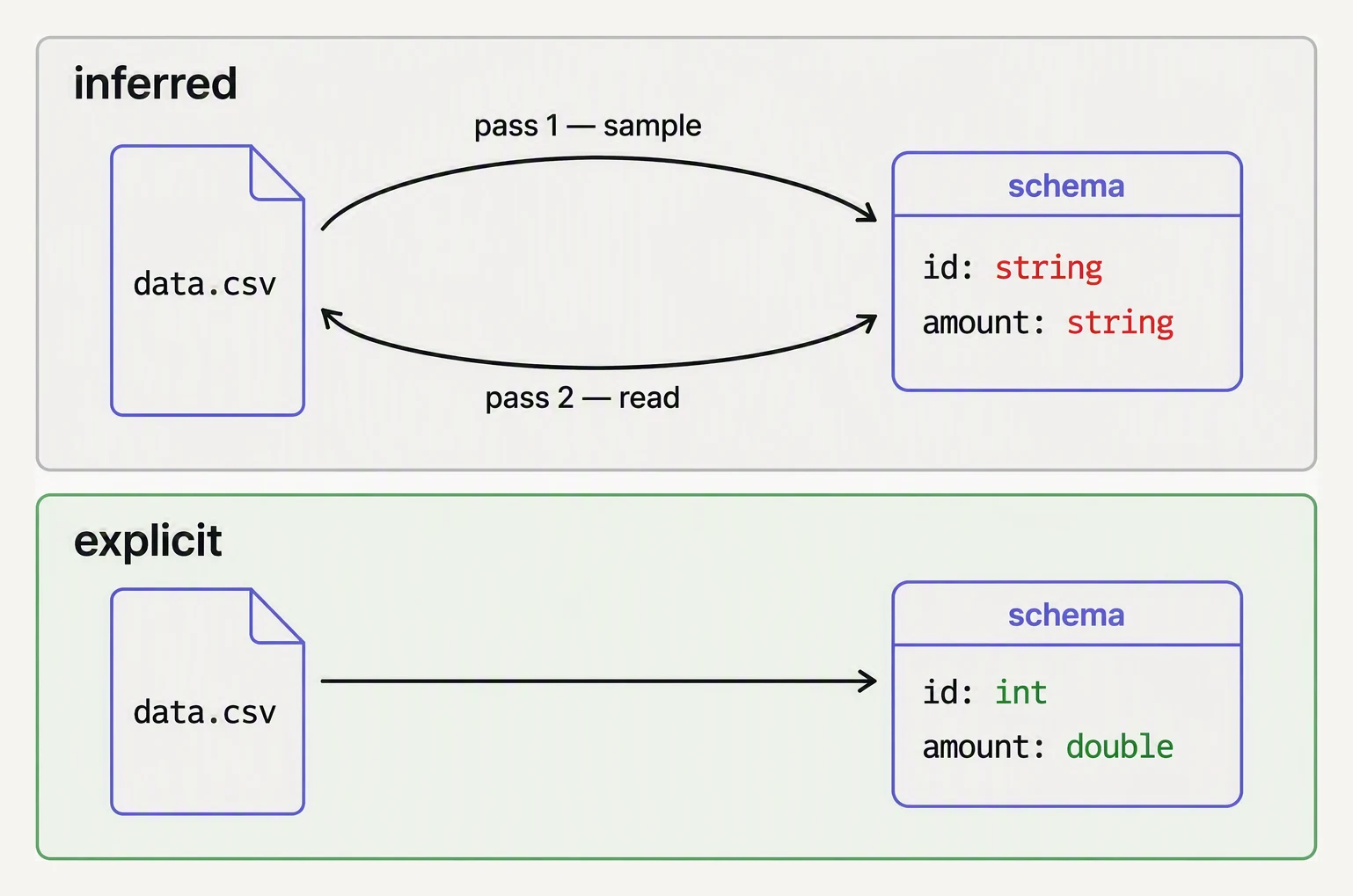
Inference costs an extra pass — and guesses. Declaring costs neither.
When you set inferSchema=True on a CSV read:
df = spark.read.option("header", True).option("inferSchema", True).csv("s3://bucket/big.csv")Spark does this:
- Reads the first few rows to find column names
- Scans the entire file a second time to determine each column’s type
- Then returns a DataFrame referencing the data
That second scan is the cost. On a 100GB CSV, you’ve paid the read cost twice before any of your actual queries run. On a streaming source you’ve usually pre-scanned the input.
JSON is worse: Spark needs to scan everything to find every possible field across all records, since JSON records can have different keys.
Parquet doesn’t have this problem — schemas are stored in the file footer and inferred instantly. Always prefer Parquet to CSV/JSON for new data.
How inference goes wrong
Beyond the speed cost, inference makes mistakes:
| Column | What’s in the file | What Spark infers | What you wanted |
|---|---|---|---|
zip_code | 01234, 00876 | IntegerType | StringType (leading zeros lost!) |
id | 12345, 98765, 1.5e9 | DoubleType | LongType |
event_at | 2026-05-28T10:30:00Z | StringType | TimestampType |
amount | 100.50, 200.00, N/A | StringType | DoubleType (or null on N/A) |
The zip code case is the classic — Spark sees integers and silently drops the leading zeros, breaking joins downstream.
The StructType building blocks
A Spark schema is a StructType (a named, ordered collection of typed
fields — think “struct” as in C/Go). Each StructField has a name, a
DataType, and a nullability flag.
from pyspark.sql.types import (
    StructType, StructField,
    StringType, IntegerType, LongType, DoubleType,
    BooleanType, DateType, TimestampType,
    ArrayType, MapType,
)

orders_schema = StructType([
    StructField("order_id",   LongType(),      nullable=False),
    StructField("user_id",    LongType(),      nullable=False),
    StructField("amount",     DoubleType(),    nullable=True),
    StructField("currency",   StringType(),    nullable=True),
    StructField("status",     StringType(),    nullable=False),
    StructField("created_at", TimestampType(), nullable=True),
    StructField("tags",       ArrayType(StringType()), nullable=True),
])

df = spark.read.schema(orders_schema).option("header", True).csv("s3://bucket/orders.csv")
The result:
- Spark skips the inference pass entirely — because you already told it the types, it never needs to read the file a second time just to guess them
- Type coercion happens on read; bad rows become
null(or fail, depending on mode) - Downstream code can rely on the types
The DDL string shorthand also works:
orders_schema = """
  order_id   BIGINT,
  user_id    BIGINT,
  amount     DOUBLE,
  currency   STRING,
  status     STRING,
  created_at TIMESTAMP,
  tags       ARRAY<STRING>
"""
df = spark.read.schema(orders_schema).csv("s3://bucket/orders.csv")
Either form is fine. DDL strings are shorter; programmatic
StructType is easier to compose at runtime.
Common DataTypes
The ones you’ll use every day:
| Type | Example value | Notes |
|---|---|---|
StringType | "Mumbai" | Default for text |
IntegerType | 42 | 32-bit; use LongType for IDs |
LongType | 1234567890123 | 64-bit; default for any ID |
DoubleType | 3.14159 | Use DecimalType for money |
DecimalType(p, s) | 123.45 | Exact decimal; required for finance |
BooleanType | True | |
DateType | "2026-05-28" | Day-precision |
TimestampType | "2026-05-28T10:00:00Z" | UTC under the hood |
ArrayType(T) | ["a", "b"] | List of T |
MapType(K, V) | {"k": "v"} | Dict |
StructType | nested record | For nested JSON-shaped data |
For money, always use DecimalType. DoubleType introduces floating-
point rounding errors that haunt financial reconciliation.
Three modes for handling bad rows
When a row doesn’t conform to the schema, you choose what happens with
.option("mode", ...):
| Mode | Behavior |
|---|---|
PERMISSIVE (default) | Fields that can’t parse become null; the row survives |
DROPMALFORMED | Bad rows are silently dropped |
FAILFAST | Job fails on the first bad row |
df = (spark.read
      .schema(orders_schema)
      .option("mode", "FAILFAST")
      .csv("s3://bucket/orders.csv"))
For production pipelines:
- Bronze (raw landing) —
PERMISSIVE+ capture the raw text in a_corrupt_recordcolumn so you can debug later - Silver (cleaned) —
FAILFASTor strict validation; fix the upstream problem - Gold (mart) — should never see bad data; it was validated upstream
Inspecting an inferred schema
A common workflow: infer first to see what Spark thinks, then write an explicit schema.
# Inspect an inferred schema, then convert it to DDL you can paste.

# Simulated 'inferred schema' as Spark would produce it
inferred = {
    "type": "struct",
    "fields": [
        {"name": "order_id",   "type": "long",      "nullable": False},
        {"name": "user_id",    "type": "long",      "nullable": False},
        {"name": "amount",     "type": "double",    "nullable": True},
        {"name": "currency",   "type": "string",    "nullable": True},
        {"name": "status",     "type": "string",    "nullable": False},
        {"name": "created_at", "type": "timestamp", "nullable": True},
    ],
}

# Build a DDL string you can paste into your code
ddl_parts = [
    f'{f["name"]:<12s} {f["type"].upper()}'
    for f in inferred["fields"]
]
print("Schema as DDL:")
print(",\n".join("  " + p for p in ddl_parts))
Schema as DDL:
order_id LONG,
user_id LONG,
amount DOUBLE,
currency STRING,
status STRING,
created_at TIMESTAMPThat’s the whole workflow in miniature: take whatever Spark guessed (here a struct dict, in real life
df.schema.json()), read it once with human eyes, and freeze it into a DDL string you paste into your code so the
guess never runs again. From this point on the read is deterministic — Spark is told order_id is LONG and
currency is STRING, rather than re-scanning the file to re-derive that every time. Inference becomes a one-time
development convenience, not a permanent runtime tax.
Schema evolution — the production hard part
Source data changes. A field is added. A field becomes optional. A field’s type changes from int to string. Your schema needs to evolve.
Three strategies:
1. Strict — enforce the schema, fail on new fields
Best for fact tables where new fields would silently fall on the floor.
# Old + new files both readable; new columns logged
df = spark.read.schema(orders_schema_v3).csv("s3://bucket/orders/")
2. Permissive merge — Parquet’s mergeSchema
When you write Parquet with different schemas over time, Spark can merge them on read:
df = (spark.read
      .option("mergeSchema", "true")
      .parquet("s3://bucket/orders/"))
Expensive (reads every file’s footer) but useful in dev.
3. Use a table format
Delta Lake, Iceberg, and Hudi all support proper schema evolution: add columns safely, with type-promotion rules, and an audit trail of schema changes. This is the production answer.
# Delta — schema evolution with one option
(df_new.write
   .format("delta")
   .mode("append")
   .option("mergeSchema", "true")
.save("s3://bucket/orders_delta/"))In one breath
A Spark schema is a StructType of StructFields (each a name, a DataType, and a nullability flag), and you can
let Spark infer it — convenient, but it re-scans the entire CSV/JSON just to guess types (doubling I/O) and
guesses wrong in dangerous ways (a zip code 01234 becomes the integer 1234) — or declare it explicitly via
StructType or a DDL string, which skips the inference pass and coerces types on read; Parquet sidesteps the whole
problem by storing its schema in the footer, money belongs in DecimalType not DoubleType, malformed rows are
handled by PERMISSIVE/DROPMALFORMED/FAILFAST modes, and real schema evolution is what pushes teams to Delta
or Iceberg.
Practice
Before the quiz, run the inference-failure table in your head: for zip_code values 01234/00876, what type
does Spark infer, what did you want, and what exactly breaks downstream? Then make the production call: for a Bronze
raw-landing table vs a Silver cleaned table, which bad-row mode fits each and why — and what does pairing
PERMISSIVE with a _corrupt_record column buy you that plain DROPMALFORMED does not?
Quick check
inferSchema=True problematic on large CSV files in production?A question to carry forward
Look closely at why we cared so much about pinning down types — and one column in every schema we wrote gives it
away. order_id and user_id were LongType, marked nullable=False, fussed over more than the others. They are
the keys, and a key only earns that fussiness when you’re about to match it against another table’s key. A
schema in isolation is just a description; it becomes load-bearing the moment two DataFrames have to meet on a
shared column.
And that meeting is both the most common thing you’ll do with two DataFrames and — you already know this from the last chapter — one of the most expensive, because matching keys across the cluster means a shuffle. So the question to carry forward is where structure and performance collide: when you take two well-typed DataFrames and combine them on a key, how does Spark actually do it, why is the naive version a full shuffle, and when can a tiny table turn an hour-long join into a one-minute one? That is joins in Spark, and it is the next lesson.
Practice this in an interview
All questionsRDD is the low-level, type-safe distributed collection with no schema knowledge. DataFrame adds a named-column schema on top, enabling the Catalyst optimizer and codegen — but loses compile-time type safety. Dataset merges both worlds: it carries a schema and passes through Catalyst while remaining statically typed in Scala/Java.
A star schema has a central fact table joined directly to denormalized dimension tables, giving simple two-table joins and fast query performance at the cost of some data redundancy. A snowflake schema normalizes dimensions into sub-dimension tables, reducing storage and update anomalies but requiring more joins that can slow analytical queries.
A star schema has a central fact table joined directly to denormalized dimension tables — one join hop per dimension, simple queries, better query performance. A snowflake schema normalizes dimension tables into sub-dimensions, reducing storage redundancy but requiring more joins. Star schemas are preferred for analytics workloads; snowflake schemas are sometimes used when a dimension is very large and has many redundant attribute values.
Schema evolution covers adding, renaming, removing, or retyping columns in a data stream or table over time. Safe strategies include: only adding nullable columns (backwards-compatible), using schema registries to enforce compatibility rules before a producer publishes, and open table formats like Iceberg that track schema history and allow column renames and reorders without rewriting data.