Delta Lake — ACID on top of Parquet
The storage layer that turned data lakes into something you can actually trust. Time travel, schema enforcement, and the MERGE that finally made upsert easy.
Written and reviewed by Shreyash Prashu Last reviewed
What you'll learn
- How the _delta_log directory gives Parquet ACID semantics
- Time travel, schema enforcement, and schema evolution — when to use each
- The MERGE operation and the CDC/SCD-Type-2 pattern
- VACUUM, OPTIMIZE, Z-ORDER — the maintenance trio
Before you start
The last lesson left you with a folder of Parquet files that somehow behaved like a database:
- atomic writes
- undo
- schema enforcement
It also asked what makes that possible. The answer has a name, Delta Lake, but to appreciate what it adds you have to first feel what’s missing without it.
Plain Parquet on S3 is a good storage format and a bad database. Two writers can clobber each other. A failed write leaves orphan files. A reader can pick up half a commit. You can’t “go back to yesterday.”
Delta Lake fixes all of this by adding a transaction log (an append-only directory of JSON commit files that records every change to the table) next to your Parquet files. The data is still Parquet — anyone with a Parquet reader can read the underlying files. But everything that touches the table goes through the log.
It gives you:
- ACID (Atomicity, Consistency, Isolation, Durability — database-style guarantees that each write either fully succeeds or leaves nothing behind)
- versioning
- the features built on top
Common misconception: Delta Lake is not a new file format. It is Parquet files plus a transaction log. The Parquet files are readable by any Parquet tool; the log is what adds the database semantics.
If you’re on Databricks, Delta is the default for everything. Knowing how the log works is what separates someone who uses Delta from someone who debugs it.
The mechanism — a log of commits
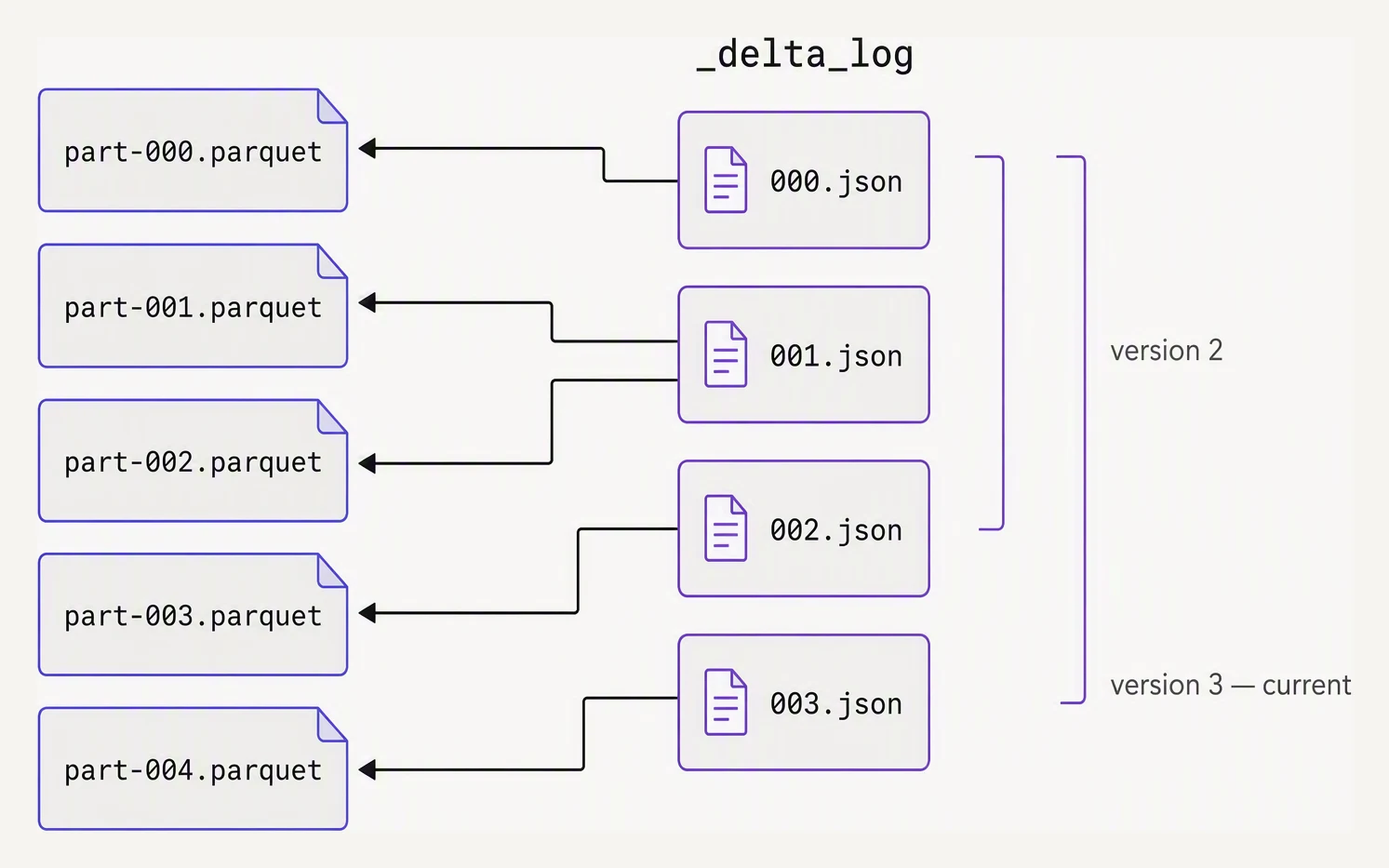
The log is the table. The parquet files are just bytes it points at.
A Delta table is a directory:
/data/customers/
  _delta_log/
    00000000000000000000.json
    00000000000000000001.json
    00000000000000000002.json
    ...
  part-00000-abc.snappy.parquet
  part-00001-def.snappy.parquet
  part-00002-ghi.snappy.parquet
  ...
Each .json file in _delta_log/ is one commit. A commit lists which Parquet files were added (add) and which were removed (remove) in that transaction. The state of the table at version N is the union of all add/remove actions in commits 0 through N.
That’s the whole core idea. Everything else — time travel, ACID, schema enforcement — falls out of this one principle: the table is defined by its log, not by which files exist on disk.
When you write to a Delta table, the writer:
- Reads the current version (highest numbered log file)
- Writes new Parquet files (not yet visible)
- Atomically appends
N+1.jsonwith the add/remove actions - (On conflict — another writer also wrote N+1 — the writer retries with N+2 if the changes don’t conflict)
The atomicity comes from the underlying object store’s conditional-write guarantee:
- On S3, Delta uses a PUT with
If-None-Match(fail if the file already exists) - On ADLS it uses a lease-based conditional put
- On GCS it’s the equivalent
The log file appearing IS the commit happening. If two writers race to write the same version file, only one wins; the loser retries.
Reading and writing — same as Parquet, mostly
The PySpark API barely changes:
# Write
(df.write
   .format("delta")
   .mode("overwrite")
   .save("/data/customers"))

# Or as a UC-managed table
df.write.format("delta").saveAsTable("main.sales.customers")

# Read
df = spark.read.format("delta").load("/data/customers")
df = spark.read.table("main.sales.customers")
You can also use the path form spark.read.format("delta").load(...) or the table form. On Databricks with Unity Catalog, prefer the table form — it gives you permissions, lineage, and discovery.
Time travel
Because the log is append-only, every prior version of the table is still reconstructable:
# By version number
df_old = (spark.read
    .format("delta")
    .option("versionAsOf", 5)
    .load("/data/customers"))

# Or by timestamp
df_yesterday = (spark.read
    .format("delta")
    .option("timestampAsOf", "2026-05-27 09:00:00")
    .load("/data/customers"))

# SQL equivalent
spark.sql("SELECT * FROM main.sales.customers VERSION AS OF 5")
spark.sql("SELECT * FROM main.sales.customers TIMESTAMP AS OF '2026-05-27'")
Time travel is what makes Delta a real database, not a fancy folder. You can:
- roll back a bad write
- reproduce a model’s training data exactly
- diff yesterday’s table against today’s
Schema enforcement vs schema evolution
By default, Delta enforces the schema. A write whose columns or types don’t match the table fails loudly at write time, not silently at read time:
# Table has columns: customer_id (long), name (string), age (int)
bad = spark.createDataFrame(
    [(1, "Aarav", "thirty")],   # age is string, not int!
    ["customer_id", "name", "age"]
)
bad.write.format("delta").mode("append").saveAsTable("main.sales.customers")
# AnalysisException: Cannot resolve column 'age' with type STRING
This is the feature that prevented entire categories of “we don’t know how this column got NULLs” incidents.
When you actually do want to add a column, opt in explicitly with mergeSchema:
# Adding a new column 'country' — opt in to schema evolution
(new_df.write
   .format("delta")
   .mode("append")
   .option("mergeSchema", "true")
   .saveAsTable("main.sales.customers"))
For dropping or changing column types, you use ALTER TABLE and the table needs column mapping enabled — Delta keeps the old columns in the log but hides them from new queries.
MERGE — the killer feature
The single most important Delta operation. MERGE lets you do an atomic upsert:
- insert new rows
- update existing ones
- optionally delete
All of that happens in one transaction. This is the pattern for:
- CDC streams
- slowly-changing dimensions
- any “I have a batch of changes, apply them to the current snapshot” job
from delta.tables import DeltaTable

# Existing target table
target = DeltaTable.forPath(spark, "/data/customers")

# Incoming changes (from Kafka, a daily extract, whatever)
updates = spark.read.parquet("/staging/customer_updates/")

(target.alias("t")
   .merge(updates.alias("s"), "t.customer_id = s.customer_id")
   .whenMatchedUpdateAll()
   .whenNotMatchedInsertAll()
   .execute())
That five-line block replaces what used to be a multi-stage pipeline of “read both, anti-join to find new, join to find changed, write to staging, swap tables.”
Atomic. One commit in the log.
One atomic statement: update, insert, and delete
Toggle the MERGE clauses, then hit Run MERGE to see which rows are updated , deleted , or inserted into the target. The SQL snippet updates live as you toggle.
| id | name | status | amount |
|---|---|---|---|
| 1 | Mara | active | 120 |
| 2 | Idris | active | 340 |
| 3 | Chen | paused | 80 |
| 4 | Selin | active | 210 |
| 5 | Kwame | inactive | 0 |
| 6 | Priya | active | 560 |
| 7 | Tomás | paused | 95 |
| 8 | Hana | active | 430 |
| id | name | status | amount |
|---|---|---|---|
| 2 | Idris | active | 390 |
| 4 | Selin | inactive | 0 |
| 7 | Tomás | active | 140 |
| 11 | Anika | active | 220 |
| 12 | Finn | active | 175 |
MERGE INTO target AS t
USING source  AS s
  ON t.id = s.id
  WHEN MATCHED THEN
    UPDATE SET *
  WHEN NOT MATCHED THEN
    INSERT *
You can be more precise about what to update or insert:
(target.alias("t")
   .merge(updates.alias("s"), "t.customer_id = s.customer_id")
   .whenMatchedUpdate(
       condition = "s.updated_at > t.updated_at",   # only newer rows
       set = {
           "name":       "s.name",
           "email":      "s.email",
           "updated_at": "s.updated_at",
       }
   )
   .whenNotMatchedInsert(values = {
       "customer_id":  "s.customer_id",
       "name":         "s.name",
       "email":        "s.email",
       "updated_at":   "s.updated_at",
   })
   .whenMatchedDelete(condition = "s.op = 'DELETE'")
   .execute())
For SCD Type 2 (preserve history as separate rows with effective date ranges), the recipe is two MERGEs:
- one to close out the current row by setting
valid_to = now() - one to insert the new version with
valid_from = now()
The Databricks docs have a canonical template — bookmark it.
OPTIMIZE and Z-ORDER
Delta accumulates small files over time. Each write produces new Parquet files; each MERGE often rewrites a few. OPTIMIZE compacts small files into target-sized ones (default 1GB):
OPTIMIZE main.sales.customers;OPTIMIZE works on the underlying Parquet but updates the Delta log to point at the new compacted files. Readers see no change.
Z-ORDER is OPTIMIZE plus a clustering: it co-locates rows that share filter values, so predicate pushdown skips more row groups:
OPTIMIZE main.sales.customers ZORDER BY (country, signup_date);Pick Z-ORDER columns based on your filter predicates, not your join keys (joins benefit from partitioning, not Z-ORDER). One to four columns max — more than that and the clustering doesn’t help.
VACUUM — the cleanup
Time travel keeps old files around until you explicitly remove them. VACUUM deletes files no longer referenced by the current table state, older than a retention threshold:
-- Default retention is 7 days
VACUUM main.sales.customers;

-- Or a custom retention
VACUUM main.sales.customers RETAIN 168 HOURS;
After VACUUM, time travel to versions older than the retention window will fail — the files are gone. The default 7 days is a balance between “able to undo a bad week” and storage cost.
Simulating the Delta log
You don’t need a real Delta engine to understand the model. The shape of _delta_log is small enough to fit in 30 lines:
# A toy Delta-style transaction log.
# Each commit lists files added and removed.

class DeltaTable:
    def __init__(self):
        self.commits = []   # list of {add: [...], remove: [...]}
        self.files = {}     # file_id -> rows

    def write(self, file_id, rows, remove=None):
        self.files[file_id] = rows
        self.commits.append({
            "version": len(self.commits),
            "add": [file_id],
            "remove": remove or [],
        })
        suffix = f" -{remove}" if remove else ""
        print(f"commit v{len(self.commits) - 1}: +{file_id}{suffix}")

    def read_snapshot(self, version=None):
        version = version if version is not None else len(self.commits) - 1
        live = set()
        for c in self.commits[: version + 1]:
            live.update(c["add"])
            live.difference_update(c["remove"])
        rows = []
        for f in sorted(live):          # sorted -> deterministic snapshot order
            rows.extend(self.files[f])
        return rows


t = DeltaTable()

# Initial load
t.write("part-0", [{"id": 1, "v": "a"}, {"id": 2, "v": "b"}])

# Append new file
t.write("part-1", [{"id": 3, "v": "c"}])

# MERGE-style overwrite: replace part-0 with part-2
t.write("part-2", [{"id": 1, "v": "A"}, {"id": 2, "v": "B"}], remove=["part-0"])

print("\nCurrent snapshot:")
print(t.read_snapshot())

print("\nTime travel to v0:")
print(t.read_snapshot(version=0))

print("\nTime travel to v1:")
print(t.read_snapshot(version=1))
commit v0: +part-0
commit v1: +part-1
commit v2: +part-2 -['part-0']
Current snapshot:
[{'id': 3, 'v': 'c'}, {'id': 1, 'v': 'A'}, {'id': 2, 'v': 'B'}]
Time travel to v0:
[{'id': 1, 'v': 'a'}, {'id': 2, 'v': 'b'}]
Time travel to v1:
[{'id': 1, 'v': 'a'}, {'id': 2, 'v': 'b'}, {'id': 3, 'v': 'c'}]Look at what time travel to v0 returns: the original part-0 rows (lowercase a, b), even though v2 removed part-0 and replaced them with uppercase. The file is still on disk; the log just stops counting it as live from v2 onward. That is the core trick.
Real Delta has thousands of details on top, including:
- checkpoints every 10 commits
- action types for protocol versioning
- statistics for data skipping
But the snapshot-from-log model is the whole heart of it.
In one breath
Delta Lake is Parquet plus a transaction log — a _delta_log/ directory of numbered JSON commits, each listing the files added and removed in one atomic transaction. The table’s state at any version is just the running union of those add/remove actions. That’s why everything else falls out for free:
- time travel — read any old version,
RESTOREa bad write in seconds - schema enforcement — a mismatched write fails loudly,
mergeSchemaopts into evolution - MERGE — atomic upsert-and-delete in one commit — the backbone of CDC and SCD Type 2
Keep it healthy with the maintenance trio:
- OPTIMIZE compacts small files
- Z-ORDER clusters by your filter columns
- VACUUM reaps unreferenced files past the retention window — never with
RETAIN 0 HOURSin production
Practice
Before the quiz, trace the log: a table is at version 7. A nightly job runs a MERGE that updates 3 rows and inserts 2, then someone runs OPTIMIZE. How many new commits appear in _delta_log/, and if you now RESTORE ... VERSION AS OF 7, does the OPTIMIZE compaction get undone too? Reason about what each operation writes to the log.
Quick check
_delta_log/ directory contain?A question to carry forward
You can now write a table that never corrupts, undo a mistake in seconds, and apply a batch of changes atomically with one MERGE. But look at how we’ve been running every one of these snippets — by hand, one cell at a time, watching it finish.
Production doesn’t work that way. That MERGE needs to:
- fire every night at 2 a.m.
- run only after the upstream extract lands
- retry twice if a node dies
- page someone if it fails for real
It also needs to be defined in version control, not clicked into a UI. So the question is: how do you take the reliable storage you just built and wrap it in a schedule that runs, retries, and ships itself from CI? That is Databricks Jobs and Asset Bundles, and it is the next lesson.
Practice this in an interview
All questionsA data warehouse stores structured, schema-on-write data optimized for SQL analytics but is expensive for raw or unstructured data. A data lake stores any format cheaply on object storage but lacks ACID transactions and query performance. A lakehouse layers open table formats (Delta Lake, Iceberg, Hudi) on object storage to deliver warehouse-grade performance and ACID semantics at data lake costs — it is the dominant architecture in 2026.
DVC (and lakeFS) version raw datasets and model artifacts as immutable snapshots tied to Git commits, giving reproducibility and rollback. A feature store manages computed features for training and serving, its main job being to keep offline and online feature definitions in sync to prevent training-serving skew. They are complementary: DVC answers what data made this model, while a feature store answers how do I serve the same features consistently.
Atomicity ensures a transaction either commits fully or rolls back entirely — no partial updates. Consistency ensures every committed transaction leaves the database in a valid state that satisfies all defined constraints. Isolation ensures concurrent transactions do not see each other's intermediate state. Durability ensures a committed transaction survives crashes because its changes are flushed to non-volatile storage.
cache() stores a DataFrame in executor memory using the default MEMORYANDDISK storage level. persist() lets you choose the storage level — memory-only, disk-only, serialized, or replicated. Use caching when a DataFrame is reused multiple times in the same application; without it, Spark recomputes the entire lineage from scratch on each action.