Lazy evaluation
PySpark transformations don't run when you write them. They build a DAG. Actions trigger the actual work. Master this and Spark stops surprising you.
Written and reviewed by Shreyash Prashu Last reviewed
What you'll learn
- Why filter/map/groupBy don't execute until an action is called
- The list of actions that actually trigger execution
- How lazy evaluation enables Spark's whole-plan optimization
Before you start
The last lesson leaned the whole time on a phrase it never justified: nothing runs until an action. A ten-step
DataFrame chain defines in 50 milliseconds; the next line’s .write takes 20 minutes, because the transformations
only built a plan. We called that strange — most code runs the instant you call it — and promised to explain why
Spark deliberately refuses, and what it gains by hoarding the whole DAG until you force its hand. This lesson is
that answer, and it is the “oh, that’s why” moment of PySpark.
The single biggest “oh, that’s why” moment in PySpark comes from learning this: transformations don’t run. They build a plan. Nothing happens on the cluster until you call an action.
This is called lazy evaluation, and it’s the reason a 200-line PySpark script can produce a fast, optimized job — Spark sees the whole DAG before running anything.
Transformations vs Actions
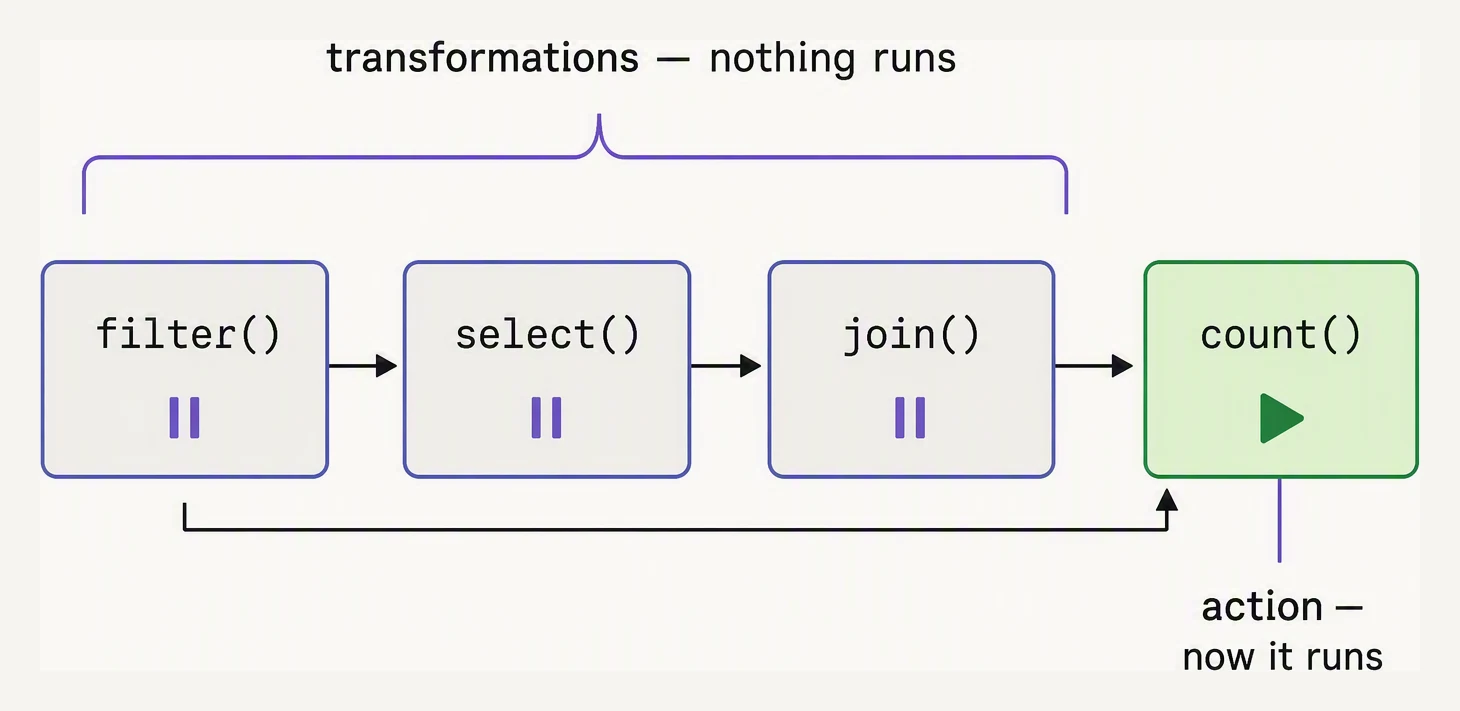
Transformations only describe work. An action is what runs it.
| Transformations (lazy — build the DAG) | Actions (eager — trigger execution) |
|---|---|
select, filter, withColumn, drop | count, collect, take, first, show |
groupBy, agg, join, union | write.parquet/csv/json/save |
orderBy, distinct, repartition | toPandas, foreach, foreachPartition |
cache, persist (marks for caching) | Anything that materializes results |
Memorize the right column. Everything else is a transformation.
The surprising part
Watch what happens when this code runs:
from pyspark.sql import SparkSession, functions as F
spark = SparkSession.builder.getOrCreate()

orders = spark.read.parquet("s3://bucket/orders/")    # NOTHING runs
paid   = orders.filter(F.col("status") == "PAID")     # NOTHING runs
big    = paid.filter(F.col("amount") > 1000)          # NOTHING runs
big.printSchema()                                     # NOTHING (it's metadata)
Up to here, no executor has touched a byte of data. The first 4 lines took maybe 50 milliseconds — all in the driver, building a plan.
Now add an action:
big.count() # NOW it runsAt this moment Spark:
- Looks at the full DAG (read → filter status → filter amount → count)
- Optimizes it — both filters get pushed down to the Parquet reader so only matching rows are read
- Launches tasks, scans the file with both predicates applied at scan time, returns a count
The same physical work would happen if you’d written one filter or ten — Catalyst folds them together.
A common surprise
This script behavior catches everyone once:
# Looks like it does I/O three times. It doesn't.
df = spark.read.parquet("s3://bucket/orders/")
print("got the df")           # prints immediately — read is lazy
print(df.columns)             # prints schema — only reads metadata
print(df.count())             # the FIRST line that actually scans data
Conversely, this code does scan twice:
df = spark.read.parquet("s3://bucket/orders/")
print(df.count())             # scan #1
print(df.count())             # scan #2 — Spark re-reads from S3
The fix is .cache() or .persist() — tells Spark to keep the result
in executor memory after the first action:
df = spark.read.parquet("s3://bucket/orders/").cache()
print(df.count())             # scan, then cache
print(df.count())             # served from cache
Build a pipeline, then hit the action to watch the whole DAG fire at once:
Transformations are lazy — only an action makes Spark run.
Why lazy? Whole-DAG optimization
Lazy evaluation isn’t a quirk — it’s the foundation of Spark’s performance. Because Spark sees the entire plan before running it, the Catalyst optimizer can:
- Predicate pushdown — push
.filter()down into the file scan so Parquet readers skip non-matching row groups - Column pruning — if you
.select("a", "b")after reading 50 columns, Spark only reads 2 - Constant folding —
F.lit(1) + F.lit(2)becomesF.lit(3)at plan time - Filter reordering — apply cheap filters before expensive ones
- Join reordering — for some joins, swap the order of inputs to minimize shuffle
None of this is possible in pandas, which executes each line immediately.
A toy lazy evaluator
You can model lazy evaluation in 20 lines of Python — it’s just a deferred expression tree.
# A toy 'DataFrame' that builds a plan and runs only on .collect()
class LazyDF:
    def __init__(self, source, ops=None):
        self.source = source
        self.ops = ops or []     # list of (op_name, func) tuples

    def _add(self, name, func):
        return LazyDF(self.source, self.ops + [(name, func)])

    def filter(self, predicate):
        return self._add("filter", lambda rows: [r for r in rows if predicate(r)])

    def map(self, fn):
        return self._add("map", lambda rows: [fn(r) for r in rows])

    def explain(self):
        print("Plan:")
        for i, (name, _) in enumerate(self.ops):
            print(f"  {i}: {name}")

    def collect(self):
        rows = list(self.source)
        for _, op in self.ops:
            rows = op(rows)
        return rows

orders = LazyDF([
    {"id": 1, "amount": 50,  "status": "PAID"},
    {"id": 2, "amount": 500, "status": "FAILED"},
    {"id": 3, "amount": 25,  "status": "PAID"},
    {"id": 4, "amount": 1500,"status": "PAID"},
])

plan = (orders
    .filter(lambda r: r["status"] == "PAID")
    .filter(lambda r: r["amount"] > 100)
    .map(lambda r: {"id": r["id"], "amount": r["amount"]}))

# Nothing has run yet:
plan.explain()
print()

# Now it runs:
print("Result:", plan.collect())
Plan:
0: filter
1: filter
2: map
Result: [{'id': 4, 'amount': 1500}]Read the order of the output, because it is the lesson. The plan printed first — three operations recorded —
while not a single row had been touched. explain() walked a list of deferred ops, nothing more.
Only collect() finally ran them, threading the four rows through both filters (PAID keeps three; amount > 100
keeps just the 1500) and the projection, to land on one row. That gap between describing the work and doing it
is the entire idea.
Real Spark stuffs an optimizer into that gap — it would fuse those two filters and push them into the file
scan before the first byte is read — and spreads collect() across a thousand machines. The laziness is exactly
this.
Pitfalls
A few places lazy evaluation will bite you:
- Side effects on executors don’t reach the driver —
df.foreach(print)is an action, so it runs — but the output goes to executor logs, not your driver console. Similarly, aprintinside amaplambda runs on executors and is invisible at the driver. The fix is totake(10)first andprinton the driver. .show()is an action — it triggers a job, and on a complex pipeline that’s not what you want during exploration. Use it intentionally.- Caching helps only if you re-use —
df.cache()followed by one action is wasted memory. Cache when you read the same DataFrame multiple times.
In one breath
PySpark transformations (filter, select, groupBy, join, orderBy) are lazy — they return a new
DataFrame and only build up the DAG, doing zero work.
Actions (count, collect, show, write, toPandas) are what actually trigger execution. This deferral is
not a quirk but the whole source of Spark’s speed.
By the time you call an action, the optimizer can see the entire plan and rewrite it with predicate pushdown, column pruning, filter and join reordering — something pandas, which runs each line eagerly, can never do.
The catch is that DataFrames aren’t cached, so calling .count() twice re-scans twice unless you .cache().
Practice
Before the quiz, predict the timing of a script: four lines define a DataFrame and chain two filters. The fifth
prints df.columns, and the sixth calls df.count().
Which line is the first to touch data on the cluster, and why do the lines before it return “instantly”? Then
the cache trap: a beginner sprinkles .count() between every transformation “to check progress” on a 500 GB
table — explain in cost terms exactly what that habit does, and the one-line fix.
Quick check
.count() twice. What happens?A question to carry forward
Look at the optimizer’s bag of tricks one more time — pushdown, pruning, constant folding, filter and join reordering. Every one of them does the same kind of thing:
- it removes work;
- moves it earlier; or
- fuses steps that were going to run anyway.
The optimizer is brilliant at making the cheap parts cheaper. But there is one operation it can rearrange and never truly erase: the shuffle. It quietly set the stage boundaries two lessons ago, and we kept flagging it in passing.
When you groupBy("country"), every “US” row in the cluster has to physically move to the same machine — and no
amount of pushdown changes the fact that data must cross the network.
Catalyst can sometimes avoid a shuffle, or shrink it. But when one is genuinely needed, it is almost always the single most expensive thing your job does: the difference between a 30-second run and a 30-minute one.
So the question to carry forward is the one that turns understanding Spark into tuning Spark: what exactly happens during a shuffle that makes it so costly? Which everyday operations trigger one, often without you realizing? That is shuffles, and it is the next lesson — the one that closes this architecture chapter.
Practice this in an interview
All questionsLazy evaluation means Spark records transformations in a plan and waits for an action to execute it. That delay lets Spark optimize the complete DataFrame or RDD computation, while actions such as count, show, collect, and write trigger jobs.
Catalyst is a rule-based and cost-based query optimizer that transforms a logical plan through four phases — analysis, logical optimization, physical planning, and code generation — before any data is touched. Adaptive Query Execution (AQE), introduced in Spark 3, extends this by re-optimizing the physical plan at runtime using actual shuffle statistics rather than stale estimates.
pandas operates in-memory on a single machine, making it fast and simple for datasets under a few gigabytes. Spark distributes computation across a cluster, handles terabyte-scale data, and integrates with cloud storage — but adds significant overhead for small data. The crossover point is roughly when your data no longer fits in RAM or when processing time on a single machine becomes unacceptable.
Narrow transformations compute each output partition using data from exactly one input partition — no data moves across the network. Wide transformations require data from multiple input partitions, forcing a shuffle across the network, which is the most expensive operation in a Spark job.