Databricks — where Spark actually runs
The managed Spark platform that most data teams now deploy to. Workspaces, clusters, Unity Catalog, Photon — and an honest look at when it's worth the bill.
Written and reviewed by Shreyash Prashu Last reviewed
What you'll learn
- The five pieces of the Databricks stack and how they connect
- Why Photon makes Spark SQL 2-3x faster without rewriting code
- Notebook vs SQL warehouse vs job — pick the right runtime
- When Databricks is worth the price (and when EMR/Glue is enough)
Before you start
The last lesson handed the clusters to someone else — stop babysitting Spark and let a platform run it. For most data teams, that platform is Databricks, and this lesson answers the question we closed on.
Once you’re not patching versions and wiring schedulers by hand, what does day-to-day Spark actually look like? What does the platform add on top of the engine you just spent a chapter learning?
If you join a data team today and they say “we run on Spark,” the next sentence is almost always “…on Databricks.” Self-hosted EMR clusters and bare YARN setups still exist, but the center of gravity has moved.
The reason is simple: Databricks bundles managed Spark, governance, ML, and BI into one product. It calls this pattern a lakehouse (a data lake with database-quality reliability and performance, rather than separate lake + warehouse systems). The Photon engine has quietly made it the fastest place to run Spark SQL.
This lesson is the map. What’s in the box, what each piece does, and the honest cost trade-off.
The five pieces
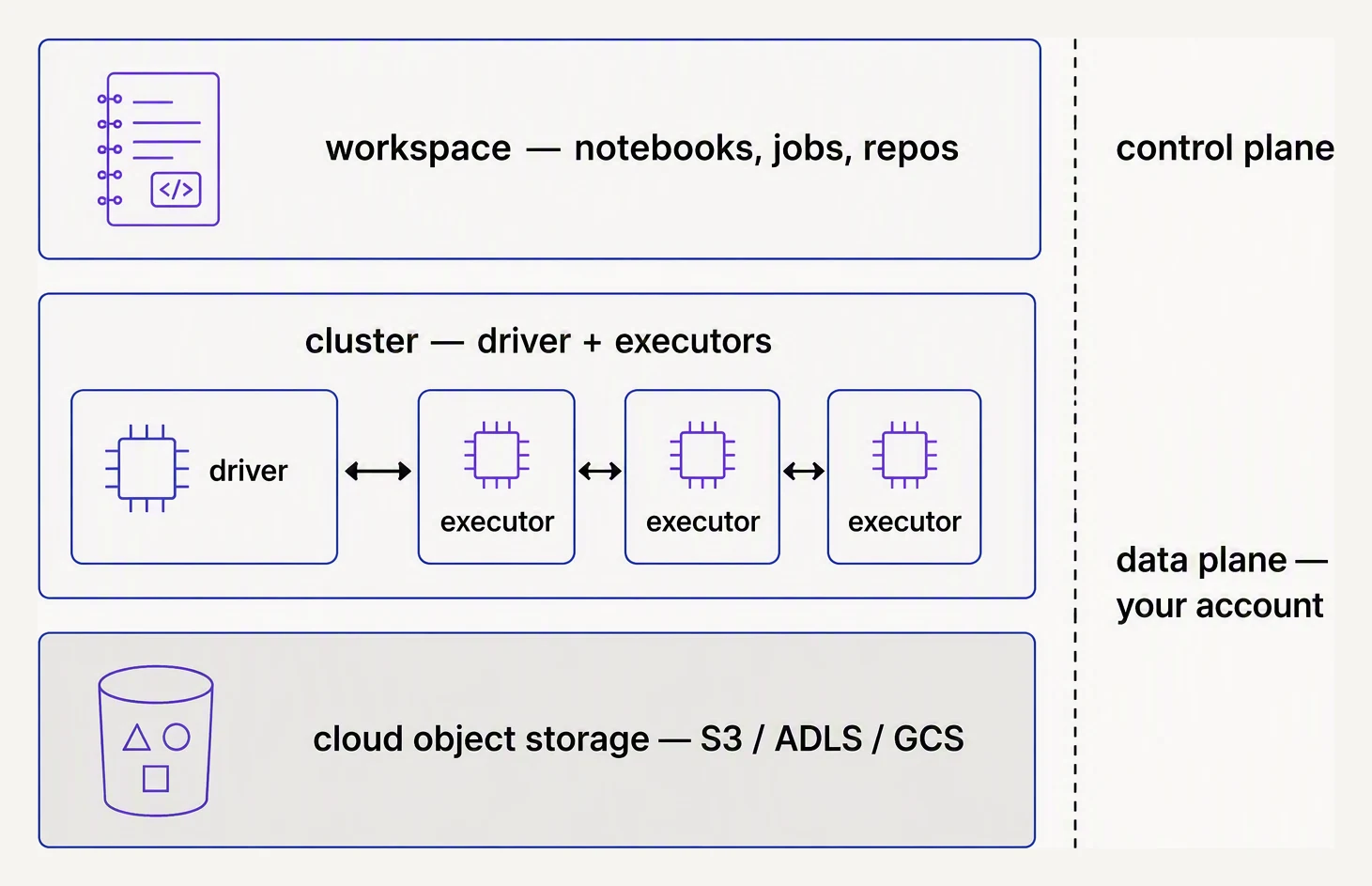
Notebooks and jobs on top, your cloud storage underneath.
A Databricks deployment has these moving parts. You’ll touch all of them within a week of joining a team:
| Piece | What it is |
|---|---|
| Workspace | The web UI — notebooks, files, jobs, dashboards |
| Compute | Clusters (general-purpose) and SQL warehouses (BI-optimized) |
| Workflows | The job scheduler — DAGs of tasks |
| Unity Catalog | Governance — tables, permissions, lineage |
| Delta Lake | The storage format — Parquet with ACID on top |
A Databricks account holds one or more workspaces (usually one per environment: dev / staging / prod). The account is where billing and identity live. The workspace is where you actually work. Unity Catalog spans across workspaces in the same account, which is what makes cross-environment governance possible.
Photon — the part that’s worth paying for
Open-source Spark uses a JVM-based execution engine. Databricks ships Photon, a vectorized query engine written in C++. Photon doesn’t replace Catalyst; the optimizer is the same. When the physical plan can run on Photon, the per-row work happens in tight SIMD-friendly C++ loops instead of generated Java bytecode.
The payoff for the typical SQL or DataFrame job:
- Aggregations and joins — 2-3x faster end-to-end
- Window functions — often 3-5x faster
- Parquet/Delta scans with predicate pushdown — close to wire speed
You opt in by checking “Use Photon” on the cluster config. Your code doesn’t change. The catch: Photon adds a surcharge (roughly 50-75% more DBUs than the same non-Photon cluster tier), so it pays off only when the speedup compensates. For ad-hoc exploration it usually does. For tiny jobs the overhead isn’t worth it.
# Same PySpark code. Photon makes the physical plan use the C++ engine.
from pyspark.sql import functions as F

orders = spark.read.table("main.sales.orders")

revenue = (orders
    .filter(F.col("status") == "PAID")
    .groupBy("country")
    .agg(F.sum(F.col("amount") - F.col("discount")).alias("revenue"))
    .orderBy(F.desc("revenue")))

revenue.write.mode("overwrite").saveAsTable("main.sales.revenue_by_country")
Nothing in that snippet says “Photon.” The cluster decides; Catalyst emits a Photon physical plan when it can.
Three runtimes, three personalities
Databricks gives you three places to run code. Each has its own sweet spot:
Notebooks run on a general-purpose cluster. They’re great for exploration, ML, and any job that mixes PySpark, SQL, and Python. The cell-based UI is your day-to-day.
SQL warehouses are clusters tuned for BI — fast startup, Photon on by default, integrated with the SQL Editor. You’d point Tableau, Power BI, or Looker at a SQL warehouse, not at a notebook cluster.
Jobs are scheduled or triggered runs of notebooks, Python wheels, or JARs. Production work lives here. You’ll learn the full pattern in the Databricks jobs lesson.
Unity Catalog — the governance layer
Pre-Unity Catalog, every workspace had its own Hive metastore. Tables were scoped to one workspace. Permissions were a mess. Lineage didn’t exist.
Unity Catalog (UC) replaced that. The three-level namespace is
catalog.schema.table — and it’s the same across all workspaces in
the account:
# A UC-qualified table reference. Works from any workspace in the account.
df = spark.read.table("main.sales.orders")

# Permissions live in UC, not in the cluster
spark.sql("GRANT SELECT ON main.sales.orders TO `analyst-group`")
UC gives you column-level lineage (which downstream tables touched
orders.customer_id?), row-level security, audit logs, and one
permission model for tables, models, and volumes (managed file
storage). If you’re starting a Databricks workspace today, UC is
the default — the old Hive metastore is deprecated.
The CLI — IaC for Databricks
Anything you can do in the UI you can do with the databricks CLI.
You’ll use it to deploy code, manage clusters from CI, and ship Asset
Bundles (the modern way to version-control jobs):
# Configure once
databricks configure --token

# List your workspaces
databricks workspace list /

# Run a job from CI
databricks jobs run-now --job-id 12345

# Deploy a bundle (see databricks-jobs lesson)
databricks bundle deploy --target prod
For anything past the prototype stage, you want jobs and clusters defined in YAML and deployed from CI — not clicked into existence in the UI.
The cost question
Databricks bills on DBUs (Databricks Units) — a normalized per-hour cluster cost — plus the underlying cloud VM cost. A DBU on a Photon job cluster runs roughly $0.30-0.55 depending on tier. A small Photon-on i3.xlarge cluster can easily burn $5-10/hour.
That’s expensive compared to running your own EMR or Glue jobs. The math works when:
- You have heavy production ETL — Photon and AQE save more hours than you spend on DBUs
- You need ML + BI + ETL on one platform — paying for three separate stacks (Snowflake + SageMaker + Airflow) usually costs more
- You value governance — UC is a real moat over rolling your own
- Your team is small — Databricks operates the platform, you don’t
Databricks is the wrong answer when:
- Your workload is small (a few hundred GB) — Snowflake or BigQuery on serverless will be cheaper and simpler
- You only need batch ETL — Glue or EMR Serverless can do it for less
- You’re cost-sensitive in early stage — Databricks is hard to make cheap
Simulating the cluster model
The cluster ↔ workspace ↔ catalog model is just a layered name resolver — much like a filesystem. Here’s the shape, in pure Python:
# A tiny Unity Catalog model: account -> workspace -> catalog.schema.table.

class Catalog:
    def __init__(self):
        self.tables = {}  # "schema.table" -> rows

    def write(self, fqn, rows):
        self.tables[fqn] = rows
        print(f"  wrote {len(rows)} rows to {fqn}")

    def read(self, fqn):
        return self.tables.get(fqn, [])

class Workspace:
    def __init__(self, name, catalog):
        self.name = name
        self.catalog = catalog  # shared across workspaces

    def sql(self, fqn, op="read"):
        print(f"[{self.name}] {op} {fqn}")
        if op == "read":
            return self.catalog.read(fqn)

# One catalog, two workspaces — both see the same governed tables.
uc = Catalog()
dev = Workspace("dev-workspace", uc)
prod = Workspace("prod-workspace", uc)

uc.write("sales.orders", [{"id": 1, "amount": 100}, {"id": 2, "amount": 200}])

print(dev.sql("sales.orders"))
print(prod.sql("sales.orders"))
wrote 2 rows to sales.orders
[dev-workspace] read sales.orders
[{'id': 1, 'amount': 100}, {'id': 2, 'amount': 200}]
[prod-workspace] read sales.orders
[{'id': 1, 'amount': 100}, {'id': 2, 'amount': 200}]The table was written once, into the catalog, and both workspaces read the same rows back without knowing or caring who wrote them. That’s the whole mental model: clusters are the compute, Unity Catalog is the shared namespace, and any workspace pointed at the same UC sees the same tables with the same permissions.
In one breath
Databricks is a managed lakehouse — the place most teams now run Spark so they don’t have to operate it. Five pieces fit together:
- a workspace (the UI)
- compute (general-purpose clusters and BI-tuned SQL warehouses)
- workflows (the job scheduler)
- Unity Catalog (account-wide
catalog.schema.tablegovernance, lineage, and permissions) - Delta Lake (the storage format)
Photon, a C++ vectorized engine, makes the same unchanged code 2-3x faster on a ~50-75% DBU surcharge. It pays off on heavy SQL but not on tiny jobs. Match the runtime to the work — notebook for exploration, SQL warehouse for dashboards, job cluster for scheduled runs. Set auto-termination, and remember the platform earns its bill on heavy ETL + ML + BI + governance, not on a few hundred GB of batch.
Practice
Before the quiz, price it out in your head. A team runs hourly ETL over 5TB, plus Tableau dashboards refreshing every few minutes, plus ad-hoc notebooks. Which runtime do you assign to each of the three workloads, where do you turn Photon on, and which single default setting will quietly inflate the bill if you forget it?
Quick check
A question to carry forward
Notice that the table in our toy was just there — written once and read from two workspaces. There was no mention of what happens if two writers hit it at the same time, how you’d undo a bad write, or what stops someone appending a column with the wrong type.
Plain Parquet on a cloud bucket answers none of those:
- two writers clobber each other
- a failed write leaves orphan files
- “go back to yesterday” isn’t a thing
Yet every Databricks table you just saw is rock-solid on exactly those points. What turns a folder of Parquet files into something that behaves like a database — atomic writes, time travel, schema enforcement — without giving up the open Parquet underneath? That one layer is Delta Lake, and it is the next lesson.
Practice this in an interview
All questionspandas operates in-memory on a single machine, making it fast and simple for datasets under a few gigabytes. Spark distributes computation across a cluster, handles terabyte-scale data, and integrates with cloud storage — but adds significant overhead for small data. The crossover point is roughly when your data no longer fits in RAM or when processing time on a single machine becomes unacceptable.
RDD is the low-level, type-safe distributed collection with no schema knowledge. DataFrame adds a named-column schema on top, enabling the Catalyst optimizer and codegen — but loses compile-time type safety. Dataset merges both worlds: it carries a schema and passes through Catalyst while remaining statically typed in Scala/Java.
The driver is a single JVM process that hosts the SparkContext, builds the DAG, schedules tasks, and coordinates results. Executors are JVM processes on worker nodes that actually run tasks and cache data. The cluster manager (YARN, Kubernetes, standalone) sits between them, allocating resources.
Parquet is a columnar, compressed format optimized for analytical reads — only the queried columns are scanned. Avro is row-oriented, schema-embedded, and optimized for write-heavy pipelines and Kafka serialization. CSV is human-readable but schema-less, uncompressed, and slow at scale — use it only at system boundaries where a downstream tool requires it.