MLflow on Databricks — tracking to serving
Databricks invented MLflow, then built the rest of an ML platform around it. Tracking, Unity Catalog model registry, and serving endpoints — what's actually production-ready.
What you'll learn
- How managed MLflow auto-logs from any Databricks notebook or job
- Registering models to Unity Catalog (the new path) vs the deprecated Workspace registry
- Serving endpoints — real-time inference with auto-scaling and A/B
- Feature Engineering in Unity Catalog — Databricks' native feature store
Before you start
The last lesson ended on a question: when a job produces a trained model instead of a table, does the same platform close the loop from training all the way to live serving? The answer is yes — and the loop runs on a tool Databricks itself created.
Databricks built MLflow. They also built the rest of an ML platform around it — and that integration is the strongest argument for doing ML on Databricks rather than wiring up the OSS pieces yourself. Every notebook has a tracking server attached. Models register to Unity Catalog with lineage. Serving endpoints are one CLI command. Feature tables live alongside your data tables.
This lesson is what changes when you take a model from “works in a notebook” to “serves traffic in production” on Databricks.
What you get for free
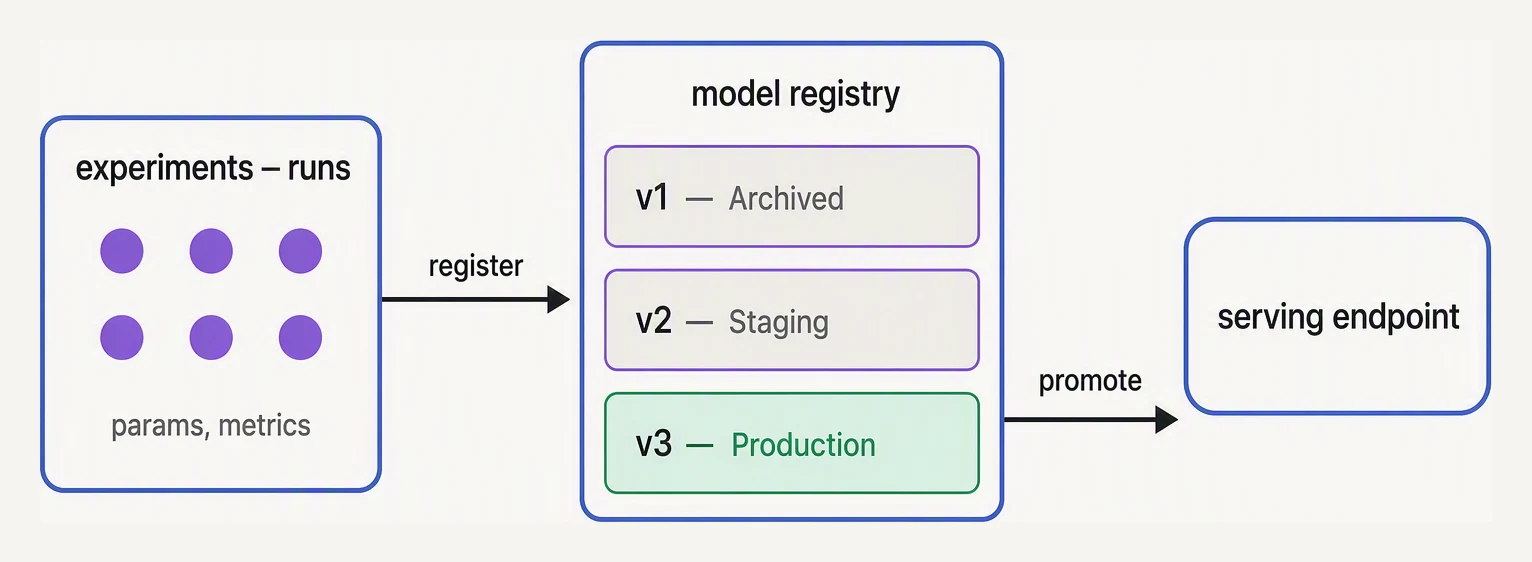
Track many, register a few, serve one.
The instant you import mlflow in a Databricks notebook, several
things are already wired up:
- Tracking server — calling
mlflow.<flavor>.autolog()(or enabling workspace-level autologging in settings) captures metrics, parameters, and the trained model artifact for sklearn, XGBoost, LightGBM, PyTorch, TensorFlow, and Spark MLlib with no extra code. - Experiment — each notebook has an auto-created experiment at the notebook’s path. Runs from that notebook appear there.
- Artifact store — backed by your workspace’s DBFS / Unity Catalog volume. No S3 setup, no auth config.
- UI — the “Experiments” tab in the workspace, filterable, diff-able, with per-run plots.
A complete training script that takes advantage of all of this:
import mlflow
import mlflow.sklearn

from sklearn.ensemble import RandomForestClassifier
from sklearn.model_selection import train_test_split

# 1. Read features from a UC table — full lineage tracking
df = spark.read.table("main.ml.churn_features").toPandas()

X = df.drop(columns=["churned"])
y = df["churned"]
X_tr, X_te, y_tr, y_te = train_test_split(X, y, test_size=0.2, random_state=42)

# 2. Autolog: every metric, param, and the model itself, captured automatically
mlflow.sklearn.autolog()

with mlflow.start_run(run_name="rf-baseline"):
    model = RandomForestClassifier(n_estimators=200, max_depth=8)
    model.fit(X_tr, y_tr)

    # Manual logging on top of autolog still works
    test_acc = model.score(X_te, y_te)
    mlflow.log_metric("test_accuracy", test_acc)
No tracking URI to configure. No S3 bucket to create. The run appears in the experiment UI before the cell finishes.
The shift to Unity Catalog model registry
Up to 2023, Databricks shipped a Workspace Model Registry — a flat namespace of registered models, one per workspace. It worked but didn’t fit the Unity Catalog world. Since 2024, the recommended path is to register models in Unity Catalog, using the three-level namespace.
mlflow.set_registry_uri("databricks-uc")

# Register from a finished run
result = mlflow.register_model(
    model_uri = f"runs:/{run_id}/model",
    name = "main.ml.churn_model",
)
print(result.version)   # "3"
A UC-registered model gets you:
- Permissions — same GRANT/REVOKE as tables. An analyst can
SELECTfeatures but notEXECUTEthe model unless granted. - Lineage — UC tracks which feature tables fed the model, which notebook trained it, which endpoints serve it.
- Cross-workspace access — a model registered in
prodcan be read by astagingworkspace pointed at the same UC. - Aliases —
@champion,@challenger,@productionare movable pointers to versions:
from mlflow.tracking import MlflowClient
client = MlflowClient(registry_uri="databricks-uc")

# Promote version 3 to "champion"
client.set_registered_model_alias(
    "main.ml.churn_model", "champion", 3,
)

# Load the current champion — your serving code doesn't care about version
model = mlflow.pyfunc.load_model("models:/main.ml.churn_model@champion")
Aliases are the replacement for the old Staging / Production
stages. They’re movable pointers; the underlying versions stay
immutable, which is what you want for audit.
Model serving — real-time inference
Loading a model into a notebook is fine for batch scoring (you write predictions back to a Delta table). For real-time use cases — fraud checks, recommendations, anything that needs sub-second response — you want a serving endpoint.
A Databricks serving endpoint is an auto-scaling HTTPS service backed by a UC-registered model version. Create one from the CLI:
databricks serving-endpoints create \
  --name churn-endpoint \
  --json '{
    "config": {
      "served_entities": [{
        "entity_name": "main.ml.churn_model",
        "entity_version": "3",
        "workload_size": "Small",
        "scale_to_zero_enabled": true
      }]
    }
  }'
scale_to_zero_enabled: true is the cost-saver — the endpoint
spins down idle replicas. First request after idle takes a few
seconds (cold start); steady traffic stays warm.
For A/B testing, an endpoint can serve multiple model versions behind a traffic split:
{
  "config": {
    "served_entities": [
      {"entity_name": "main.ml.churn_model", "entity_version": "3", "name": "v3"},
      {"entity_name": "main.ml.churn_model", "entity_version": "4", "name": "v4"}
    ],
    "traffic_config": {
      "routes": [
        {"served_model_name": "v3", "traffic_percentage": 90},
        {"served_model_name": "v4", "traffic_percentage": 10}
      ]
    }
  }
}
10% of requests hit v4, 90% hit v3. You compare metrics in the endpoint’s monitoring tab; if v4 wins, you promote it to 100% by updating the config.
Querying the endpoint is a plain HTTPS POST:
curl -X POST https://<workspace>.cloud.databricks.com/serving-endpoints/churn-endpoint/invocations \
  -H "Authorization: Bearer $DATABRICKS_TOKEN" \
  -H "Content-Type: application/json" \
  -d '{"dataframe_records": [{"tenure_months": 12, "monthly_charges": 70.5}]}'
The endpoint handles request batching, auto-scaling, and metrics collection for free. You don’t run a Flask server.
Feature Engineering in Unity Catalog
Training and serving need the same features computed the same way. That’s the “training-serving skew” problem. The OSS solution is a feature store like Feast. Databricks ships Feature Engineering in Unity Catalog (formerly Databricks Feature Store) — a native feature store backed by UC tables.
A feature table is just a Delta table with a primary key, registered to UC. You compute it once (a scheduled job), then both training code and serving code read from the same table:
from databricks.feature_engineering import FeatureEngineeringClient, FeatureLookup

fe = FeatureEngineeringClient()

# Define a feature table
fe.create_table(
    name = "main.ml.customer_features",
    primary_keys = ["customer_id"],
    schema = customer_features_df.schema,
    description = "Per-customer features for churn model",
)
fe.write_table(name="main.ml.customer_features", df=customer_features_df, mode="merge")

# At training time, join features to a labels dataframe
training_set = fe.create_training_set(
    df = labels_df,
    feature_lookups = [
        FeatureLookup(
            table_name = "main.ml.customer_features",
            feature_names = ["tenure_months", "monthly_charges", "avg_session_minutes"],
            lookup_key = "customer_id",
        ),
    ],
    label = "churned",
)

training_df = training_set.load_df().toPandas()
# ... train your model on training_df ...

# Log model WITH feature spec — serving endpoint will auto-fetch features
fe.log_model(
    model = trained_model,
    artifact_path = "model",
    flavor = mlflow.sklearn,
    training_set = training_set,
    registered_model_name = "main.ml.churn_model",
)
The killer detail is in the last call: fe.log_model records which
features were used. At inference time, the serving endpoint can
look up the features by primary key automatically — you POST
{"customer_id": 42} and the endpoint fetches the latest features
from the UC table before scoring.
That eliminates the “the feature value at train time differs from serve time” class of bug, and it means your serving client doesn’t need to know what features the model uses.
Lineage in one query
Once you’ve done a UC-registered training run, the lineage is
queryable. Databricks surfaces model-to-table lineage in
system.access.table_lineage and exposes endpoint config in
system.serving.served_entities (enable system tables in the
account console first):
-- What tables did the churn model training run read?
SELECT DISTINCT source_table_full_name
FROM system.access.table_lineage
WHERE target_table_full_name = 'main.ml.churn_model';

-- What endpoints are serving entities from the main catalog?
SELECT name, entity_name, entity_version, state
FROM system.serving.served_entities
WHERE entity_name LIKE 'main.ml.%';
The exact system table schema evolves as Databricks adds capabilities — check the system tables docs for the current column names before querying. The principle is the same: this is the kind of audit trail that’s tedious in a hand-rolled MLOps stack and free in Databricks because everything goes through UC.
A pyfunc model in pure Python
The MLflow pyfunc abstraction — “any model is a callable that takes a dataframe and returns predictions” — is small enough to demo:
# A toy MLflow-style registry + pyfunc model.

class Registry:
    def __init__(self):
        self.models = {}      # name -> {version -> model_obj}
        self.aliases = {}     # (name, alias) -> version

    def register(self, name, model):
        self.models.setdefault(name, {})
        version = len(self.models[name]) + 1
        self.models[name][version] = model
        print(f"registered {name} version {version}")
        return version

    def set_alias(self, name, alias, version):
        self.aliases[(name, alias)] = version
        print(f"alias {name}@{alias} -> v{version}")

    def load(self, uri):
        # "models:/name@alias" or "models:/name/version"
        name_part = uri.replace("models:/", "")
        if "@" in name_part:
            name, alias = name_part.split("@")
            version = self.aliases[(name, alias)]
        else:
            name, v = name_part.split("/")
            version = int(v)
        print(f"loading {name} v{version}")
        return self.models[name][version]


class ChurnModel:
    def __init__(self, threshold):
        self.threshold = threshold

    def predict(self, X):
        # Pretend logistic regression on 'tenure'
        return [1 if x["tenure"] < self.threshold else 0 for x in X]


reg = Registry()
reg.register("churn", ChurnModel(threshold=6))
reg.register("churn", ChurnModel(threshold=4))
reg.set_alias("churn", "champion", 1)
reg.set_alias("churn", "challenger", 2)

# Same batch, scored before and after a promotion
batch = [{"tenure": 3}, {"tenure": 5}, {"tenure": 10}]

# Serving code: loads @champion, doesn't know or care about the version
champion = reg.load("models:/churn@champion")
print("predictions:", champion.predict(batch))

# Promote challenger (v2) to champion
reg.set_alias("churn", "champion", 2)
champion = reg.load("models:/churn@champion")
print("after promotion:", champion.predict(batch))
registered churn version 1
registered churn version 2
alias churn@champion -> v1
alias churn@challenger -> v2
loading churn v1
predictions: [1, 1, 0]
alias churn@champion -> v2
loading churn v2
after promotion: [1, 0, 0]Watch the middle customer (tenure: 5). Under the champion v1
(threshold 6) they score 1 — predicted to churn. The serving code
never changed, but the moment the @champion alias swings to v2
(threshold 4), the very next load returns the new model and that same
customer scores 0.
Aliases as movable pointers to immutable versions is the whole trick:
production loads @champion, and promoting a new model is a single
alias-swap that takes effect on the next load — no redeploy, no code
change.
Honest take
The Databricks ML stack is excellent when you’re already on Databricks. Tracking, registry, serving, feature store — all integrated, all governed by UC, all queryable.
The catch: it’s a Databricks ecosystem. Endpoints don’t serve outside the platform. The feature store doesn’t work without UC. If your training is on Databricks but serving is on a Kubernetes cluster elsewhere, you’re either lifting models to a generic registry (OSS MLflow + S3 + Ray Serve or BentoML), or doubling your feature pipeline. Pick the stack based on where all of training, batch scoring, and online serving will live.
If that’s all Databricks: use the native pieces. If not: OSS MLflow plus your own serving is still a perfectly good answer.
In one breath
On Databricks, import mlflow already wires up tracking —
autolog() captures metrics, params, and the model with no extra code.
Register the model into Unity Catalog
(models:/catalog.schema.name), not the deprecated Workspace registry,
so it inherits table-grade permissions and lineage. Move aliases
(@champion, @challenger) as pointers to immutable versions.
A serving endpoint turns a version into an auto-scaling HTTPS service
(with scale_to_zero and declarative traffic splits for A/B).
Feature Engineering in UC logs which features a model needs. The
endpoint fetches them by key at inference — killing training-serving
skew.
It’s all excellent if you live on Databricks; endpoints and the feature store don’t travel, so choose by where serving runs, not just training.
Practice
Before the quiz, reason through a release: model v4 is registered and you want 10% of live traffic on it while v3 keeps the rest.
What’s the alias and serving-config change? How do you promote v4 to 100% once it wins? And — the subtle one — if v4’s features are looked up from a UC feature table, what does the client actually need to send in the request body?
Quick check
fe.log_model(...) with a training_set over plain mlflow.sklearn.log_model?A question to carry forward
That closes PySpark. You now have the full Databricks loop:
- Store in Delta.
- Transform with PySpark.
- Schedule with Workflows.
- Train and serve with MLflow.
Every reliable piece of it rested on one quiet assumption we never
examined. The wheel lived in src/. The Asset Bundle was “checked into
Git.” Production work was “reviewable in a pull request.” Model
versions were immutable so you could audit what changed.
Strip all of that away and ask the blunt question: what is the thing that actually remembers every change to a codebase? What lets a team work on it at once without overwriting each other? What lets you undo a mistake from three weeks ago without a backup?
That tool is Git, and it is the foundation the next section is built on — starting with why version control exists at all.
Practice this in an interview
All questionsExperiment tracking captures the full reproducibility context of a training run — code version, hyperparameters, dataset hash, environment, and metrics — so any result can be reproduced and compared. MLflow is an open-source, self-hosted lifecycle platform; Weights and Biases is a hosted, collaboration-first product with richer real-time visualisation.
ML workflows are multi-step DAGs with dependencies, and an orchestrator gives you dependency management, retries, backfills, caching, observability, and lineage that chained cron jobs cannot. Airflow is a general-purpose task orchestrator defining DAGs in Python, while Kubeflow Pipelines is ML-native, passing typed artifacts between containerized steps on Kubernetes with conditional logic like deploy only if accuracy exceeds a threshold. Choosing depends on whether you need generic scheduling or ML-specific, container-based pipelines.
Apply FinOps to ML by tagging every workload (training jobs, endpoints, GPU pools) by team, model, and environment so cost is attributable, then track unit-economics metrics like cost per prediction or per training run rather than just total spend. Set budgets and alerts, identify idle GPUs and overprovisioned endpoints, and enforce guardrails like autoscaling and instance-type policies. The goal is continuous visibility and accountability so teams optimize cost without killing experimentation.
A feature store is a shared data platform that computes, stores, and serves ML features consistently for both training and serving. It eliminates training-serving skew by ensuring the same transformation code runs in both contexts, and it reduces duplicated work by letting teams share and discover features across models.