GitHub Actions for ML — code CI and model CD
One repo, two pipelines. Code CI runs on every PR. Model CD runs on a schedule, retrains, validates against baselines, and blocks the deploy if it regressed. Here's how to wire them up.
Written and reviewed by Shreyash Prashu Last reviewed
What you'll learn
- Why ML needs two CI/CD pipelines, not one — and the difference between them
- The YAML structure that every Actions workflow uses
- A real "test inference + block merge on regression" workflow
- The model-retrain-on-schedule pipeline and the safety gates inside it
Before you start
The last lesson froze the environment into an immutable image — but left the build running on human discipline: you tagged and pushed by hand, and humans skip steps at 11 p.m.
We asked who holds that discipline when you don’t, who rebuilds and tests and refuses to merge a regression on every change without anyone remembering to. The answer is a pipeline, and for ML it is actually two.
In a regular software project you’ve got one CI pipeline: lint, type check, test, deploy. In an ML project you’ve got two, and conflating them is one of the most common ways teams ship broken models. The reason CI runs on every push is simple: the earlier you catch a breakage, the cheaper it is to fix. A failed test on a PR is a five-minute revert; the same bug caught a week later in production is an incident.
- Code CI — runs on every PR. Lint, types, unit tests, sample inference, baseline-comparison. Same idea as software CI but with an ML twist: it runs the model and confirms it still produces sane outputs.
- Model CD — runs on a schedule (or triggered by drift alerts). Pulls fresh data, retrains, validates against a held-out eval set and against the currently-deployed model, registers the new version, and either promotes it or files an issue.
Both live in the same repo. They share code. They share Docker images. But the triggers and failure modes are different, and so is who gets paged when they break.
The Actions YAML cheat sheet
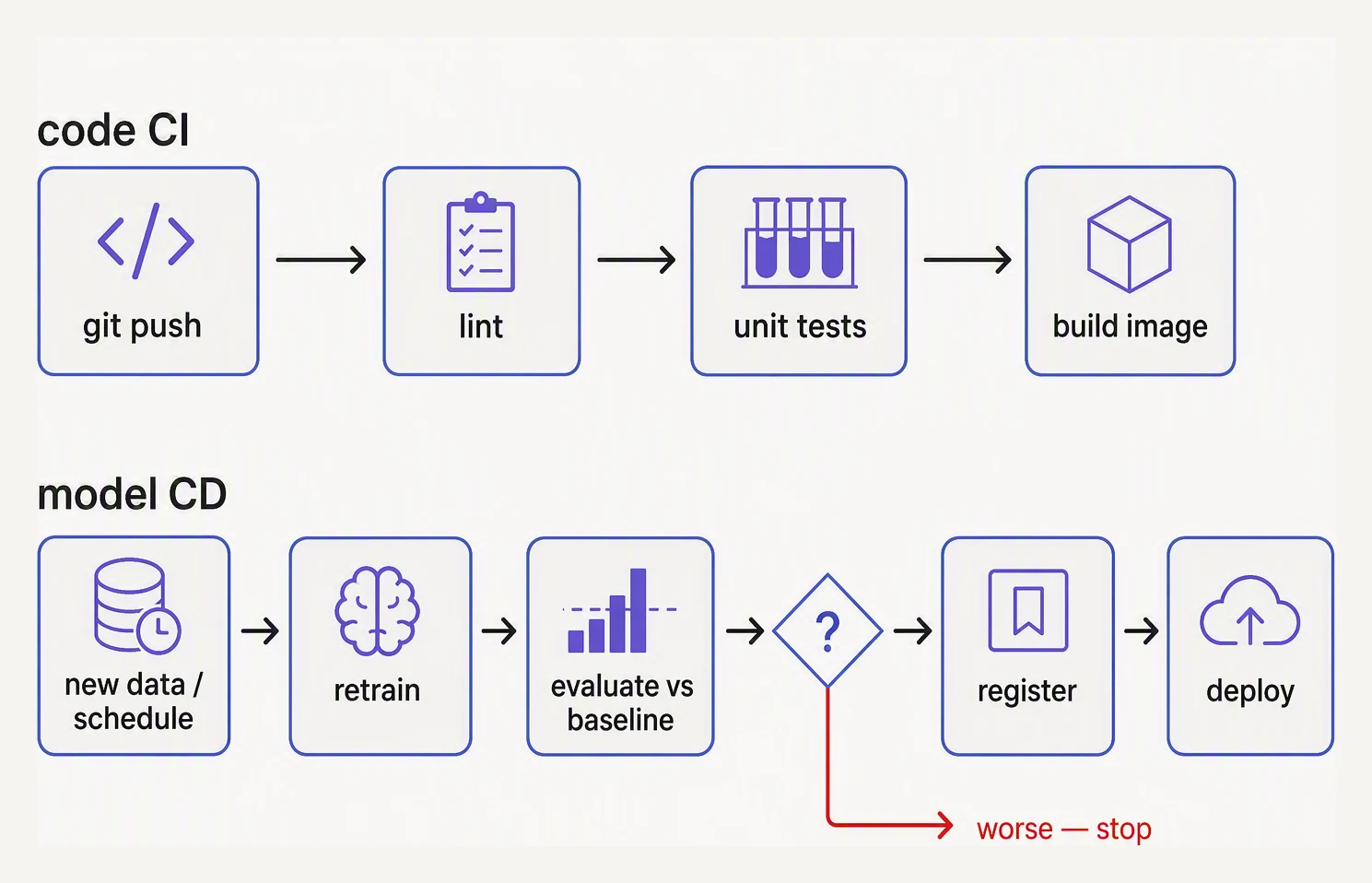
Code CI and model CD are different pipelines with different triggers.
A workflow file lives at .github/workflows/<name>.yml. The minimum
useful shape:
name: code-ci

on:
  pull_request:
    branches: [main]
  push:
    branches: [main]

jobs:
  test:
    runs-on: ubuntu-latest
    steps:
      - uses: actions/checkout@v4
      - uses: actions/setup-python@v5
        with:
          python-version: "3.12"
      - run: pip install -r requirements.txt -r requirements-dev.txt
      - run: ruff check .
      - run: mypy app/
      - run: pytest -q
Five things to internalize:
| Key | What it controls |
|---|---|
on | When the workflow runs (pull_request, push, schedule, workflow_dispatch, …) |
jobs | Top-level units that run in parallel by default |
runs-on | The runner — the machine that executes the job (ubuntu-latest is a GitHub-hosted VM; you can also point to a self-hosted machine) |
steps | Sequential commands or actions inside a job |
uses | A reusable action from the marketplace |
That’s 80% of what you need. The other 20% is needs: (job ordering),
if: (conditional steps), secrets.* (API keys), and matrix builds.
Toggle needs: edges — see how dependency order shapes which jobs run in parallel
Each chip adds or removes a needs: dependency between jobs. Jobs with no unmet deps run concurrently in the same wave. Hit Run to watch the waves execute in order — and notice how the total time drops when you parallelize independent jobs.
Code CI — the PR-gating pipeline
For ML, the code CI runs the standard checks and a smoke test of the model: load the most recent registered model, predict on a small fixture dataset, and compare the metrics to a frozen baseline. If a code change broke the inference path, you find out before merge.
# .github/workflows/code-ci.yml
name: code-ci

on:
  pull_request:
    branches: [main]

jobs:
  lint-test:
    runs-on: ubuntu-latest
    steps:
      - uses: actions/checkout@v4
      - uses: actions/setup-python@v5
        with:
          python-version: "3.12"
      - run: pip install -r requirements.txt -r requirements-dev.txt
      - run: ruff check .
      - run: mypy app/
      - run: pytest -q tests/unit

  inference-smoke-test:
    needs: lint-test
    runs-on: ubuntu-latest
    steps:
      - uses: actions/checkout@v4
      - uses: actions/setup-python@v5
        with:
          python-version: "3.12"
      - run: pip install -r requirements.txt
      - name: Load current prod model + run fixture inference
        env:
          MLFLOW_TRACKING_URI: ${{ secrets.MLFLOW_TRACKING_URI }}
        run: python -m tests.smoke.run_inference
      - name: Compare against frozen baseline metrics
        run: python -m tests.smoke.check_regression --threshold 0.02
The two jobs and the needs: between them is the pattern: fast checks
first, slower ML-specific checks only if those pass.
The interesting script is check_regression. It loads the metrics
produced by run_inference, compares them to a
tests/fixtures/baseline_metrics.json file checked into the repo, and
exits non-zero if any metric dropped by more than the threshold. That
exit 1 is what causes the PR check to fail and blocks merge.
A small “inside the smoke test” example
This is the kind of script the workflow above invokes. It’s pure Python, nothing GitHub-specific.
import sys

from sklearn.datasets import make_classification
from sklearn.linear_model import LogisticRegression
from sklearn.metrics import f1_score, accuracy_score

# Stand-in for 'load current prod model'. In real life:
#   model = mlflow.pyfunc.load_model("models:/churn-classifier/Production")
X_train, y_train = make_classification(n_samples=500, random_state=0)
model = LogisticRegression(max_iter=1000).fit(X_train, y_train)

# Stand-in for 'load checked-in fixture dataset'.
X_fix, y_fix = make_classification(n_samples=200, random_state=1)

pred = model.predict(X_fix)
new_metrics = {
    "f1": round(float(f1_score(y_fix, pred)), 4),
    "accuracy": round(float(accuracy_score(y_fix, pred)), 4),
}
print("metrics on fixture set:", new_metrics)

# Compare to a frozen baseline (would be loaded from tests/fixtures/baseline_metrics.json).
baseline = {"f1": 0.86, "accuracy": 0.87}
threshold = 0.02

regressions = []
for name, base in baseline.items():
    delta = new_metrics[name] - base
    print(f"  {name}: new={new_metrics[name]:.4f} baseline={base:.4f} delta={delta:+.4f}")
    if delta < -threshold:
        regressions.append(name)

if regressions:
    print(f"\nREGRESSION DETECTED in: {regressions}")
    sys.exit(1)
else:
    print("\nAll metrics within tolerance.")
metrics on fixture set: {'f1': 0.6442, 'accuracy': 0.63}
f1: new=0.6442 baseline=0.8600 delta=-0.2158
accuracy: new=0.6300 baseline=0.8700 delta=-0.2400
REGRESSION DETECTED in: ['f1', 'accuracy']Watch the gate actually slam shut. The fixture metrics (f1 0.6442,
accuracy 0.63) fall far below the frozen baseline of 0.86 / 0.87. The
deltas blow past the 0.02 threshold, and the script ends in
sys.exit(1). That is precisely the non-zero exit that turns a PR check
red and blocks the merge.
(In this toy, the “regression” is engineered: the model trains on
random_state=0 data but the fixture is random_state=1, a different
synthetic distribution, against an arbitrary baseline. So it’s bound to
fail.) In a real pipeline the fixture and baseline are consistent, so a
red check means the code genuinely broke the model, not the data.
The shape is what matters:
- Load the current production model.
- Predict on the same checked-in dataset every time.
- Compare against a known threshold.
- Exit non-zero on regression.
Your PR check goes red when a change breaks the model, without anyone having to remember to test it.
Model CD — the scheduled retrain pipeline
This is the workflow people forget to build. It runs on a cron (or on demand, or when a drift alert fires), pulls fresh data, retrains, and only promotes if the new model beats the old one on the same eval set.
# .github/workflows/model-cd.yml
name: model-cd

on:
  schedule:
    - cron: "0 3 * * 1"      # every Monday 03:00 UTC
  workflow_dispatch:          # also runnable manually

jobs:
  retrain:
    runs-on: ubuntu-latest
    timeout-minutes: 60
    steps:
      - uses: actions/checkout@v4
      - uses: actions/setup-python@v5
        with: { python-version: "3.12" }
      - run: pip install -r requirements.txt
      - name: Pull fresh training data
        env:
          AWS_ACCESS_KEY_ID: ${{ secrets.AWS_ACCESS_KEY_ID }}
          AWS_SECRET_ACCESS_KEY: ${{ secrets.AWS_SECRET_ACCESS_KEY }}
        run: python -m training.pull_data --output data/train.parquet
      - name: Train candidate model
        env:
          MLFLOW_TRACKING_URI: ${{ secrets.MLFLOW_TRACKING_URI }}
        run: python -m training.train --data data/train.parquet
      - name: Evaluate candidate vs current Production
        run: python -m training.evaluate_candidate --min-improvement 0.005
      - name: Promote to Staging (only if eval passed)
        if: success()
        run: python -m training.promote --to Staging
      - name: Open issue on failure
        if: failure()
        uses: actions/github-script@v7
        with:
          script: |
            github.rest.issues.create({
              owner: context.repo.owner,
              repo: context.repo.repo,
              title: `Retrain failed on ${new Date().toISOString().slice(0,10)}`,
              body: `The scheduled retrain failed. See run: ${context.serverUrl}/${context.repo.owner}/${context.repo.repo}/actions/runs/${context.runId}`,
              labels: ["mlops","incident"],
            });
The shape worth memorizing:
- Fetch fresh data — read-only, scoped credentials.
- Train with logging to MLflow, full provenance.
- Evaluate the candidate and the current production model on the same held-out set. Promote only if the candidate beats prod by your threshold.
- Promote to Staging, not directly to Production. Humans (or shadow traffic) approve the final promotion.
- Open an issue on failure so someone investigates instead of the model going stale silently.
A note on secrets and runners
Two things that bite teams adopting Actions for ML:
- Secrets. Store credentials in repository Settings → Secrets, then
reference as
${{ secrets.NAME }}. They’re masked in logs. Never hard-code. - Self-hosted runners. The default
ubuntu-latestis fine for CPU inference, lint, and tests. The moment your training run needs a GPU or > 7 GB of RAM, you’ll want a self-hosted runner pointed at an EC2 GPU box (or similar). The workflow YAML changes only theruns-on:label.
In one breath
ML needs two pipelines, not one: code CI runs on every PR — lint, types, unit tests, and a smoke test that loads the current model and checks its metrics on a frozen, checked-in fixture against a baseline, exiting non-zero (red check, blocked merge) on regression.
And model CD runs on a schedule or a drift alert — pull fresh data, retrain, evaluate the candidate against the live model on the same eval set, and promote only to Staging if it wins, opening an issue instead of silently shipping a worse model.
Practice
Before the quiz, reason about the fixture rule. The smoke test deliberately runs on a small, checked-in dataset that never changes without a PR — not live production data. If you swapped in live data, every CI run would produce slightly different metrics.
Explain why that would destroy the test’s whole purpose: when the number dropped, what would you not be able to conclude? Then the CD side: the lesson calls “scheduled cron, blind redeploy to Production” the most damaging retrain pattern — what one step turns it from dangerous into safe?
Quick check
A question to carry forward
Look closely at the Model CD workflow we just wrote and you’ll notice it straining against its container.
“Pull data → train → evaluate → promote, and open an issue on failure” is really a graph of steps with
dependencies. We forced it into GitHub Actions’ flat list of jobs glued together with needs:. For a weekly
linear retrain, that holds.
But it starts to crack the moment you want what real ML pipelines want:
- A step that fans out over a hundred data partitions.
- A failed stage that retries just itself without re-pulling 50 GB.
- A backfill of last month’s runs.
- A clear view of which step in last Tuesday’s run actually died.
GitHub Actions is a trigger; it is not built to be a data-pipeline engine. So the question to carry forward is: when “build, test, ship” grows into a branching DAG of data-dependent steps that must be scheduled, retried, backfilled, and observed, what runs it?
That is pipeline orchestration — Airflow, Dagster, Prefect — and it is the next lesson, the one that closes out the Tooling chapter.
Practice this in an interview
All questionsML CI/CD must validate not just code correctness but also model quality — automated retraining triggers, data validation, model evaluation gates, and canary deployment checks that standard software pipelines have no equivalent for. A regression in model AUC is as much a deployment failure as a 500 error.
Register every candidate as an immutable, versioned artifact, then move it through environments (dev to staging to prod) gated by automated checks rather than promoting straight to prod. In modern MLflow you use aliases like champion and challenger instead of the deprecated stage labels, and promotion is a governed, auditable action with sign-off and an easy rollback by repointing the alias. Always validate in staging and roll out progressively (canary or shadow) before full traffic.
A git commit captures code, but an ML run also depends on the exact training data, hyperparameters, environment, and randomness, none of which live in Git. Datasets are too large for Git and change independently of code, so you need a data-versioning tool like DVC or lakeFS to pin a content hash of the data to the commit. Full reproducibility means versioning code, data, config, environment, and seeds together and linking them.
Full ML reproducibility requires locking three layers: the random seed across all frameworks, the software environment via pinned dependency manifests or container images, and the training data via content-addressed versioning. Missing any one layer means the same code can produce different models on different runs or machines.