Docker for ML services
Works-on-my-laptop is not a deployment strategy. Docker is how you ship a Python ML service that runs the same in CI, staging, and production — and how you stop debugging library version mismatches at 11 p.m.
Written and reviewed by Shreyash Prashu Last reviewed
What you'll learn
- Why containerization matters more for ML than for typical web services
- Base image choice —
python:3.12-slimvsnvidia/cudavs distroless - Multi-stage builds — building wheels in one stage, copying them into a tiny runtime
- The Dockerfile for a FastAPI + sklearn service, plus the
.dockerignorethat keeps it small
Before you start
The last lesson left us with a crack right under the foundations. Our tests passed in CI — but “passed in CI” only proves the model behaved on that machine, with those library versions. The same code, with a different NumPy or a different OS, can round a float differently and serve a subtly different model. We asked how to freeze the entire environment so that “passed in CI” actually means “behaves identically in production.” This lesson is the freezer.
A model trained on your laptop runs against scikit-learn 1.6, NumPy
2.1, Python 3.12, and a copy of glibc you’ve never thought about. The
production VM you’re about to deploy to has none of those at the right
versions. Without a container, you’ll discover this at deploy time — and
again every time a CI runner gets a new image.
Containers are the standard fix. For ML they matter even more than for typical web services, because:
- ML libraries are enormous (PyTorch alone is 1 GB+) and their build flags interact with CUDA versions.
- A pickled model is tied to a specific library version. Load a sklearn 0.24 pickle in 1.6 and you’ll get warnings, weird behaviour, or a hard crash.
- Training and serving environments diverge unless you force them to be the same.
A container (not a virtual machine — it shares the host OS kernel, so it starts in milliseconds and adds almost no runtime overhead) freezes a runtime plus a Python environment plus your code into one immutable artifact. Build once, run anywhere it’ll run. Reproducibility comes from the fact that every run pulls identical bytes from the same image layers — there is no “it updated overnight” because the layers are content-addressed and immutable.
The minimum viable Dockerfile
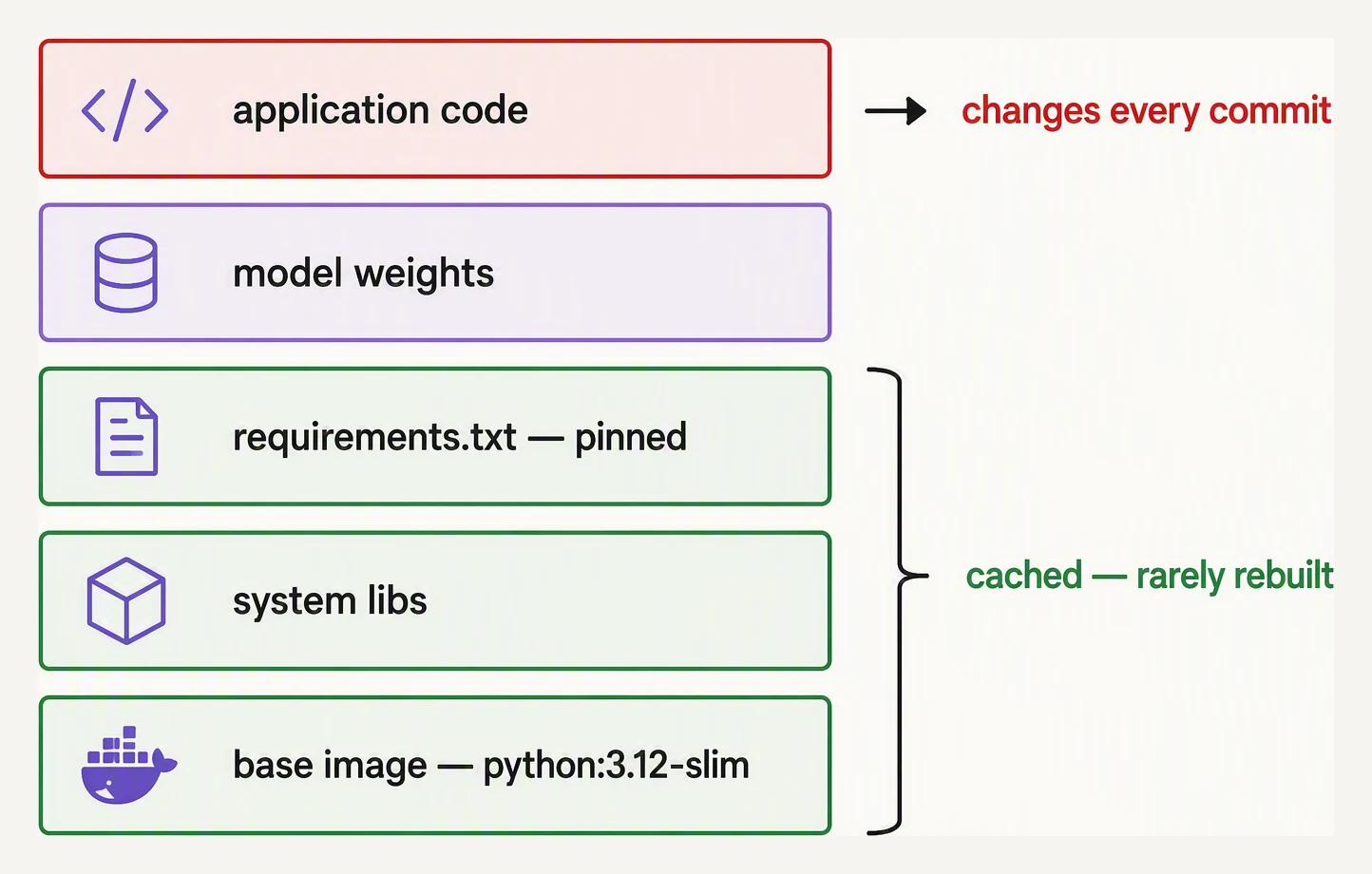
Put what changes least at the bottom, and your rebuilds stay fast.
Here’s a complete Dockerfile for a FastAPI + sklearn service. Read it once, then we’ll dissect it.
# syntax=docker/dockerfile:1.7
FROM python:3.12-slim AS base

# Don't write .pyc, don't buffer stdout — both matter in containers.
ENV PYTHONDONTWRITEBYTECODE=1 \
    PYTHONUNBUFFERED=1 \
    PIP_NO_CACHE_DIR=1

WORKDIR /app

# System deps some wheels expect. Modern manylinux wheels (numpy, sklearn)
# vendor their own libgomp, so try WITHOUT this first — keep it only if your
# image hits "libgomp.so.1: cannot open shared object file" at import time.
RUN apt-get update \
    && apt-get install -y --no-install-recommends libgomp1 \
    && rm -rf /var/lib/apt/lists/*

# Install Python deps FIRST so we cache them.
COPY requirements.txt .
RUN pip install --no-cache-dir -r requirements.txt

# Then copy the app. This layer rebuilds whenever code changes,
# but the (slow) dependency layer above stays cached.
COPY app/ ./app/
COPY models/ ./models/

# Don't run as root in production.
RUN useradd --create-home --shell /bin/bash appuser \
    && chown -R appuser:appuser /app
USER appuser

EXPOSE 8000
CMD ["uvicorn", "app.main:app", "--host", "0.0.0.0", "--port", "8000"]
A few details that matter:
- Layer order. We copy
requirements.txtand install dependencies before copying the source. Docker caches layers by content; if your code changes but your deps don’t, the slowpip installlayer is reused. Reverse the order and every code change re-downloads PyTorch. --no-install-recommendskeeps apt from pulling in 200 MB of things you don’t need.- Non-root user. Containers running as root are a security
smell. Make a user,
chownthe working directory, andUSERit. - No
latesttags. We pinpython:3.12-slim. Anyone reading the Dockerfile six months from now still knows exactly what version they’re inheriting.
Order instructions stable → volatile so expensive layers stay cached
Use the up / down buttons to reorder Dockerfile instructions. Then hit Change app code to see which layers rebuild. Layers above the last COPY . . stay cached; that layer and everything after rebuilds. Move the expensive pip install above the COPY . . to keep it cached on every code change.
FROM python:3.12-slimRUN apt-get install libgomp1COPY requirements.txt .RUN pip install -r requirements.txtCOPY . .
requirements.txt — pin everything
This file lives next to the Dockerfile.
fastapi==0.115.5
uvicorn[standard]==0.32.0
scikit-learn==1.6.0
numpy==2.1.3
pydantic==2.10.3
joblib==1.4.2
Pin exact versions, not ranges. Reproducibility is the entire point
of a container; allowing >= ranges means two builds five minutes apart
can produce different images. uv pip compile (or pip-tools) generates
a fully-pinned lockfile from a looser spec.
.dockerignore — the file you’ll forget to write
Without a .dockerignore, Docker sends everything in your build
directory to the daemon as build context — including your .venv/,
hundreds of megabytes of MLflow runs, Jupyter checkpoints, and your .git
history. Builds get slow and images bloat.
# .dockerignore
__pycache__/
*.pyc
*.pyo
.venv/
.env
.git/
.gitignore
.pytest_cache/
.mypy_cache/
.ruff_cache/
.ipynb_checkpoints/
mlruns/
notebooks/
tests/
*.md
Dockerfile
.dockerignore
Treat it like .gitignore for the build context. The savings on every
single image build are real.
Multi-stage — when image size matters
The single-stage Dockerfile above is fine for sklearn. For services with
compiled dependencies or build-time tools (e.g. torch from source, or
pip install that pulls a compiler), you want a multi-stage build: do
the building in a big image, then copy just the result into a small
runtime image.
# ---------- builder ----------
FROM python:3.12 AS builder
WORKDIR /build

COPY requirements.txt .
RUN pip install --no-cache-dir --user -r requirements.txt

# ---------- runtime ----------
FROM python:3.12-slim AS runtime
WORKDIR /app

# Non-root user — the same production rule as the single-stage image.
RUN useradd --create-home appuser

# Copy the installed packages into the runtime user's home.
COPY --from=builder --chown=appuser:appuser /root/.local /home/appuser/.local
ENV PATH=/home/appuser/.local/bin:$PATH

COPY --chown=appuser:appuser app/ ./app/
COPY --chown=appuser:appuser models/ ./models/

USER appuser
EXPOSE 8000
CMD ["uvicorn", "app.main:app", "--host", "0.0.0.0", "--port", "8000"]
The runtime image doesn’t contain gcc, make, build headers, or any
of the wheels’ build artifacts — just the installed packages. That can
cut image size by a factor of 2–5 and reduce the attack surface in
production.
Choosing a base image
| Base | Compressed pull size | When to use it |
|---|---|---|
python:3.12-slim | ~50 MB (~125 MB on disk) | Default for CPU-only Python services |
python:3.12-alpine | ~25 MB | Tempting, but musl breaks many ML wheels — avoid |
gcr.io/distroless/python3 | ~50 MB | When you’re security-conscious and don’t need a shell |
nvidia/cuda:12.4.1-runtime-ubuntu22.04 | ~3 GB | GPU inference (PyTorch / TensorRT) |
pytorch/pytorch:2.5.1-cuda12.4-cudnn9-runtime | ~6 GB | Official PyTorch + CUDA stack |
The honest advice: use python:3.12-slim until you actually need a GPU.
Alpine’s musl libc breaks pre-built ML wheels (numpy, scikit-learn,
pytorch) and forces source builds — you’ll save 25 MB and lose hours.
For GPU inference, start from the official CUDA / framework images. Don’t hand-roll the CUDA install.
A small runnable sanity check
You can’t build Docker images in the browser, but you can verify the Python part of your service runs cleanly under the same dependency set you’d install in the container. Treat this as the “would the container start?” smoke test:
# Simulates what your container would do at startup: load a model, call predict.
import joblib, tempfile, os

from sklearn.ensemble import RandomForestClassifier
from sklearn.datasets import make_classification

# 'training step' (would normally happen outside the container)
X, y = make_classification(n_samples=500, n_features=4, random_state=0)
model = RandomForestClassifier(n_estimators=20, random_state=0).fit(X, y)

# Persist as your container would expect at /app/models/model.joblib
with tempfile.TemporaryDirectory() as tmp:
    path = os.path.join(tmp, "model.joblib")
    joblib.dump(model, path)

    # 'startup' inside the container: load the artifact and predict
    loaded = joblib.load(path)
    pred = loaded.predict(X[:3])
    print("loaded model OK, predictions on 3 rows:", pred.tolist())
loaded model OK, predictions on 3 rows: [0, 0, 1]The whole drama of containerization is in that one boring line of output. The model serialized to disk, came back
through joblib.load, and predicted [0, 0, 1] — exactly what it would do on startup inside the container. The
only thing standing between this passing on your laptop and failing in production is whether the sklearn version
that reads the pickle matches the one that wrote it. Pin that version in the image (next section) and this smoke
test passing locally becomes a genuine promise about production, not a hopeful guess.
In the real container, swap the in-memory artifact path for
/app/models/model.joblib. If joblib.load works on the file you baked
into the image — and your sklearn version inside the container matches
the one used to train — you’re good.
Build, tag, push
# Build
docker build -t churn-service:0.1.0 .

# Run locally
docker run --rm -p 8000:8000 churn-service:0.1.0

# Tag for a registry and push
docker tag churn-service:0.1.0 ghcr.io/yourorg/churn-service:0.1.0
docker push ghcr.io/yourorg/churn-service:0.1.0
Always tag with an immutable version (0.1.0, a git SHA, or both). Tag
latest is a polite suggestion that mutates under your feet. Production
deploys should reference a specific tag, never latest.
In one breath
A container freezes the OS runtime, the pinned Python environment, and your code into one immutable,
content-addressed artifact that runs identically in CI, staging, and production — and it matters more for ML than
for web apps because libraries are huge, pickled models are version-locked, and training/serving drift apart
unless forced together; the craft is in pinning exact versions, ordering layers so the slow dependency install
caches above your fast-changing code, ignoring junk via .dockerignore, and reaching for multi-stage builds only
when you have build-time tooling you don’t want at runtime.
Practice
Before the quiz, reason about the layer-cache rule with a stopwatch in mind. You copy requirements.txt and run
pip install before copying app/. A teammate flips the order — source first, deps second — and swears it’s
cleaner. On the next one-line code change, whose image rebuilds in seconds and whose re-downloads PyTorch, and
why? Then connect it to the smoke test you ran: it loaded a pickle and predicted [0, 0, 1] — what single line of
requirements.txt is the difference between that smoke test being a real guarantee and a lucky coincidence?
Quick check
requirements.txt and run pip install BEFORE copying your source code in a Dockerfile?requirements.txt says scikit-learn>=1.0. What's the risk?A question to carry forward
So now the environment is frozen into an image, and the smoke test passing locally is a real promise about production. But look at what you just did to get that promise: you ran the build by hand, ran the smoke test by hand, tagged and pushed by hand. An immutable artifact is only as trustworthy as the discipline that produces it — and humans skip steps at 11 p.m.
So the question to carry forward is who holds that discipline when you don’t. Every push should rebuild the image, run the tests inside it, refuse to merge if the model regressed, and — separately — retrain on a schedule and block any candidate that’s worse than what’s live. None of that should depend on someone remembering to do it. So: how do you turn “build, test, ship” into an automatic pipeline that runs on every change and on every Monday morning? That is CI/CD for ML with GitHub Actions, and it is the next lesson.
Practice this in an interview
All questionsDocker packages the serving environment, including system libraries and inference dependencies, while ONNX packages the model's computation graph and weights in a framework-independent format. Together, they let a model exported from PyTorch or TensorFlow run in a small, repeatable container with an inference runtime suited to the target hardware.
ML workflows are multi-step DAGs with dependencies, and an orchestrator gives you dependency management, retries, backfills, caching, observability, and lineage that chained cron jobs cannot. Airflow is a general-purpose task orchestrator defining DAGs in Python, while Kubeflow Pipelines is ML-native, passing typed artifacts between containerized steps on Kubernetes with conditional logic like deploy only if accuracy exceeds a threshold. Choosing depends on whether you need generic scheduling or ML-specific, container-based pipelines.
ML CI/CD must validate not just code correctness but also model quality — automated retraining triggers, data validation, model evaluation gates, and canary deployment checks that standard software pipelines have no equivalent for. A regression in model AUC is as much a deployment failure as a 500 error.
Full ML reproducibility requires locking three layers: the random seed across all frameworks, the software environment via pinned dependency manifests or container images, and the training data via content-addressed versioning. Missing any one layer means the same code can produce different models on different runs or machines.