Microsoft Agent Framework — overview
Microsoft Agent Framework is Microsoft's unified Python and .NET SDK for agents, tools, threads, and workflows. Learn its execution model, Azure strengths, production trade-offs, and when to choose it over LangGraph or ADK.
Written and reviewed by Shreyash Prashu Last reviewed
What you'll learn
- Why Microsoft unified AutoGen and Semantic Kernel into MAF
- How ChatAgent, tools, threads, and workflows fit together
- What agent.run does with and without a thread
- How conversation history changes context size and cost
- When MAF is the right choice over LangGraph or ADK
Before you start
It is 3 a.m. A customer asks your support bot, “Why did my Azure bill jump in March?” The bot checks the billing tool and gives a useful answer.
Then the customer asks, “What about February?”
The bot has forgotten the first question. It cannot tell what “what about” refers to, so it either asks the customer to repeat themselves or confidently compares the wrong things. Both outcomes are expensive ways to discover that a chat box is not the same thing as a conversation.
Now imagine the same product six months later: a billing agent, a policy agent, a human approval step for refunds, and an auditor workflow. Different teams built each piece with different Microsoft libraries, so authentication, tracing, history, and deployment conventions no longer line up.
That was the problem Microsoft Agent Framework, or MAF, was built to address. MAF is the agent-framework Python and .NET SDK for agents and multi-step agent systems. It unifies AutoGen, a research-oriented multi-agent library, and Semantic Kernel, an enterprise-oriented library for plugins and orchestration.
What MAF actually is
MAF has two related execution models:
- A ChatAgent is a model-directed loop. The model receives instructions and messages, chooses whether to answer or call a tool, observes tool results, and continues until it produces a final response.
- A workflow is an explicit graph. You define executors, connections, and sometimes routing conditions.
A billing question has an uncertain path: inspect the account, retrieve invoices, query usage, then explain the result. An invoice approval process has a known path: validate, check policy, ask for approval, then post it. The first suits an agent loop; the second suits a workflow.
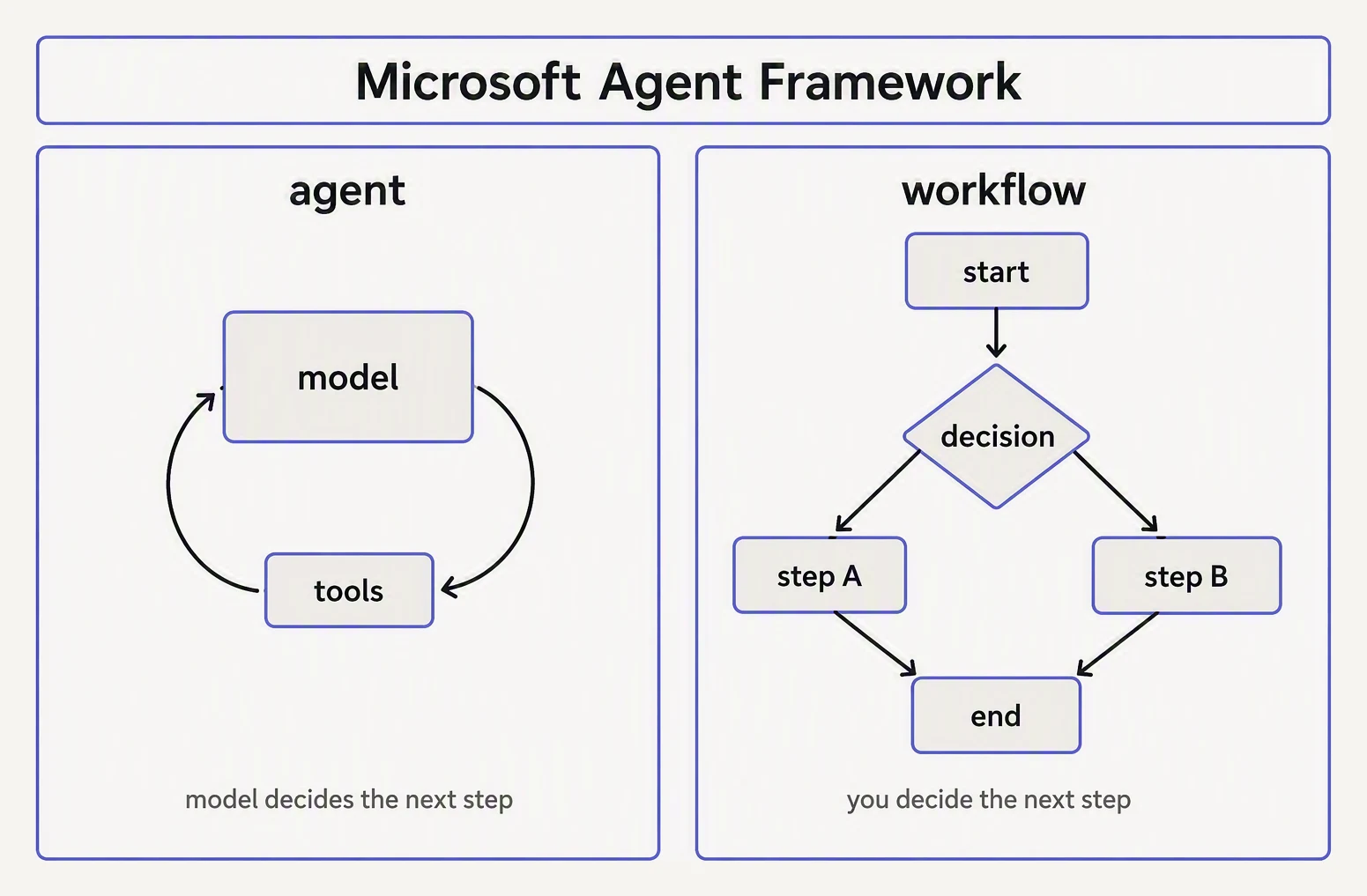
Loop when the path is unknown. Graph when it is not.
The four building blocks are:
| Block | Plain-English meaning | What it controls |
|---|---|---|
| ChatAgent | An LLM with instructions and optional tools | How one agent reasons and responds |
| Tools | Functions the model can request | What the agent can do outside the model |
| Threads | Containers for message history | What the agent can use as conversation context |
| Workflows | Graphs of agents and other executors | How several steps or agents coordinate |
The model supplies probabilistic decisions. MAF supplies the machinery that turns those decisions into tool calls, executions, observations, and final answers.
That machinery is especially useful around Azure. AzureOpenAIChatClient is a first-class client, Entra ID credentials can replace API keys, and MAF fits Microsoft’s Foundry, Bot Service, Azure Functions, and OpenTelemetry ecosystem. Other model providers are supported; Azure is the reason many teams choose MAF over a neutral framework.
The smallest useful agent
You create a model client, give it to an agent with instructions, and run the agent.
# requires: pip install agent-framework==1.0.0 agent-framework-azure-ai==1.0.0 azure-identity==1.25.0
# Run after authenticating with Azure CLI: az login

from agent_framework import ChatAgent
from agent_framework.azure import AzureOpenAIChatClient
from azure.identity import AzureCliCredential

# 1. The model client. Entra ID supplies the credential.
chat_client = AzureOpenAIChatClient(
    credential=AzureCliCredential(),
    endpoint="https://my-foundry-resource.openai.azure.com",
    deployment_name="gpt-4.1",
)

# 2. The agent. It has instructions, but no tools yet.
agent = ChatAgent(
    chat_client=chat_client,
    name="data-explainer",
    instructions=(
        "You explain data engineering concepts in two sentences. "
        "Never use marketing language."
    ),
)

# 3. One request. .run() returns one completed response.
async def main():
    result = await agent.run("What is a window function in SQL?")
    print(result.messages[-1].text)

# In real code:
# import asyncio
# asyncio.run(main())

print("Shape only — real run needs Azure creds.")
The object relationships are:
AzureOpenAIChatClientcontacts the model.ChatAgentadds the name and instructions.agent.run()sends a request and returns the response.
deployment_name is your Azure deployment name, not necessarily the public model name. AzureCliCredential() uses an Azure CLI login for local development; a hosted service usually uses a managed identity or another Entra credential.
The call is stateless by default. The agent object exists in Python, but existence is not memory. Unless you pass conversation state, each call includes only its own input.
What happens during a run
For:
“Why did my March bill jump?”
a typical run is:
- MAF sends the instructions and user message to the model.
- The model requests a tool such as
get_invoice(month="March"). - MAF validates and executes the tool.
- MAF sends the result back as a new message.
- The model requests another tool or writes the answer.
- MAF returns the completed result.
The model does not execute Python merely because it wrote a function name. MAF receives the structured request, runs the function, and feeds the result back. Your application can log the request, validate arguments, require approval, or reject it before a side effect occurs.
One agent.run() call can therefore contain several model turns. Trace the complete run and each tool call when investigating latency or cost.
Threads are history, not human memory
A thread is a conversation-history container. Passing it to later calls makes earlier messages available to the model.
thread = agent.get_new_thread()

await agent.run(
    "What is a window function?",
    thread=thread,
)

await agent.run(
    "Show me one in PySpark.",
    thread=thread,
)
The second call can resolve “one” because the thread contains the first question and answer. Without thread=thread, it is an independent request.
A thread does not store facts in the model’s weights. It stores messages, which become input context on later calls. That has two consequences.
First, history increases context size. Consider:
| Call | New user input | Earlier history included | Input sent to model |
|---|---|---|---|
| 1 | 200 tokens | 0 | 200 |
| 2 | 100 tokens | 500 tokens | 600 |
| 3 | 120 tokens | 850 tokens | 970 |
Across three calls, the model receives 200 + 600 + 970 = 1,770 input tokens. Sending each question independently would use only 200 + 100 + 120 = 420 input tokens. Exact counts vary, but long threads can increase context, latency, and cost.
Second, a thread is not an authentication session.
For a prototype, agent.get_new_thread() creates an in-memory thread. It disappears when the process does, so production services should persist enough state to reconstruct or resume it in Cosmos DB, Redis, SQL, or another store.
Keep tenant and user identity separate from the conversation ID, authorize thread access, expire or summarize old history, encrypt sensitive messages, and define deletion policies. Avoid retaining tool results containing secrets longer than necessary.
Tools: the boundary between words and work
A tool is a callable operation exposed with a description and typed input schema. Type annotations describe arguments, and documentation helps describe the operation to the model.
def get_invoice(month: str, account_id: str) -> dict:
    """Return totals and line items for one billing month."""
    ...
MAF uses this information to create the tool schema and manages the tool-call loop. The model chooses when to request the tool, but your application owns execution.
Types are not authorization. The function must verify the authenticated caller’s account scope; otherwise a model can request another customer’s account_id.
Start with read-only tools. Refunds, database writes, emails, and infrastructure operations need authorization, validation, idempotency, audit logging, and sometimes human approval. Hosted capabilities such as code execution, file search, and web search also need explicit data and permission boundaries.
The next lesson covers MAF tools in depth.
Workflows: make the known path explicit
A workflow coordinates work that should not be left entirely to model judgment. Its nodes, often called executors, receive input, perform work, and emit output; edges connect each output to the next step.
A billing workflow might load invoices, classify the change, draft an explanation, audit its numbers, and route a refund recommendation for human approval. If the auditor must always run, encode that edge. “Remember to audit yourself” is a prompt suggestion; a graph edge is control flow.
Use an agent loop when the route is uncertain and a workflow when it is a business rule. Many systems use both: an agent researches within one node while a workflow controls the larger process.
MAF includes:
- Sequential execution for fixed pipelines
- Concurrent execution for independent work
- Handoff for transferring control between specialists
- Group chat for shared multi-agent discussion
- Magentic-One for more general open-ended orchestration
Every additional agent adds model calls, context transfer, failure paths, and opportunities for contradictory conclusions. Start with one agent and workflow edges you can explain on a whiteboard.
Choosing MAF in practice
The deciding question is where your identity, models, deployment, and operators already live.
| Situation | Sensible first choice | Why |
|---|---|---|
| Azure OpenAI, Entra ID, Foundry, and Azure hosting are standard | MAF | Less authentication and deployment glue |
| A .NET team needs the same concepts as a Python team | MAF | Python and .NET support |
| Stateful graphs with retries, checkpoints, and explicit branching dominate | MAF or LangGraph | Compare their workflow and persistence models |
| The stack is primarily GCP or provider-neutral | ADK, LangGraph, or OpenAI Agents SDK | MAF’s Azure advantage is less valuable |
MAF wins when Azure model access, Entra authentication, Foundry integration, .NET parity, and Microsoft hosting conventions remove work. It is weaker when your organization has no Azure footprint: you carry its concepts without receiving its strongest integrations. LangGraph may be preferable when durable graph state and recovery dominate; ADK may fit a deeply Google Cloud-based service.
API stability note
MAF reached GA in 2026, but convenience methods can still change. The shapes shown here—ChatAgent, AzureOpenAIChatClient, agent.run(), and get_new_thread()—represent the 1.x model described by this lesson. Before production rollout, confirm current signatures, persistence support, hosted-tool names, and provider requirements in the official documentation.
Quick check
Quick check
Next
The next lesson covers MAF tools: schemas, function execution, approval, MCP, and the safeguards that keep an agent from turning a plausible sentence into an expensive side effect.
Practice this in an interview
All questionsAn AI agent is an application that lets an LLM choose and execute validated tools in a bounded loop, carrying observations and state forward until it reaches a goal or needs approval. A single LLM call produces one response or tool-call proposal and stops; it does not itself provide the loop, live-system access, memory, or side effects.
Tool calling extends the LLM's output space to include structured function invocations. The model emits a JSON object naming a tool and its arguments; the runtime executes the tool and feeds the result back as a new message. An agent is a loop that repeats this cycle — observe, think, act — until the task is complete or a stopping condition is met.
Tool use lets an LLM emit a structured request for an external function, which the application validates, authorizes, executes, and returns to the model. Reliable tools have clear descriptions, narrow scope, strict typed inputs, least-privilege access, idempotency, and useful structured errors.
MCP is an open protocol originally introduced by Anthropic that standardizes how an AI host discovers and uses tools, resources, and prompt templates exposed by separate servers. It solves bespoke integration sprawl by giving each server one common interface, while leaving model orchestration, permissions, and user approval to the host.