Human-in-the-loop with LangGraph
Pause the graph, let a human review or edit, resume from where it stopped. The pattern is "LLM proposes, human disposes" — and it's what makes agents safe to ship.
Written and reviewed by Shreyash Prashu Last reviewed
What you'll learn
- How
interrupt_beforeandinterrupt_afterpause the graph at chosen nodes - The "LLM proposes, human disposes" pattern for safe write actions
- How to resume — with or without edits — via
app.invoke(None, config)
Before you start
The agents that survive contact with production almost never run end-to-end without supervision.
Whenever the LLM is about to do something with consequences, you want a human in the loop (a person who can review, approve, or correct the agent’s planned action before it happens).
Consequential actions include:
- send an email
- file a ticket
- run a SQL DELETE
- post to social
LangGraph’s interrupt mechanism is built for this. You declare which nodes should pause before or after they run.
The graph stops mid-flight, persists state via the checkpointer, and waits. A human inspects, edits if needed, and resumes. The shape is consistent — LLM proposes, human disposes.
This works because of the checkpointer you added in the previous lesson: when the graph pauses, it writes the full current state to durable storage.
The process can sleep, the pod can restart — and
invoke(None, config) later reads that saved state and picks up
exactly where it stopped.
How interrupts work
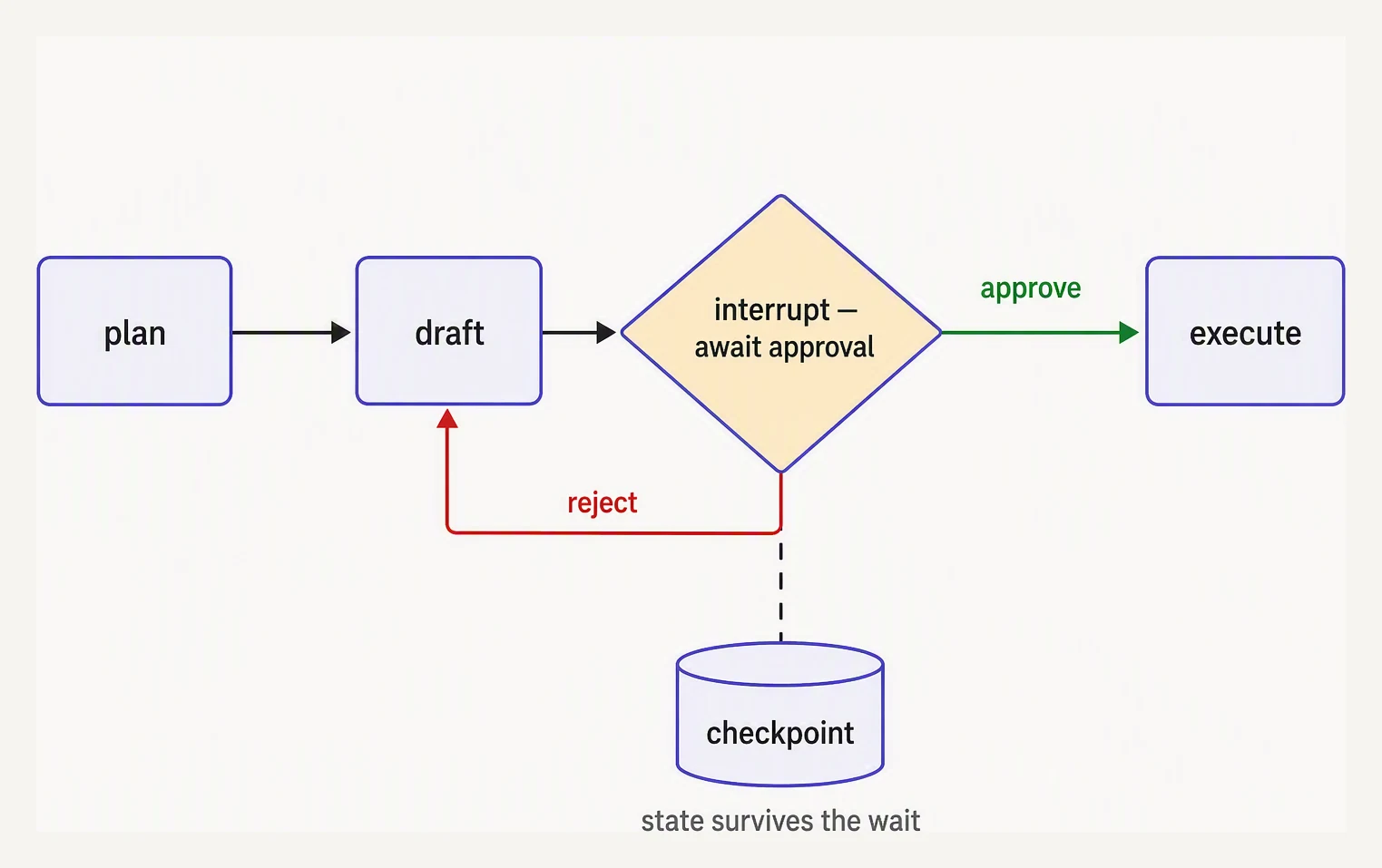
The pause is durable — state is checkpointed, not held in memory.
Pause and resume
Two knobs on .compile():
app = graph.compile(
    checkpointer=checkpointer,
    interrupt_before=["send_email"],   # pause before running this node
    interrupt_after=["draft"],         # pause after this node finishes
)
When .invoke() reaches an interrupted node, it stops and returns.
The state is in the checkpointer. The graph is paused, not finished.
Resuming is one line:
app.invoke(None, config=config)That None is the signal: “no new input — just resume from where
you stopped.”
LangGraph picks up at the interrupt point, runs the next node, and continues.
If a human edited state in between, you call app.update_state(...)
first, then .invoke(None, ...).
The canonical example — an email-drafting agent
Three nodes:
- draft — LLM writes an email based on the user’s intent.
- review — human looks at the draft, optionally edits.
- send — actually sends the email via API.
We interrupt_before=["send"] so the graph pauses with the draft
ready, before anything irreversible happens.
# Mocked LangGraph with human-in-the-loop interrupt. The interrupt_before
# pattern, update_state, and resume-with-None mirror real LangGraph.

from typing import TypedDict

START, END = "__start__", "__end__"

class MemorySaver:
    def __init__(self): self.store = {}
    def get(self, t): return self.store.get(t)
    def put(self, t, s): self.store[t] = s

class StateGraph:
    def __init__(self, schema, reducers=None):
        self.schema, self.reducers = schema, reducers or {}
        self.nodes, self.edges = {}, {}
    def add_node(self, n, fn): self.nodes[n] = fn
    def add_edge(self, s, d): self.edges[s] = d
    def compile(self, checkpointer=None, interrupt_before=None):
        return CompiledGraph(self, checkpointer, interrupt_before or [])

class CompiledGraph:
    def __init__(self, g, cp, ib):
        self.g, self.cp, self.interrupt_before = g, cp, ib
    def _merge(self, state, update):
        merged = dict(state)
        for k, v in update.items():
            merged[k] = self.g.reducers[k](state.get(k), v) if k in self.g.reducers else v
        return merged
    def invoke(self, new_input, config):
        thread = config["configurable"]["thread_id"]
        if new_input is None:
            # resume — run the node we paused before, skipping its interrupt once
            saved = self.cp.get(thread)
            state, node, resuming = saved["state"], saved["next_node"], True
        else:
            prior = self.cp.get(thread)
            state = self._merge(prior["state"] if prior else {}, new_input)
            node, resuming = self.g.edges[START], False
        while True:
            if node == END:
                self.cp.put(thread, {"state": state, "next_node": END, "interrupted": False})
                return state
            if node in self.interrupt_before and not resuming:
                # PAUSE — persist and return early
                self.cp.put(thread, {"state": state, "next_node": node, "interrupted": True})
                return state
            resuming = False
            state = self._merge(state, self.g.nodes[node](state))
            node = self.g.edges[node]
    def get_state(self, config):
        return self.cp.get(config["configurable"]["thread_id"])
    def update_state(self, config, update):
        thread = config["configurable"]["thread_id"]
        saved = self.cp.get(thread)
        saved["state"] = self._merge(saved["state"], update)
        self.cp.put(thread, saved)

# --- the graph ---
class State(TypedDict):
    intent: str
    draft: str
    sent: bool

def draft_email(state):
    return {"draft": (
        f"Subject: Following up on {state['intent']}\n\n"
        f"Hi — wanted to circle back on {state['intent']}. "
        f"Let me know if next week works.\n\nThanks!"
    )}

def send_email(state):
    print(f"  [SENDING] {state['draft'][:60]!r}...")
    return {"sent": True}

graph = StateGraph(State)
graph.add_node("draft", draft_email)
graph.add_node("send", send_email)
graph.add_edge(START, "draft")
graph.add_edge("draft", "send")
graph.add_edge("send", END)

checkpointer = MemorySaver()
app = graph.compile(checkpointer=checkpointer, interrupt_before=["send"])  # pause before sending!

config = {"configurable": {"thread_id": "email-1"}}

# --- run until interrupt ---
print("Step 1: invoke — should pause before 'send'")
state = app.invoke({"intent": "the Q3 contract", "draft": "", "sent": False}, config=config)
print(f"  draft:\n{state['draft']}\n  sent? {state['sent']}")

snapshot = app.get_state(config)
print(f"  paused at node: {snapshot['next_node']}, interrupted: {snapshot['interrupted']}")

# --- human reviews and edits the draft ---
print("\nStep 2: human edits the draft")
app.update_state(config, {"draft": state["draft"].replace("circle back", "follow up")})
edited = app.get_state(config)["state"]
print(f"  edited draft:\n{edited['draft']}")

# --- resume — invoke with None ---
print("\nStep 3: resume with invoke(None, config)")
final = app.invoke(None, config=config)
print(f"  sent? {final['sent']}")
Step 1: invoke — should pause before 'send'
draft:
Subject: Following up on the Q3 contract
Hi — wanted to circle back on the Q3 contract. Let me know if next week works.
Thanks!
sent? False
paused at node: send, interrupted: True
Step 2: human edits the draft
edited draft:
Subject: Following up on the Q3 contract
Hi — wanted to follow up on the Q3 contract. Let me know if next week works.
Thanks!
Step 3: resume with invoke(None, config)
[SENDING] 'Subject: Following up on the Q3 contract\n\nHi — wanted to fol'...
sent? TrueThe flow, step by step
- Call
.invoke(input, config). The graph runsdraft, then stops becausesendis ininterrupt_before. The draft is in state. - The application UI displays the draft, lets the human edit.
- The human’s edits flow back via
app.update_state(config, {...}). - The application calls
app.invoke(None, config). The graph picks up atsend, runs it, finishes.
The graph code didn’t have to know about the human. The interrupt is a runtime concern, not a node concern.
Detecting “paused” state
After a paused .invoke(), you check the state snapshot to see
where it stopped.
snapshot = app.get_state(config)
# snapshot.next        → ("send",)   # the next node it would run
# snapshot.values      → the current state dict
# snapshot.tasks       → tasks pending at the pause point
In a real app, snapshot.next being non-empty means “we paused;
show the UI.” Empty means the graph finished.
Patterns beyond “approve/edit”
The interrupt mechanism is general. Variations:
- Approve / reject / edit / regenerate. UI presents the draft; user clicks one. Approve resumes. Reject updates state with guidance and re-invokes the draft node. Regenerate clears the current draft and re-invokes draft.
- Tool authorization. The LLM proposes a tool call; the graph pauses before executing high-risk tools (anything that writes, deletes, or spends money). The human authorizes specific calls.
- Clarifying questions. The agent asks the user a question; the
graph pauses; the user answers via
update_state; resume. - Multi-stage approval. Different reviewers at different nodes — a draft reviewer pauses at one node, a legal reviewer at another.
All of these use the same primitives: interrupt_before or
interrupt_after, update_state, and .invoke(None, config).
interrupt_after — auditing what just happened
interrupt_before is for safety: stop before doing something. The
mirror, interrupt_after (pause after a node finishes, before the
next one starts), is for audit: you can inspect what it produced
before moving on.
Useful for:
- Logging full state to an audit system before continuing.
- Letting a human spot-check an intermediate result.
- Running expensive evals on the output of a particular node.
app = graph.compile(
    checkpointer=cp,
    interrupt_after=["plan"],     # pause AFTER planning, before execution
)
A common bug — forgetting the checkpointer
Interrupts only work with a checkpointer.
If you forget to pass checkpointer=... to .compile(), the graph
will raise an error when it hits an interrupted node. There is no
persisted state to pause into or resume from. Always pair them.
In one breath
- The pattern is “LLM proposes, human disposes” — gate any consequential action (send, write, delete, spend) on a person.
interrupt_beforepauses just before a node runs (safety);interrupt_afterpauses after (audit) — both persist state via the checkpointer and return early.- Resume with
app.invoke(None, config)— theNonemeans “no new input, continue from saved state”; apply human edits first withupdate_state. - Interrupts don’t work without a checkpointer — there’s nothing to pause into or resume from.
- The same three primitives cover approve/reject/edit, tool authorization, clarifying questions, and multi-stage review — and edits from a client are untrusted input, so constrain what
update_statemay change.
Quick check
Quick check
interrupt_before=['send_email'] do?Wrapping up
You now have the full LangGraph toolkit:
- state graphs
- reducers
- persistence
- human-in-the-loop
With those four pieces, you can express almost any agent shape, including:
- multi-step tool use
- retries
- multi-turn conversations
- approval gates
- audit pauses
The next steps in the track look at evaluation, observability, and production patterns — what it takes to actually run these agents in front of users.
Practice this in an interview
All questionsRLHF (Reinforcement Learning from Human Feedback) aligns a language model's outputs to human preferences by training a reward model on ranked human comparisons, then using that reward signal to fine-tune the policy with reinforcement learning. It solves the gap between a model that is good at next-token prediction and a model that is genuinely helpful, harmless, and honest.
Tool calling extends the LLM's output space to include structured function invocations. The model emits a JSON object naming a tool and its arguments; the runtime executes the tool and feeds the result back as a new message. An agent is a loop that repeats this cycle — observe, think, act — until the task is complete or a stopping condition is met.
Tool use lets an LLM emit a structured request for an external function, which the application validates, authorizes, executes, and returns to the model. Reliable tools have clear descriptions, narrow scope, strict typed inputs, least-privilege access, idempotency, and useful structured errors.
An AI agent is an application that lets an LLM choose and execute validated tools in a bounded loop, carrying observations and state forward until it reaches a goal or needs approval. A single LLM call produces one response or tool-call proposal and stops; it does not itself provide the loop, live-system access, memory, or side effects.