MAF tools — functions, approval, MCP
How Python functions become MAF tools, when to require human approval, and the hosted tools (code interpreter, file search, MCP) you get for free.
Written and reviewed by Shreyash Prashu Last reviewed
What you'll learn
- Turning a Python function into an MAF tool with type hints + docstring
- Annotating parameters with descriptions the model actually sees
- Human-in-the-loop approval for sensitive tool calls
- Hosted tools — code interpreter, file search, web search, MCP
Before you start
Tools are where MAF earns its keep. A tool is any capability the LLM can invoke — a Python function, a hosted service, or an external API — described to the model as a JSON schema so it knows what to call and when. The framework introspects your Python functions and builds that schema automatically — you write ordinary Python, MAF handles the wire format. This lesson covers the patterns you’ll actually use in production: function tools, parameter annotations, human approval, and the hosted tools Microsoft ships.
A function becomes a tool
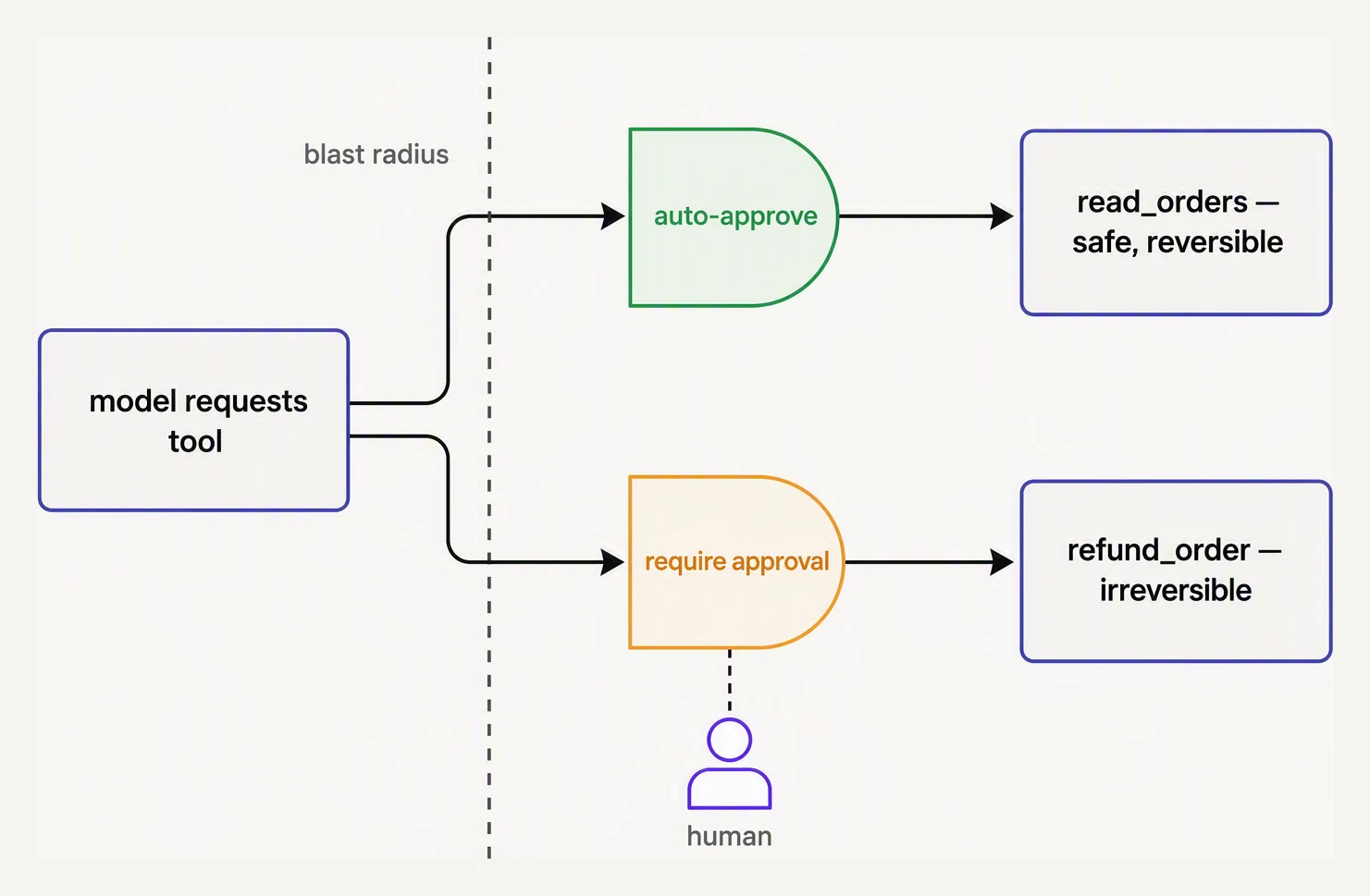
Classify by blast radius, not by convenience.
The contract: a Python function with type hints and a docstring is a
valid MAF tool. Pass it in tools=[...] and the agent can call it.
# requires: pip install agent-framework (for the commented agent wiring)
# The get_weather function below is plain Python — the agent setup is the
# real MAF shape you'd paste into a project.

from typing import Annotated
from pydantic import Field

# 1. Define a plain Python function. Type hints + docstring are the contract.
def get_weather(
    city: Annotated[str, Field(description="City name, e.g. 'Tokyo'")],
    unit: Annotated[str, Field(description="celsius or fahrenheit")] = "celsius",
) -> dict:
    """Return the current temperature for a city."""
    fake = {"Tokyo": 18, "Lagos": 32, "Reykjavik": 4}
    temp = fake.get(city, 20)
    if unit == "fahrenheit":
        temp = temp * 9 / 5 + 32
    return {"city": city, "temperature": temp, "unit": unit}

# 2. Hand it to the agent. MAF generates the JSON schema from your signature.
#    from agent_framework import ChatAgent
#    from agent_framework.azure import AzureOpenAIChatClient
#
#    agent = ChatAgent(
#        chat_client=AzureOpenAIChatClient(...),
#        name="weather-bot",
#        instructions="Use get_weather for any weather question. Never guess.",
#        tools=[get_weather],
#    )
#
#    result = await agent.run("What's it like in Tokyo right now?")
#    print(result.messages[-1].text)

# Sanity-check the tool itself (this part DOES run):
print(get_weather("Tokyo"))
print(get_weather("Lagos", unit="fahrenheit"))
{'city': 'Tokyo', 'temperature': 18, 'unit': 'celsius'}
{'city': 'Lagos', 'temperature': 89.6, 'unit': 'fahrenheit'}A few things to notice:
Annotated[type, Field(description="...")]is how you give the model a per-parameter description. Without it, the model only sees the type and parameter name — often enough, sometimes not.- The docstring becomes the tool description. Treat it like documentation for the model, not for a human reader. Be explicit about what the function does and when to call it.
- Return values should be JSON-serializable. A
dict,list, Pydantic model, or primitive. MAF serializes it back to the model.
Human-in-the-loop approval
For sensitive actions — sending email, modifying a database, calling a paid API — you don’t want the model to act unsupervised. MAF supports tool approval (a human-in-the-loop gate between the model’s decision and the tool’s execution): the framework pauses before executing, surfaces the proposed call to your application, and waits for approval.
from agent_framework import ChatAgent, ApprovalRequired

def delete_user(user_id: str) -> dict:
    """Permanently delete a user account. Irreversible."""
    return {"deleted": user_id}

agent = ChatAgent(
    chat_client=chat_client,
    instructions="Help the admin manage user accounts.",
    tools=[
        ApprovalRequired(delete_user),  # gate this one
        # ... other tools without approval
    ],
)

async for event in agent.run_stream("Delete user u_42", thread=thread):
    if event.kind == "tool_approval_requested":
        # show the proposed call to a human, then:
        if human_approves(event.tool_call):
            await event.approve()
        else:
            await event.deny(reason="Manager declined")
The point: the LLM proposes, a human disposes. Your UI shows the tool name, the arguments, and a confirm button. This pattern is the only safe way to wire agents to destructive actions.
Hosted tools you get for free
MAF ships with a handful of tools you don’t have to implement:
| Tool | What it does |
|---|---|
| Code interpreter | Runs sandboxed Python. Use for math, data analysis, plotting. |
| File search | Vector-indexes uploaded files and answers questions over them. |
| Web search | Bing-backed grounding for fresh information. |
| MCP tools | Connect to any Model Context Protocol server. |
Wiring them in is one line each:
from agent_framework.tools import CodeInterpreterTool, FileSearchTool, MCPTool

agent = ChatAgent(
    chat_client=chat_client,
    instructions="Analyze the uploaded CSV and answer questions.",
    tools=[
        CodeInterpreterTool(),
        FileSearchTool(vector_store_ids=["vs_abc123"]),
        MCPTool(server_url="https://my-mcp-server.example.com"),
        get_weather,  # your own tool sits alongside
    ],
)
MCP — connect to anything
MCP (Model Context Protocol) is the open standard for “give my agent access to this external system.” Instead of writing a custom tool for GitHub, Notion, your internal API, you point MAF at an MCP server and all of that server’s tools become available to the agent.
The practical effect: you stop writing glue code. If a vendor publishes
an MCP server, your agent can use it. MAF’s MCPTool handles auth,
transport, and the tool discovery handshake.
What MAF does and doesn’t do for you
Does: schema generation, the tool-call loop, parallel tool execution, error handling (a tool exception is fed back to the model as an error message, not a crash), token accounting, OpenTelemetry traces per tool call.
Doesn’t: tool retry logic with backoff (you write it), tenant-aware
authorization (you check user_id before the tool runs), rate limiting
across users (use middleware — next lesson).
In one breath
- A plain Python function with type hints + a docstring is a valid MAF tool; the framework introspects it into the JSON schema the model reads.
Annotated[type, Field(description=...)]gives each parameter a description; the docstring becomes the tool description — write both for the model, not a human.- Gate destructive/sensitive tools with
ApprovalRequired(...)— the LLM proposes, a human disposes; never wire writes/sends/deletes without it. - MAF ships hosted tools (code interpreter, file search, web search) and
MCPToolto connect any MCP server — one line each, no glue code. - It does schema generation, the tool loop, parallel calls, and error-as-message; you still own retries, tenant authorization, and rate limiting — and keep the tool list to ~5–15, routing by intent beyond that.
Quick check
Quick check
Next
Tools handle single-agent capabilities. The next lesson covers workflows — when a task needs multiple specialized agents collaborating as a graph.
Practice this in an interview
All questionsMCP is an open protocol originally introduced by Anthropic that standardizes how an AI host discovers and uses tools, resources, and prompt templates exposed by separate servers. It solves bespoke integration sprawl by giving each server one common interface, while leaving model orchestration, permissions, and user approval to the host.
Tool use lets an LLM emit a structured request for an external function, which the application validates, authorizes, executes, and returns to the model. Reliable tools have clear descriptions, narrow scope, strict typed inputs, least-privilege access, idempotency, and useful structured errors.
Tool poisoning is malicious instruction content in a tool description or result; cross-server shadowing uses one server’s names or content to influence or misroute another server’s capability; a rug pull changes a previously reviewed capability later. Defenses combine origin-aware namespaces, isolated trust contexts, capability snapshots and change review, exact-argument authorization, sandboxing, and runtime monitoring.
Tool calling extends the LLM's output space to include structured function invocations. The model emits a JSON object naming a tool and its arguments; the runtime executes the tool and feeds the result back as a new message. An agent is a loop that repeats this cycle — observe, think, act — until the task is complete or a stopping condition is met.