RAG with LangChain — loaders, splitters, vector stores
LangChain's RAG pieces fit together cleanly for prototypes. Document loaders, text splitters, embeddings, vector stores, retrievers — wired end-to-end.
Written and reviewed by Shreyash Prashu Last reviewed
What you'll learn
- The LangChain RAG primitives — loaders, splitters, embeddings, vector stores, retrievers
- How
RecursiveCharacterTextSplitteractually chunks (and what its knobs do) - When LangChain RAG is enough and when teams roll their own
Before you start
You already know what RAG is from the gen-AI lesson:
- chunk
- embed
- store
- retrieve
- generate
LangChain gives you a primitive for each stage. They snap together cleanly. The whole prototype fits on one screen.
The question for this lesson isn’t “what is RAG?” — it’s “what does RAG look like when you wire it up with LangChain, and where do real teams diverge from the framework?”
The four LangChain RAG primitives
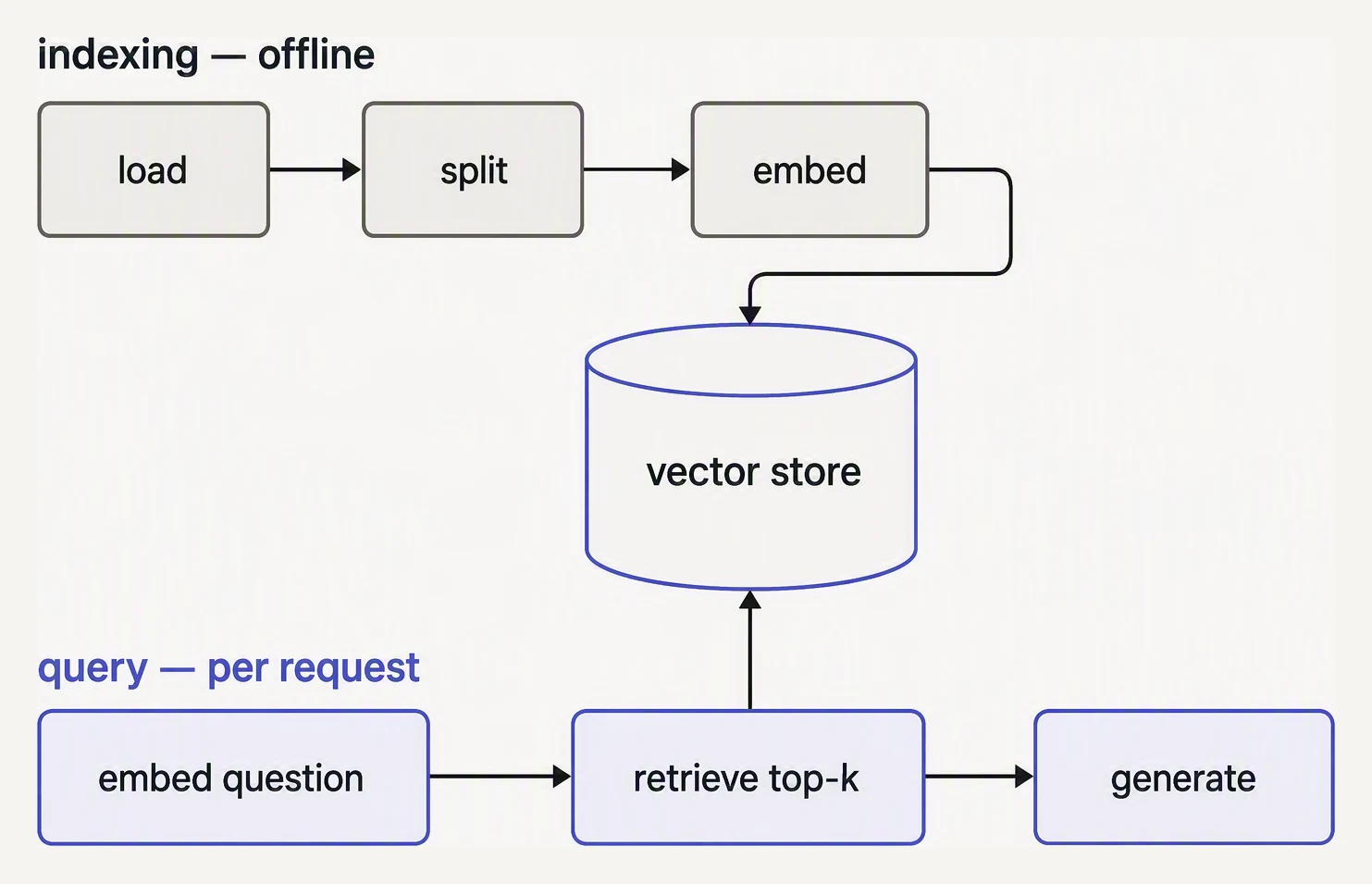
Two paths that meet at the vector store — one runs once, one runs per question.
# 1. Document loaders — read files into LangChain `Document` objects
from langchain_community.document_loaders import PyPDFLoader, WebBaseLoader

# 2. Text splitters — chunk Documents into smaller Documents
from langchain_text_splitters import RecursiveCharacterTextSplitter

# 3. Embeddings — text → vectors
from langchain_openai import OpenAIEmbeddings

# 4. Vector stores — index + similarity search
from langchain_chroma import Chroma
# or: langchain_qdrant, langchain_postgres (for pgvector), langchain_pinecone…
These all share an interface:
- Loaders return
List[Document]. - Splitters take and return
List[Document]. - Embeddings turn strings into floats.
- Vector stores take
Documents and embeddings and give you a retriever.
Document loaders
A loader normalizes “stuff on disk” into LangChain’s Document — which is just page_content: str + metadata: dict.
There are loaders for:
- PDFs
- websites
- Notion
- S3
- Confluence
- GitHub
- Slack
- a hundred other sources
from langchain_community.document_loaders import PyPDFLoader

docs = PyPDFLoader("contract.pdf").load()
# → [Document(page_content="...", metadata={"source": "contract.pdf", "page": 0}),
#     Document(page_content="...", metadata={"source": "contract.pdf", "page": 1}),
#     ...]
The metadata matters more than people realize. You’ll use it later to filter retrieval (“only chunks from this customer’s docs”) and to cite sources.
Text splitters
A loader gives you one Document per page or file. That’s almost always too big to embed. Splitters chunk further.
RecursiveCharacterTextSplitter is the workhorse. It tries to split on a list of separators (["\n\n", "\n", " ", ""]) in order, falling back to the next one if a chunk is still too big.
splitter = RecursiveCharacterTextSplitter(
    chunk_size=500,     # max characters per chunk (use a tokenizer fn for token-accurate limits)
    chunk_overlap=50,   # overlap, so context isn't lost at boundaries
    length_function=len,  # len() counts characters; swap for tiktoken to count tokens
)
chunks = splitter.split_documents(docs)
The two knobs you’ll tune:
chunk_size— the most important RAG knob in your whole pipeline. Units are whateverlength_functioncounts — characters by default, tokens if you pass a tokenizer. 200–1 000 characters is the usual starting range; sweep it and measure recall@k.chunk_overlap— typically 10–20% ofchunk_size. Stops important sentences from being cut in half at a boundary.
For code or markdown, use RecursiveCharacterTextSplitter.from_language(...) or MarkdownHeaderTextSplitter — structural splitting beats character-count splitting whenever the document has structure.
Embeddings + vector store
Once you have chunks, you embed them and stuff them into a vector store.
embeddings = OpenAIEmbeddings(model="text-embedding-3-large")

vectorstore = Chroma.from_documents(
    documents=chunks,
    embedding=embeddings,
    persist_directory="./chroma_db",
)
Chroma is the easiest local store. For production, you’ll usually reach for:
- Qdrant
- pgvector
- Pinecone
The LangChain interface is the same across them:
from_documents()as_retriever()similarity_search()
The retrieval chain
Every vector store gives you a retriever via .as_retriever(). Wire it into an LCEL chain that stuffs the retrieved context into a prompt.
# Mocked end-to-end LangChain RAG. The structure mirrors real code:
#   loader -> splitter -> embeddings -> vectorstore -> retriever -> prompt -> model
# We mock the vectorstore + LLM so you can run it.

# --- mock primitives ---
class Document:
    def __init__(self, page_content, metadata=None):
        self.page_content = page_content
        self.metadata = metadata or {}
    def __repr__(self):
        return f"Document({self.page_content[:40]!r})"

class RecursiveCharacterTextSplitter:
    def __init__(self, chunk_size=500, chunk_overlap=50):
        self.chunk_size = chunk_size
        self.chunk_overlap = chunk_overlap
    def split_documents(self, docs):
        out = []
        for d in docs:
            text = d.page_content
            step = self.chunk_size - self.chunk_overlap
            for i in range(0, len(text), step):
                out.append(Document(text[i:i + self.chunk_size], d.metadata))
        return out

class MockEmbeddings:
    """Bag-of-words 'embedding'. Real embeddings come from OpenAIEmbeddings()."""
    vocab = ["spark", "join", "dataframe", "billion", "rows", "slow",
             "fast", "shuffle", "partition", "memory", "executor"]
    def embed(self, text):
        text = text.lower()
        return [1.0 if w in text else 0.0 for w in self.vocab]

class MockVectorStore:
    def __init__(self):
        self.records = []
    @classmethod
    def from_documents(cls, documents, embedding):
        store = cls()
        store.embedding = embedding
        for d in documents:
            store.records.append((d, embedding.embed(d.page_content)))
        return store
    def similarity_search(self, query, k=3):
        import math
        qv = self.embedding.embed(query)
        def cos(a, b):
            dot = sum(x*y for x, y in zip(a, b))
            na = math.sqrt(sum(x*x for x in a)) or 1
            nb = math.sqrt(sum(y*y for y in b)) or 1
            return dot / (na * nb)
        ranked = sorted(self.records, key=lambda r: -cos(qv, r[1]))
        return [d for d, _ in ranked[:k]]
    def as_retriever(self, k=3):
        store = self
        class Retriever:
            def invoke(self, query):
                return store.similarity_search(query, k=k)
        return Retriever()

class MockLLM:
    def invoke(self, prompt):
        # Pull out the question and respond using context
        return ("Based on the docs: Spark joins on billion-row tables "
                "are slow because of shuffle. Tune partitions and "
                "broadcast-join small tables.")

# --- the pipeline (this part mirrors real LangChain RAG) ---
raw = [Document(
    "Spark joins on billion-row tables are slow due to expensive shuffle. "
    "Tune shuffle partitions. Use broadcast joins for small tables. "
    "Increase executor memory if joins spill. "
    "Avoid skewed keys; salt them if needed."
)]

splitter = RecursiveCharacterTextSplitter(chunk_size=80, chunk_overlap=10)
chunks = splitter.split_documents(raw)
print(f"split into {len(chunks)} chunks")

vectorstore = MockVectorStore.from_documents(chunks, embedding=MockEmbeddings())
retriever = vectorstore.as_retriever(k=2)

# The retrieval chain — retrieve, stuff into a prompt, call LLM
def rag_chain(question):
    docs = retriever.invoke(question)
    context = "\n\n---\n\n".join(d.page_content for d in docs)
    prompt = (
        "Use the context below to answer. If not in context, say I don't know.\n\n"
        f"Context:\n{context}\n\nQuestion: {question}\nAnswer:"
    )
    return MockLLM().invoke(prompt), docs

answer, sources = rag_chain("Why are my Spark joins slow on a billion rows?")
print("\nANSWER:", answer)
print("\nSOURCES used:")
for s in sources:
    print(" -", s.page_content[:80])
split into 4 chunks
ANSWER: Based on the docs: Spark joins on billion-row tables are slow because of shuffle. Tune partitions and broadcast-join small tables.
SOURCES used:
- Spark joins on billion-row tables are slow due to expensive shuffle. Tune shuffl
- executor memory if joins spill. Avoid skewed keys; salt them if needed.Reading the mock output
Trace the flow:
- The splitter cut one document into 4 character chunks.
- The mock embedder scored each against the query’s bag of words.
- The retriever returned the 2 highest-cosine chunks as the context.
Notice the second source starts mid-word with a leading space. That’s exactly the boundary problem chunk_overlap exists to soften.
That whole pipeline — load, split, embed, store, retrieve, generate — is maybe twenty lines with the real LangChain classes. It’s the fastest way to get a “talk to my docs” demo running.
Where prototypes diverge from production
LangChain’s RAG pieces are great for prototyping. They are not always what production teams ship long-term. The reasons:
- Chunking quality matters more than the framework. Real teams invest in document-aware chunking (per-section, per-function, per-table) that goes beyond what
RecursiveCharacterTextSplitterships with. - Hybrid retrieval is essential. LangChain has it (
EnsembleRetriever), but many teams roll their own BM25 + dense fusion because they want to tune the merge weights and integrate with their existing search infra. - Re-ranking is the highest-leverage add. A cross-encoder re-ranker after retrieval is almost always worth its latency cost. LangChain supports it (
ContextualCompressionRetriever) but the integration with Cohere Rerank / BGE-reranker is easy enough to do without the wrapper. - Observability. Production RAG needs trace-level logging of retrieved chunks and their scores. LangChain has LangSmith for this; some teams prefer their own metrics pipeline.
Adding citations
A few extra lines turn the chain above into a citation-aware version — ask the model to refer to sources by index, and pass the metadata back to the caller.
prompt = """Use the numbered sources to answer. Cite as [1], [2], etc.

Sources:
{numbered_context}

Question: {question}
Answer:"""

# numbered_context = "[1] chunk1...\n[2] chunk2..."
# Then expose `docs` so the UI can render the actual source.
For anything user-facing, do this. Without citations, a confidently wrong answer is indistinguishable from a correct one.
In one breath
LangChain gives one primitive per RAG stage. They snap together in ~20 lines:
-
Loaders —
Document=page_content+metadata -
Splitters
-
Embeddings
-
Vector stores
-
Retrievers
-
RecursiveCharacterTextSplitteris the workhorse;chunk_sizeis the single biggest RAG knob (sweep it, measure recall@k), andchunk_overlapkeeps sentences from being cut at boundaries. -
metadatais load-bearing — it drives retrieval filtering and citations; production RAG without it is hard to debug. -
It’s the fastest prototype, but teams customize the pieces that matter most: better chunking, hybrid retrieval, a re-ranker, and trace-level observability.
-
Always evaluate retrieval quality separately — if the right chunk isn’t in the top-k, no prompt can recover it.
Quick check
Quick check
RecursiveCharacterTextSplitter?Document.metadata matter?Next
LangChain handles linear pipelines beautifully:
- chains
- RAG
- simple loops
When your workflow has real branching, cycles, or persistent state, the next four lessons cover LangGraph, the framework that LangChain itself recommends for those cases.
Practice this in an interview
All questionsRAG retrieves relevant external documents at query time and gives them to an LLM as context before generation. A basic pipeline ingests and chunks documents, embeds the chunks into a searchable store, retrieves the best matches for a question, and asks the LLM to answer from that evidence.
Chunking splits source documents into retrievable units before embedding. The right strategy depends on document structure, query style, and the model's context window. Fixed-size chunks are simple but break mid-sentence; semantic or structural chunking preserves coherence; hierarchical chunking enables parent-document retrieval for richer context.
Chunking divides source documents into retrievable units. Fixed, overlapping, structure-aware, semantic, and parent-child strategies trade retrieval precision against context, duplication, latency, and cost; choose among them using document structure, query granularity, token limits, and an evaluation set rather than a universal token count.
RAG couples a retrieval step — fetching relevant documents from an external store — with a generative model so the LLM can answer questions about knowledge it was never trained on. It solves the stale-knowledge and hallucination problems without retraining. The pattern is preferred when the knowledge base changes frequently or contains proprietary data.