Aggregates and GROUP BY
Counting, summing, averaging — the math that turns rows into answers — plus the WHERE-versus-HAVING distinction every beginner gets wrong.
Written and reviewed by Shreyash Prashu Last reviewed
What you'll learn
- The five aggregates you'll use daily: COUNT, SUM, AVG, MIN, MAX
- The three flavours of COUNT, and when each matters
- GROUP BY on one column and on several
- WHERE versus HAVING — what filters rows, what filters groups
Before you start
An aggregate function takes many rows and collapses them into a single number. SELECT AVG(price) FROM products returns one row, however many products there are. That is the whole idea — and GROUP BY is how you say “do that once per group” rather than once for the entire table.
We will work on this product table all lesson:
| id | name | category | price |
|---|---|---|---|
| 1 | Pencil | Stationery | 2 |
| 2 | Notebook | Stationery | 6 |
| 3 | Coffee | Grocery | 9 |
| 4 | Laptop | Electronics | 900 |
| 5 | Cable | Electronics | 12 |
The five you reach for
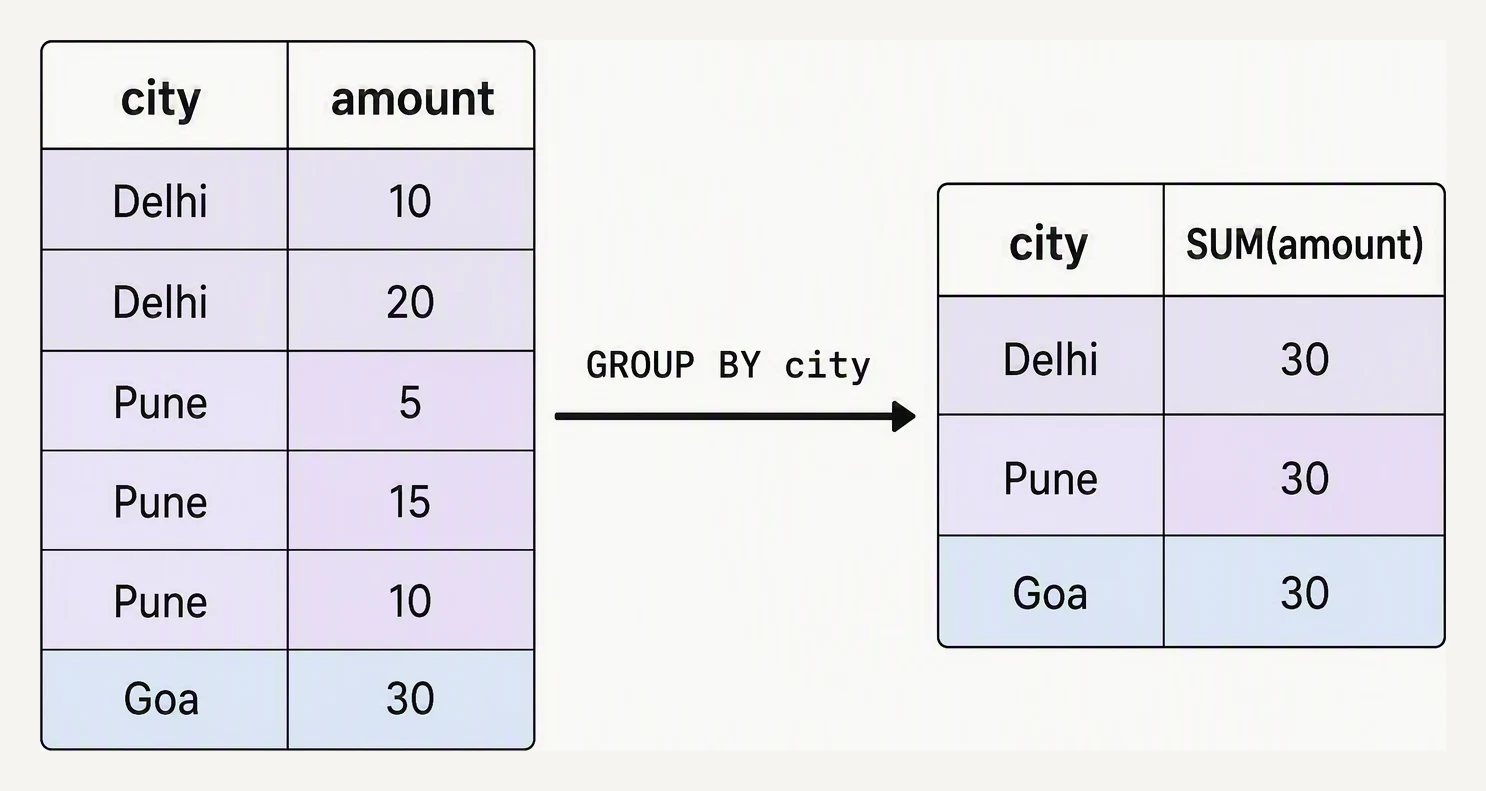
GROUP BY collapses many rows into one per key.
COUNT(*)counts rows.SUMtotals.AVGaverages.MINandMAXtake the extremes.
When every column you select is an aggregate, the engine treats the whole table as one big group and hands back a single row:
SELECT COUNT(*) AS n,
       MIN(price) AS cheapest,
       MAX(price) AS dearest,
       SUM(price) AS catalog_value,
       AVG(price) AS avg_price
FROM products;| n | cheapest | dearest | catalog_value | avg_price |
|---|---|---|---|---|
| 5 | 2 | 900 | 929 | 185.8 |
The three flavours of COUNT
This is the question interview panels open with. The three are not interchangeable the moment NULLs are involved. Suppose a tiny orders table where one product is unrecorded:
| order_id | user_id | product_id |
|---|---|---|
| 1 | 7 | 4 |
| 2 | 7 | NULL |
| 3 | 9 | 4 |
SELECT COUNT(*)                AS total_rows,
       COUNT(product_id)       AS known_products,
       COUNT(DISTINCT user_id) AS distinct_buyers
FROM orders;| total_rows | known_products | distinct_buyers |
|---|---|---|
| 3 | 2 | 2 |
COUNT(*)counts every row.COUNT(col)counts only rows wherecolis not NULL (so it drops order 2).COUNT(DISTINCT col)counts unique non-NULL values (users 7 and 9).
Write COUNT(email) on a table where some users have no email and you will quietly under-count — a classic silent bug.
GROUP BY — one result per group
Add GROUP BY and the aggregate runs once for each distinct value of the grouping column:
SELECT category,
       COUNT(*)   AS n,
       AVG(price) AS avg_price
FROM   products
GROUP BY category
ORDER BY avg_price DESC;| category | n | avg_price |
|---|---|---|
| Electronics | 2 | 456 |
| Grocery | 1 | 9 |
| Stationery | 2 | 4 |
The one rule to remember: every column in SELECT must either appear in GROUP BY or sit inside an aggregate. Otherwise, the engine has many rows for that column and no way to pick one. You can group by several columns too; each unique combination becomes one row.
WHERE filters rows; HAVING filters groups
This is where people stumble. WHERE runs before grouping and filters individual rows; HAVING runs after grouping and filters whole groups. And you cannot put an aggregate in WHERE, because at that stage the aggregate has not been computed yet.
SELECT category, AVG(price) AS avg_price
FROM   products
GROUP BY category
HAVING AVG(price) > 10;| category | avg_price |
|---|---|
| Electronics | 456 |
Only Electronics survives — Grocery (9) and Stationery (4) average below 10. Compare the two clauses as a pair. WHERE price > 10 keeps the pricey rows and then groups them. HAVING AVG(price) > 10 groups everything and then keeps the pricey groups. Different question, different answer. Prefer WHERE when the condition is about a row (it is faster — fewer rows to group). Use HAVING only when the condition is about the group.
Practice
Quick check
Practice this in an interview
All questionsA JOIN that fans out rows — one-to-many or many-to-many — causes the same source row to appear multiple times in the joined result set. Aggregating on that inflated set multiplies values, giving totals larger than the true sum.
SQL's standard aggregate functions are COUNT, SUM, AVG, MIN, and MAX. MIN and MAX work on any orderable type including strings and dates, using the type's collation or sort order, which surprises analysts who expect numeric-only semantics.
You can always GROUP BY a derived expression written directly. Whether you can reference a SELECT alias in GROUP BY depends on the database: MySQL and BigQuery allow it, while PostgreSQL and SQL Server do not because aliases are not resolved until after GROUP BY in the logical order.
GROUP BY on multiple columns creates one group per unique combination of those column values. Each row in the result represents a distinct tuple, and every non-aggregated column in SELECT must appear in the GROUP BY list.
Because after grouping, multiple source rows collapse into one output row. Any column not in the GROUP BY key could have different values across those collapsed rows, making a single deterministic output value impossible without an aggregate function.
All three are extensions to GROUP BY that produce multiple levels of aggregation in a single query. ROLLUP produces hierarchical subtotals, CUBE produces all possible subtotal combinations, and GROUPING SETS lets you specify exactly which grouping combinations you want.