NULL and three-valued logic
Why col = NULL is silently wrong, how NULL behaves in aggregates and groups, and the handful of functions that tame it.
Written and reviewed by Shreyash Prashu Last reviewed
What you'll learn
- The TRUE / FALSE / NULL truth table that breaks naive filters
- How aggregates and GROUP BY treat NULLs
- COALESCE, NULLIF, IFNULL — what each one is for
- Telling 'missing' apart from 'empty string'
Before you start
NULL means unknown. Not zero, not empty string — we simply do not know. SQL takes that literally: almost any expression that touches a NULL returns NULL rather than true or false. That one rule is behind more “why are my numbers off?” tickets than anything else in the language.
Three values, not two
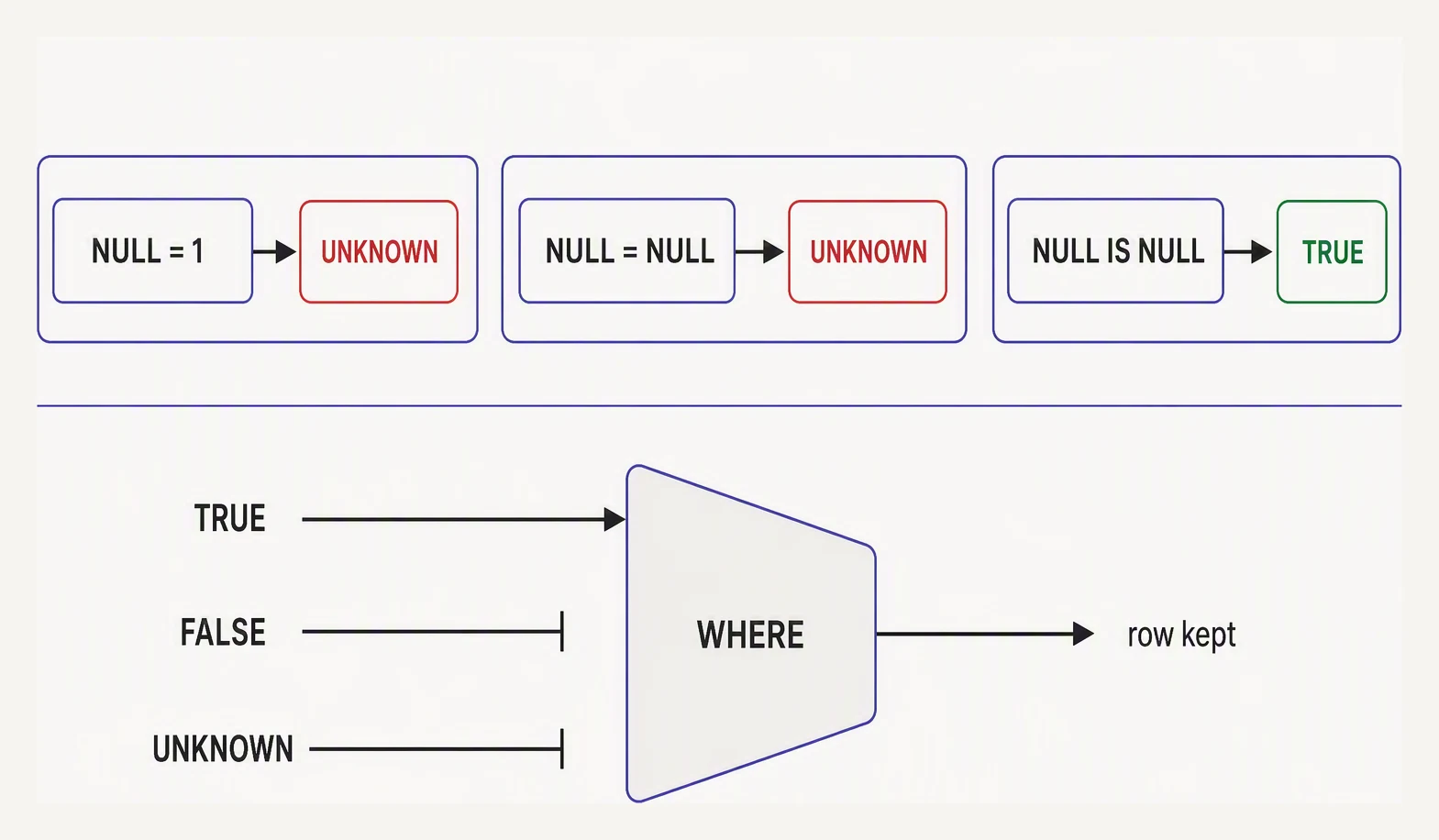
NULL is not a value — it is the absence of one, and it never equals anything.
Ordinary languages have TRUE and FALSE. SQL has a third, UNKNOWN, written as NULL:
| Expression | Result |
|---|---|
1 = 1 | TRUE |
1 = 2 | FALSE |
1 = NULL | NULL |
NULL = NULL | NULL |
NULL <> NULL | NULL |
Filtering NULLs
The catch is that WHERE keeps a row only when the predicate is TRUE. NULL is not TRUE. So WHERE col = NULL returns zero rows, even for the rows where col really is NULL.
And note that NULL = NULL is not TRUE either: two unknowns cannot be confirmed equal. The only correct test is the dedicated IS NULL, which always returns a real true or false:
| label | value | value = NULL | value IS NULL |
|---|---|---|---|
| has_value | 5 | NULL | false |
| is_zero | 0 | NULL | false |
| is_null | NULL | NULL | true |
See how value = NULL is itself NULL on every row — useless as a filter — while IS NULL actually tells the truth.
NULL in aggregates — quietly skipped
Every aggregate except COUNT(*) ignores NULLs. Given the column x holding 10, 20, NULL, 30:
SELECT COUNT(*) AS rows_total,
       COUNT(x) AS non_null,
       SUM(x)   AS sum_x,
       AVG(x)   AS avg_x
FROM demo;| rows_total | non_null | sum_x | avg_x |
|---|---|---|---|
| 4 | 3 | 60 | 20 |
AVG(x) is (10 + 20 + 30) / 3 = 20, not divided by 4. The NULL is dropped from both the sum and the count. Whether that is what you want depends on the question. If missing should count as zero, you must say so with COALESCE.
GROUP BY, by contrast, is one of the few places SQL relaxes the rule and gathers all NULLs into a single group, for usability.
COALESCE and NULLIF
COALESCE(a, b, c, …) returns the first non-NULL argument — the everyday way to supply a default:
| name | nickname | COALESCE(nickname, name) | COALESCE(email, ‘(none)‘) | |
|---|---|---|---|---|
| Ava | A | ava@x.com | A | ava@x.com |
| Bo | NULL | bo@x.com | Bo | bo@x.com |
| Cy | C | NULL | C | (none) |
Its mirror image, NULLIF(a, b), returns NULL when a = b and a otherwise — whose classic use is treating an empty string as genuinely missing:
| name | email IS NULL | NULLIF(email, ”) IS NULL | |
|---|---|---|---|
| Ava | ava@x.com | false | false |
| Bo | (empty string) | false | true |
| Cy | NULL | true | true |
email IS NULL catches only Cy. NULLIF(email, '') IS NULL catches both Bo (empty) and Cy (NULL) — usually exactly what you mean by “do we actually have an email for this person?”
Practice
Quick check
Practice this in an interview
All questionsCOUNT() counts every row including those with NULLs. COUNT(column) counts only rows where that column is non-NULL. COUNT(DISTINCT column) counts unique non-NULL values in the column.
NULL never equals NULL in SQL — join conditions use equality, so rows where either key is NULL are silently excluded from INNER JOIN results and placed in the unmatched set for OUTER JOINs. If you need NULL-to-NULL matching, you must use IS NOT DISTINCT FROM or COALESCE the key to a sentinel value.
NULL represents an unknown value. Comparing anything to NULL with = produces NULL (not TRUE or FALSE), and WHERE only passes rows where the condition evaluates to TRUE. The correct syntax is IS NULL or IS NOT NULL.
All aggregate functions except COUNT() silently ignore NULL values. This means AVG divides by the count of non-NULL rows, not total rows, which can silently skew results if NULLs are not accounted for.