ORDER BY, LIMIT, and DISTINCT
Sorting results, paging through them, and removing duplicates — the small clauses you touch in almost every query.
Written and reviewed by Shreyash Prashu Last reviewed
What you'll learn
- Sorting by one column, several columns, and even a column you didn't select
- Paging with LIMIT + OFFSET, and why deep offsets get slow
- DISTINCT versus GROUP BY for removing duplicates
Before you start
A query with no ORDER BY returns rows in whatever order the engine found convenient. That is not random, but it is not guaranteed either. The order can quietly shift between runs after an index change or a parallel scan. So if the order of the output matters, you say so.
We will sort this small product table:
| id | name | category | price |
|---|---|---|---|
| 1 | Pencil | Stationery | 2 |
| 2 | Notebook | Stationery | 6 |
| 3 | Coffee | Grocery | 9 |
| 4 | Laptop | Electronics | 900 |
| 5 | Cable | Electronics | 12 |
ORDER BY — sort the rows
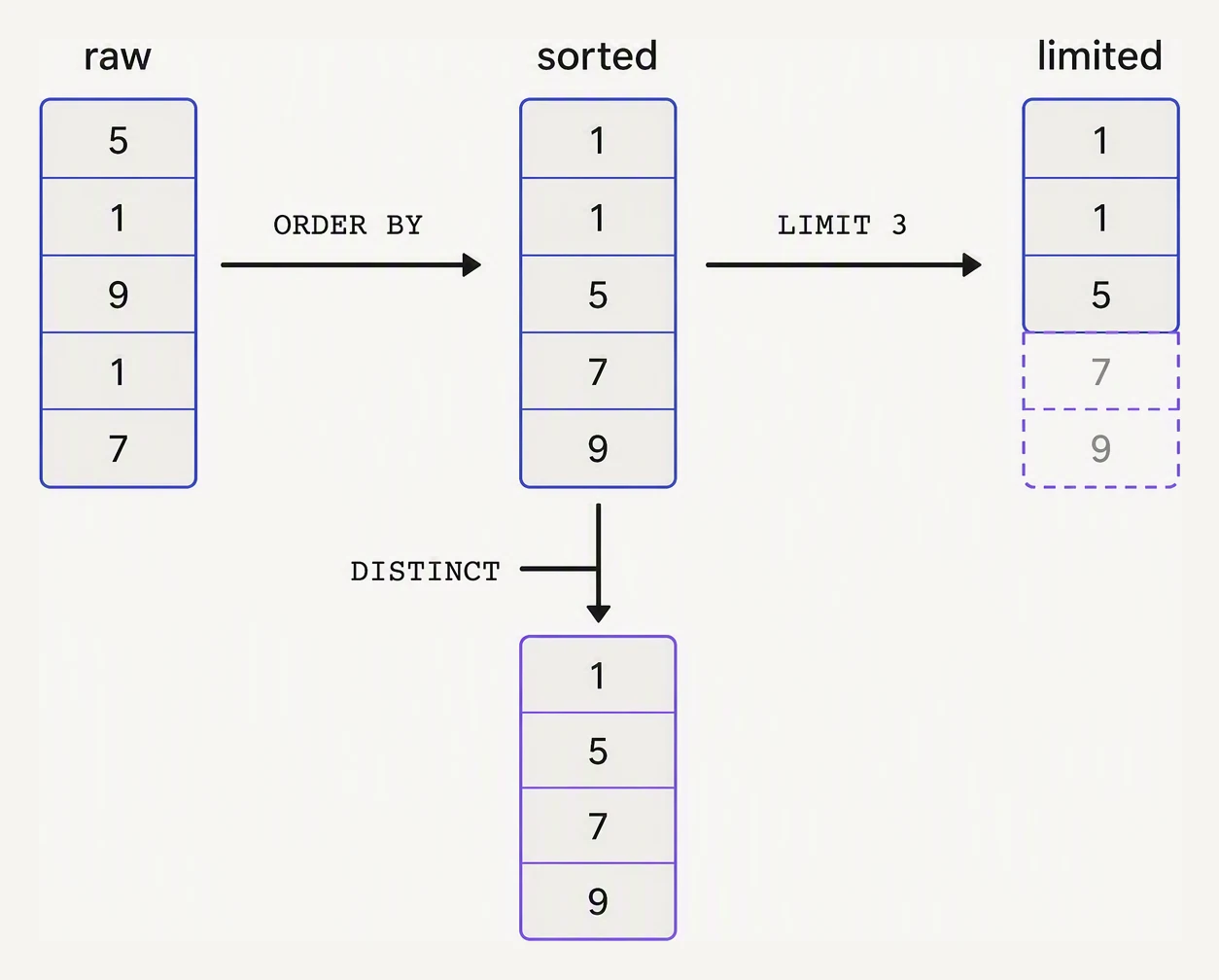
Three separate jobs, applied in that order.
The default is ascending; add DESC for descending.
SELECT name, price
FROM   products
ORDER BY price DESC;| name | price |
|---|---|
| Laptop | 900 |
| Cable | 12 |
| Coffee | 9 |
| Notebook | 6 |
| Pencil | 2 |
Sort priority runs left to right, which lets you break ties. ORDER BY category, price DESC sorts by category first, then puts the priciest item first within each category.
Because ORDER BY runs after FROM, it can sort by a column you did not even select. SELECT name FROM products ORDER BY price DESC returns just the names, but in price order — handy for “a clean list, in the right business order.”
LIMIT and OFFSET — top-N and paging
LIMIT n keeps the first n rows after sorting — that is how you ask for “the three priciest”:
SELECT name, price
FROM   products
ORDER BY price DESC
LIMIT 3;| name | price |
|---|---|
| Laptop | 900 |
| Cable | 12 |
| Coffee | 9 |
OFFSET k skips the first k rows, so LIMIT 20 OFFSET 40 is “page 3 of 20-per-page”. It is the natural way to paginate — but it has a sting in the tail.
DISTINCT — collapse duplicate rows
DISTINCT removes rows where every selected column is identical:
SELECT DISTINCT category
FROM   products
ORDER BY category;| category |
|---|
| Electronics |
| Grocery |
| Stationery |
The catch is in that word every. SELECT DISTINCT category, price de-duplicates on the whole (category, price) pair. It does not de-duplicate on category alone, so two Electronics items at different prices both survive.
For pure de-duplication DISTINCT and GROUP BY are interchangeable. Reach for GROUP BY the moment you also want a COUNT(*) or SUM(...) alongside — which is the next lesson.
Practice
Quick check
Practice this in an interview
All questionsLIMIT restricts the number of rows returned; OFFSET skips that many rows before returning results. Deep pagination with large OFFSET values is slow because the database must scan and discard all skipped rows — keyset pagination on an indexed column is the production-scale alternative.
When you list multiple columns in ORDER BY, SQL sorts by the first column, then breaks ties using the second, and so on. The default direction is ASC (ascending). Each column gets its own independent ASC or DESC modifier.
SQL processes clauses in this order: FROM, WHERE, GROUP BY, HAVING, SELECT, ORDER BY, LIMIT. This matters because it explains why you cannot use a SELECT alias in a WHERE clause, but you can use it in ORDER BY.
Both eliminate duplicate rows, but GROUP BY is the right choice when you also want aggregate values per group. DISTINCT is cleaner when you only need unique rows with no aggregation. In practice most optimizers produce identical plans for simple cases, but semantics and intent differ.