Vectorless retrieval (PageIndex)
Retrieval without embeddings: PageIndex turns a document into a tree the LLM reasons down. Learn when it beats a vector database, where it fails, and when to combine both.
Written and reviewed by Shreyash Prashu Last reviewed
What you'll learn
- How PageIndex builds a navigable tree from document structure
- Why hierarchy can beat flat top-k similarity on contracts, filings, and manuals
- How to calculate the latency and token cost of hop-by-hop navigation
- When to choose PageIndex, a vector database, or a hybrid design
- How to diagnose bad parsing, missed branches, stale indexes, and unsupported answers
Before you start
At 3 a.m., someone asks whether your company can stop serving a customer whose invoice is 45 days late.
The answer is in a 240-page master services agreement. It depends on a payment clause, a definition in the opening pages, and a remedies section several chapters away. A flat retriever returns three passages about invoices. They sound right. None says whether suspension is allowed, what notice is required, or whether a cure period applies.
This is the problem vectorless retrieval tries to solve.
Standard RAG usually splits documents into chunks, turns each chunk into an embedding—a list of numbers representing its meaning—and stores those vectors in a vector database. At query time, it embeds the question and retrieves the nearest chunks. The method is fast and powerful.
It is also flat. The retriever knows that two passages look semantically similar. It does not naturally know that one is a subsection of “Events of Default,” that another is an exception under “Termination,” or that a table on page 87 belongs to the paragraph on page 86.
PageIndex preserves that hierarchy. It builds a tree of sections, summaries, and page ranges. An LLM reasons through the tree, choosing which branch to inspect before reading the underlying pages.
It is less like searching a bag of paragraphs and more like using the table of contents intelligently.
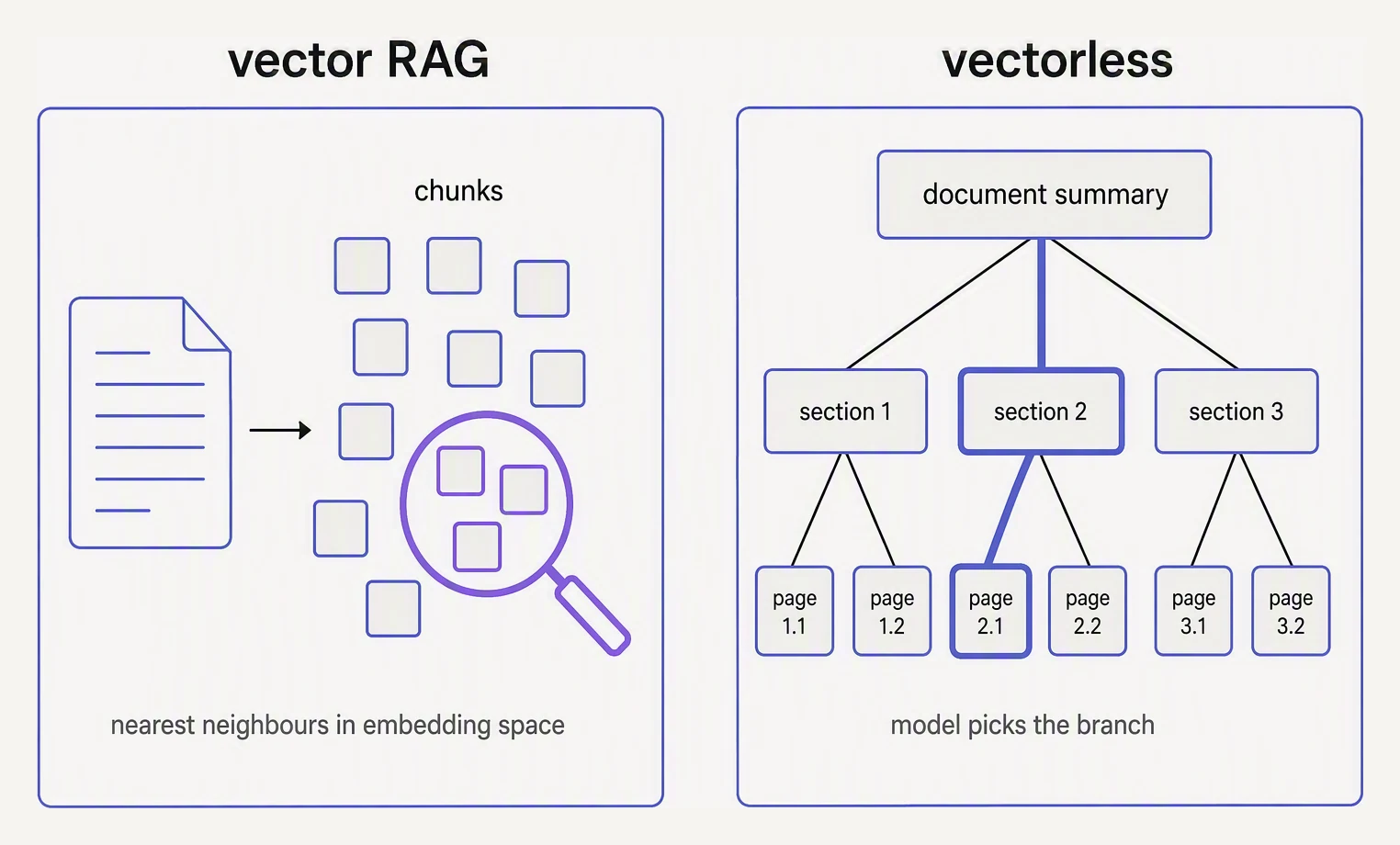
One searches chunks. The other reads the table of contents.
In one breath
PageIndex turns a document into a navigable tree. At query time, the LLM chooses a branch, descends through more specific branches, and reads the selected pages. This can find an answer whose location is obvious from the document’s structure even when its wording is not close to the question.
The trade-off is model inference: a vector lookup may take milliseconds, while tree navigation may require several sequential LLM decisions.
The mental model: retrieval as routing
Imagine opening the contract yourself. You would inspect the table of contents, notice “Fees,” “Default,” and “Termination,” jump to the likely chapter, and use headings and page numbers before studying the prose.
A PageIndex-style system gives the model a machine-readable version of that table of contents. A typical node contains:
- a title, such as “Payment Defaults”
- a short summary
- a start and end page
- child nodes for more specific sections
The result might look like this:
Contract
├── Definitions                         pages 1–12
├── Commercial terms                    pages 13–48
│   ├── Fees and invoices               pages 13–24
│   ├── Payment obligations             pages 25–29
│   └── Defaults and remedies           pages 30–36
├── Service delivery                    pages 49–60
├── Termination                         pages 61–69
└── Liability and indemnity             pages 70–91
The tree is an index, not a replacement for the contract. Its summaries help the model decide where to look; the final answer should still use the original pages.
The crucial change is the evidence used for routing:
A flat vector retriever asks, “Which chunks mean something similar to this query?”
A tree navigator asks, “Which part of this document is most likely to contain the answer, given the section titles, summaries, and the question?”
How navigation works
There are two phases: building the index and using it.
1. Build the tree
The system receives a document, often a PDF, and:
- extracts text and page boundaries
- identifies headings, subheadings, tables, and other structural cues
- assigns sections to parent sections
- creates summaries and page ranges
- stores the tree alongside the original document
Scanned PDFs, inconsistent headings, and multi-column layouts can confuse extraction. They may require OCR, layout-aware parsing, cleanup, or manual correction.
Summaries matter too. “Payment Obligations” is useful; “Section 4.2” with a vague summary is not. This work is usually offline and reusable across queries, but a revised contract needs a revised tree. Serving a new PDF with an old tree produces stale citations and answers.
2. Navigate at query time
For the question, “The customer is 45 days late. Can the supplier suspend service, and what notice is required?”, the navigator sees the root and top-level summaries. “Commercial terms” looks relevant, so it inspects that branch. Among its children, “Defaults and remedies” is the strongest route because the question asks what action follows a payment failure.
At the leaf, the system retrieves the original pages—not merely the summary. An answer step then uses those pages as context and should cite the relevant page or section.
Implementations vary: one may make a request per hop, while another may show multiple levels in one request or explore several branches in parallel. The general rule is that retrieval cost is tied to model reasoning over the tree rather than one cheap similarity lookup.
Why hierarchy helps
Structure carries information that wording does not. A contract may say “failure to remit undisputed charges” while the question asks about “a late invoice.” The section title “Events of Default” remains a strong routing clue.
Hierarchy also narrows ambiguity. “Notice” might mean notice of breach, termination, or suspension. A flat search may return all three; the tree lets the model distinguish their parent sections.
This helps when the answer depends on:
- a chapter’s role rather than a repeated keyword
- definitions or exceptions near a parent clause
- tables or schedules attached to a section
- page order and document context
- a small set of long, well-organised documents
A worked example with numbers
Take a 240-page supplier contract with six top-level branches, an average of five children per branch, and three levels from root to leaf. The query concerns late payment.
A flat vector system might split the document into 600 chunks and retrieve the five nearest:
- “Invoices are payable within 30 days.”
- “The supplier may terminate for convenience with 60 days’ notice.”
- “Disputed invoices must be investigated in good faith.”
- “The customer may suspend a service for maintenance.”
- “Interest accrues on overdue balances.”
That is plausible context, but it is not an answer. The key clause—whether non-payment permits suspension after notice—may rank sixth because it says “service interruption following an uncured payment default.”
Now follow the tree:
Root
→ Commercial terms
→ Defaults and remedies
→ Suspension for payment default
Three decisions lead to the section whose title and summary describe the legal relationship directly. The system can fetch pages 30 through 33, giving the answer model the actual clause, cure period, and cross-reference to the notice provision.
Suppose each navigation request sends 2,000 input tokens and produces 200 output tokens. Three sequential hops consume:
- 6,000 navigation input tokens
- 600 navigation output tokens
If the final answer request adds 3,000 input tokens for the selected pages and 400 output tokens, the query uses 9,000 input tokens and 1,000 output tokens, before system prompts and repeated tree content.
Suppose each navigation request takes 700 milliseconds and the final answer takes another 700 milliseconds. The serial path is about 2.8 seconds:
700ms + 700ms + 700ms + 700ms = 2,800ms
These are illustrative numbers, not a benchmark. The causal point is that each sequential reasoning hop adds a model round trip. A vector database can perform its lookup in milliseconds, though the eventual answer still needs an LLM.
The example also shows a quality limitation. If the answer requires both “Defaults and remedies” and “Termination,” a greedy single-path navigator can miss one. Production systems need multiple-branch retrieval, cross-reference following, or a targeted fallback search.
PageIndex versus a vector database
The useful question is: what signal tells us where the answer is?
| Retrieval need | Better first choice | Reason |
|---|---|---|
| Search millions of mixed documents | Vector database | Broad semantic recall at low lookup cost |
| Find a phrase, identifier, or invoice number | Keyword or exact search | Exact terms are stronger evidence |
| Answer from one well-structured contract | PageIndex | Headings, definitions, and page ranges reveal where to look |
| Search a technical manual by chapter and procedure | PageIndex | Hierarchy separates similar terms used in different procedures |
| Find passages across many unrelated files | Vector database or hybrid | A tree per document does not provide cheap global recall |
| Need the lowest time to first token | Vector database | It avoids serial model calls during retrieval |
| Need auditable navigation and page citations | PageIndex, with validation | The path can be logged and checked against source pages |
Advanced RAG often combines keyword search, metadata filters, reranking, and parent-child expansion, so not every vector system is truly flat. PageIndex starts from the opposite direction: structure is the primary index and embeddings may not be needed.
PageIndex fits bounded, organised documents such as contracts, filings, manuals, insurance policies, and policy handbooks. It is a poor first choice for millions of short, loosely structured documents, unreliable page boundaries, rapidly changing files, broad discovery across a corpus, or extremely tight latency requirements. Exact identifiers are usually better handled by keyword or metadata search.
The hybrid pattern
Often the strongest design uses both methods:
- Filter to the relevant document and version with metadata.
- Use keyword or vector search for broad corpus recall.
- Load the tree for the shortlisted document.
- Navigate to the relevant section.
- Follow cross-references and answer from the selected pages.
Vectors provide recall across the corpus; the tree provides structure-aware precision within a document. A vector result can also trigger parent-section and neighbouring-page expansion. If the tree finds no useful branch, search the original chunks as a fallback.
Failure modes you can diagnose
The tree is wrong
If navigation selects a generic branch or cites unrelated pages, inspect parsing first. Scanned PDFs, headers, footers, columns, and detached tables of contents commonly produce bad trees.
Check titles, parent-child relationships, and page ranges on sample documents. Add OCR or layout-aware parsing, remove repeated headers and footers, and preserve source page numbers through the answer.
The summary hides the fact
A parent summary such as “General payment provisions” may omit the decisive fact that suspension follows a five-day cure period. The leaf can be correct while the navigator rejects its parent.
Make summaries retrieval-oriented: preserve obligations, thresholds, exceptions, entities, and cross-references. For high-stakes documents, check summaries against the source.
The answer needs two branches
A response may find the late-payment clause but omit the required notice because the evidence spans “Defaults and remedies” and “Notices.”
Support multi-branch retrieval, follow explicit cross-references, or split the question into “What triggers the remedy?” and “What procedure follows?” Do not force every question into one greedy path.
The answer is unsupported
Summaries are routing material, not final evidence. Retrieve the original page range after choosing a branch, require citations or quotations where appropriate, and abstain when the pages do not support the claim. Grounding remains necessary.
The index is stale
Trees are tied to document versions. A page insertion can shift every later range.
Store a document hash or version identifier with each tree, rebuild when the source changes, and log that identifier with every answer.
A production pattern
Start with 50 to 100 real questions whose evidence pages are marked by hand. Include obvious headings, different wording, questions spanning two sections, tables or footnotes, and unanswerable questions.
Compare a vector baseline with PageIndex on:
- section and page recall
- path accuracy
- citation support
- latency and token use
Log the chosen path as well as the answer. If the correct page never arrived, changing the answer prompt will not help. If it arrived but the answer contradicts it, inspect grounding and generation.
What to remember
- PageIndex uses titles, summaries, parent-child relationships, and page ranges as its retrieval index.
- The LLM navigates the tree before reading the selected source pages.
- Hierarchy can beat top-k similarity when structure reveals an answer’s location.
- Navigation costs model inference, so latency and token use grow with hops.
- Use vectors for broad recall, PageIndex for structured documents, and a hybrid when you need both.
- Validate parsing, retrieve original evidence, support multiple branches, and track document versions.
Check yourself
Quick check
Questions about this lesson
What is vectorless retrieval?
Vectorless retrieval finds relevant content without embeddings or a vector index. PageIndex is the leading example: it turns a document into a hierarchical tree (titles, short summaries, and page ranges) and the LLM reasons a path down it — choosing the most relevant branch at each level, like flipping to the right chapter — then reads only that section to answer. Retrieval becomes a reasoning task over structure rather than a similarity lookup.
Is PageIndex better than a vector database?
Neither is universally better; they trade different costs. A vector database does one approximate-nearest-neighbour lookup in milliseconds and scales to millions of chunks, but it's flat and ignores document structure. PageIndex is structure-aware and explainable but spends an LLM call at each hop down the tree, so it's slower and pricier per query and best for a bounded set of well-structured documents. Many systems combine them: shortlist documents with vectors, then navigate within one using PageIndex.
When does vectorless retrieval beat flat vector RAG?
When the document has clear structure and the answer is found by reasoning about where it lives rather than by surface similarity. Flat top-k can return plausible-but-wrong neighbours because cosine similarity is blind to structure; navigating a tree to 'Financials → Risk factors' is more precise and can explain its choice. For huge unstructured corpora where speed and recall dominate, vector search still wins.
Practice this in an interview
All questionsNo single method wins: use PageIndex when a small set of well-structured documents makes section and page hierarchy important, and use a vector database when you need fast retrieval across a large or messy corpus. PageIndex trades embedding lookup for LLM-guided tree navigation, so a hybrid system often uses vectors to shortlist documents and PageIndex to find evidence inside one.
A vector database stores embeddings with metadata and searches their vector space using nearest-neighbor indexes. Because documents and queries are embedded by the same model, it can retrieve paraphrases and related concepts rather than only shared keywords; production systems often add metadata filters, lexical search, and reranking.
Retrieval cheaply searches a large corpus and returns a candidate set with high recall. Reranking applies a more expensive query-document model to that smaller set to improve precision and ordering, but it cannot recover a relevant document that retrieval never returned.
RAG retrieves relevant external documents at query time and gives them to an LLM as context before generation. A basic pipeline ingests and chunks documents, embeds the chunks into a searchable store, retrieves the best matches for a question, and asks the LLM to answer from that evidence.