GGUF & running LLMs locally
Run LLMs on your own machine: understand GGUF, llama.cpp, quantization tiers, memory budgets, chat templates, and the failure modes that make local models look broken.
Written and reviewed by Shreyash Prashu Last reviewed
What you'll learn
- What GGUF stores and why it is an inference format rather than a model
- How Q4_K_M and other quantization tiers trade memory, speed, and quality
- How weights, KV cache, context length, and GPU offload consume memory
- How to choose local GGUF inference instead of a hosted API or vLLM
- How to diagnose broken templates, out-of-memory errors, and slow generation
Before you start
Your company has a confidential support transcript. You want a model to summarise it, but sending the transcript to a hosted API is forbidden. The only machine available is a laptop with 16 GB of RAM and no discrete GPU.
That used to sound like a non-starter. It is now a routine afternoon project. A quantized 7B or 8B model can fit and answer on a CPU. Inference can stay local when using a verified local runtime with network access, telemetry, cloud fallback, and prompt logging disabled or controlled. Audit the wrapper and bind any server only to the required interface. It will not feel like a frontier model running on eight GPUs. It can still be extremely useful.
The format that made this practical is GGUF. The engine most closely associated with it is llama.cpp.
What GGUF actually is
A language model is mostly learned numbers called weights, plus supporting information such as the tokenizer, architecture settings, and sometimes the chat template.
A file format decides how those things are stored. safetensors and GGUF are file formats; neither is a model, inference engine, or quantization algorithm.
GGUF, short for “GPT-Generated Unified Format,” is a container designed primarily for running models. It stores tensors, metadata, and tokenizer information in a format that a native runtime can read efficiently. A typical download can therefore be used without reconstructing a Python environment or finding matching configuration files. The runtime can memory-map it, allowing the operating system to page portions into memory instead of eagerly copying the entire file into a second buffer.
safetensors remains useful for frameworks such as Transformers, where Python, accelerators, distributed execution, and training tools are already present. GGUF is attractive when you want a compact, self-contained artifact for a lightweight native runtime.
Large models may be distributed as several split GGUF files. The shards still contain the model artifact and metadata; you still need a compatible engine.
The mental model: three memory bills
A file named model-7b-Q4_K_M.gguf may be about 4 GB, but that does not mean 4 GB of free RAM is enough. Local inference has three important memory bills:
- Model weights: the learned numbers stored in the GGUF file.
- The KV cache: temporary attention state for the current conversation.
- Runtime overhead: working buffers, compute space, tokenizer state, the operating system, and other processes.
Treat file size as a rough estimate of resident weight memory and a practical lower bound for responsive CPU inference, not a hard physical-RAM floor. mmap can page weights from disk, but insufficient RAM may cause severe thrashing; offload and runtime copies also change the budget.
KV-cache growth
The KV cache, or key-value cache, stores intermediate key and value vectors for tokens already processed. During generation, the model attends to earlier tokens; reprocessing them from scratch would be wasteful. A longer prompt or conversation therefore needs more cache, and multiple conversations need multiple caches.
KV-cache capacity scales with context and concurrent sequences. Some runtimes allocate it at startup; others grow it on demand. A long prompt can consequently cause startup OOM, dynamic-allocation OOM, or context overflow/truncation. Check the configured context, batch or parallel slots, and logs.
A 32,768-token context needs eight times as much KV-cache storage as a 4,096-token context when everything else is equal. For example, imagine a 32-layer transformer with 8 key-value heads, 128 dimensions per head, 4,096 cached tokens, and 16-bit cache values:
2 × 32 layers × 4,096 tokens × 8 heads × 128 values × 2 bytes
That is 536,870,912 bytes, or 512 MiB, before other buffers. At 32,768 tokens, the same cache needs about 4 GiB. Real models differ in layers, head dimensions, grouped-query attention, and cache data types, but the arithmetic is the right mental model.
Estimating the working budget
The practical budget is:
available memory > weights + KV cache + runtime overhead
On a 16 GB laptop, the operating system and applications may already use 3 to 5 GB. A roughly 4 GB Q4 model, moderate cache, and runtime buffers can fit; a 14 GB FP16 copy cannot. A 32K context may consume several additional gigabytes.
The calculator below estimates the weight portion for common tiers. Treat its answer as “does the model have a chance?” rather than “the process is guaranteed to fit.”
Size ≈ params × bits-per-weight ÷ 8, plus ~1.5 GB for context and runtime. Quantization only shrinks the weights — it doesn't change the parameter count. Q4_K_M is the community default: most of the quality, a fraction of the size.
Quantization tiers: the Q-soup decoded
Quantization represents numbers with fewer bits than the original. FP16 uses 16 bits per value; Q4 stores most values using roughly 4 bits, plus scales and other information needed to reconstruct useful approximations.
The runtime does not simply discard the last twelve bits. It divides weights into groups and stores a scale for each group. The integer identifies a bucket and the scale determines its range, allowing groups with different ranges to retain detail without using 16 bits for every value.
This introduces approximation error. It is often tolerable because neural networks contain redundancy, but quality can fall for code, arithmetic, rare languages, exact copying, or long-context retrieval.
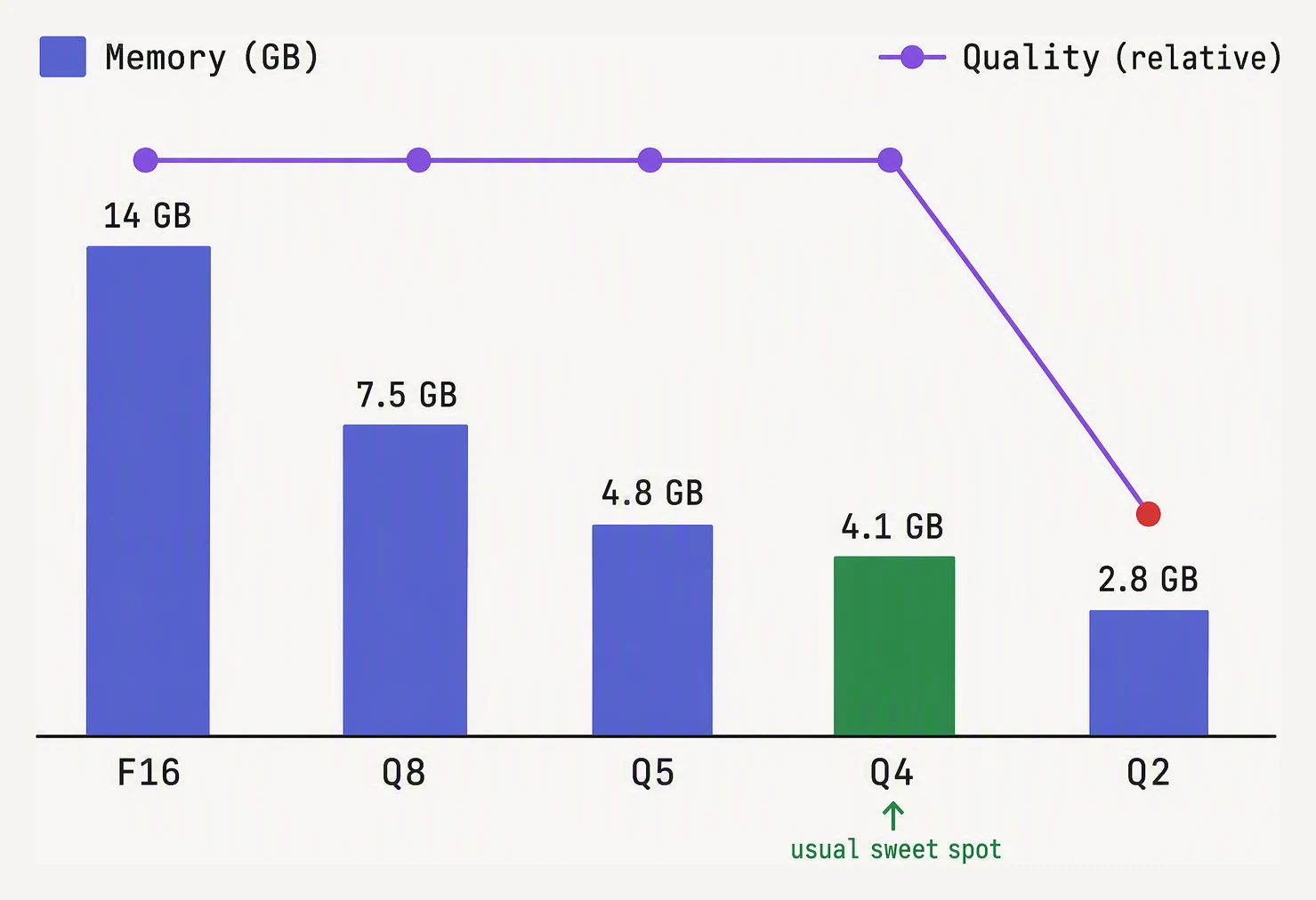
Quality holds surprisingly well down to 4-bit, then falls off a cliff.
The names in a GGUF filename describe the approximate scheme:
- Q4, Q5, and Q8 indicate approximate bits per weight. Lower usually means a smaller file and more approximation.
- K identifies the grouped “k-quant” family.
- S, M, and L mean small, medium, and large variants within a family, often with different mixtures across tensor types.
- IQ identifies importance-aware schemes, a separate family designed to spend precision where it matters more.
Thus Q4_K_M means approximately 4-bit k-quantization with a medium size and quality trade-off. Scales, metadata, block structure, and higher-precision tensors mean the average is not exactly four bits.
Q8_0 preserves more information and is often close to original quality, but its weight storage is roughly twice that of a Q4-class file. Q2_K and similar aggressive tiers make models fit when nothing else does, but quality loss is more likely. Q4_K_M is a useful general starting point, not a guarantee. Two Q4 files can differ because of their quantizer, calibration data, and tensor-mixing decisions, so compare candidates on representative prompts.
Quantization can improve speed by reducing memory-bandwidth pressure, especially on CPUs. It does not automatically do so: the engine must support the format efficiently, and CPU–GPU spilling can make a compressed model slow.
A worked 7B example
Suppose the confidential-support laptop has 16 GB of RAM and you are considering a 7-billion-parameter model.
Idealised weight calculations:
- FP16:
7 billion × 16 ÷ 8 = 14 billion bytes, about 14.0 GB or 13.0 GiB. - Nominal 8-bit:
7 billion × 8 ÷ 8 = 7 billion bytes, about 7.0 GB or 6.5 GiB. - Nominal 4-bit:
7 billion × 4 ÷ 8 = 3.5 billion bytes, about 3.5 GB or 3.3 GiB.
The Q4 file is larger than 3.5 GB in practice because of scales, metadata, and mixed-precision tensors. A Q4_K_M file for this model size may be closer to roughly 4 GB. Check the actual download size.
Budget the machine:
- Operating system and desktop: 4 GB
- Q4_K_M weights: approximately 4 GB
- KV cache: perhaps 0.5 to several GB, depending on architecture and context
- Runtime buffers and other applications: 1 to 2 GB
That can fit in 16 GB, with room disappearing as context grows. FP16 cannot fit alongside the operating system. Q8 may fit on a mostly empty machine, but leaves much less room for context.
With 8 GB of VRAM and 16 GB of system RAM, llama.cpp can often GPU-offload as many layers as fit on the GPU and keep the rest in system memory. This is not the same as having the whole model on the GPU. Transfers across the CPU–GPU boundary can add overhead, so inspect how many layers are offloaded and how much data crosses it. A partial offload can help, but may be painfully slow over a constrained link.
Drive manufacturers quote decimal gigabytes; operating systems often display gibibytes. A file advertised as 4.0 GB appears as about 3.73 GiB. That discrepancy is harmless; an out-of-memory error is not.
Choosing a local runtime
| Situation | Sensible first choice | Why |
|---|---|---|
| One person, private or offline documents | GGUF with llama.cpp or a desktop wrapper | Practical on modest hardware; locality depends on network, telemetry, fallback, and logging controls |
| Small internal service with low traffic | llama.cpp server mode or another lightweight native runtime | Simple deployment and low overhead |
| Many concurrent users on owned GPUs | vLLM or a similar GPU serving engine | Continuous batching and GPU memory management improve throughput |
| No hardware or operations team | Hosted API | Someone else supplies GPUs, scaling, updates, and availability |
| Training or fine-tuning | Framework-native weights such as safetensors | Training tools expect optimizer state, gradients, and framework integration |
A hosted API usually wins on convenience and peak quality if privacy, compliance, network, and cost requirements allow it. Local inference wins when controlled data locality, offline operation, fixed hardware cost, or experimentation matters more. vLLM targets GPU servers handling many overlapping requests; on a single-user laptop, its complexity may not solve the real constraint.
GGUF does not make a weak model wise. A local 7B model still lacks the knowledge, retrieval, tool use, and reliability of larger systems. If it needs company policy documents, pair it with retrieval rather than relying on memorisation. See RAG basics for the grounding pattern.
The production pattern
Select the model and quantization
Choose an instruct-tuned model for conversation. A base model may continue text rather than follow instructions. Check the licence as carefully as benchmark scores: “local” does not mean unrestricted commercial use.
Choose a quantization tier from the memory budget. Start with Q4_K_M for a practical balance; move to Q5, Q6, or Q8 when memory and task quality justify it. Use more aggressive tiers only after testing the actual task.
Download from a trusted source and record the model revision, quantization, checksum, runtime version, and context setting. A model file is a dependency; similar filenames do not guarantee reproducibility.
Validate the chat format
Then test the chat template. It formats system, user, and assistant messages into the token sequence used during training. The wrong control tokens can cause nonsense, role labels, or ignored system instructions. GGUF metadata can carry a template, but the wrapper must apply it correctly.
Before connecting private data, run a fixed smoke test: short answers, structured output if needed, and a prompt longer than a few paragraphs. Compare quantizations on representative examples. A local model can be private and still be confidently wrong.
Expose the runtime safely
Finally, expose it carefully. A desktop application bound to the local machine is different from a server on a network interface. Add authentication, restrict access, and decide whether prompts and outputs are logged. An unauthenticated endpoint is not private.
Failure modes you can see first
| First symptom | Likely cause | Practical fix |
|---|---|---|
| Repeated role labels, strange control tokens, or ignored system message | Wrong chat template, end-of-sequence handling, or a base model used as instruct | Use the documented template and confirm the runtime reads GGUF metadata |
| It loads, then dies on a long prompt | KV cache or context allocation exhausted memory, or the context limit was reached | Check context, batch or parallel slots, and logs; lower context or concurrency, close applications, or use a smaller model |
| Generation is slow despite a GPU | CPU fallback, unsupported backend, or repeated CPU–GPU transfers | Inspect startup logs, confirm the GPU backend, and check layers actually offloaded |
| Quality collapses after switching from Q5 to Q2 | Quantization error damages task-sensitive weights or activations | Test Q4 or Q5 on real prompts rather than selecting by file size |
| Fluent answers invent current facts | Local weights are static and lack current-data access | Add retrieval or tools, or use a hosted system with an appropriate data path |
| Two applications produce different quality from the same file | Different templates, sampling, stop sequences, or runtime versions | Pin the full configuration, not only the GGUF filename |
If a setup becomes slow after several minutes, check context growth. KV-cache usage grows with active tokens; memory pressure can trigger swapping and collapse generation speed. A prompt may instead hit the context limit, be truncated, or cause an overflow. Start a fresh conversation or lower the context to test the hypothesis.
Check yourself
Quick check
What to remember
- GGUF is an inference-oriented model container, not the model or engine.
- llama.cpp runs GGUF on CPU, GPU, or a mixture through layer offload. Partial offload is not the same as fitting the whole model in VRAM.
- Quantization reduces weight precision and memory. Q4_K_M is a useful starting point, not a universal guarantee.
- Budget for weights, KV cache, and runtime overhead. Context length and concurrent conversations can consume memory after the model has loaded.
- Use local GGUF inference for private, offline, single-user, or modest-hardware workloads when runtime network, telemetry, fallback, and logging are controlled. Use hosted APIs for convenience and frontier capability, and GPU serving such as vLLM when many requests share expensive GPUs.
Questions about this lesson
What is GGUF and why not just use the Hugging Face .safetensors files?
GGUF is a single-file format optimized for inference: it packs the weights, tokenizer, metadata, and chat template into one memory-mappable file that a dependency-free C++ engine (llama.cpp) can run with no Python. .safetensors files are built for training — full precision, sharded, paired with a framework. For just running a model locally, especially on CPU or a laptop, GGUF is far lighter and self-contained, which is why Ollama and LM Studio use it.
Which GGUF quantization tier should I use?
Q4_K_M is the community default — roughly 4 bits per weight, the k-quant method, medium variant that protects the most important tensors — keeping almost all of the quality at about a quarter of the FP16 size. Use Q8_0 if you have memory to spare and want near-lossless quality, Q5_K_M for a middle ground, and Q2_K only as a last resort when memory is desperate. Dropping one tier is usually what fits a model onto a smaller machine.
How much RAM do I need to run a 7B model in GGUF?
Estimate file size as params × bits-per-weight ÷ 8, plus ~1–2 GB for context and runtime. A 7B model is about 14 GB at FP16, ~7 GB at Q8_0, and ~4–5 GB at Q4_K_M — so Q4_K_M runs comfortably in 8 GB of RAM or VRAM. llama.cpp also offloads as many layers to the GPU as fit and runs the rest on CPU, so partial-GPU machines work too.
Practice this in an interview
All questionsGGUF is a single-file format for packaging an LLM's weights, tokenizer data, and metadata for local inference. The Q4 K M tier is a mixed-precision quantization recipe that stores most weights at roughly four bits each, reducing memory substantially while preserving more quality than a uniformly quantized four-bit format.
Work top-down: start at the model layer with quantization, distillation, or routing cheaper models for easy requests, since model choices drive every downstream cost. Then optimize the runtime with batching, caching, and techniques like prompt caching for LLMs, and finally match infrastructure to the load using autoscaling on queue depth and spot or batch capacity. Track cost per token or per prediction alongside latency percentiles and accuracy so optimizations never silently degrade quality.
SwiGLU is a gated feed-forward layer that applies SiLU to one learned projection, multiplies it elementwise with a second projection, and projects the result back down. Many modern LLMs use it because this learned multiplicative gate often improves language-model quality at a similar parameter and compute budget, although it is not a universal replacement for GELU.
LLMOps extends classical MLOps to handle foundation model scale, prompt-based configuration, non-deterministic outputs, and evaluation without a scalar ground truth. Key new concerns include prompt versioning, output quality evaluation via LLM judges or human review, hallucination monitoring, cost management, and RAG pipeline observability.