Self-hosting LLMs — when it's worth it
When to run your own model and when to stay on an API. vLLM, quantization (GPTQ, AWQ, GGUF, bitsandbytes), VRAM math, and the honest break-even with hosted inference.
Written and reviewed by Shreyash Prashu Last reviewed
What you'll learn
- The VRAM math: model_params × bytes_per_param ≈ memory needed
- Why vLLM is the default inference server (PagedAttention, continuous batching)
- GPTQ vs AWQ vs GGUF vs bitsandbytes — when to pick which
- The honest break-even where self-hosting beats the API bill
Before you start
There’s a moment in every LLM project where someone asks: “should we just run our own model?” The honest answer is “almost certainly not, and here’s exactly when that flips.” Self-hosting trades a predictable API bill for ops surface, GPU capex, and a team that knows CUDA. The conditions where it pays off are narrower than the open-source enthusiasm suggests.
When you actually need to self-host
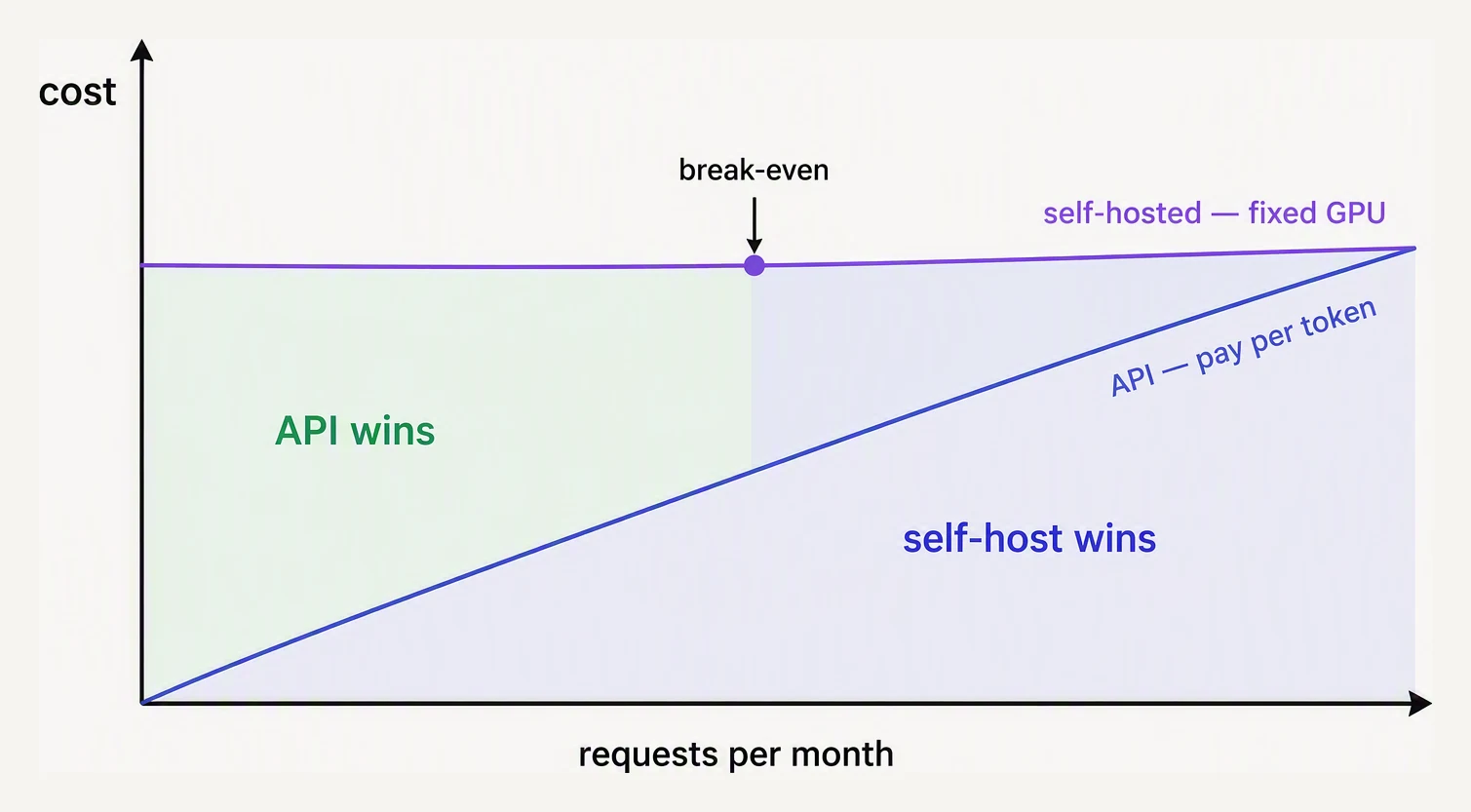
Self-hosting is a volume bet, not an ideology.
The honest list:
- Data can’t leave your network. Healthcare, defense, certain regulated finance workloads. Even with hosted “zero data retention” promises, some compliance regimes (parts of GDPR, HIPAA in some configurations, IL5/IL6) need on-prem.
- You have steady high volume. If you’re doing 10M+ tokens/day, every day, on the same model — the unit economics start to favor self-hosting.
- You need a fine-tuned model with weights you control. Hosted fine-tuning options exist but lock you in; if you need to ship the weights as a binary, you’re self-hosting.
- Latency-sensitive at the edge. On-device or factory-floor inference where a round-trip to a hosted API is too slow.
If none of the above apply, an API beats self-hosting on cost, velocity, and capability. The best open-weights models still trail frontier hosted models by 6-18 months on hard tasks. Pay the bill.
The VRAM math
A model’s memory footprint is roughly:
VRAM_needed ≈ N_params × bytes_per_param + KV_cache + overheadThe KV cache is the per-token attention state the model builds
while processing a prompt and generating a response; it grows with
both context length and the number of concurrent requests. bytes_per_param depends on quantization:
| Precision | Bytes/param | 70B model | 8B model |
|---|---|---|---|
| FP32 (rare) | 4 | 280 GB | 32 GB |
| FP16 / BF16 | 2 | 140 GB | 16 GB |
| INT8 | 1 | 70 GB | 8 GB |
| INT4 (GPTQ/AWQ) | 0.5 | 35 GB | 4 GB |
Add ~20% for the KV cache (grows with context length and batch size) and CUDA overhead. So a 70B model:
- FP16: 140 GB weights + KV → needs 2× A100 80GB (or 1× H100 80GB with aggressive offloading, painfully). Tensor-parallel across two cards.
- INT4: 35 GB weights + KV → fits comfortably on 1× A100 80GB or even an L40S 48GB. Big cost drop, modest quality drop (typically ~1-3% on benchmarks, sometimes invisible in your workload).
For an 8B model in INT4, you’re at 4-5 GB — runs on a consumer RTX 4090 (24 GB), an L4 (24 GB), or a Mac with unified memory.
vLLM: the default inference server
Running model.generate() from a transformers script is fine for a
demo. In production you want vLLM (or SGLang, now an equally mainstream
choice). The throughput win comes from PagedAttention and continuous
batching, with chunked prefill and prefix/KV-cache-aware
routing on top. vLLM is an open-source Python
inference server (not a model library) that exposes an
OpenAI-compatible HTTP API and handles batching, memory management,
and concurrency for you. It made self-hosted inference 5-20x faster
than naive implementations through two key ideas:
- PagedAttention — the KV cache is the largest memory consumer during inference. vLLM treats it like virtual memory: split into fixed-size pages, allocated on demand, shared across requests. This cuts memory waste from ~60-80% (naive) to under 4%.
- Continuous batching — instead of waiting for a batch to fill or finish, vLLM swaps requests in and out at every generation step. A short response that finishes early gets evicted; a new request joins the in-flight batch. GPU utilization goes from 30% to 90%+. Note: this raises throughput (requests served per second) — the per-request latency may be the same or slightly higher as each request shares GPU cycles with more concurrent neighbors.
The result: same GPU, same model, often 10x more requests per second than a basic Hugging Face pipeline.
Start the server (a CLI command, not Python) — it exposes an OpenAI-compatible HTTP API:
vllm serve meta-llama/Llama-3.3-70B-Instruct \
  --tensor-parallel-size 2 \
  --quantization awq \
  --max-model-len 8192 \
  --gpu-memory-utilization 0.92
Then hit it with the ordinary OpenAI client — only the base_url changes:
from openai import OpenAI

client = OpenAI(
    base_url="http://gpu-host:8000/v1",
    api_key="not-used-but-required",
)

response = client.chat.completions.create(
    model="meta-llama/Llama-3.3-70B-Instruct",
    messages=[{"role": "user", "content": "Explain PagedAttention briefly."}],
    max_tokens=200,
)
print(response.choices[0].message.content)
Before launching, you do the memory check — weights plus a KV cache that grows with batch size and context length:
def vram_estimate(n_params_b, bytes_per_param, ctx_len, batch_size):
    weights_gb = n_params_b * bytes_per_param
    # KV cache (kept in FP16) grows with batch_size * ctx_len: ~45 KB per token
    kv_gb = batch_size * ctx_len * 0.000045
    overhead_gb = 4                          # CUDA, activations, vLLM runtime
    return weights_gb + kv_gb + overhead_gb

# Llama-3.3 70B, 8k context, batch 32 — INT4 (AWQ) vs FP16:
int4 = vram_estimate(70, 0.5, 8192, 32)
print(f"INT4 (AWQ): {int4:.1f} GB")
print(f"  fits on 1x A100 80GB?    {int4 < 80}")

fp16 = vram_estimate(70, 2.0, 8192, 32)
print(f"FP16:       {fp16:.1f} GB")
print(f"  fits on 1x A100 80GB?    {fp16 < 80}")
print(f"  fits on 2x A100 (160GB)? {fp16 < 160}")
INT4 (AWQ): 50.8 GB
fits on 1x A100 80GB? True
FP16: 155.8 GB
fits on 1x A100 80GB? False
fits on 2x A100 (160GB)? TrueThe same 70B model is a one-GPU job in INT4 (50.8 GB) but a two-GPU job in FP16
(155.8 GB won’t fit a single 80 GB card). That single quantization choice is
often what decides whether self-hosting is affordable at all.
vLLM is the right answer for ~90% of GPU self-hosting. TensorRT-LLM offers higher peak throughput at significant operational cost; SGLang is strong for structured generation; TGI exists but is losing ground. Start with vLLM.
Quantization: GPTQ, AWQ, GGUF, bitsandbytes
Quantization shrinks weights from 16 bits to 8, 4, or even 2 bits per parameter. It’s how you fit a 70B model on a single GPU. Four formats matter:
- GPTQ — post-training quantization, runs a calibration pass over a sample dataset to choose quantization scales per layer. Industry-standard for GPU INT4. Slightly slower to produce than AWQ, sometimes marginally better quality.
- AWQ (Activation-aware Weight Quantization) — quantizes weights while preserving the channels that activations rely on most. Often the best quality/speed trade-off, well-supported by vLLM. Pick this for new deployments unless you have a reason not to.
- GGUF — the format used by llama.cpp for CPU and Mac inference. Supports a range of bit widths (Q4_K_M, Q5_K_M, Q8_0). The right choice for laptop demos, edge devices, M-series Macs, and CPU-only servers. Slower per token than GPU but vastly cheaper to run.
- bitsandbytes — runtime quantization (load FP16, quantize on the fly to INT8/INT4). Convenient for experiments and fine-tuning (QLoRA uses bnb 4-bit). Slower at inference than GPTQ/AWQ — don’t use it for production serving.
Rule of thumb: GPU production = AWQ. Edge / Mac / CPU = GGUF via llama.cpp. Experiments = bitsandbytes.
The honest break-even
When does self-hosting beat the API bill? Rough math:
Hosted (gpt-5):                     $5 / M input + $20 / M output
Hosted (claude-sonnet-4-6):         $3 / M input + $15 / M output
Hosted (llama-3.3-70b on Together): ~$0.90 / M tokens (mixed)
Self-hosted Llama-3.3-70B AWQ:
  - 1× A100 80GB on AWS:           ~$3.00/hour = $2,160/month
  - Sustained ~600 tok/sec output
  - 600 × 3600 × 24 × 30 = 1.56B tokens/month at full saturation
  - Per-million cost at saturation: ~$1.40 / M (output equivalent)
So self-hosting an open-weights 70B model is cheaper than the equivalent hosted open-weights API only at very high steady utilization — the GPU has to be busy. At 20% utilization, your effective per-token cost is 5x the saturated number, and you’re paying $7/M tokens to serve a model that costs $0.90/M on a hosted platform.
The economic break-even sits roughly here:
- API wins if you’re under 5-10 M tokens/day, traffic is bursty, or you need frontier capability (gpt-5, opus, sonnet 4.6).
- Hosted open-weights wins (Together, Anyscale, Fireworks) if you want open-source models without the ops headache.
- Self-hosting wins if you have steady, predictable load above ~50M tokens/day, an ops team, and either compliance constraints or a strong need for custom fine-tunes.
What to do today
A pragmatic ramp:
- Start on a frontier API from OpenAI, Anthropic or Google. Build features. Measure tokens, latency, cost.
- Move easy queries to a hosted open-weights endpoint. Together, Fireworks, Groq. You get the cost savings of OSS without operating anything.
- Self-host only when one of the four conditions above (compliance, scale, fine-tunes, edge) clearly applies. Use vLLM with AWQ quantization. Start with one GPU and one model.
- Keep the hosted path warm as a fallback. If your GPUs go down at 2am, route traffic to the hosted endpoint for $0.90/M tokens while you fix things. Multi-provider routing is cheap insurance.
In one breath
- Self-hosting trades a predictable API bill for ops, GPU capex, and CUDA expertise — the default answer is “stay on the API.”
- It pays off in four cases: data can’t leave the network, steady high volume, weights you must control, or edge latency.
- VRAM ≈ params × bytes/param + KV cache + overhead — quantization (the bytes/param) is what decides one GPU vs two for the same model.
- vLLM (PagedAttention + continuous batching) is the default server — ~5–20× a naive loop; pick AWQ for GPU production, GGUF for Mac/CPU/edge.
- The break-even needs a busy GPU — an idle H100 burns money, so below steady ~50M tokens/day a hosted API almost always wins.
Quick check
Quick check
Wrapping up
You’ve now seen the full stack: how LLMs work, how to ground them with RAG, how to evaluate that grounding, how to control cost, and when (rarely) to run the models yourself. Measure before you optimize, the boring patterns win, and frontier APIs beat ambitious self-hosting for most teams — none of that changes in 2027.
Practice this in an interview
All questionsWork top-down: start at the model layer with quantization, distillation, or routing cheaper models for easy requests, since model choices drive every downstream cost. Then optimize the runtime with batching, caching, and techniques like prompt caching for LLMs, and finally match infrastructure to the load using autoscaling on queue depth and spot or batch capacity. Track cost per token or per prediction alongside latency percentiles and accuracy so optimizations never silently degrade quality.
Cost scales with input plus output tokens; latency scales with output tokens and model size. The highest-leverage levers are: model routing (use a small model when the task is simple), prompt caching (reuse expensive prefix computation), output length control, and batching. Together these can cut spend 60–90% without quality regression.
GGUF is a single-file format for packaging an LLM's weights, tokenizer data, and metadata for local inference. The Q4 K M tier is a mixed-precision quantization recipe that stores most weights at roughly four bits each, reducing memory substantially while preserving more quality than a uniformly quantized four-bit format.
Smaller models win on latency, inference cost, on-device deployment, and fine-tuning feasibility. When trained on high-quality, curated data and aligned for a narrow task, a 7B–13B model can match or exceed a general-purpose 70B+ model on that specific workload while using a fraction of the compute budget.