KV cache offloading & the memory hierarchy
When the KV cache outgrows GPU VRAM, move idle cache blocks through CPU RAM and storage without confusing extra capacity for free speed.
Written and reviewed by Shreyash Prashu Last reviewed
What you'll learn
- Why the KV cache is per-token working memory and why its location controls decode latency
- How grouped-query attention changes KV memory, with a worked capacity calculation
- How promotion, eviction, recomputation, and tiering interact during a real session
- Which offloading tiers are useful, which create tail-latency disasters, and how to diagnose both
Before you start
Your support bot has 100 open conversations. Each customer pasted a 20,000-token contract into the chat. The GPU can hold the model, but not 100 copies of all those conversations. At 3 a.m., a customer replies to a conversation that has been quiet for an hour.
You have three choices:
- Throw away its cache and process the 20,000 tokens again.
- Keep every cache on the GPU and run out of memory.
- Move the quiet cache somewhere slower, then bring it back when the customer returns.
The third choice is KV cache offloading: moving a model’s attention cache between memory tiers so inactive sessions consume capacity without pretending that slow storage is fast GPU memory.
The useful mental model is not “a cache on a disk.” It is “a sleeping process whose working memory has been parked.”
The KV cache is working memory
A transformer generates text one token at a time. For the next token, each attention layer compares the new query with earlier tokens using their keys and values.
The KV cache stores those keys and values after they are computed. Without it, generating token 101 would recompute the keys and values for tokens 1 through 100. Token 102 would repeat that work again, plus token 101.
With a cache, the model computes keys and values for the new token once, appends them, and reads earlier keys and values for the next token. During prefill, it processes the supplied prompt and builds the initial cache. During decode, it generates tokens sequentially and extends that cache.
This makes the cache unusually hot data: it is consulted during every decode step, at every transformer layer, for every active sequence. “It fits somewhere” is not the same as “it is usable there.”
How much memory does one conversation need?
A useful approximation is:
bytes per token = 2 × layers × KV heads × head dimension × bytes per element
The first 2 is for keys and values. The other terms are:
- layers: how many transformer layers store a cache
- KV heads: how many key/value heads exist
- head dimension: the width of each head
- bytes per element: usually 2 for bfloat16 or float16
Consider an 8-billion-parameter model with:
- 32 layers
- 8 KV heads
- head dimension 128
- bfloat16 cache values, at 2 bytes each
The arithmetic is:
2 × 32 × 8 × 128 × 2 = 131,072 bytes per token
That is 128 KiB per token. A 32,768-token conversation therefore needs:
32,768 × 131,072 = 4,294,967,296 bytes
That is exactly 4 GiB, ignoring metadata and allocator overhead.
One conversation is manageable. One hundred such conversations need about 400 GiB of KV cache. An L4 has 24 GB of VRAM. Even an 80 GB accelerator must also hold model weights, temporary activations, CUDA workspaces, and other requests.
Grouped-query attention matters here. The example has 32 query heads but only 8 KV heads. If it stored 32 KV heads instead, the cache would be four times larger: about 16 GiB for the same sequence. That is an architecture property, not an offloading trick. Offloading moves the bytes; it does not eliminate them.
Sliding-window attention, compressed representations, and KV quantization can change the size or access pattern. The central rule remains:
Decode needs fast access to the cache that the model is actively attending to.
Four tiers: bandwidth versus capacity
A serving system has a memory hierarchy. The tiers differ in capacity, bandwidth, latency, and whether the GPU can use them without a costly detour.
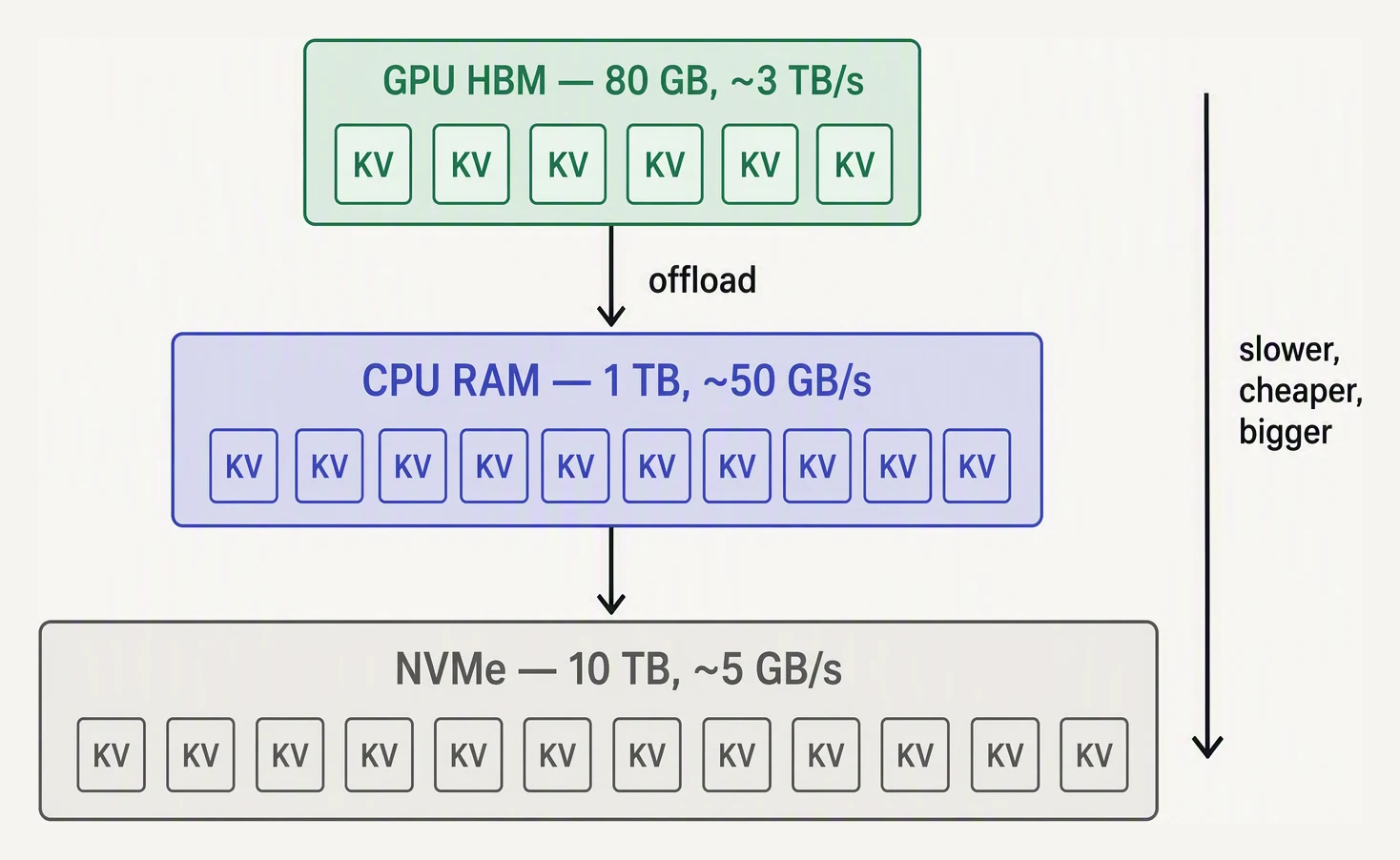
The cache does not vanish when it will not fit. It moves to a slower tier and has to be promoted before it becomes hot again.
The figures below are useful orders of magnitude, not promises. Hardware, NUMA placement, filesystems, and workload can change them substantially.
The KV cache is working memory: it's re-read for every generated token, so where it sits sets your latency. Offloading trades speed for capacity — promote a session back to VRAM the moment it's active again.
- G1 — GPU VRAM. An NVIDIA H100, for example, has stated HBM3 bandwidth of 3.35 TB/s. Capacity is comparatively small, and model weights already occupy much of it. Active decode belongs here.
- G2 — CPU RAM. Host DIMMs may have high aggregate bandwidth, but the GPU reaches them across the host-device connection. PCIe 4.0 by 16 has roughly 32 GB/s of theoretical one-way bandwidth; PCIe 5.0 by 16 roughly doubles that to 64 GB/s. CPU RAM is a parking place for idle sessions, not an equal replacement for VRAM.
- G3 — local NVMe SSD. A fast drive may approach several GB/s for large sequential transfers. Scattered reads are slower, and latency is measured in microseconds. It suits cold blocks or snapshots, not active decode.
- G4 — networked storage. Network filesystems, remote block devices, and object-backed stores provide capacity. Bandwidth and tail latency depend on the network and service. Use them for recovery state, not per-token attention reads.
The hierarchy is a capacity ladder:
GPU VRAM → CPU RAM → local SSD → networked storage
The arrow means “slower and usually larger,” not “fetch the next token from the next tier.”
What promotion costs
Return to the 4 GiB cache. With CPU RAM and a PCIe 5.0 by 16 connection rated at 64 GB/s, the ideal transfer time is:
4 GiB ÷ 64 GB/s ≈ 67 milliseconds
That is a lower bound. Scheduling, pinned-memory setup, NUMA placement, competing transfers, and decimal GB versus binary GiB make observed time higher.
At 128,000 tokens, the same cache is about 16 GiB, so one ideal promotion takes roughly a quarter of a second. That may be acceptable after 20 minutes of idleness but not for an autocomplete endpoint with a 200-millisecond tail-latency target.
Reading the 4 GiB cache from a slow tier during generation at 20 tokens per second would require about 80 GiB/s of raw traffic. That is more than a PCIe link can usefully provide before model weights and other requests are considered. The system must promote the cache into GPU-accessible memory before treating the session as active. Blockwise implementations can promote pieces, but the active working set still needs a fast home.
Offloading is a lifecycle
When a request is decoding, its KV blocks are resident on the GPU. The scheduler must reserve headroom for new tokens and temporary work. Filling the last byte of VRAM is not a success if the next kernel allocation fails.
After an idle timeout, the server can copy a session’s blocks to CPU RAM and release GPU blocks. It keeps the conversation identity, token positions, model revision, and block locations. If CPU RAM is pressured, colder blocks can move to local SSD.
When the user returns, the scheduler admits the session only if it can reserve enough GPU space. It promotes the blocks, restores the sequence position, and prefills the new user message. The old conversation does not need to be prefetched again.
A useful policy includes:
- An idle threshold and hysteresis. Do not demote during every brief pause. Use different thresholds for moving down and back up to avoid bouncing.
- Recency and quotas. Evict least-recently-used sessions first, protect active streams, and cap each tenant’s CPU and SSD usage.
- Bounded promotion. Limit simultaneous wake-ups and reserve VRAM for active work.
Caches are usually stored in fixed-size blocks. That avoids large contiguous allocations and lets the scheduler move selected blocks. Smaller blocks reduce waste but increase metadata and transfer overhead. “CPU offload” can mean block swapping, pinned host staging, or model-weight offload. Measure the path your serving engine actually implements.
Offload versus recompute
Another option is to evict an idle cache and recompute the prompt when the user returns. For the 32,768-token example, recomputation processes 32,768 old tokens; CPU-RAM restoration moves about 4 GiB; SSD restoration moves the same data plus storage overhead.
For a 2,048-token version of the model, the cache is only 256 MiB. Recomputing may be faster than promotion, especially when the GPU is busy. For a 128,000-token conversation, preserving the cache is more attractive if the wake-up delay fits the product’s budget.
The crossover depends on:
- prompt length
- model architecture
- GPU prefill throughput
- host-device and SSD bandwidth
- contention
- return probability
- latency target
A practical system can keep long, likely-to-return sessions in CPU RAM, recompute short or unlikely sessions, and discard cold sessions entirely.
This differs from PagedAttention. PagedAttention addresses fragmentation inside a memory tier with fixed-size, non-contiguous blocks. Offloading moves those blocks between tiers. They can be used together.
Failure modes and diagnosis
VRAM–RAM thrashing
A returning session suddenly has a high time to first token. GPU utilization falls while PCIe traffic and host-memory bandwidth rise. The usual causes are an idle threshold that is too short or a cache budget at which active requests repeatedly displace one another.
Add hysteresis, reserve VRAM for active work, cap simultaneous promotions, and consider recomputing short contexts. Track promotion bytes and wait time, not just average throughput.
Cold storage on the decode path
A stream occasionally freezes for hundreds of milliseconds or seconds. Token inter-arrival time has a long tail, while SSD queue depth or network read latency rises and the GPU waits.
Promote the complete active working set before decode. Delay or reject a request when promotion capacity is unavailable, and prevent CPU offload from silently becoming operating-system swap. Never use networked storage as per-token backing memory.
Stale or incompatible caches
After deployment, a conversation may produce bizarre output or fail with shape, dtype, or device-placement errors. A KV tensor is valid only when all of these are compatible:
- model weights
- tokenizer and template
- parallel layout
- attention configuration
- positional encoding
- cache dtype
- sequence position
Treat persisted caches as disposable derived data. Validate metadata and checksums; invalidate and prefill again whenever relevant assumptions change.
Promotion OOM
A sleeping session wakes while VRAM appears to have free space, then promotion fails. The budget must include:
- weights
- activations
- workspaces
- CUDA graphs
- communication buffers
- other sequences
- any temporary promotion buffers
Keep a safety margin, admission-control active tokens, promote in bounded batches, and fall back to recomputation or a controlled overload response rather than discovering the limit during a kernel launch.
When to use it
Offloading earns its complexity when conversations are long enough that prefill is expensive, many sessions are idle, and the product values retaining warm state. It is particularly useful for bursty chat: thousands of sessions may exist while only a few hundred decode at once.
Do not reach for it automatically for short, stateless, or latency-critical requests. One of these alternatives may solve the root problem more cleanly:
- Reducing context
- Choosing a model with a smaller KV footprint
- Using an appropriate sliding window
- Improving admission control
Offloading adds capacity, not compute; it trades memory pressure for movement, wake-up latency, and operational complexity.
Check yourself
Quick check
What to remember
- During decode, the KV cache is working memory, not an archive.
- Cache size depends on layers, KV heads, head dimension, precision, and sequence length. Grouped-query attention can reduce it substantially.
- Keep active decode in VRAM, idle sessions in CPU RAM when appropriate, and colder state on SSD. Network storage is for recovery, not live generation.
- Offloading trades movement and wake-up latency for capacity; it does not reduce KV bytes or model compute.
- Offloading moves blocks between tiers; PagedAttention manages blocks within a tier.
- Monitor p99 wake-up latency, promotion bandwidth, and GPU idle time.
Questions about this lesson
Why can't the KV cache just stay in GPU memory?
It can for a single user with moderate context, but the KV cache grows with both the number of concurrent sessions and the length of each context, and GPU VRAM is only tens of GB. Serve many users or very long contexts and the cache exceeds VRAM. Rather than dropping sessions, servers offload the least-active KV cache to larger, slower tiers (CPU RAM, then SSD) and promote it back to VRAM when the session becomes active again.
Is KV cache offloading the same as PagedAttention?
No. PagedAttention fights fragmentation within a single tier — it stores KV in non-contiguous fixed-size blocks so GPU VRAM packs tightly and little is wasted. Offloading addresses running out of the tier entirely — it moves cache across the VRAM → CPU RAM → SSD hierarchy. They are complementary, and production servers like vLLM do both: paged blocks inside each tier, tiered placement across them.
Offload the KV cache or recompute it — which is better?
It depends on prompt length. Offloading preserves the cache and reloads it over PCIe when the session resumes; eviction drops it and re-runs the prefill (attention over the whole prompt) on return. For long contexts, reloading from CPU RAM is much cheaper than recomputing thousands of tokens, so offloading wins. For short prompts, recompute is simple and about as fast. Mature servers implement both and choose based on length and memory pressure.
Practice this in an interview
All questionsThe practical choices are to reduce or quantize the cache, shard it across GPUs, offload inactive sessions to CPU memory, or evict the cache and recompute the prompt later. SSD and network storage are suitable for cold session state, not latency-sensitive token-by-token decoding.
A KV cache stores the key and value tensors for previously processed tokens in each transformer layer, so autoregressive decoding computes only the new token's projections instead of rebuilding the whole prefix. This reduces per-step attention work from quadratic to linear in context length, while cache memory grows with layers, sequence length, batch size, and KV-head count.
The KV cache stores the key and value tensors computed during previous forward passes so they do not need to be recomputed for every new token during autoregressive generation. Without it, generating each token would require a full forward pass over the entire context from scratch, making inference cost grow quadratically with sequence length rather than linearly.
PagedAttention addresses KV-cache memory waste in LLM serving by storing each sequence in fixed-size, non-contiguous GPU blocks, avoiding large contiguous reservations and reducing fragmentation; shared blocks can also support copy-on-write and prefix reuse. Continuous batching addresses scheduling by admitting and retiring requests between generation iterations, keeping a changing batch full instead of waiting for every request to finish.