Numbers
int, float, Decimal, Fraction — and the floating-point quirk that has quietly cost real companies real money.
Written and reviewed by Shreyash Prashu Last reviewed
What you'll learn
- The four numeric types Python ships with, and when each one matters
- Why 0.1 + 0.2 is not 0.3, and how to fix it for money
- Floor division, modulo, and banker's rounding
- The math module essentials and the right way to compare two floats
Before you start
A bank once shipped a billing feature where invoice totals were off by a fraction of a cent. On any single invoice, nobody would ever notice. But spread across a million customers, those vanishing fractions added up to real, audited money — and the cause was nothing more exotic than adding a column of floats.
That story is the whole reason this lesson exists. Python gives you four numeric types, and most of the time you reach for one without thinking. The skill worth building is knowing when the default is wrong — because the difference between the right type and the convenient one is the difference between code that balances and code that quietly leaks accuracy.
int and float — the everyday pair
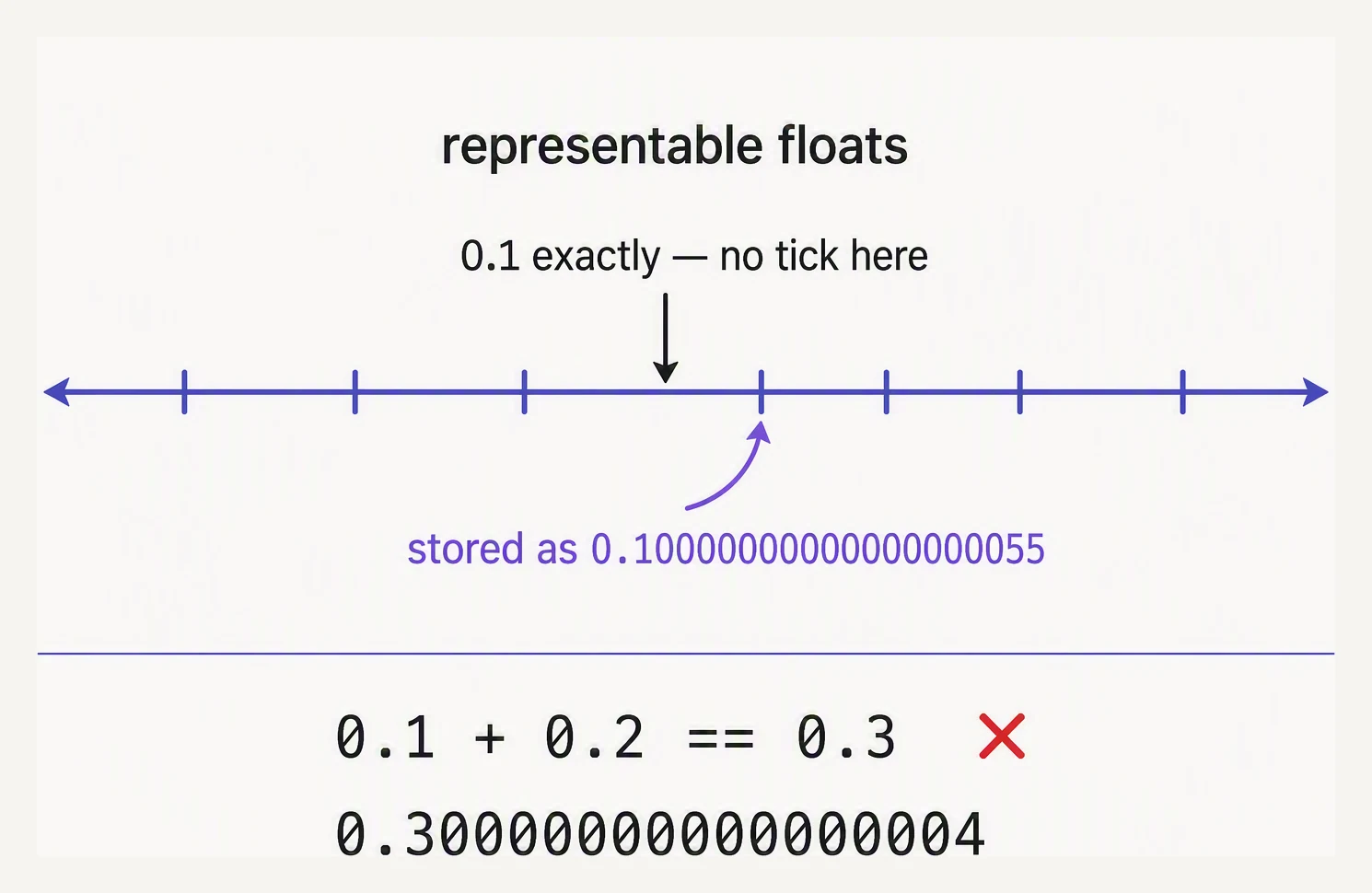
Floats are binary. Some decimals simply have no exact address.
Two types cover almost all arithmetic you will ever write. An int is an arbitrary-precision integer: it has no maximum value, and Python simply grows it as needed. A float is a 64-bit IEEE 754 double — the very same floating-point number every modern language uses, with all the same trade-offs.
big = 2 ** 100
print(big)
print(type(big))

small = 1.0
print(type(small))

# Mixing int and float promotes the result to float.
print(type(big + 1.0))
1267650600228229401496703205376
<class 'int'>
<class 'float'>
<class 'float'>That thirty-one-digit integer printed exactly, with no overflow — an int will hold whatever you throw at it. The moment a float joins the arithmetic, though, the result becomes a float, and floats carry only about 15 to 17 significant digits.
Division has a wrinkle worth pinning down. The / operator always produces a float, even when both sides are whole numbers. When you want an integer quotient, use // (floor division, which rounds toward negative infinity — so -7 // 2 is -4, not -3) and % for the remainder. divmod hands you both at once, which is exactly what you want for splitting a quantity into units:
print(7 / 2)            # 3.5    — true division, always a float
print(7 // 2)           # 3      — floor division
print(7 % 2)            # 1      — remainder
print(2 ** 10)          # 1024   — exponent
print(divmod(127, 60))  # (2, 7) — 127 seconds is 2 min 7 sec

print(abs(-3.5))        # 3.5
print(round(3.567, 1))  # 3.6
print(round(2.5))       # 2  — banker's rounding (rounds to even)
3.5
3
1
1024
(2, 7)
3.5
3.6
2The last line catches everyone the first time: round(2.5) is 2, not 3. Python uses banker’s rounding — round half to even — which cancels out the upward bias you would otherwise accumulate across many roundings. If you genuinely need the schoolbook “always round half up,” you build it yourself with Decimal, which we are about to meet.
The floating-point gotcha
Here is the most famous one-liner in all of programming — famous because it behaves the same in Python, JavaScript, Java, and C:
a = 0.1 + 0.2
print(a)
print(a == 0.3)
0.30000000000000004
FalseThis is not a Python bug, and it is not Python rounding badly. It is simply that 0.1 cannot be written exactly in binary, in precisely the way 1/3 cannot be written exactly in decimal — the digits go on forever, so the stored value is a hair off, and the tiny errors surface when you add. For most data work that last-digit noise is harmless. For money, taxes, billing, and anything an auditor will ever inspect, it is not harmless at all.
Decimal — for money and anything that must be exact
decimal.Decimal is a base-10 type that does arithmetic the way you were taught in school: 0.1 + 0.2 really does equal 0.3. The one rule to internalise is to build a Decimal from a string, never from a float — because Decimal(0.1) faithfully copies the float’s imprecision, while Decimal("0.1") is exactly one tenth.
from decimal import Decimal, getcontext

a = Decimal("0.1")
b = Decimal("0.2")
print(a + b)
print(a + b == Decimal("0.3"))

# A real billing scenario: 1,000 line items of one cent each.
line_items_float = [0.01] * 1000
line_items_dec = [Decimal("0.01")] * 1000

# Add them up one at a time, the way a running balance accumulates.
float_total = 0.0
for item in line_items_float:
    float_total += item
print("float sum:  ", float_total)
print("decimal sum:", sum(line_items_dec))

# You can set the working precision globally.
getcontext().prec = 6
print(Decimal("1") / Decimal("7"))
0.3
True
float sum: 9.999999999999831
decimal sum: 10.00
0.142857There it is in numbers. A thousand one-cent items should total exactly ten dollars, and Decimal says so. The float running total lands at 9.999999999999831 — wrong in the fifteenth decimal place. (Python’s built-in sum() has used a compensated algorithm since 3.12, so sum(line_items_float) happens to come out at exactly 10.0 — but a balance updated one transaction at a time, which is what real billing code does, accumulates the error.) On one invoice that error is invisible; multiplied across a million customers it becomes the bank’s missing pennies from the opening.
Fraction — exact rational numbers
fractions.Fraction stores a number as a numerator over a denominator and never rounds at all. You reach for it when you want exact ratios — probabilities, music intervals, unit conversions — rather than a decimal approximation:
from fractions import Fraction

# 1/3 + 1/6 is exactly 1/2, with no float noise.
print(Fraction(1, 3) + Fraction(1, 6))

# Built from a float, it inherits the float's imprecision;
# built from a string, it is clean.
print(Fraction(0.1))
print(Fraction("0.1"))

# Convert back to float whenever you need one.
print(float(Fraction(22, 7)))
1/2
3602879701896397/36028797018963968
1/10
3.142857142857143That monstrous fraction in the third line is the real 0.1 your computer has been storing all along — Fraction(0.1) just exposed it. You will not reach for Fraction every day, but when you need exactness with no decimals involved, nothing else will do.
The math module essentials
For anything past basic arithmetic, the standard library’s math module is the first stop:
import math

print(math.pi)            # 3.141592653589793
print(math.e)             # 2.718281828459045
print(math.sqrt(16))      # 4.0
print(math.floor(3.7))    # 3
print(math.ceil(3.2))     # 4
print(math.log10(1000))   # 3.0  — base-10 log, exact here
print(math.log(1000, 10)) # NOT exactly 3.0 — it divides two logs

# isclose — the right way to compare floats.
print(0.1 + 0.2 == 0.3)
print(math.isclose(0.1 + 0.2, 0.3))
3.141592653589793
2.718281828459045
4.0
3
4
3.0
2.9999999999999996
False
TrueLook closely at those two log lines, because they are the lesson in miniature. math.log10(1000) is a special-cased base-10 log and returns exactly 3.0. But math.log(1000, 10) computes log(1000) / log(10), two floats divided — and that division lands at 2.9999999999999996. Same mathematics, different floating-point path, different last digit.
Which is why the final pair matters so much. 0.1 + 0.2 == 0.3 is False, but math.isclose(0.1 + 0.2, 0.3) is True. isclose compares with a sensible relative-and-absolute tolerance, so it works for tiny and huge numbers alike.
In one breath
intis unbounded;floatis a 64-bit IEEE 754 double with ~15–17 significant digits./always gives a float;//floors,%is the remainder,divmodgives both.rounduses banker’s rounding (half to even), soround(2.5)is2.- For money, use
Decimalbuilt from strings —0.1 + 0.2then truly equals0.3. - Compare floats with
math.isclose, never==.
Practice
Quick check
7 // 2 return?0.1 + 0.2 == 0.3 evaluate to False?What’s next
Numbers handle quantity; the other half of almost every program is text. Next comes strings — how Python slices, searches, and formats text, and why a string can never be changed in place.