Tuples
Immutable sequences with hidden superpowers — unpacking, named tuples, and the right tool whenever the answer is 'this should never change.'
Written and reviewed by Shreyash Prashu Last reviewed
What you'll learn
- Why immutability turns a sequence into something you can hash
- Packing and unpacking, including the star that collects the rest
- When to choose a NamedTuple over a dict or a dataclass
- Why every grid algorithm uses (x, y) tuples as dictionary keys
Before you start
A tuple is, at first glance, just a list that cannot be changed — it is immutable. That sounds like pure loss: why would you want a collection you are not allowed to edit? But follow the consequence one step. Because a tuple’s contents can never change, Python can compute a stable numeric fingerprint for it — a hash — that will never go stale. And once something can be hashed, it can be used as a dictionary key, stored in a set, shared safely between threads, and compared quickly. The restriction is exactly what unlocks the power. A tuple is the right tool whenever you mean “this is a record, not a collection.”
Creating tuples
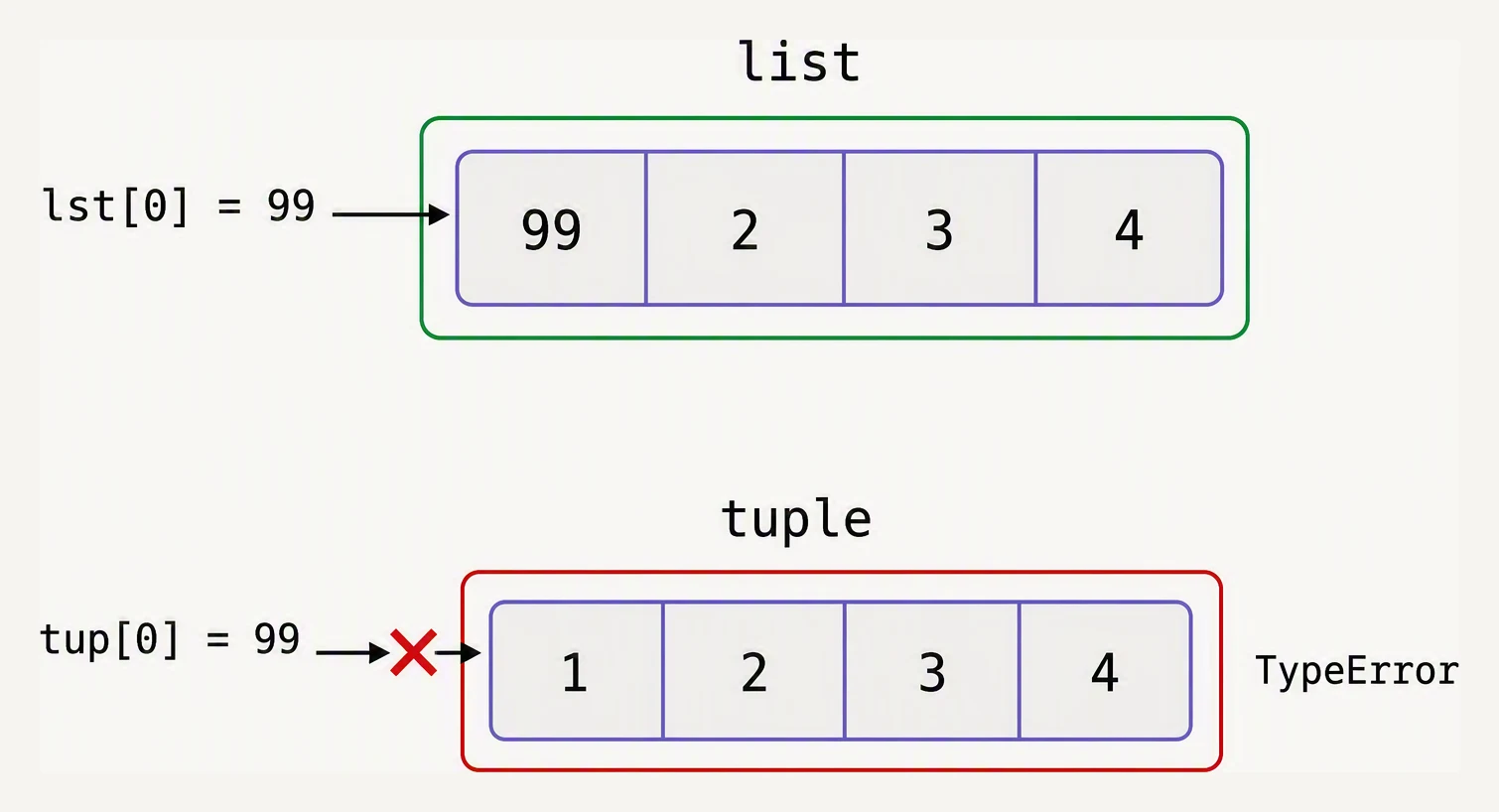
Same contents, different promise.
The surprise in making a tuple is that the parentheses are often optional — it is the commas that do the work. Which leads straight to the one-element gotcha everyone meets once:
point = (3.0, 4.0)
origin = 0, 0          # parentheses optional — the commas make the tuple
single = (42,)         # a one-element tuple NEEDS the trailing comma
not_a_tuple = (42)     # this is just an int in parentheses

print(type(point), type(origin), type(single), type(not_a_tuple))

row = ("alice", 28, "engineer", "delhi")
print(row[0])
print(row[-1])
print(row[1:3])

try:
    row[1] = 29        # tuples cannot be modified
except TypeError as e:
    print("TypeError:", e)
<class 'tuple'> <class 'tuple'> <class 'tuple'> <class 'int'>
alice
delhi
(28, 'engineer')
TypeError: 'tuple' object does not support item assignmentRead the first line of output closely: (42) printed as int, not tuple, because parentheses without a comma are just grouping. It is (42,) — with the lonely trailing comma — that makes a one-element tuple. Indexing and slicing work exactly as they do for lists, but any attempt to assign into a position fails, because the whole point of a tuple is that it does not change.
Unpacking — the feature that makes tuples feel natural
Unpacking is why tuples are everywhere in idiomatic Python. You assign a whole tuple’s worth of names in a single line, and suddenly a lot of code reads more like English:
# One name per element.
point = (3.0, 4.0)
x, y = point
print(f"x={x}, y={y}")

# Swap two variables with no temporary.
a, b = 1, 2
a, b = b, a
print(a, b)

# "Return multiple values" — really, return one tuple and unpack it.
def stats(numbers):
    return min(numbers), max(numbers), sum(numbers) / len(numbers)

lo, hi, avg = stats([4, 8, 15, 16, 23, 42])
print(f"lo={lo} hi={hi} avg={avg:.2f}")
x=3.0, y=4.0
2 1
lo=4 hi=42 avg=18.00That swap line, a, b = b, a, is doing something quietly elegant: the right side is packed into a tuple (b, a) first, then unpacked into the names on the left — which is why no temporary variable is needed. And when a function appears to “return several values,” it is really returning a single tuple; Python just lets you unpack it at the call site so it reads cleanly.
Star unpacking — collect the rest
A single star lets one name absorb “everything else,” and it works on either side of the assignment:
first, *rest = [1, 2, 3, 4, 5]
print(first, rest)

first, *middle, last = ["alice", "bob", "chen", "dani", "eli"]
print("first:", first)
print("middle:", middle)
print("last:", last)

# The same star spreads a tuple back OUT into positional arguments.
def distance(x1, y1, x2, y2):
    return ((x2 - x1) ** 2 + (y2 - y1) ** 2) ** 0.5

p1 = (0, 0)
p2 = (3, 4)
print(distance(*p1, *p2))
1 [2, 3, 4, 5]
first: alice
middle: ['bob', 'chen', 'dani']
last: eli
5.0It is one symbol pulling in two directions: *rest on the left collects leftover items into a list, while *p1 on the right spreads a tuple’s items out as separate arguments. Once you see the symmetry, you will spot it in nearly every API client that forwards positional arguments.
NamedTuple — a tuple whose fields have names
A plain tuple of two or three elements is perfectly readable. Past that, you will lose track of which index means what — was the user id position 1 or position 2? NamedTuple solves this by giving every field a name and a type, while staying a real tuple underneath:
from typing import NamedTuple

class Event(NamedTuple):
    timestamp: str
    user_id: int
    action: str
    success: bool

e = Event("2026-05-28T10:15:00", 42, "login", True)

# Reach in by name OR by index.
print(e.user_id)
print(e[1])

# Still fully unpackable.
ts, uid, action, ok = e
print(ts, uid, action, ok)

# And still immutable.
try:
    e.user_id = 99
except AttributeError as ex:
    print("AttributeError:", ex)
42
42
2026-05-28T10:15:00 42 login True
AttributeError: can't set attributeA NamedTuple keeps everything a tuple gives you — immutable, indexable, hashable, unpackable — and adds dot-access by field name. It is the cheapest “record” type Python offers.
When a tuple beats a list
Reach for a tuple when:
- the collection has a fixed structure (a 2-D point is always
x, y); - you need it as a dictionary key or set element;
- it should be safe to pass around with no risk of being changed;
- you are returning several values from a function.
Reach for a list when:
- the size grows and shrinks, or the contents change;
- you are iterating over many of the same kind of thing — all the customer IDs, all the rows.
That hashable property is not abstract; it is the reason a whole class of algorithms is written the way it is:
# Tuples make perfect dictionary keys — here, caching grid lookups.
cache = {}
cache[(0, 0)] = "origin"
cache[(3, 4)] = "five away"
print(cache)

# A list key fails, because lists are mutable and therefore unhashable.
try:
    cache[[0, 0]] = "nope"
except TypeError as e:
    print("TypeError:", e)
{(0, 0): 'origin', (3, 4): 'five away'}
TypeError: unhashable type: 'list'That is precisely why every grid- and graph-based algorithm in Python keys its dictionaries on (x, y) tuples — they are the smallest hashable record you can make.
In one breath
- A tuple is an immutable sequence; immutability is what makes it hashable.
- Commas make tuples, not parentheses — a one-element tuple is
(42,). - Unpacking assigns many names at once;
a, b = b, aswaps with no temporary. - One
*collects leftover items on the left and spreads arguments on the right. NamedTupleadds field names to a tuple; tuples can be dict keys and set elements, lists cannot.
Practice
Quick check
a, *b, c = [1, 2, 3, 4, 5]?What’s next
Tuples are about fixed records. Next come sets — unordered collections of unique items, and the right tool for deduplication and for membership tests at scale.
Practice this in an interview
All questionsLists are mutable sequences; tuples are immutable. Use a tuple when the collection of items is fixed by meaning — coordinates, RGB values, function return values — and a list when the collection will grow, shrink, or be modified in place. Immutability also makes tuples hashable, so they can serve as dict keys or set members.
Immutable types — int, float, bool, str, bytes, tuple, frozenset — cannot be changed after creation; operations return new objects. Mutable types — list, dict, set, bytearray — can be changed in place. Mutability determines hashability (only immutables can be dict keys/set members), function side-effect behaviour, and thread-safety considerations.
Python passes references to objects, so a mutable argument (list, dict, set) can be modified inside a function and the change is visible to the caller. An immutable argument (int, str, tuple) cannot be mutated in place, so rebinding the local name only affects the local scope. The most common trap is using a mutable object as a default argument value, which is shared across all calls.
Choose a list when order matters and you need indexed access or duplicates. Choose a dict when you need to map keys to values and look up by key in O(1). Choose a set when you need uniqueness, fast membership testing, or set-algebra operations. Getting this choice wrong usually means either incorrect results (keeping duplicates when you needed uniqueness) or avoidable O(n) lookups.