Hugging Face transformers in 10 lines
AutoTokenizer, AutoModel, pipeline — how to load any of 500,000 pretrained models with three lines of code and run inference.
Written and reviewed by Shreyash Prashu Last reviewed
What you'll learn
- The AutoTokenizer / AutoModel pattern
- When to use
pipeline()vs the manual approach - How tokenization shapes line up with model inputs
- What changed in Transformers v5 (PyTorch-first)
Before you start
The Hugging Face transformers library is the de facto interface to
pretrained transformers today. Over 500,000 models on the hub, all
loadable in two lines. Once you know the AutoTokenizer /
AutoModel pattern, every new model is just a string in a
from_pretrained() call.
The pattern, every time
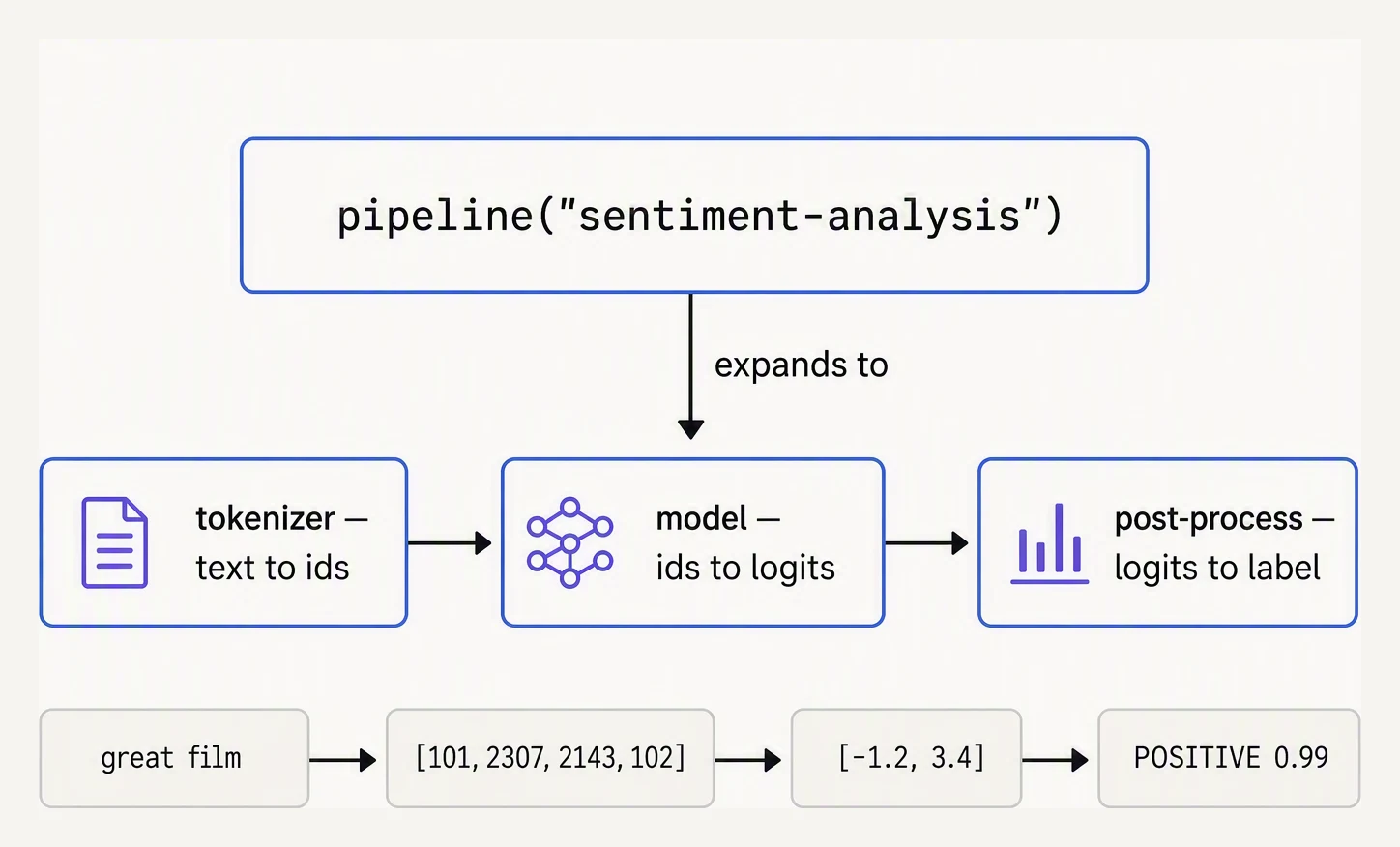
One line of code, three components — worth knowing when it breaks.
from transformers import AutoTokenizer, AutoModelForCausalLM
import torch

model_name = "meta-llama/Llama-3.2-1B-Instruct"
tokenizer = AutoTokenizer.from_pretrained(model_name)
model = AutoModelForCausalLM.from_pretrained(
    model_name,
    torch_dtype=torch.bfloat16,
    device_map="auto",
)
Two lines that download (cached after the first run) and load any model
on the Hub. The Auto* classes inspect the model’s config to pick the
right architecture — LlamaForCausalLM, MistralForCausalLM, etc — so
the same code works across families.
Generating text
inputs = tokenizer("Once upon a time,", return_tensors="pt").to(model.device)
outputs = model.generate(
    **inputs,
    max_new_tokens=50,
    do_sample=True,
    temperature=0.7,
    top_p=0.9,
)
print(tokenizer.decode(outputs[0], skip_special_tokens=True))
The shape of every text-generation call:
- Tokenize input text → tensor of token IDs
- Generate with the model → tensor of token IDs (including input + new tokens)
- Decode the IDs back to text
return_tensors="pt" says give me PyTorch tensors — multi-dimensional
arrays that can live on a GPU and track gradients — (or "np" for NumPy
arrays; PyTorch is the default and only first-class framework as of v5).
What’s inside inputs?
# HF needs PyTorch + GB-scale weights, so here we just simulate the *shape* of
# what tokenization returns: a dict with token IDs and an attention mask.

# Example: tokenizing two sentences of different lengths
# (HF pads the shorter one to match the longer)

import numpy as np

# Simulated output of:  tokenizer(["Hi.", "How are you doing today?"], padding=True, return_tensors="np")
input_ids = np.array([
    [9023, 13,    0,   0,    0,    0,    0],     # "Hi."  + padding
    [4438, 527, 499, 3815, 3432, 30, 0],          # "How are you doing today?"
])
attention_mask = np.array([
    [1, 1, 0, 0, 0, 0, 0],     # 1 = real token, 0 = padding
    [1, 1, 1, 1, 1, 1, 0],
])

print("input_ids shape:", input_ids.shape)
print("attention_mask shape:", attention_mask.shape)
print("\nThe model uses the attention mask to ignore padding tokens.")
input_ids shape: (2, 7)
attention_mask shape: (2, 7)
The model uses the attention mask to ignore padding tokens.The two essential tensors are input_ids (which token each position is)
and attention_mask (1 for real tokens, 0 for padding). The model uses
the mask to ignore padded positions in attention.
pipeline() — the one-liner for common tasks
For prototypes, pipeline() wraps tokenizer + model + post-processing
into a single callable:
from transformers import pipeline

# Text generation
gen = pipeline("text-generation", model="meta-llama/Llama-3.2-1B-Instruct")
print(gen("The future of AI is", max_new_tokens=30)[0]["generated_text"])

# Sentiment classification
clf = pipeline("sentiment-analysis")     # uses a default DistilBERT model
print(clf("This is fantastic!"))         # [{'label': 'POSITIVE', 'score': 0.9998}]

# Embeddings
emb = pipeline("feature-extraction", model="BAAI/bge-base-en-v1.5")
vec = emb("hello world")   # returns nested list [batch][tokens][dim]; mean-pool to get a flat vector
Great for demos. For production, use the AutoTokenizer /
AutoModel* pattern explicitly — you control batching, device
placement, and inference settings.
The AutoModelFor* family
The Auto* classes come in flavors matching the task:
| Class | What it returns | Use case |
|---|---|---|
AutoModel | hidden states | Custom heads, embeddings |
AutoModelForCausalLM | next-token logits | Generation (GPT, Llama, Mistral) |
AutoModelForMaskedLM | per-token logits over vocab | BERT-style masking |
AutoModelForSequenceClassification | label logits | Classification |
AutoModelForTokenClassification | per-token label logits | NER |
AutoModelForSeq2SeqLM | decoder logits | T5, BART |
Always pick the one matching your task. The class determines what head sits on top of the base transformer.
Chat templates
Modern instruction-tuned models expect a specific format for multi-turn conversations:
messages = [
    {"role": "system", "content": "You are a helpful assistant."},
    {"role": "user", "content": "What is the capital of France?"},
]

prompt = tokenizer.apply_chat_template(
    messages,
    tokenize=False,
    add_generation_prompt=True,
)
inputs = tokenizer(prompt, return_tensors="pt").to(model.device)
outputs = model.generate(**inputs, max_new_tokens=50)
Every model family has its own chat template (special tokens around
each turn). apply_chat_template() handles this for you — the
template is stored in the tokenizer’s config. Don’t try to construct
chat prompts by hand; you’ll get the wrong special tokens.
What the library doesn’t do
- It doesn’t train. Use
transformers+trl(for RLHF / DPO) ortransformers+accelerate(for distributed training). TheTrainerclass is fine for small fine-tuning runs. - It doesn’t serve. Use vLLM, TGI, SGLang, or hosted APIs for production inference.
- It doesn’t manage prompts. That’s your application’s job.
In one breath
- The whole library reduces to one pattern:
AutoTokenizer.from_pretrained(name)+AutoModelFor<Task>.from_pretrained(name)— theAuto*classes read the model config and pick the right architecture, so any of the 500,000+ Hub models is just a string. - Generation is always tokenize → generate → decode;
return_tensors="pt"gives PyTorch tensors (the only first-class framework as of Transformers v5, which sunset TF/Flax). - Pick the
AutoModelFor*flavour that matches the task (CausalLM for generation, MaskedLM for BERT, SequenceClassification, Seq2SeqLM…) — the class decides the head. For chat models, always usetokenizer.apply_chat_template()so you get the model’s exact special tokens. pipeline()is the one-liner for prototypes; for production reach for vLLM/TGI (10–50× throughput), load inbfloat16, and remember the library doesn’t train, serve, or manage prompts for you.
Quick check
Quick check
tokenizer.apply_chat_template() instead of formatting messages yourself?Practice this in an interview
All questionsStart with a pretrained backbone, train a small task-specific head, use label-preserving augmentation and careful regularisation, and exploit same-domain unlabelled data with self-supervised or semi-supervised learning. Prevent leakage during splitting, and consider gradient-boosted trees or regularised linear models when the data are structured and extremely scarce.
Transfer learning reuses a network pre-trained on a large dataset (typically ImageNet) as a feature extractor or starting point for a new task. Early layers learn general features (edges, textures) that transfer well across domains; later layers encode task-specific patterns and are fine-tuned or replaced. This dramatically reduces the labelled data and compute needed for the target task.
Transfer learning reuses weights pretrained on a large dataset as a starting point for a new task. Feature extraction freezes the backbone and trains only a new head; full fine-tuning updates all weights. The right choice depends on dataset size and how similar the new task is to the pretraining domain.
Transformers usually outperform recurrent neural networks because they train all sequence positions in parallel, connect distant tokens through short attention paths, and scale effectively with modern accelerator hardware. Their quadratic attention and growing context memory still make RNNs attractive for streaming and highly resource-constrained workloads.